Duplicate Content: Why It Happens and How to Fix It

Former Head of Content at Ahrefs

Looking to learn what duplicate content is, and how it might be hurting your SEO?
Duplicate content is a source of constant anxiety for many site owners.
Read almost anything about it, and you'll come away believing that your site is a ticking time bomb of duplicate content issues. A Google penalty is merely days away.
Thankfully, this isn't true—but duplicate content can still cause SEO issues. And with 25-30% of the web being duplicate content, it's useful to know how to avoid and fix such issues.
In this guide, you'll learn:
What is duplicate content?
Duplicate content is the same or similar content that appears on the web in more than one place. It can exist on one website or across multiple websites.
For example, let's play a game of spot the difference...
Here's the page located at caltonnutrition.com/tag/protein-powder/...
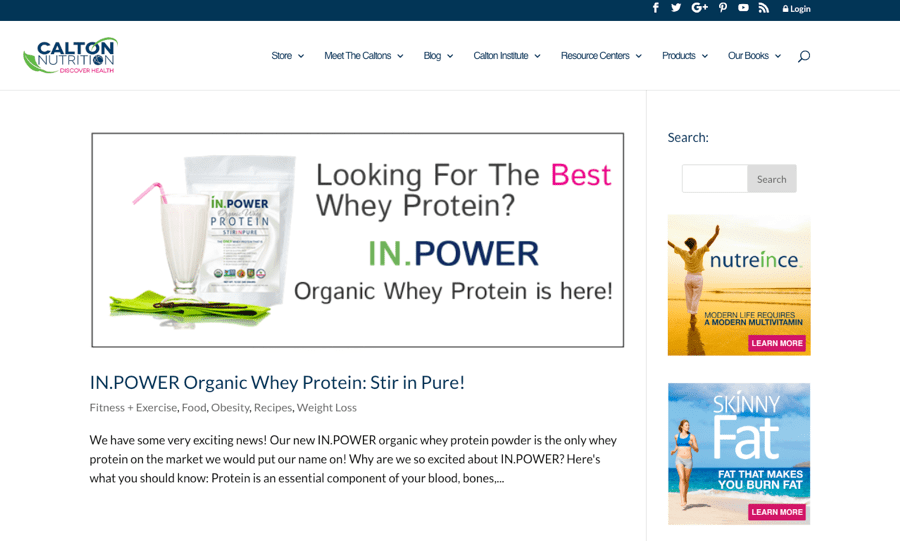
... and here's the page located at caltonnutrition.com/tag/whey/:
Notice any difference? Me neither. The content at both URLs is identical. AKA duplicate content.
Why is duplicate content bad for SEO?
Google says there's no such thing as a duplicate content penalty. But duplicate content can hurt your SEO performance for a few reasons.
- Undesirable or unfriendly URLs in search results;
- Backlink dilution;
- Burns crawl budget;
- Scraped or syndicated content outranking you.
1. Undesirable or unfriendly URLs in search results
Imagine that the same page is available at three different URLs:
- domain.com/page/
- domain.com/page/?utm_content=buffer&utm_medium=social
- domain.com/category/page/
The first should show up in search results, but Google can get this wrong. If that happens, an undesirable URL may take its place.
Because people may be less inclined to click on an unfriendly URL, you may get less organic traffic.
2. Backlink dilution
If the same content is available at many URLs, then each of those URLs may attract backlinks. That results in the splitting of "link equity" between URLs.
To show an example of this in the wild, take a look at these two pages on buffer.com:
https://buffer.com/library/social-media-manager-checklist https://buffer.com/resources/social-media-manager-checklist
These pages are almost exact duplicates. And they have 106 and 144 referring domains (links from unique websites), respectively.
Before you panic, know that this isn't always a problem because of how Google handles duplicate content.
In simple terms, when they detect duplicate content, they group the URLs into one cluster. They then "select what [they] think is the 'best' URL to represent the cluster in search results" and "consolidate properties of the URLs in the cluster, such as link popularity, to the representative URL." This process is known as canonicalization.
So, in the case above, Google should show only one of the URLs in organic search and attribute all referring domains in the cluster (106+144) to that URL.
But that's not what happens, as we see both URLs ranking in Google for similar keywords.
In this instance, Google likely isn't consolidating "link equity" at one URL.
DISCLAIMER
We can't be sure how Google sees these two URLs, as we don't have access to Buffer's Google Search Console account. It may be that they see both of these URLs as duplicates, and one of them will disappear from organic search soon.
3. Burns crawl budget
Google finds new content on your website via crawling, which means they follow links from existing pages to new pages. They also recrawl pages they know about from time to time to see if anything has changed.
Having duplicate content serves only to create more work for them. That can affect the speed and frequency at which they crawl your new or updated pages.
That's bad because it may lead to delays in indexing new pages and reindexing updated pages.
Sidenote
Because Google's "crawl rate limit" is higher for more responsive websites, this is more of an issue for slow websites with smaller bandwidth allowances. Their systems will also crawl the duplicate URLs less often.
4. Scraped content outranking you
Occasionally, you may permit another website to republish your content. That's known as syndication. Other times, sites may scrape your content and republish it without permission.
Both of these scenarios lead to duplicate content across multiple domains, but they usually don't cause problems. It's only when the scraped or republished content starts outranking the original on your site that issues arise.
The good news is this is a rare occurrence, but it can happen.
Does Google have a duplicate content penalty?
Google has stated on multiple occasions that they don't have a duplicate content penalty.

We don’t have a duplicate content penalty. It’s not that we would demote a site for having a lot of duplicate content.

John Mueller, Webmaster Trends Analyst Google
Let’s put this to bed once and for all, folks: There’s no such thing as a duplicate content penalty.

Susan Moskwa, Former Webmaster Trends Analyst Google
DYK Google doesn't have a duplicate content penalty.

Gary Illyes, Webmaster Trends Analyst Google
But, this isn't entirely true. If your duplicate content is accidental and not the result of intentional manipulation of search results or spammy practices, then you won't get penalized. If it is, then you might.
Google confirms that here:
In the rare cases in which Google perceives that duplicate content may be shown with intent to manipulate our rankings and deceive our users, we'll also make appropriate adjustments in the indexing and ranking of the sites involved. As a result, the ranking of the site may suffer, or the site might be removed entirely from the Google index, in which case it will no longer appear in search results.
The question is, what counts as "intent to manipulate our rankings and deceive our users"?
Google has a lot of information on that here. But basically, it's things like:
- Intentionally creating multiple pages, subdomains, or domains with lots of duplicate content.
- Publishing lots of scraped content
- Publishing affiliate content scraped from Amazon or other sites (and adding no additional value)
However, as discussed above, duplicate content can still hurt SEO—even without a penalty.
Common causes of duplicate content
There's no single cause of duplicate content. There are many.
Faceted/filtered navigation
Faceted navigation is where users can filter and sort items on the page. Ecommerce websites use it a lot.
This kind of navigation appends parameters to the end of the URL.
Because there are usually many combinations of these filters, faceted navigation often results in lots of duplicate-or-near-duplicate content.
Take a look at these two pages, for example:
bbclothing.co.uk/en-gb/clothing/shirts.html?new_style=Checked bbclothing.co.uk/en-gb/clothing/shirts.html?Size=S&new_style=Checked
The URLs are unique, but the content is almost identical.
Plus, the order of the parameters often doesn't matter. For example, the same page is accessible at both of these URLs:
bbclothing.co.uk/en-gb/clothing/shirts.html?new_style=Checked&Size=XL bbclothing.co.uk/en-gb/clothing/shirts.html?Size=XL&new_style=Checked
How to solve this issue
Faceted navigation is a complex beast. If you suspect this as the cause of your duplicate content issues, just read this.
Tracking parameters
Parameterized URLs are also used for tracking purposes. For example, you may use UTM parameters to track visits from a newsletter campaign in Google Analytics:
Example: example.com/page?utm_source=newsletter
How to solve this issue
Canonicalize your parameterized URLs to SEO-friendly versions without tracking parameters.
Session IDs
Session IDs store information about your visitors. They usually append a long string to the URL like so:
Example: example.com?sessionId=jow8082345hnfn9234
How to solve this issue
Canonicalize the URLs to SEO-friendly versions.
HTTPS vs. HTTP, and non-www vs. www
Most websites are accessible at one of these four variations:
- https://www.example.com (HTTPS, www)
- https://example.com (HTTPS, non-www)
- http://www.example.com (HTTP, www)
- http://example.com (HTTP, non-www)
If you're using HTTPS, it'll be one of the first two. Whether it's the www or non-www version is your choice.
However, if you don't correctly configure your server, your site will be accessible at two or more of these variations. That isn't good and can lead to duplicate content issues.
How to solve this issue
Use redirects to ensure that your website is only accessible at one location.
Case-sensitive URLs
Google sees URLs as case-sensitive.
Sidenote
This doesn't seem to be the case for Bing, which treats all URLs as lowercase.
That means these three URLs are all different:
- example.com/page
- example.com/PAGE
- example.com/pAgE
How to solve this issue
Be consistent with internal links (i.e., don't internally link to multiple versions of URLs). If that doesn't solve things, you can always canonicalize or redirect.
Trailing slashes vs. non-trailing-slashes
Google treats URLs with and without trailing slashes as unique. That means these two URLs are unique in Google's eyes:
- example.com/page/
- example.com/page
If your content is accessible at both URLs, then that can lead to duplicate content issues.
To check if this is an issue, try to load a page with and without the trailing slash. Ideally, only one version will load. The other will redirect.
For example, if you try to load this post without the trailing slash, it will redirect to the URL with the trailing slash.
Google states that this behavior is ideal.
If only one version can be returned (i.e., the other redirects to it), that’s great! This behavior is beneficial because it reduces duplicate content.
How to solve this issue
Redirect the undesirable version (e.g., without trailing slash) to the desired version (e.g., with trailing slash). You should also make sure to stay consistent with internal linking. Don't link to versions with trailing slashes sometimes, and without other times. Choose one and stick with it.
Print-friendly URLs
Print-friendly versions have the same content as the original. It's only the URL that differs.
- example.com/page
- example.com/print/page
How to solve this issue
Canonicalize the print-friendly version to the original.
Mobile-friendly URLs
Mobile-friendly URLs, like print-friendly URLs, are duplicates.
- example.com/page
- m.example.com/page
How to solve this issue
Canonicalize the mobile-friendly version to the original. Use rel="alternate" to tell Google that the mobile-friendly URL is an alternate version of the desktop content.
Recommended reading: Annotations for desktop and mobile URLs
AMP URLs
Accelerated Mobile Pages (AMP) are duplicates.
- example.com/page
- example.com/amp/page
How to solve this issue
Canonicalize the AMP version to the non-AMP version. Use rel="amphtml" to tell Google that the AMP URL is an alternate version of the non-AMP content.
If you only have AMP content, use a self-referencing canonical tag.
Recommended reading: Make your pages discoverable - amp.dev
Tag and category pages
Most CMS' create dedicated tags pages when you use tags.
For example, if you have an article about organic whey protein, and you use both "protein powder" and "whey" as tags, then you'll end up with two tag pages like these:
https://www.caltonnutrition.com/tag/whey/ https://www.caltonnutrition.com/tag/protein-powder/
That doesn't always cause duplicate content in itself, but it can.
That's the case here because there's only one page on the site with those two tags—so each tag page is identical.
How to solve this issue
Two options:
- Don't use tags. Most of the time, they have little to no value anyway.
- Noindex your tags pages. This doesn't solve the issue of crawl budget, as Google will still waste time crawling these pages.
Note that category pages can cause similar issues to tags pages. Case in point:
https://www.xs-stock.co.uk/adidas/ https://www.xs-stock.co.uk/brands/Chelsea-FC.html
Both of these pages are almost identical because there are no products listed under either category. So all we're left with is the boilerplate template copy.
Solve this by using a reasonable number of categories on your site, or even noindexing your category pages.
Attachment image URLs
Many CMS' create dedicated pages for image attachments. These pages usually show nothing but the image and some boilerplate copy.
Because this copy is the same across all auto-generated pages, it leads to duplicate content.
How to solve this issue
Disable dedicated pages for images in your CMS. In WordPress, you can do this using a plugin like Yoast.
Paginated comments
WordPress and other CMS' allow for paginated comments. This causes duplicate content as it effectively creates multiple versions of the same URLs.
- example.com/post/
- example.com/post/comment-page-2
- example.com/post/comment-page-3
How to solve this issue
Turn off comment pagination or noindex your paginated pages using a plugin like Yoast.
Localization
If you're serving similar content to people in different locales who speak the same language, then that can cause duplicate content.
For example, you might have different versions of your site for people in the US, UK, and Australia. Because there are likely only minor differences between the content served to each locale (e.g., prices in dollars versus pounds sterling), the versions will be near duplicates.
Sidenote
According to John Mueller, translated content is not duplicate content.
How to solve this issue
Use hreflang tags to tell search engines about the relationship between the variations.
Search results pages
Lots of websites have search boxes. Using these typically takes you to a parameterized search URL.
Example: example.com?q=search-term
Google's former Head of Webspam, Matt Cutts, stated that:
Typically, web search results don’t add value to users, and since our core goal is to provide the best search results possible, we generally exclude search results from our web search index. (Not all URLs that contain things like “/results” or “/search” are search results, of course.)

Matt Cutts, Former Head of Webspam Google
How to solve this issue
Use a robots meta tag to remove search pages from Google's index or block access to search results pages in robots.txt. Refrain from internally linking to search results pages.
Staging environment
A staging environment is a duplicate or near-duplicate version of your site used for testing purposes.
For example, imagine that you want to install a new plugin or change some code on your website. You might not want to push that straight to a live site with hundreds of thousands of daily visitors. The risk of catastrophe is too high. The solution is to test the changes in a staging environment first.
Staging environments become an SEO issue when Google indexes them because it results in duplicate content.
How to solve this issue
Protect your staging environment using HTTP authentication, IP whitelisting, or VPN access. If it's already indexed, use a robots noindex directive to get it removed.
How to check for duplicate content on your site
Head over to Ahrefs' Site Audit and start a crawl.
Once done, head to the Content quality report.
Look for clusters of duplicates and near-duplicates without a canonical. These are highlighted in orange.
Click any of these clusters to see the affected pages.
Investigate the reason for the duplicate content, then take the appropriate action.
Note that these won't always be issues that need rectifying, especially in the case of near duplicates.
Not an Ahrefs user?
Look for these duplicate-content-related warnings in Google Search Console:
- Duplicate without user-selected canonical
- Duplicate, Google chose different canonical than user
- Duplicate, submitted URL not selected as canonical
Learn more about how to deal with these warnings here.
To see how Google treats a specific URL, use the URL Inspection tool.
You can also check for duplicate title tags, meta descriptions, and H1s in the HTML tags report.
Bad duplicates are what you're looking for. These are pages with duplicate meta tags but different canonicals.
Select these by clicking the "Bad duplicates" toggle under HTML tags & content.
Click on any of the yellow bars to see the affected pages.
Pages with duplicate titles, meta descriptions, or H1's are often very similar.
For example, these two have the same title tag, and the content is almost identical because the product is the same. The only difference is that one of the pages is for a 3-pack of instant lighting firelogs, whereas the other is for just one.
https://www.xs-stock.co.uk/big-k-instant-light-the-wrapper-firelog-3-pack-camp-fire-fuel/ https://www.xs-stock.co.uk/big-k-instant-light-the-wrapper-firelog-camp-fire-chiminea/
Google states that you should minimise similar content like this:
If you have many pages that are similar, consider expanding each page or consolidating the pages into one.
However, a small number of similar pages is unlikely to be much of an issue.
How to check for duplicate content issues across the web
Content scraping and syndication can also lead to duplicate content issues. But it's only usually an issue if you see scraped versions of your content outranking you.
Does that happen? Yes, but it's often more of an issue for new or weak websites. Why? Because the sites scraping your content are often more authoritative. That sometimes "tricks" Google into thinking that theirs is the original.
If you have a small website, then you can often find scraped content by searching Google for a snippet of text from your page in quotes.
For larger sites, you'll need to use an automated tool like Copyscape. This searches the web for other occurrences of the content on your page(s).
Whichever method you use, most results will be from spammy and low-quality sites.
Generally speaking, these are nothing to worry about. However, if you see that a legitimate website scraped your content, and are concerned that it may be stealing your traffic, throw the URL into Ahrefs' Site Explorer to see an organic traffic estimate.
If it's getting more traffic than your page, then there may be an issue.
In this case, you have three options:
- Reach out and request that they remove the content.
- Reach out and request they add a canonical link to the original on your site.
- Submit a DMCA takedown request via Google.
If you intentionally syndicate content to other websites, then it's worth asking them to add a canonical link to the original. That will eliminate the risk of duplicate content issues.
republishing content on your own site?
If you're republishing content from others on your site, there are two ways to prevent duplicate content issues:
- Canonicalize back to the original.
- Noindex the page.
Final thoughts
Don't stress over duplicate content too much. It's usually much less of an issue than it's thought to be.
If you have a handful of duplicate or near-duplicate pages, there's unlikely to be much of a problem. The same is true when quoting content from another website or other pages on your site. Small amounts of duplicate or boilerplate content should be okay. Google has systems in place to deal with such things.
What you need to be on the lookout for are technical SEO mishaps that lead to the generation of hundreds or thousands of pages of duplicate content, such as the improper implementation of faceted navigation on ecommerce sites.
These can wreak havoc on your crawl budget, amongst other things.
Let me know in the comments or on Twitter if you're struggling with duplicate content.
Joshua Hardwick is the Head of Content at Ahrefs. He's been involved in SEO for 11 years and specializes in link building and outreach. Before working for Ahrefs, Joshua ran an SEO business providing link building and consultancy services.
His work has been referenced by many well-known publications including The New York Times, TechCrunch, The Independent and The Verge, and he's spoken at some of the industry's largest conferences including BrightonSEO, Digital Marketer Skill Share, Digital Olympus, and Benchmark Search.