
What Is Googlebot & How Does It Work?

By Patrick Stox
Technical SEO at Ahrefs
Googlebot is the web crawler used by Google to gather the information needed and build a searchable index of the web. Googlebot has mobile and desktop crawlers, as well as specialized crawlers for news, images, videos, and more.
There are more crawlers Google uses for specific tasks, and each crawler will identify itself with a different string of text called a “user agent.” Googlebot is evergreen, meaning it sees websites as users would in the latest Chrome browser.
Googlebot name | User-agent string |
|---|---|
Googlebot Smartphone | Mozilla/5.0 (Linux; Android 6.0.1; Nexus 5X Build/MMB29P) AppleWebKit/537.36 (KHTML, like Gecko) Chrome/W.X.Y.Z Mobile Safari/537.36 (compatible; Googlebot/2.1; +http://www.google.com/bot.html) |
Googlebot Desktop | Mozilla/5.0 AppleWebKit/537.36 (KHTML, like Gecko; compatible; Googlebot/2.1; +http://www.google.com/bot.html) Chrome/W.X.Y.Z Safari/537.36 Sometimes:
|
Googlebot Image | Googlebot-Image/1.0 |
Googlebot Video | Googlebot-Video/1.0 |
Googlebot News | uses standard Googlebot strings |
Google StoreBot Mobile | Mozilla/5.0 (Linux; Android 8.0; Pixel 2 Build/OPD3.170816.012; Storebot-Google/1.0) AppleWebKit/537.36 (KHTML, like Gecko) Chrome/W.X.Y.Z Mobile Safari/537.36 |
Google StoreBot Desktop | Mozilla/5.0 (X11; Linux x86_64; Storebot-Google/1.0) AppleWebKit/537.36 (KHTML, like Gecko) Chrome/W.X.Y.Z Safari/537.36 |
Google-InspectionTool Mobile | Mozilla/5.0 (Linux; Android 6.0.1; Nexus 5X Build/MMB29P) AppleWebKit/537.36 (KHTML, like Gecko) Chrome/W.X.Y.Z Mobile Safari/537.36 (compatible; Google-InspectionTool/1.0;) |
Google-InspectionTool Desktop | Mozilla/5.0 (compatible; Google-InspectionTool/1.0;) |
GoogleOther |
|
GoogleOther-Image | GoogleOther-Image/1.0 |
GoogleOther-Video | GoogleOther-Video/1.0 |
Google-CloudVertexBot | Google-CloudVertexBot |
Google-Extended | uses standard Googlebot strings |
Chrome/W.X.Y.Z in the user-agent strings is a placeholder and will be the latest version of Chrome used by Googlebot.
Googlebot runs on thousands of machines. They determine how fast and what to crawl on websites. But they will slow down their crawling so as to not overwhelm websites.
Googlebot is the fastest crawler on the web according to Cloudflare Radar, with Ahrefsbot being the 2nd fastest.
If we look at that by the percentage of HTTP requests, Googlebot is 23.7% of the overall requests from good bots. Ahrefsbot is 14.27% and just for comparison, Bingbot is 4.57% and Semrushbot is 0.6%.
Let’s look at their process for building an index of the web.
If you’re not sure which indexing control you should use, check out our flowchart in our post on removing URLs from Google search.
If you want more details about how Googlebot determines what to crawl and the speed of crawling, check out our post on crawl budget.
Technical details of Googlebot
Here are a few details about Googlebot that can help you with troubleshooting various issues.
Location
Googlebot mostly crawls from Mountain View, CA, on the Pacific coast of the United States. They do have some locale specific crawling options they may use in situations such as websites blocking crawling from the US.
Max file size
For most file types, Google will grab the first 15 MB of each file. However, for robots.txt files the max file size is 500 kibibytes (KiB).
Supported Transfer Protocols
Googlebot supports HTTP/1.1 and HTTP/2 and will choose whichever gives the best crawling performance for your site.
They can also crawl over FTP and FTPS, but this is rare.
Content encoding (compression)
Googlebot supports gzip, deflate, and Brotli (br).
HTTP caching
Google supports caching standards such as ETag and Last-Modified responses and If-None-Match and If-Modified-Since request headers.
Is it really Googlebot?
Many SEO tools and some malicious bots will pretend to be Googlebot. This may allow them to access websites that try to block them.
In the past, you needed to run a DNS lookup to verify Googlebot. But recently, Google made it even easier and provided a list of public IPs you can use to verify the requests are from Google. You can compare this to the data in your server logs.
I made a quick tool to help. Just paste in the IPs from your log you want to check. It will classify the IPs as Googlebot, Special Crawlers, User Triggered Fetches, or User Triggered Fetches (Google) for different Googlebots. The result will come back as Unknown if it's not a valid Googlebot. IPs are up to date as of December 24, 2024.
Verify Googlebot IPs
Results:
You also have access to a “Crawl stats” report in Google Search Console. If you go to Settings > Crawl Stats, the report contains a lot of information about how Google is crawling your website. You can see which Googlebot is crawling what files and when it accessed them.
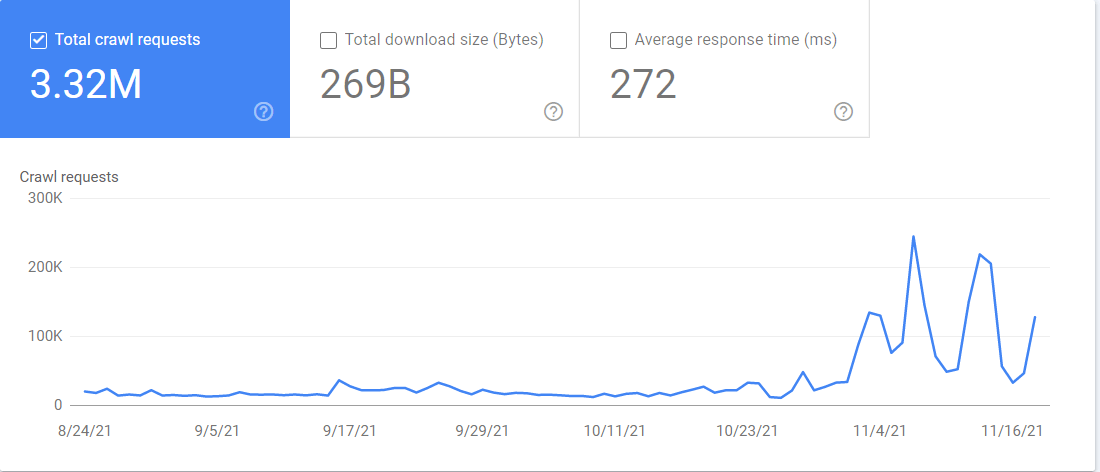
Final thoughts
The web is a big and messy place. Googlebot has to navigate all the different setups, along with downtimes and restrictions, to gather the data Google needs for its search engine to work.
A fun fact to wrap things up is that Googlebot is usually depicted as a robot and is aptly referred to as “Googlebot.” There’s also a spider mascot that is named “Crawley.” According to Google's Lizzi Harvey, the spider mascot also has an unofficial name of "Dex", short for Index.
Still have questions? Let me know on Twitter.
We have more details on this process in our article on how search engines work or if you're interested in the rendering aspects, check out our article on JavaScript SEO.
How to control Googlebot
Google gives you a few ways to control what gets crawled and indexed.
Ways to control crawling
- Robots.txt – This file on your website allows you to control what is crawled.
- Nofollow – Nofollow is a link attribute or meta robots tag that suggests a link should not be followed. It is only considered a hint, so it may be ignored.
- Change your crawl rate (deprecated) – This tool within Google Search Console allowed you to slow down Google’s crawling, but it has been deprecated.
Ways to control indexing
- Delete your content – If you delete a page, then there’s nothing to index. The downside to this is no one else can access it either.
- Restrict access to the content – Google doesn’t log in to websites, so any kind of password protection or authentication will prevent it from seeing the content.
- Noindex – A noindex in the meta robots tag tells search engines not to index your page.
- URL removal tool – The name for this tool from Google is slightly misleading, as the way it works is it will temporarily hide the content. Google will still see and crawl this content, but the pages won’t appear in search results.
- Robots.txt (Images only) – Blocking Googlebot Image from crawling means that your images will not be indexed.
If you’re not sure which indexing control you should use, check out our flowchart in our post on removing URLs from Google search.
If you want more details about how Googlebot determines what to crawl and the speed of crawling, check out our post on crawl budget.
Technical details of Googlebot
Here are a few details about Googlebot that can help you with troubleshooting various issues.
Location
Googlebot mostly crawls from Mountain View, CA, on the Pacific coast of the United States. They do have some locale specific crawling options they may use in situations such as websites blocking crawling from the US.
Max file size
For most file types, Google will grab the first 15 MB of each file. However, for robots.txt files the max file size is 500 kibibytes (KiB).
Supported Transfer Protocols
Googlebot supports HTTP/1.1 and HTTP/2 and will choose whichever gives the best crawling performance for your site.
They can also crawl over FTP and FTPS, but this is rare.
Content encoding (compression)
Googlebot supports gzip, deflate, and Brotli (br).
HTTP caching
Google supports caching standards such as ETag and Last-Modified responses and If-None-Match and If-Modified-Since request headers.
Is it really Googlebot?
Many SEO tools and some malicious bots will pretend to be Googlebot. This may allow them to access websites that try to block them.
In the past, you needed to run a DNS lookup to verify Googlebot. But recently, Google made it even easier and provided a list of public IPs you can use to verify the requests are from Google. You can compare this to the data in your server logs.
I made a quick tool to help. Just paste in the IPs from your log you want to check. It will classify the IPs as Googlebot, Special Crawlers, User Triggered Fetches, or User Triggered Fetches (Google) for different Googlebots. The result will come back as Unknown if it's not a valid Googlebot. IPs are up to date as of December 24, 2024.
Verify Googlebot IPs
Results:
You also have access to a “Crawl stats” report in Google Search Console. If you go to Settings > Crawl Stats, the report contains a lot of information about how Google is crawling your website. You can see which Googlebot is crawling what files and when it accessed them.
Final thoughts
The web is a big and messy place. Googlebot has to navigate all the different setups, along with downtimes and restrictions, to gather the data Google needs for its search engine to work.
A fun fact to wrap things up is that Googlebot is usually depicted as a robot and is aptly referred to as “Googlebot.” There’s also a spider mascot that is named “Crawley.” According to Google's Lizzi Harvey, the spider mascot also has an unofficial name of "Dex", short for Index.
Still have questions? Let me know on Twitter.
How Googlebot crawls and indexes the web
Google has shared a few versions of its pipeline in the past. The below is the most recent.
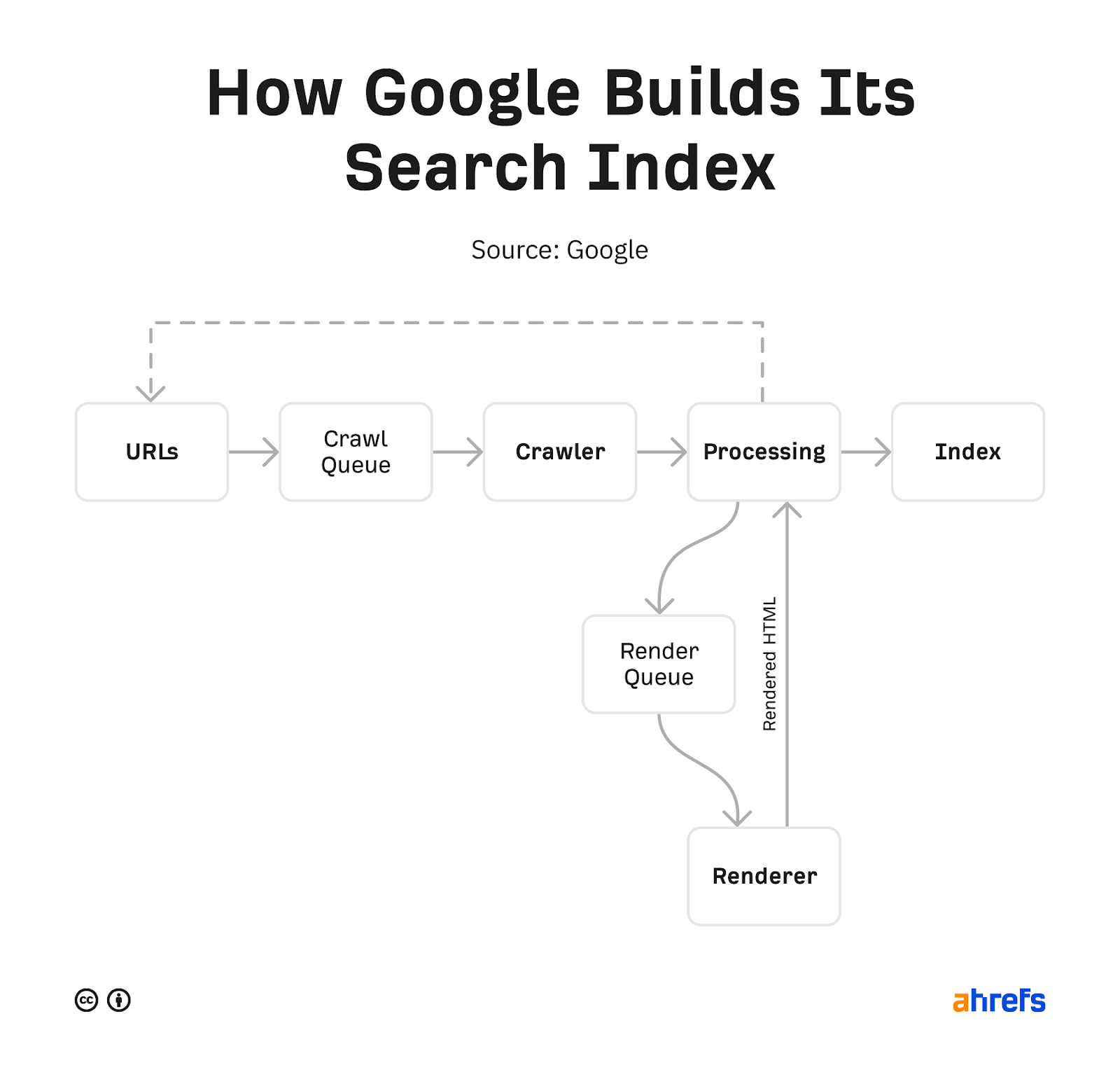
Google starts with a list of URLs it collects from various sources, such as pages, sitemaps, RSS feeds, and URLs submitted in Google Search Console or the Indexing API. It prioritizes what it wants to crawl, fetches the pages, and stores copies of the pages.
These pages are processed to find more links, including links to things like API requests, JavaScript, and CSS that Google needs to render a page. All of these additional requests get crawled and cached (stored). Google utilizes a rendering service that uses these cached resources to view pages similar to how a user would.
It processes this again and looks for any changes to the page or new links. The content of mobile version of the rendered pages is what is stored and searchable in Google’s index. Any new links found go back to the bucket of URLs for it to crawl.
We have more details on this process in our article on how search engines work or if you're interested in the rendering aspects, check out our article on JavaScript SEO.
How to control Googlebot
Google gives you a few ways to control what gets crawled and indexed.
Ways to control crawling
- Robots.txt – This file on your website allows you to control what is crawled.
- Nofollow – Nofollow is a link attribute or meta robots tag that suggests a link should not be followed. It is only considered a hint, so it may be ignored.
- Change your crawl rate (deprecated) – This tool within Google Search Console allowed you to slow down Google’s crawling, but it has been deprecated.
Ways to control indexing
- Delete your content – If you delete a page, then there’s nothing to index. The downside to this is no one else can access it either.
- Restrict access to the content – Google doesn’t log in to websites, so any kind of password protection or authentication will prevent it from seeing the content.
- Noindex – A noindex in the meta robots tag tells search engines not to index your page.
- URL removal tool – The name for this tool from Google is slightly misleading, as the way it works is it will temporarily hide the content. Google will still see and crawl this content, but the pages won’t appear in search results.
- Robots.txt (Images only) – Blocking Googlebot Image from crawling means that your images will not be indexed.
If you’re not sure which indexing control you should use, check out our flowchart in our post on removing URLs from Google search.
If you want more details about how Googlebot determines what to crawl and the speed of crawling, check out our post on crawl budget.
Technical details of Googlebot
Here are a few details about Googlebot that can help you with troubleshooting various issues.
Location
Googlebot mostly crawls from Mountain View, CA, on the Pacific coast of the United States. They do have some locale specific crawling options they may use in situations such as websites blocking crawling from the US.
Max file size
For most file types, Google will grab the first 15 MB of each file. However, for robots.txt files the max file size is 500 kibibytes (KiB).
Supported Transfer Protocols
Googlebot supports HTTP/1.1 and HTTP/2 and will choose whichever gives the best crawling performance for your site.
They can also crawl over FTP and FTPS, but this is rare.
Content encoding (compression)
Googlebot supports gzip, deflate, and Brotli (br).
HTTP caching
Google supports caching standards such as ETag and Last-Modified responses and If-None-Match and If-Modified-Since request headers.
Is it really Googlebot?
Many SEO tools and some malicious bots will pretend to be Googlebot. This may allow them to access websites that try to block them.
In the past, you needed to run a DNS lookup to verify Googlebot. But recently, Google made it even easier and provided a list of public IPs you can use to verify the requests are from Google. You can compare this to the data in your server logs.
I made a quick tool to help. Just paste in the IPs from your log you want to check. It will classify the IPs as Googlebot, Special Crawlers, User Triggered Fetches, or User Triggered Fetches (Google) for different Googlebots. The result will come back as Unknown if it's not a valid Googlebot. IPs are up to date as of December 24, 2024.
Verify Googlebot IPs
Results:
You also have access to a “Crawl stats” report in Google Search Console. If you go to Settings > Crawl Stats, the report contains a lot of information about how Google is crawling your website. You can see which Googlebot is crawling what files and when it accessed them.
Final thoughts
The web is a big and messy place. Googlebot has to navigate all the different setups, along with downtimes and restrictions, to gather the data Google needs for its search engine to work.
A fun fact to wrap things up is that Googlebot is usually depicted as a robot and is aptly referred to as “Googlebot.” There’s also a spider mascot that is named “Crawley.” According to Google's Lizzi Harvey, the spider mascot also has an unofficial name of "Dex", short for Index.
Still have questions? Let me know on Twitter.
Patrick Stox is an independent SEO consultant. Former Product Advisor, Technical SEO, and Brand Ambassador at Ahrefs. Before that he was a Technical SEO at IBM for many years, worked at an agency, had his own consultancy, and was in-house at a B2B company. A long time ago he started his career as a developer.
He’s an organizer for the Triangle SEO Meetup, the Tech SEO Connect conference, he runs a Technical SEO Slack group, and is a moderator for /r/TechSEO on Reddit.
Patrick was the lead author for the SEO chapter of the 2021 Web Almanac and reviewer for the 2022 chapter. He helped define the role of Search Marketing Strategist for the US Department of Labor. He also co-wrote the SEO Book For Beginners by Ahrefs and was the Technical Review Editor for The Art of SEO 4th Edition.
He’s spoken at 100+ industry events including Pubcon, SMX, Tech SEO Boost, Ad World, Digital Summit, and many more. He’s written 100+ articles for industry sites like Search Engine Land, Search Engine Journal, MarTech, and right here at Ahrefs. He was a finalist for SEO Speaker of the Year and SEO Contributor of the Year at the 2018 Search Engine Land Awards. He was also an EzineArticles Platinum author back in the day and still has the mug to prove it.
Patrick has judged nearly a dozen search awards for multiple years including the US Search Awards, UK Search Awards, and Interactive Marketing Awards. He participated in and documented the world’s largest SEO contest to date, the Wix SEO Hero contest which he arguably should have won.


Keep learning



Your weekly marketing’s must-reads
Join 284K marketers for weekly news, useful reads, industry updates, and the memes you didn’t know you needed.
Explore what’s inside the newsletter →