
The Free Tools SEO Strategy: How to Rank With Calculators, Converters, and Generators

By Ryan Law
Director of Content Marketing at Ahrefs
Some of the highest-traffic pages on the internet aren't articles. They're tools. A grade calculator. A file converter. A colour-palette generator. An email outreach template. Each one answers a search that a blog post never could, because the searcher doesn't want to read, they want to do.
That's the free-tools SEO strategy: instead of writing another guide, you build a small, genuinely useful tool, put it on a page, and let it rank for a query that has huge demand and almost no good competition. Done right, one tool can rank for hundreds of keywords and keep earning traffic for years.
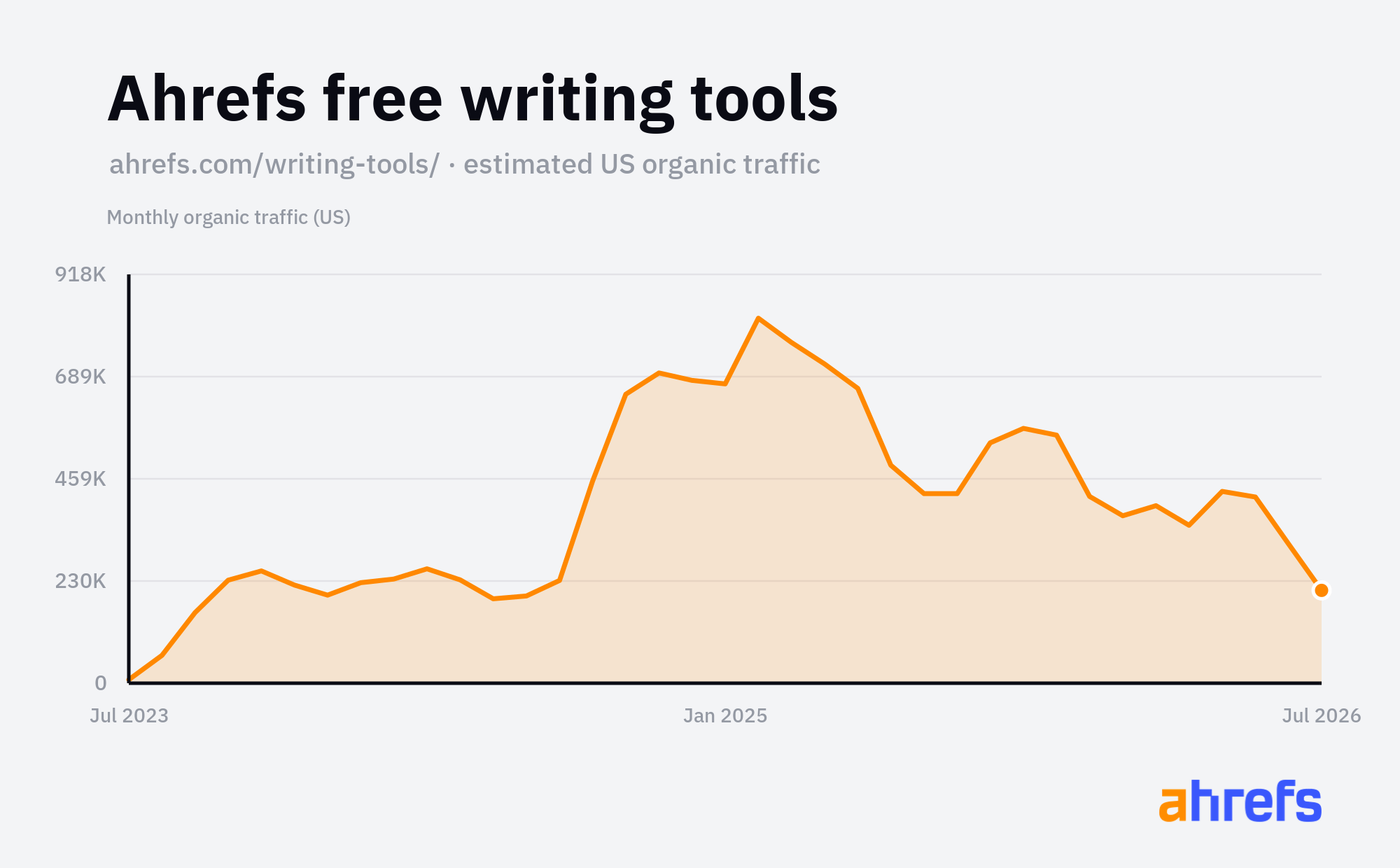
We know this works because we do it ourselves. Our /writing-tools/ subfolder launched from scratch in mid-2023, climbed to nearly a million US organic visits a month at its peak, and now holds steady in the hundreds of thousands, all from free tools built to answer specific searches. Our free SEO tools (keyword generator, backlink checker, traffic checker) tell the same story: they're consistently among our highest-traffic pages.
There's a second reason to care about this right now: tools are unusually resilient to AI.
Informational written content is exactly what AI Overviews, AI Mode, and ChatGPT are best at synthesising, and a good chunk of the traffic that used to land on how-to articles is now being answered inside the AI response instead. A tool is much harder to summarise out of existence. AI Overviews can describe how to convert a file or calculate a margin, but it can't hand the user the working converter or the interactive calculator.
The catch used to be that building tools was expensive. It isn't anymore. With Letaido or ChatGPT you can spin up a working calculator, converter, or generator in an afternoon, so the bottleneck is no longer engineering, it's knowing which tool to build. That's where Ahrefs comes in.
This window may not stay open forever: as tools get trivially easy for everyone to build, the edge will narrow. But for now there's a real opportunity to build durable search traffic with high-quality free tools made with AI.
Build your own free tools strategy with Ahrefs and Letaido
We've built tons of unique features to help you generate organic traffic with free tools:
- Matching Terms report – pulls every real search variation of a seed pattern (e.g. "calculator," "generator," "converter," "template")
- Keyword Difficulty (KD) filter – set to ≤30, paired with lowest Domain Rating (DR) in the SERP, to exclude terms dominated by high-authority sites and surface realistically rankable ones
- Category filter – narrows Matching Terms results to a specific pattern type, so you're not sifting through irrelevant variations
- SERP Overview + Page Types column – shows what's actually ranking, so you can quickly spot when page one is thin tool pages (winnable) vs. long-form articles (not a tool opportunity)
And now, you can use Letaido by Ahrefs to build and deploy any free tool from a plain-language prompt, generating a working, self-contained page in one pass without needing a developer.
1. Calculators
A calculator is a tool that takes a few inputs and returns a number the searcher needs. Someone types "margin calculator", enters their cost and sale price, and gets their profit margin instantly, no article required.
Omni Calculator shows how far this strategy can go. It's not a media brand or a SaaS with a big content team, it's a library of thousands of single-purpose calculators, each one a page targeting a specific "calculator" search. Grade calculators, finance calculators, health calculators, unit conversions. Each page does one job, and together they pull in millions of US visits a month from search.
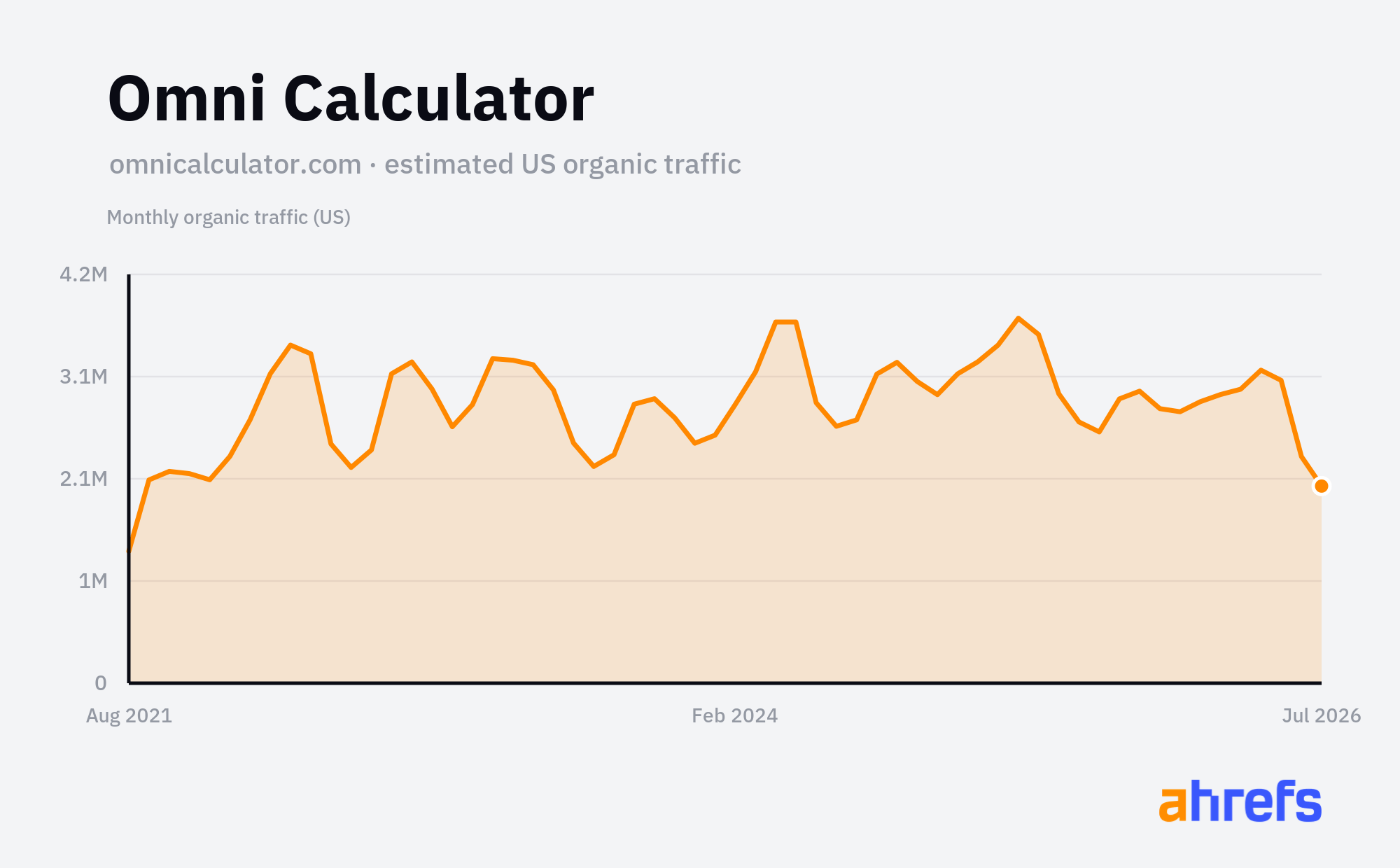
Page | Top keyword | Volume | Traffic/mo |
|---|---|---|---|
omnicalculator.com/other/test-grade | test grade calculator | 5,900 | 61,086 |
omnicalculator.com/finance/annual-income | annual income | 81,000 | 50,825 |
omnicalculator.com/finance/margin | margin calculator | 55,000 | 49,169 |
omnicalculator.com/finance/salary-to-hourly | salary to hourly calculator | 42,000 | 45,940 |
You don't have to be a pure-play calculator site to use this.
Gusto is payroll and HR software for small businesses, not a calculator site, but its free hourly paycheck calculator pulls around 17,800 US visits a month, and its salary version another 8,000. Every one of those visitors is a small-business owner working out what to pay someone, which is exactly who Gusto wants running payroll through its product. The calculator answers the question for free, and the software is the obvious next step.
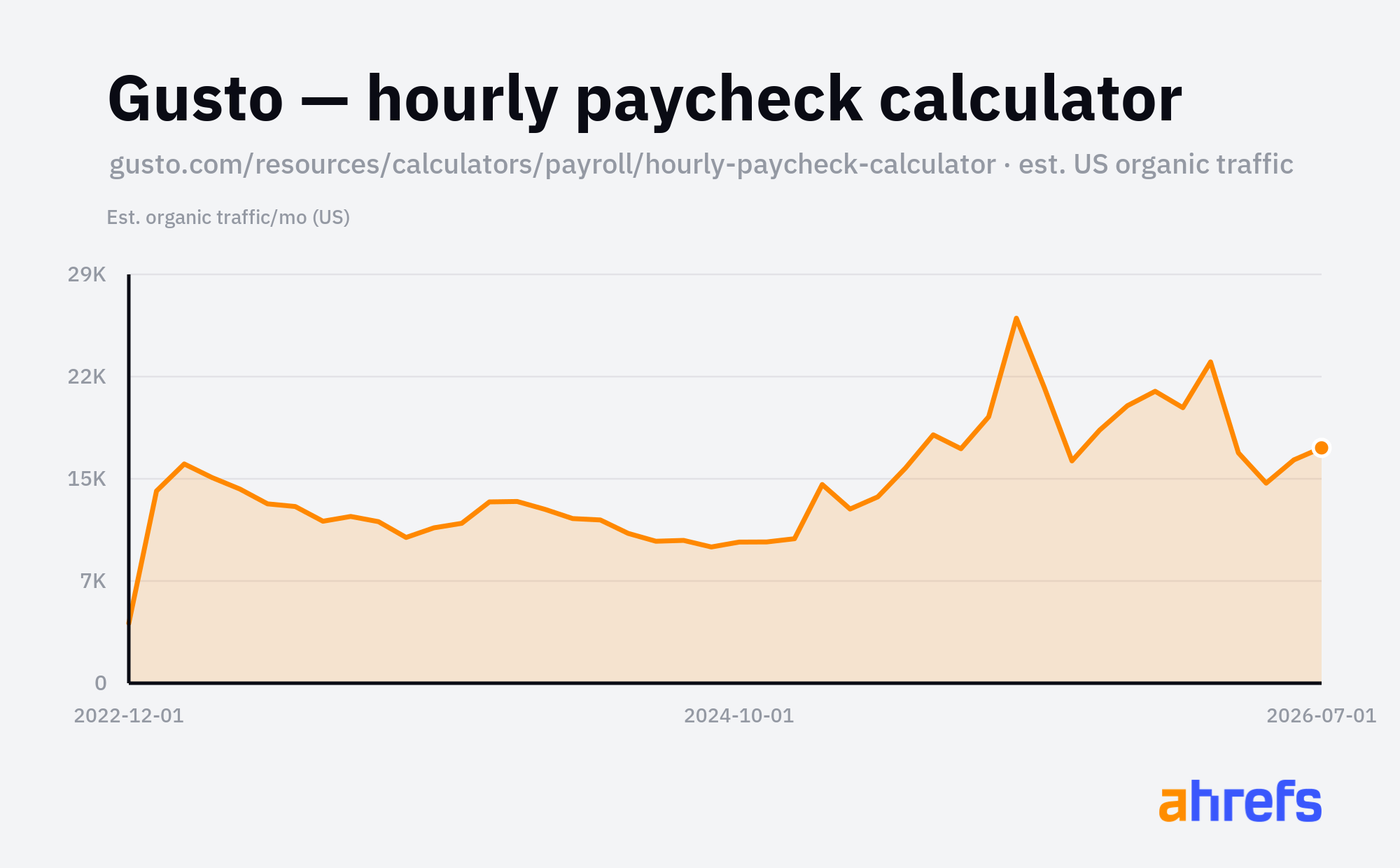
Page | Top keyword | Volume | Traffic/mo |
|---|---|---|---|
gusto.com/resources/calculators/payroll/hourly-paycheck-calculator | wage calculator | 17,000 | 17,776 |
And it works at the top end too. Shopify runs a whole /tools/ hub of free calculators and generators as one channel among many. Its profit-margin calculator peaked above 20,000 US visits a month and still pulls a few thousand today, every one of them a merchant weighing up their pricing, which is exactly who Shopify wants selling on its platform. Even a page past its peak keeps introducing the product to the right people for free.
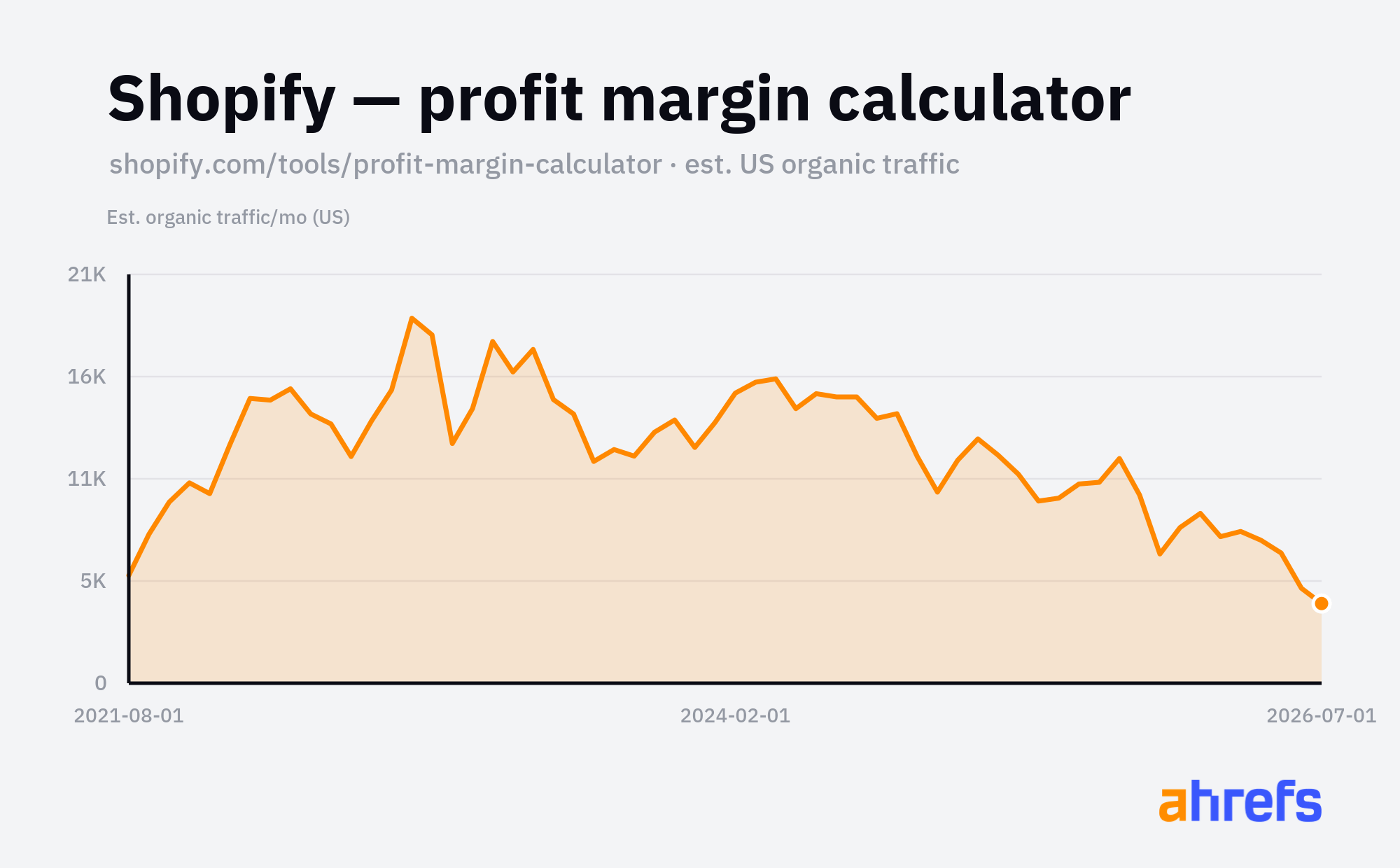
Page | Top keyword | Volume | Traffic/mo |
|---|---|---|---|
shopify.com/tools/profit-margin-calculator | margin calculator | 55,000 | 4,550 |
Calculator keyword opportunities
The obvious head terms have huge search volume, but their Keyword Difficulty is 80+ and the results are owned by big brands. You probably won't rank for these (at least not right away):
Example keyword | Niche | Volume | KD | Traffic Potential |
|---|---|---|---|---|
mortgage calculator | Real estate / fintech | 2,220,000 | 81 | 1,390,000 |
calorie calculator | Health / fitness | 868,000 | 86 | 717,000 |
gpa calculator | Education | 550,000 | 54 | 695,000 |
paycheck calculator | HR / payroll | 378,000 | 72 | 991,000 |
The winnable keywords are the niche ones. Search volume is lower, but so is difficulty (often single digits), and Traffic Potential stays high. Find the opportunity closest to your niche, then check whether the equivalent keyword exists for your own audience:
Example keyword | Niche | Volume | KD | Traffic Potential |
|---|---|---|---|---|
amazon fba calculator | Ecommerce sellers | 4,800 | 20 | 40,000 |
deck material calculator | Contractors / decking | 1,200 | 9 | 26,000 |
roof pitch calculator | Roofing | 11,000 | 13 | 6,700 |
etsy fee calculator | Etsy sellers | 2,000 | 7 | 4,000 |
twitch bits to usd | Streamers | 1,500 | 0 | 2,900 |
tattoo price calculator | Tattoo studios | 350 | 1 | 1,700 |
To find your own, paste these seed patterns into Keywords Explorer (Matching terms) and swap the bracketed part for your niche: [thing] calculator, [thing] cost calculator, [thing] price calculator, how much [thing], how many [thing], [thing] estimator, [thing] size calculator, [metric] to [metric], [thing] per [unit], [thing] savings calculator.
2. Converters
A converter changes something from one format into another. Someone searches "mp4 to mp3", uploads a video file, and downloads the audio; the tool does the one job they came for.
FreeConvert went from around 380K to over 1.5M US organic visits a month in five years on the back of "convert X to Y" searches: video, image, and document converters plus compressors. Every format pair is its own landing page, and there's no shortage of demand because people convert files constantly and rarely remember which tool they used last.
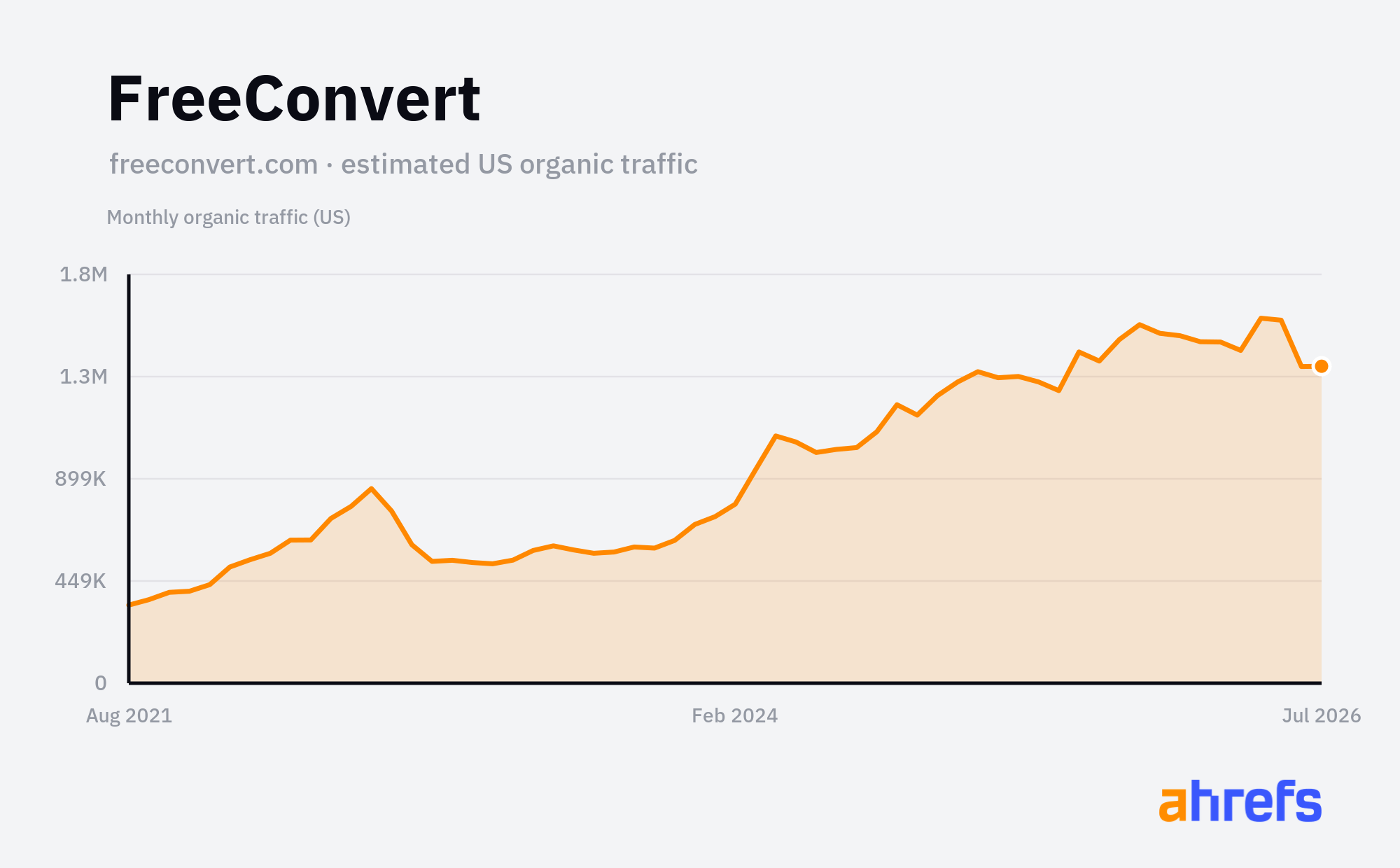
Page | Top keyword | Volume | Traffic/mo |
|---|---|---|---|
freeconvert.com/video-compressor | file compressor | 348,000 | 259,715 |
freeconvert.com/mp4-to-mp3 | mp3 converter | 263,000 | 97,330 |
freeconvert.com/convert/video-to-mp3 | video to mp3 | 64,000 | 79,809 |
freeconvert.com/heic-to-jpg | heic to jpg | 207,000 | 44,791 |
You don't need to be a converter site either.
Clockify is time-tracking software, but its free military-time converter pulls around 31,200 US visits a month, and its decimal-hours converter another 2,400. Both are the same idea applied to Clockify's own world: the people converting time formats are the people who might track time in its app. The converter does the one job the searcher came for, and the product sits right there when they're done.
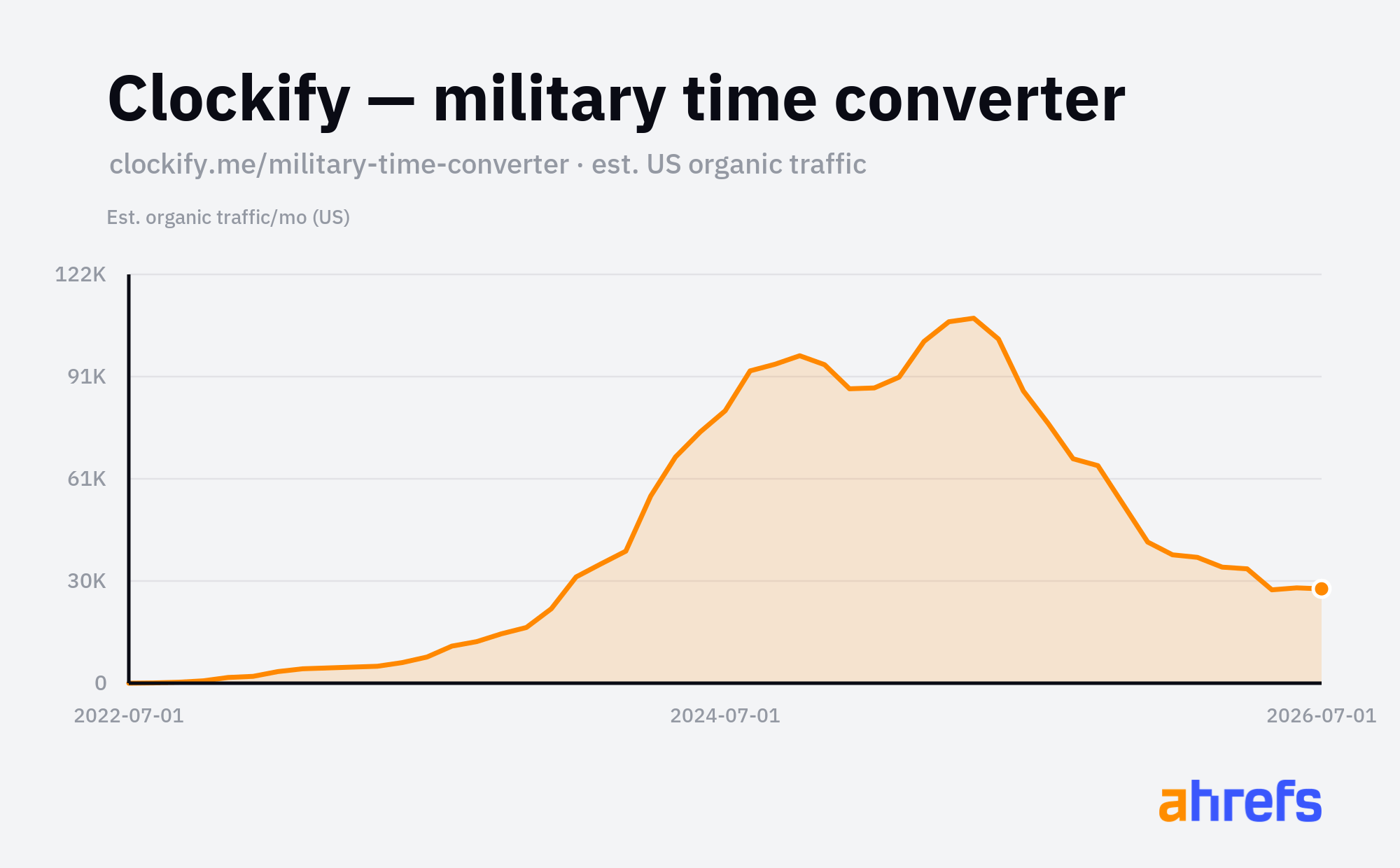
Page | Top keyword | Volume | Traffic/mo |
|---|---|---|---|
clockify.me/military-time-converter | 2200 military time | 23,000 | 31,391 |
Adobe sells Acrobat Pro, but its free online converters are a giant top-of-funnel tactic: the PDF-to-Word page alone pulls around 385,000 US visits a month. Each free conversion nudges the user a little closer to the paid subscription.
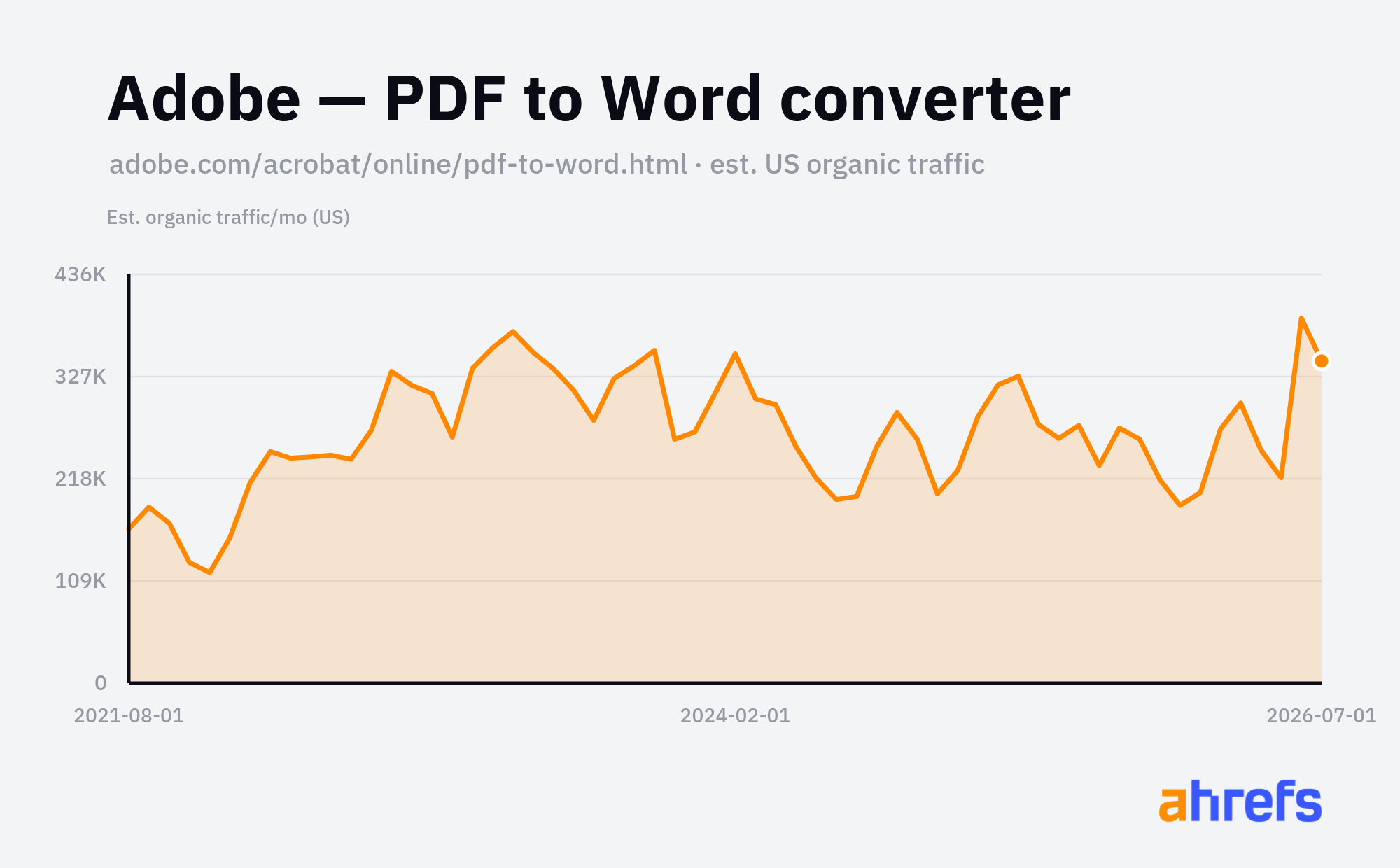
Page | Top keyword | Volume | Traffic/mo |
|---|---|---|---|
adobe.com/acrobat/online/pdf-to-word.html | pdf to word | 183,000 | 402,101 |
Converter keyword opportunities
The common format pairs have big volume, but they're taken by billion-visit sites like FreeConvert at KD 80+:
Example keyword | Niche | Volume | KD | Traffic Potential |
|---|---|---|---|---|
currency converter | Finance / travel | 459,000 | 84 | 250,000 |
celsius to fahrenheit | Science / everyday | 330,000 | 23 | 82,000 |
heic to jpg | Photography | 222,000 | 31 | 491,000 |
pdf to word | Documents / office | 220,000 | 81 | 243,000 |
The more winnable keywords are the format pairs specific to one profession, where difficulty drops to single digits:
Example keyword | Niche | Volume | KD | Traffic Potential |
|---|---|---|---|---|
pdf bank statement to csv | Accountancy / bookkeeping | 90 | 5 | 3,300 |
psd to png | Graphic design | 2,800 | 4 | 3,500 |
dwg to pdf | Architecture / CAD | 1,500 | 12 | 4,600 |
mp3 to midi | Music production | 5,700 | 10 | 8,900 |
stl to gcode | 3D printing | 1,100 | 1 | 1,500 |
yaml to json | Software / DevOps | 2,900 | 1 | 2,200 |
To find your own, paste these seed patterns into Keywords Explorer (Matching terms) and swap the bracketed part for your niche: [niche format] to [niche format], convert [format] to [format], [pro file] to csv, [pro file] to excel, [format] to pdf, [format] to text, [format] to image, [proprietary format] converter, [format] converter online, batch [format] converter.
3. Generators
A generator creates something new from a click or a prompt. Someone searches "color palette generator", hits the button, and gets a ready-to-use set of colours they can copy or export.
Coolors is a colour-palette generator that grew into a whole suite of design generators: palettes, fonts, gradients, contrast checkers. It nearly doubled its US organic traffic over five years by ranking #1 for "color palette generator", then adding a page for each adjacent "generator" and "maker" query it could serve.
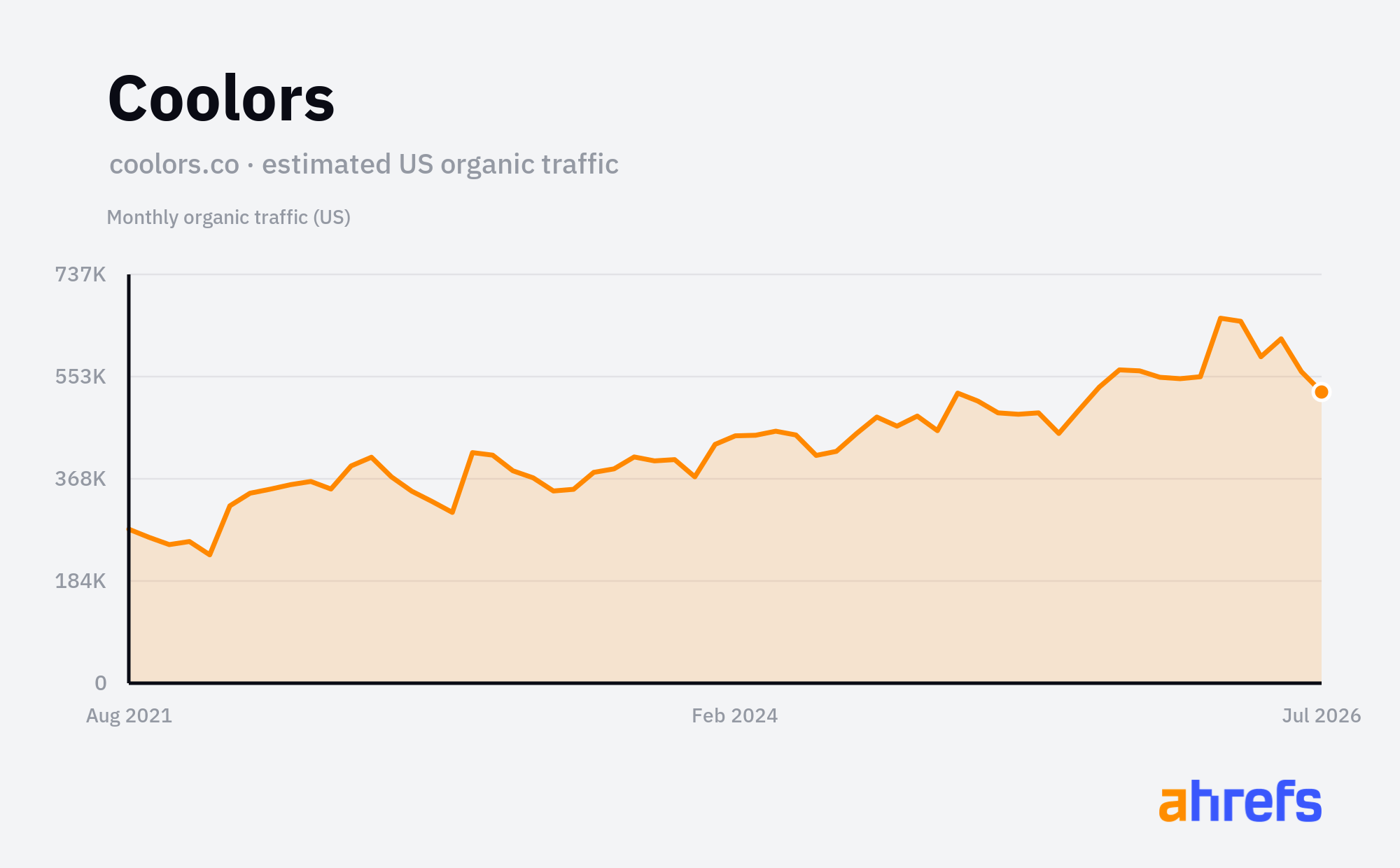
Page | Top keyword | Volume | Traffic/mo |
|---|---|---|---|
coolors.co | color palette generator | 84,000 | 340,519 |
coolors.co/font-generator | font generator | 751,000 | 75,954 |
coolors.co/image-picker | color palette from image | 10,000 | 10,334 |
coolors.co/contrast-checker | contrast checker | 7,000 | 6,640 |
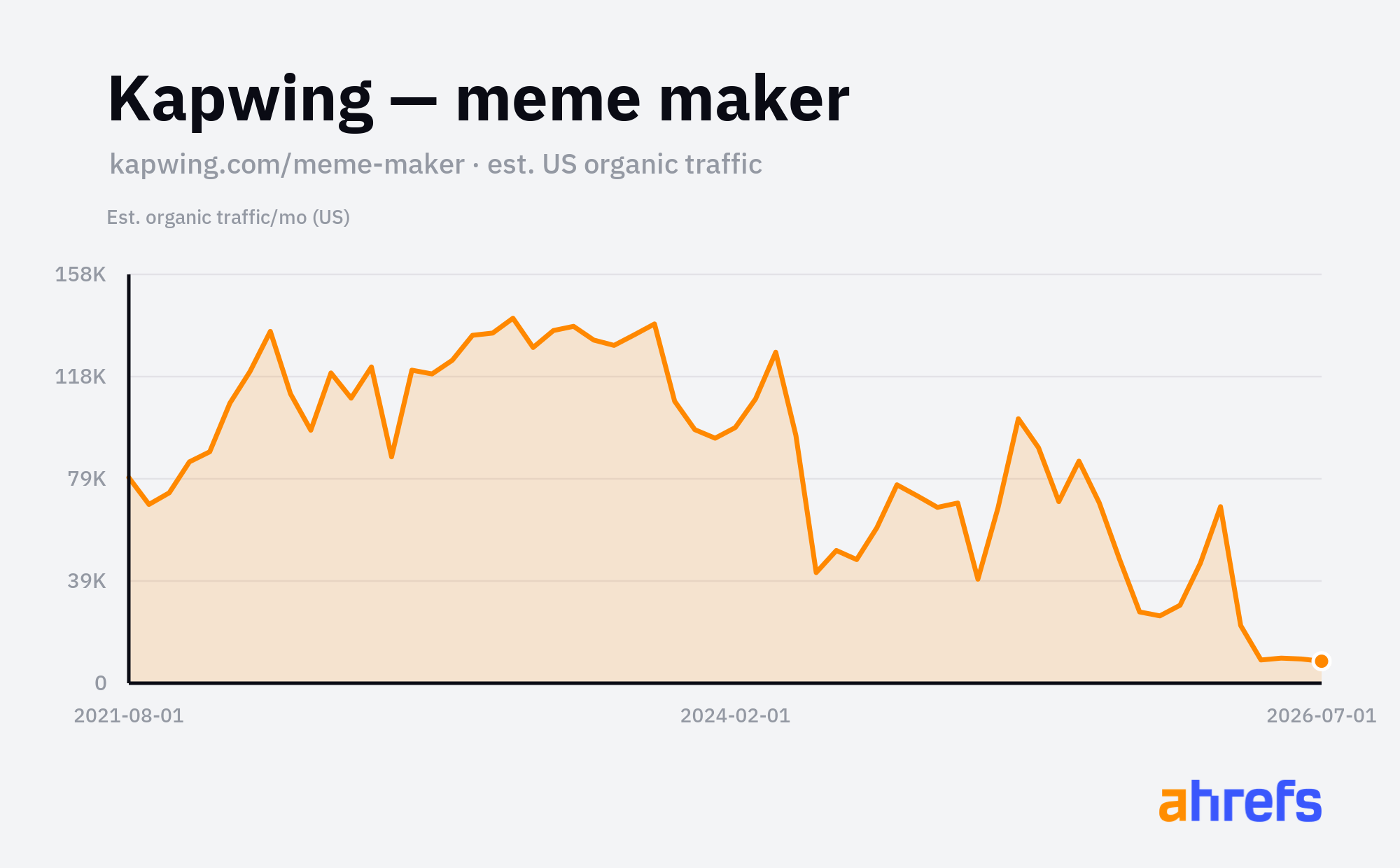
Kapwing is a video-editing tool, but a lot of its search traffic comes from small free generators: its meme maker pulls around 10,500 US visits a month and its subtitle generator another 5,800. None of those pages sell the editor directly, but the people making memes and subtitles are the people who edit video, so each free generator is a cheap way to put the product in front of the right audience.
Page | Top keyword | Volume | Traffic/mo |
|---|---|---|---|
kapwing.com/meme-maker | meme generator | 305,000 | 10,497 |
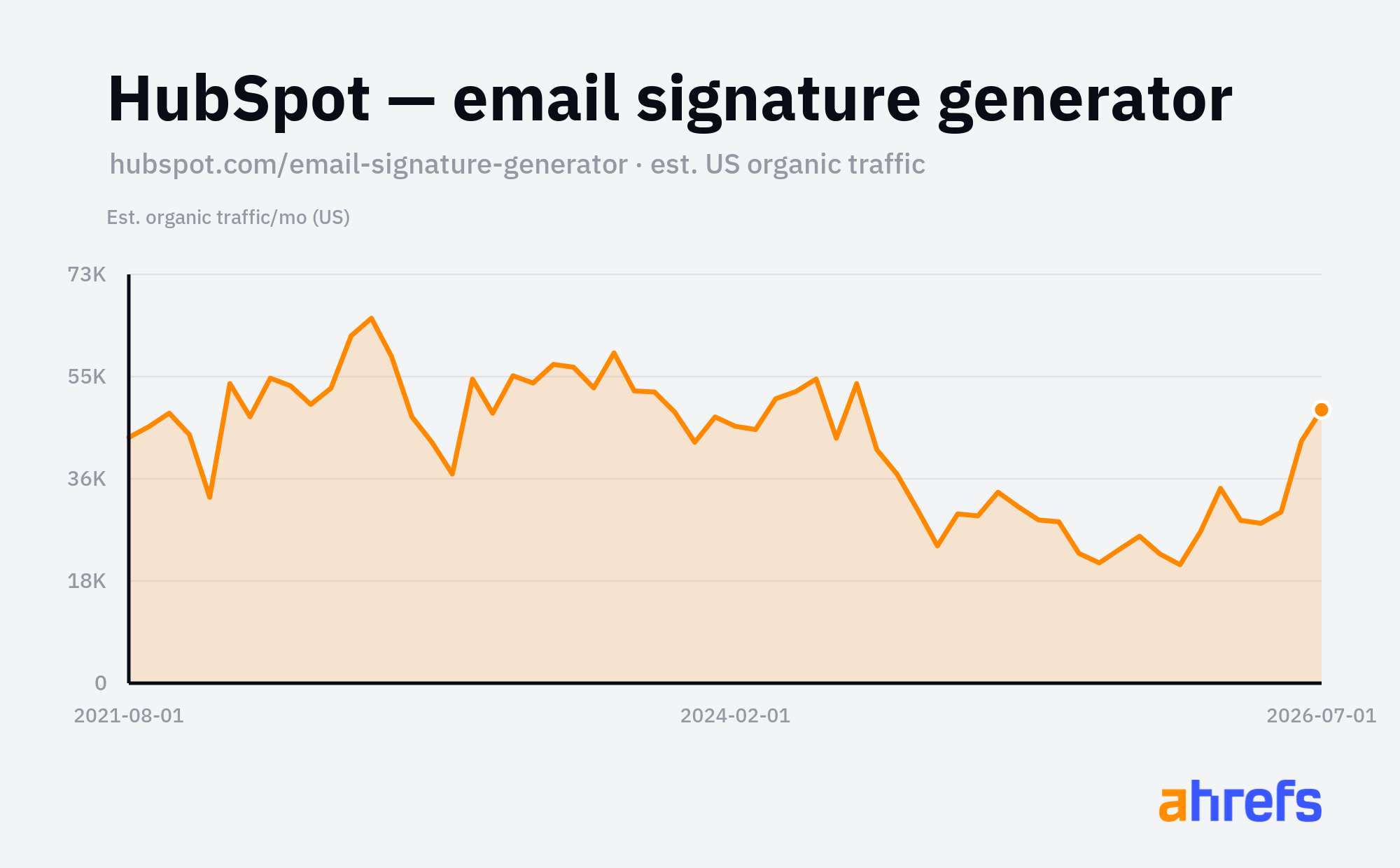
HubSpot does the same at scale. It sells CRM and marketing software, yet one of its best-performing pages is a free email signature generator pulling around 55,000 US visits a month. On the surface, it has nothing to do with the core product, but the people who need an email signature are marketers and salespeople, exactly who HubSpot wants in its funnel. A generator is a cheap, evergreen front door.
Page | Top keyword | Volume | Traffic/mo |
|---|---|---|---|
hubspot.com/email-signature-generator | email signature | 43,000 | 54,653 |
Generator keyword opportunities
The head terms have big volume but high difficulty:
Example keyword | Niche | Volume | KD | Traffic Potential |
|---|---|---|---|---|
qr code generator | Marketing / retail | 776,000 | 90 | 426,000 |
password generator | Security / tech | 300,000 | 82 | 505,000 |
invoice generator | Finance / SMB | 183,000 | 63 | 371,000 |
business name generator | Entrepreneurship | 51,000 | 80 | 243,000 |
The winnable keywords are the niche ones: smaller volume, low difficulty, strong Traffic Potential. Find the row closest to your niche, then check whether the equivalent exists for your own audience:
Example keyword | Niche | Volume | KD | Traffic Potential |
|---|---|---|---|---|
band name generator | Musicians | 11,000 | 7 | 14,000 |
podcast name generator | Podcasters | 12,000 | 8 | 9,900 |
d&d name generator | Tabletop gaming | 2,100 | 14 | 18,000 |
clan name generator | Gaming | 2,300 | 5 | 4,200 |
twitch panel maker | Streamers | 450 | 3 | 2,800 |
meta description generator | SEO / marketing | 1,600 | 12 | 4,200 |
To find your own, paste these seed patterns into Keywords Explorer (Matching terms) and swap the bracketed part for your niche: [thing] generator, [thing] maker, [thing] creator, [thing] name generator, [thing] username generator, random [thing] generator, free [thing] generator, ai [thing] generator, [thing] ideas generator, [thing] builder.
4. Templates
A template is a ready-made file the searcher can copy and fill in. Someone searches "doctors note template", lands on the page, and downloads a document they can edit, no design work of their own.
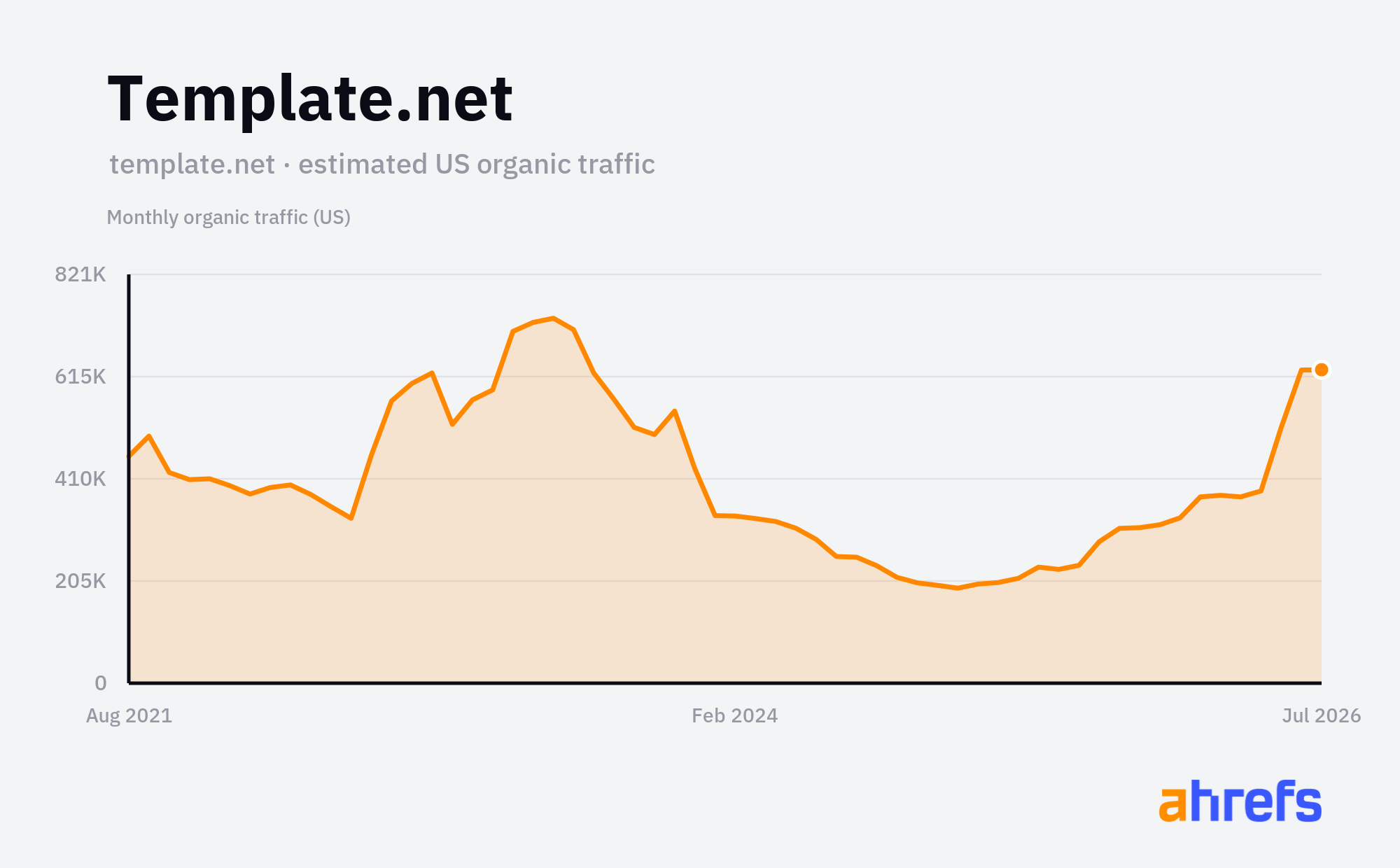
Templates are a bit different: most of them aren't interactive tools at all, just a page plus a downloadable or editable file. Template.net ranks for thousands of "template" queries (doctor's notes, obituaries, letters, calendars), each page offering a ready-made file. It's the lowest-effort version of this strategy and still pulls around 700K US visits a month.
Page | Top keyword | Volume | Traffic/mo |
|---|---|---|---|
template.net/doctor-note | doctors note template | 8,600 | 36,173 |
template.net/signature-generator | signature generator | 55,000 | 6,631 |
template.net/obituary | obituary template | 22,000 | 5,478 |
template.net/letters/character | character reference letter | 6,300 | 5,288 |
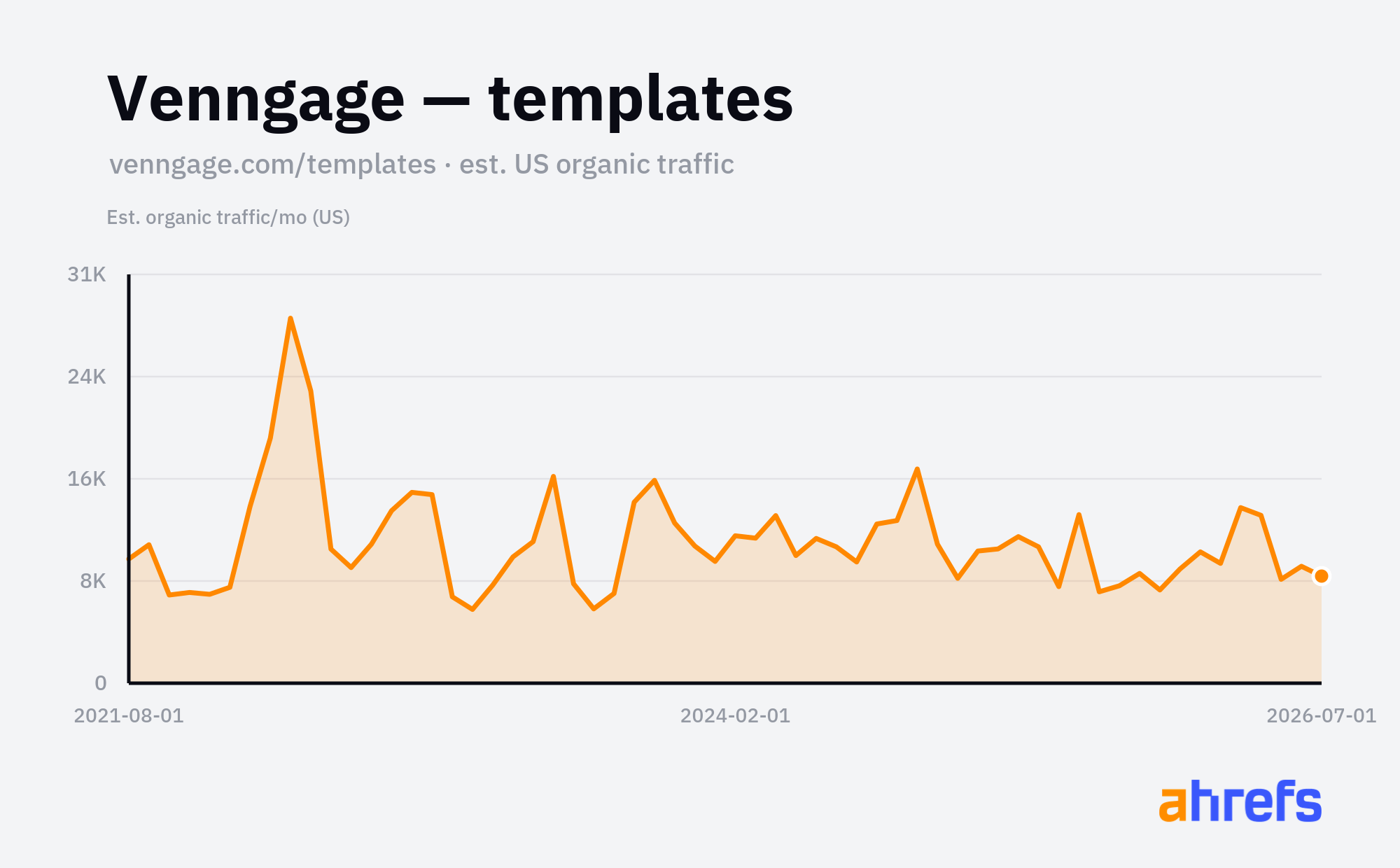
Venngage is an infographic maker, and its /templates/ hub pulls around 11,000 US visits a month across hundreds of ready-made designs, from org charts to infographics. Each template ranks for its own "template" query, hands the searcher a free starting design, then invites them to edit it inside Venngage. The template is useful on its own, and the product is the natural next click.
Page | Top keyword | Volume | Traffic/mo |
|---|---|---|---|
venngage.com/templates | infographic template | 13,000 | 10,954 |
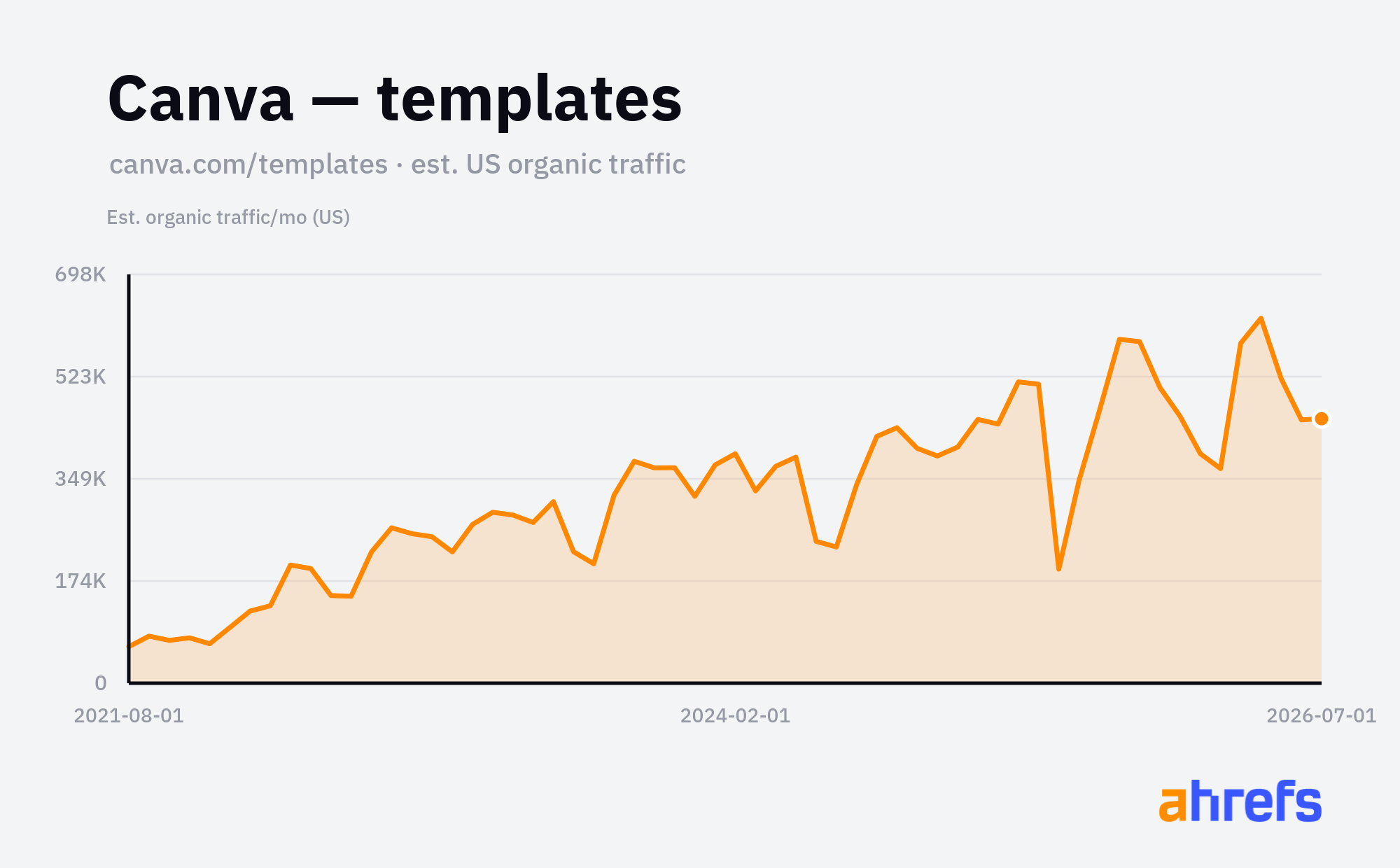
Canva runs the biggest version of this. Its /templates/ hub pulls around 505,000 US visits a month, with sub-pages for everything from budgets to meeting agendas to obituaries:
Page | Top keyword | Volume | Traffic/mo |
|---|---|---|---|
canva.com/templates/ | canva templates | 20,000 | 508,826 |
Template keyword opportunities
The generic head terms have big clusters of volume but high difficulty:
Example keyword | Niche | Volume | KD | Traffic Potential |
|---|---|---|---|---|
resume template | Careers / HR | 195,000 | 68 | 424,000 |
invoice template | Finance / SMB | 111,000 | 43 | 80,000 |
business plan template | Entrepreneurship | 87,000 | 40 | 154,000 |
budget template | Personal finance | 28,000 | 45 | 145,000 |
If you don't want to go head-to-head with Canva (and few would), you can find plenty of winnable keywords: specific documents your profession needs, with near-zero difficulty.
Example keyword | Niche | Volume | KD | Traffic Potential |
|---|---|---|---|---|
wedding seating chart template | Wedding planning | 1,900 | 7 | 11,000 |
construction estimate template | Construction | 1,200 | 2 | 3,300 |
photography contract template | Photography | 1,100 | 6 | 2,400 |
podcast script template | Podcasters | 600 | 1 | 1,400 |
real estate flyer template | Real estate | 350 | 8 | 1,600 |
tattoo consent form template | Tattoo studios | 150 | 0 | 800 |
To find your own, paste these seed patterns into Keywords Explorer (Matching terms) and swap the bracketed part for your niche: [document] template, [document] example, [document] format, [document] sample, printable [document], free [document] template, editable [document] template, [document] template word, [document] template google docs, [document] checklist.
How to find, build, and ship your own tool
The four categories look different, but the process is the same for all of them: find a winnable keyword in Keywords Explorer, build the tool with AI, then get it live on your site. Here it is end to end.
1. Search seed keywords with the Matching terms report
Every tool query follows a similar pattern: a word that signals the searcher wants to do something, not read about it. Search these seed words with a broad Matching terms report, and Ahrefs returns every variation people actually search for:
Category | Seed patterns to search |
|---|---|
Calculators | [thing] calculator, [thing] cost calculator, [thing] price calculator, how much [thing], how many [thing], [thing] estimator, [thing] size calculator, [metric] to [metric], [thing] per [unit], [thing] savings calculator |
Converters | [niche format] to [niche format], convert [format] to [format], [pro file] to csv, [pro file] to excel, [format] to pdf, [format] to text, [format] to image, [proprietary format] converter, [format] converter online, batch [format] converter |
Generators | [thing] generator, [thing] maker, [thing] creator, [thing] name generator, [thing] username generator, random [thing] generator, free [thing] generator, ai [thing] generator, [thing] ideas generator, [thing] builder |
Templates | [document] template, [document] example, [document] format, [document] sample, printable [document], free [document] template, editable [document] template, [document] template word, [document] template google docs, [document] checklist |
2. Filter for the winnable terms
The head terms ("mortgage calculator", "qr code generator") have the biggest volume, but they're dominated by billion-visit sites you won't outrank. The winnable keywords sit a level below them. Set a Keyword Difficulty filter of roughly KD ≤ 30, add a Lowest DR filter to ensure that sites like yours appear in top-ranking positions, then sort by Traffic Potential or Search volume to surface low-difficulty terms that still sit under a large parent topic.
3. Use the Category filter to find opportunities in your niche
Scan the results for a term your own audience would search: a deck material calculator for a contractor tool, a YAML-to-JSON converter for a developer product, a photography contract template for a creative platform. The best opportunities are specific: smaller volume, but near-zero difficulty and buyers who match your product.
You can use the Category filter to quickly find relevant opportunities for your specific niche:
4. Sanity-check the SERP
Click into the SERP overview for your shortlisted keyword. If the top results are thin, single-purpose tool pages rather than deep guides, that's your signal: a focused tool page can win here. If the page-one results are all 3,000-word articles, the intent isn't a tool.
The Page types column makes it very easy to check which page types rank best in any SERP:
5. Build the tool with AI
Once you've found a keyword worth building for, you don't need a developer to make the tool itself. Describe exactly what it should do, then paste that into Letaido, ChatGPT, Claude, or any capable model.
A good prompt contains the inputs, the outputs, and the on-page copy that helps it rank. Here's a real one I used to build a deck material calculator, the niche term from the Calculators section above:
Prompt: deck material calculator
Build me a single-page "deck material calculator" as one self-contained HTML file. Inputs: deck length and width (in feet), the deck board width (in inches, default 5.5), the gap between boards (in inches, default 0.25), joist spacing (12, 16, or 24 inches), and an editable price per board. Outputs: the number of deck boards needed, total linear feet of decking, the number of joists, and an estimated materials cost. Show the working underneath each number so people can see how it's calculated, not just the final total. Make it fast and mobile-friendly, with a clear title, a one-line explainer at the top, and no login or sign-up. Underneath the calculator, add a short FAQ answering "how much decking do I need?" and "how many deck boards per square foot?" so the page can rank for those searches.
Here's what Letaido built from that prompt in one pass—a working calculator in about a minute, for $1.24:
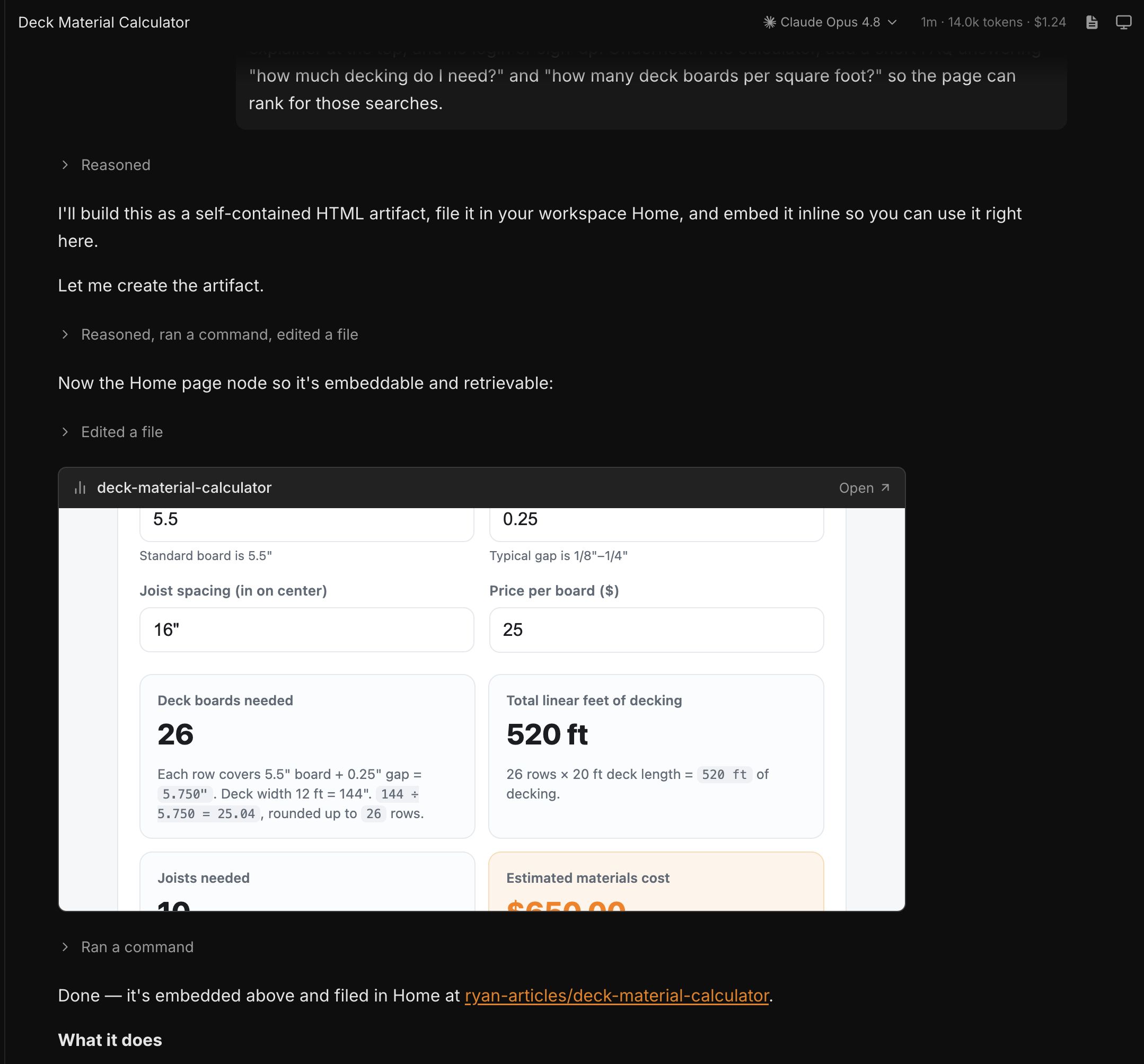
Swap the specifics for your own keyword. For a converter, ask for a paste-and-convert box; for a generator, ask for a "generate" button and a way to copy the result; for a template, ask for a fillable form plus a "download as PDF" button. Then iterate in the chat until it behaves the way you want.
6. Ship it to your site
This is the part that's genuinely harder than building the tool, and it depends entirely on your stack. The tool AI hands you is usually a self-contained page (HTML, CSS, and a little JavaScript). Getting it live and ranking is the real work:
- WordPress: embed the tool with a custom HTML block or a plugin, or drop it on its own landing-page template. Keep it on a clean, descriptive URL (e.g.
/tools/deck-calculator/). - Webflow, Framer, or a site builder: use an embed/HTML component. Watch that the embed is crawlable and not hidden behind an iframe search engines ignore.
- A custom or headless site (React, Next.js, etc.): your developers can drop the logic straight into a real page, which is best for speed and SEO but needs engineering time.
- No site, or you want it live fast: host the standalone page on its own (Letaido can publish it for you, or a static host works), then link to it from your main site.
Whichever route you take, the SEO basics decide whether it ranks: a descriptive URL and title, the tool visible in the page's HTML (not buried in an un-crawlable iframe), fast load on mobile, and that FAQ block so the page has text to match the query. Get one tool live, let it rank, and use what it teaches you to build the next.
Final thoughts
Tools are largely immune to the thing eating everyone else's traffic: an AI Overview can summarise an article, but it can't do your calculation or convert your file for you—people still have to land on the page and use it.
Free tools have never been easier to make: that deck calculator cost me $1.24 and about a minute, where a few years ago it was a developer ticket. And people are genuinely glad to find them—a free tool that does one job well earns links, return visits, and goodwill in a way another blog post rarely does.
A defensible traffic opportunity that's getting cheaper to build and that users actually like is a rare combination. Go build one.
Ryan Law is the Director of Content Marketing at Ahrefs. Before joining the team, Ryan was CMO at content marketing agency Animalz.
Over the past 13 years, Ryan has been a writer, content strategist, team lead, marketing director, VP, CMO, and agency co-founder. He's worked with companies including Google, Zapier, Textio, Clearbit, and Algolia and hosted workshops and webinars for many more.
Ryan is the creator of two fantasy novels, two writing courses, and many more (less successful) projects.
Keep learning






Your weekly marketing’s must-reads
Join 284K marketers for weekly news, useful reads, industry updates, and the memes you didn’t know you needed.
Explore what’s inside the newsletter →