
SEO Basics: Beginner’s Guide to SEO Success

Former Head of Content at Ahrefs



If you want people to find your website through Google, you need to know the basics of SEO. These are simpler than you might think.
Keep reading to learn what SEO is, how to set things up for success, and how to get indexed.
SEO fundamentals
What is SEO?
SEO (Search Engine Optimization) is about optimizing your website and content to increase its visibility across search engines and AI assistants like ChatGPT, Gemini, and Perplexity—not just for clicks, but to make sure you get mentioned in results, snippets, summaries, and web content.
Why is SEO important?
People are likely searching for what you do on Google or Bing—sometimes even via an AI assistant.
If your business appears when those topics get searched, you can attract customers. But you’re unlikely to show up without effort, as others are trying to do the same. This is why SEO matters.
It helps show search engines and AI assistants that your brand deserves to be seen.
What are the benefits of SEO?
SEO helps your business appear where people are actively searching or asking questions—whether that’s in traditional search results or AI summaries.
The more people see your website appear in their search results and conversations, the more likely they’ll be to think favorably of you and even buy something from you in the future.
Unlike ads, organic visibility doesn’t cost you every time someone sees or interacts with your content.
For example, we get an estimated 5.6M monthly visits from organic search.
To replicate that with paid ads would cost around $4.2M per month—proof that strong SEO creates lasting, compounding value.
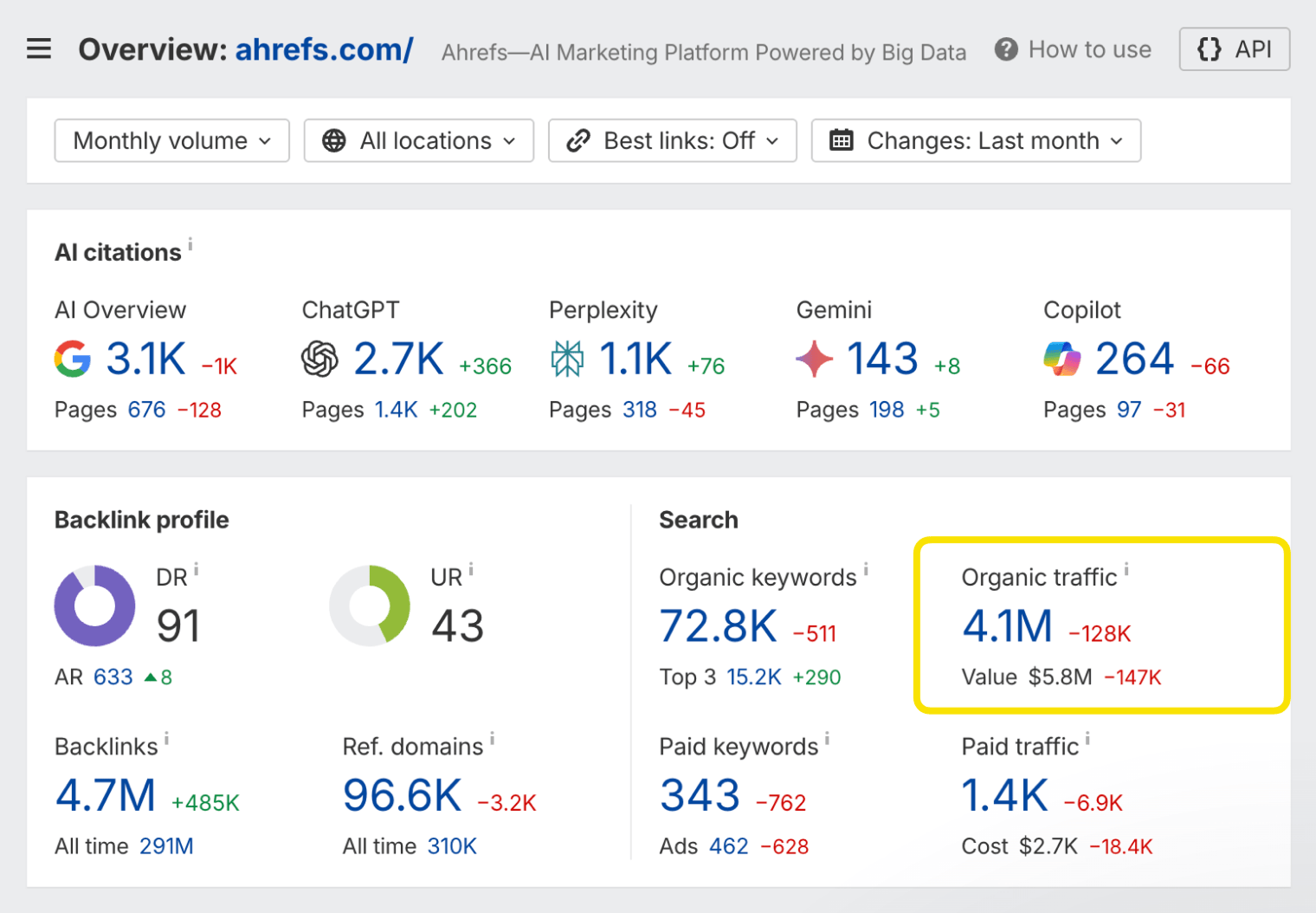
No source of traffic is truly free. SEO costs time and effort.
How do you do SEO?
SEO involves five main steps:
These steps are the main focus of our beginner’s guide to SEO.
Setting up for SEO success
Doing SEO is much easier when your website is properly set up for SEO success. Let’s look at a few ways to do that.
Get a good domain
Most domains are fine for SEO, so don’t panic if you already have one. But if you’re still shopping around, keep these two elements of a good domain in mind.
Domain name
Something short and memorable is best here. Don’t try to shoehorn keywords. Your business name without hyphens or special characters is usually a good bet.
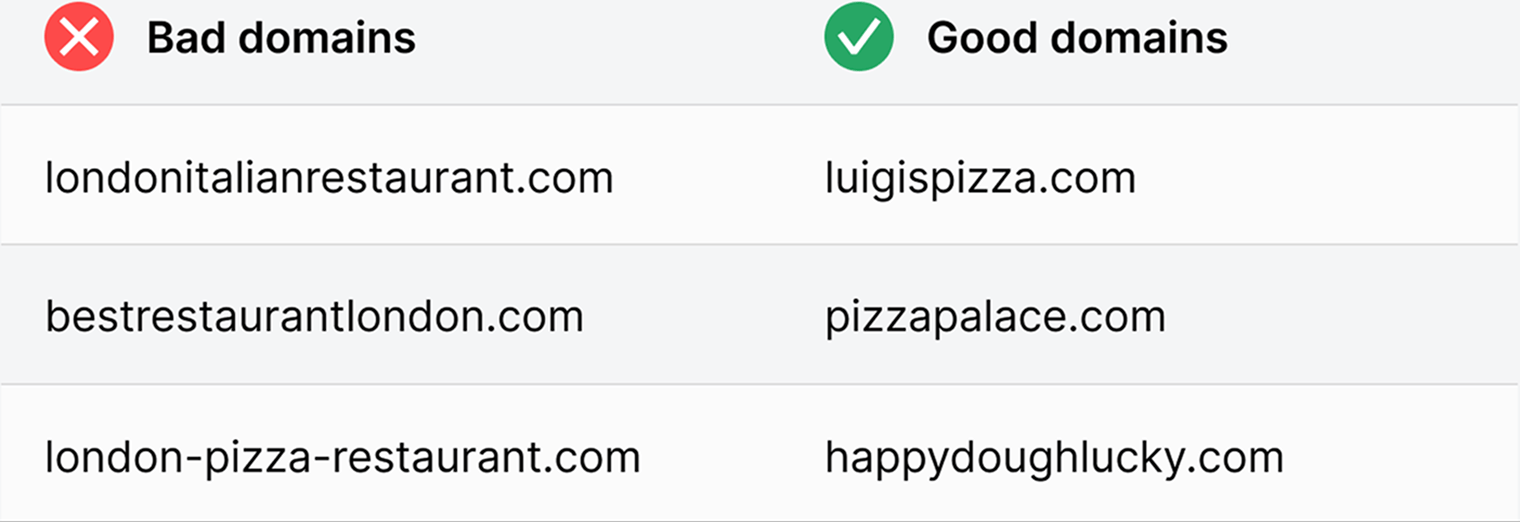
Top-level domain (TLD)
This is the part after the name, like .com. Your choice of TLD makes no difference for SEO.1 But we think .com is best for most people, as it’s the most recognizable and trusted. For charities, .org or your local equivalent also works.
If you only do business in one country outside the U.S., your country code top-level domain (ccTLD), like .co.uk, is fine too.
It’s best to stay clear of TLDs like .info and .biz that people tend to associate with spam. But it’s not the end of the world if you have one. You can still build a legit website that gets seen.
If you are serving a specific country, using a ccTLD like .fr for France or .es for Spain is a strong indicator to search engines that your site is targeted to users in that country.
Use a website platform
Website platforms let you create and manage a website—even if you can’t code.
There are two types:
Hosted vs. Self-hosted platforms
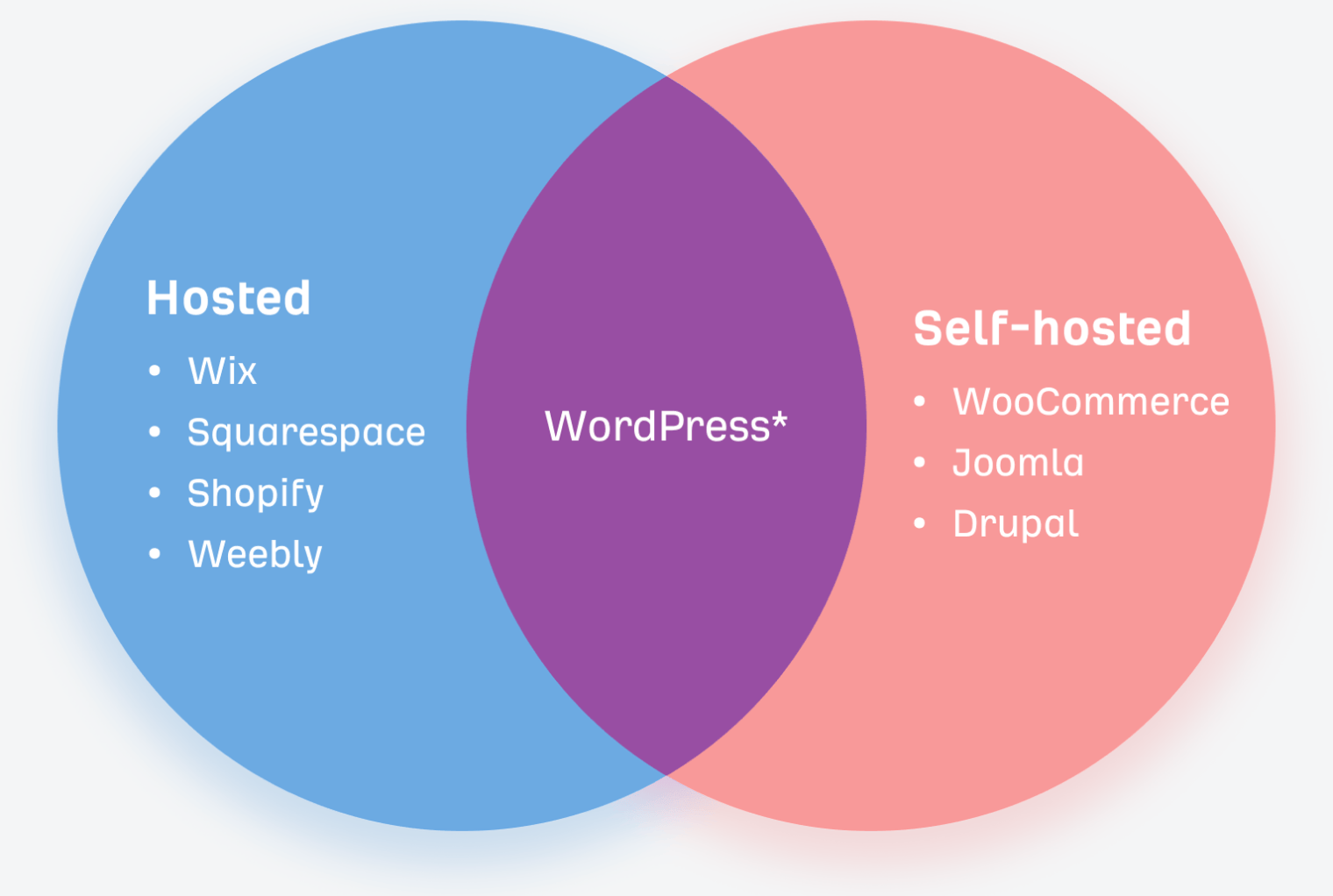
* WordPress has a hosted solution at wordpress.com
Most SEOs recommend a self-hosted, open-source platform like WordPress because:
- It’s customizable. You can edit the open-source code how you like. There’s also a vast community of resources, and advice from developers who know the platform inside out.
- It’s scalable and extensible. There are millions of plugins for extending its functionality, including many SEO plugins. This kind of hosting grows with your business.
That said, if you value ease of use and customer support, a hosted solution like Webflow or Shopify might be a better fit—especially for newer businesses. Hosted platforms have improved a lot in the last few years. Most now offer robust SEO features out of the box.
Use a good web host
If you’re using a hosted solution, you’ll need a web host. This is the company that stores your website’s files and makes them accessible to users—and increasingly, to AI crawlers like Googlebot, Bingbot, and GPTBot.
When choosing a host, consider the three S’s—plus a fourth one that’s becoming more relevant:
Your site needs to be encrypted. Choose a host that provides a free SSL/TLS certificate, or at least supports Let’s Encrypt. This protects visitor data and is a trust signal for both users and search engines.
Closer servers mean faster load times. If most of your traffic is from one country, pick a host with servers nearby. This improves site speed, which is a ranking factor 2 and contributes to better visibility in search and AI results.
Good support is non-negotiable. Ideally, you want 24/7 live support. Test them out—ask questions about SSL setup, CDN integration, or crawler access before committing.
Your site should be easy for search engines and AI systems to crawl. Choose a host that lets you configure robots.txt (some limit or lock this), and control your sitemaps (some auto-generate these). These are key to ensuring your site is fully crawlable, indexable, and visible. You also want to choose a host that doesn’t block known AI crawlers.
Did you know?
Create a positive user experience
Google and AI assistants want to serve pages that give visitors a positive experience.3 Let’s look at a few ways you can do this.
Use HTTPS
Nothing is worse for visitors than their personal data being susceptible to hackers. Always encrypt your site with SSL/TLS.
Choose an appealing design
Nobody wants to visit a website that looks like it’s from the ’90s. So while there’s no need to redesign your website every few months, it should look good and reflect your brand.
Make sure it’s mobile-friendly
More searches are now done on mobile than desktop.4 So it’s critical that your website is as pleasant to use on mobile as on desktop.
Use a readable font size
People browse the web using all kinds of devices. Make sure your content is readable across the board.
Avoid intrusive pop-ups and ads
Everyone hates ads, but sometimes you need them. If that’s the case, avoid intrusive interstitials. Pages with these may not rank as highly.5
Make sure it loads fast
Page speed is a ranking factor on desktop and mobile. According to Google, 5-second load times will cause 90% of users to leave your site without interacting with it.6
Create a logical site structure
It should be easy for visitors and search engines to find content on your site. That’s why it’s important to create a logical hierarchy for your content. You can do this by sketching a mind map.
Use a mind map to create your site structure
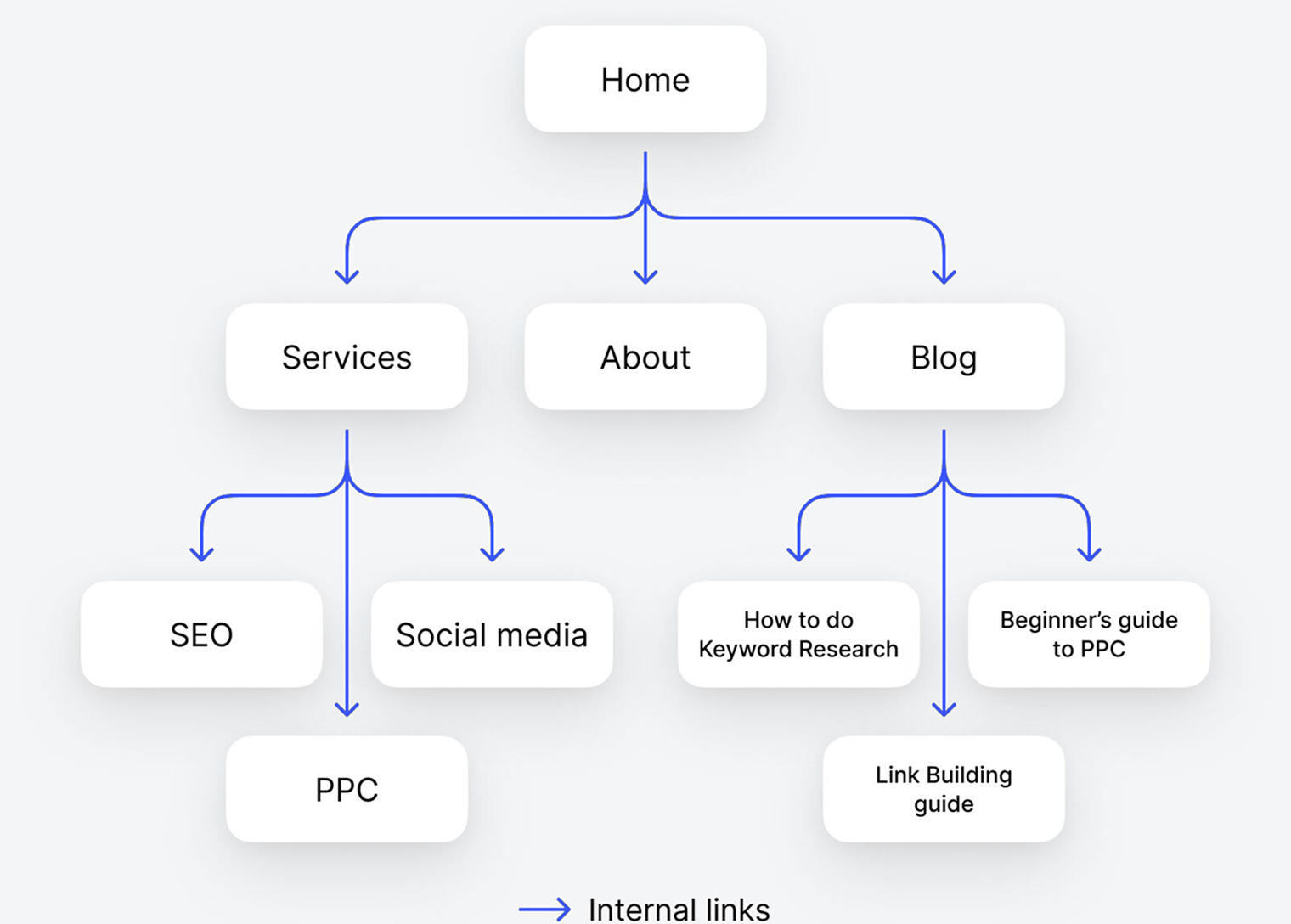
Each branch on the map becomes an internal link, which is a link from one page on a website to another.
Internal links are crucial for UX and SEO for a few reasons:
- They help search engines find new pages. Google can’t index pages it can’t find, and that can stop AI assistants accessing them, too.
- They help search engines and AI assistants understand what your page is about. Both platforms look at the clickable words in the link for this, otherwise known as anchor text.8
Use a logical URL structure
URLs are important because they help both users and search engines understand the content and context of a page. WordPress lets you choose from several URL (permalink) formats. The main ones are:
- Plain: website.com/?p=123
- Day and name: website.com/2021/03/04/seo-basics/
- Month and name: website.com/2021/03/seo-basics/
- Numeric: website.com/archives/865
- Post name (recommended): website.com/seo-basics/
If you’re setting up a new site, go with the clearest and most descriptive structure. That’s post name. If you’re working with an existing website, it’s rarely a good idea to change the URL structure; it may break things.
Install an SEO plugin
Focus on local SEO
If your business operates locally, you’ll need to know a thing or two about local SEO.
It involves optimizing your web presence to appear in geographically relevant searches across Google, Maps, and increasingly, AI platforms like Gemini.
This helps you show up where it counts—whether that’s a maps search for services ”near me”, or a business-related keyword search.
- Set up your Google Business Profile, to appear on Google Search and Maps—including categories, services, images, Q&A, and regular updates.
- Ensure NAP (Name, Address, Phone) consistency across your website, GBP, and major directories.
- Actively collect and respond to customer reviews, on Google and any other business-relevant directories.
- Create locally targeted content (e.g. location pages, blog posts, FAQs) that mirrors how people search.
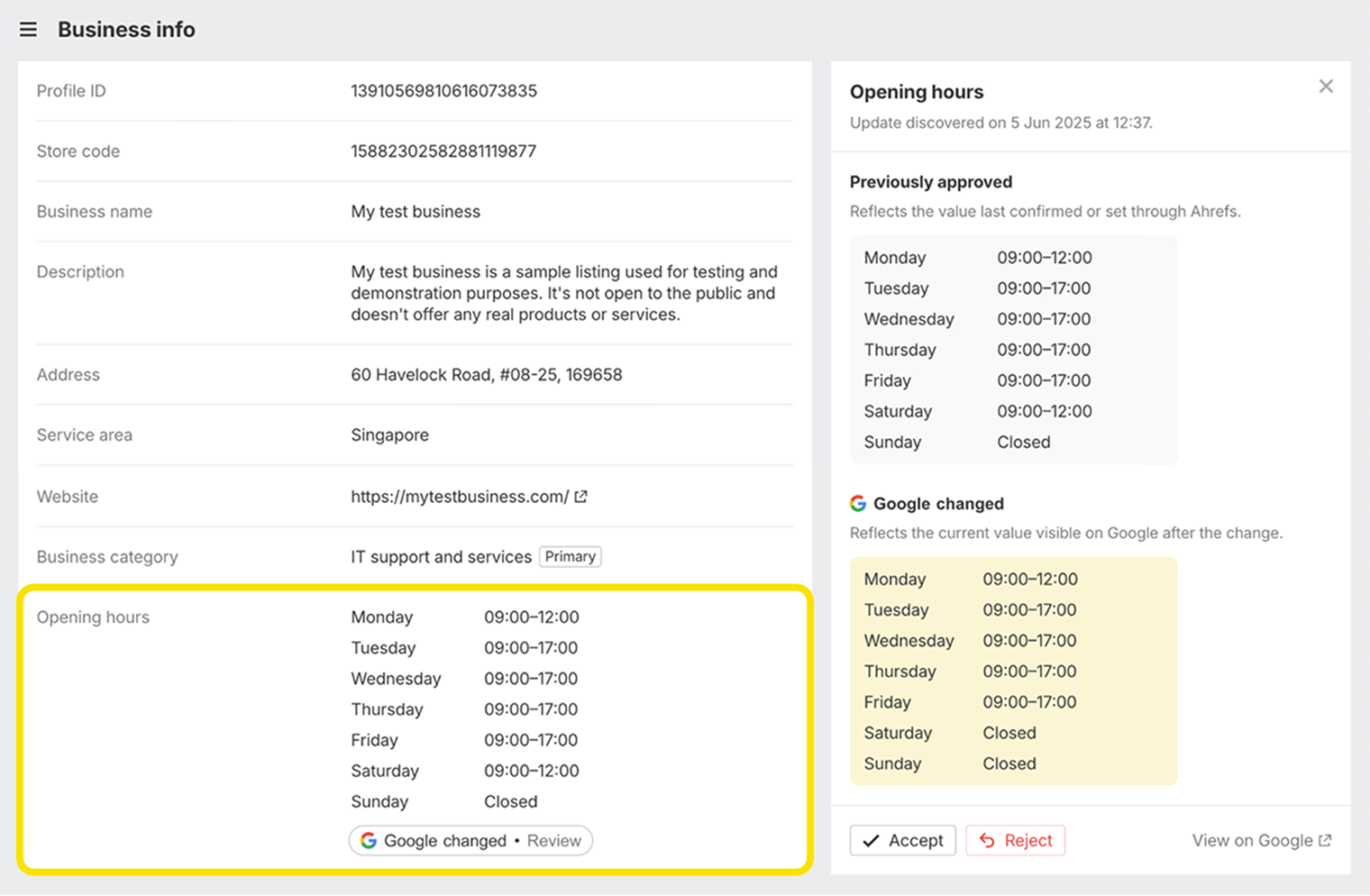
- Monitor your business profile, to keep on top of updates made by Google based on visitor feedback. You can track these changes and reject any unwanted edits with Ahrefs Google Business Profile Monitor.
Getting on Google
Having a website set up for SEO success will help Google crawl and index your pages. And once you get onto Google, you’re more likely to show up in AI assistants, since they reference search engine results.
Submitting your site to Google can speed up this process further. That’s because this helps Google find your website even if it has no backlinks.
How to submit your website to Google
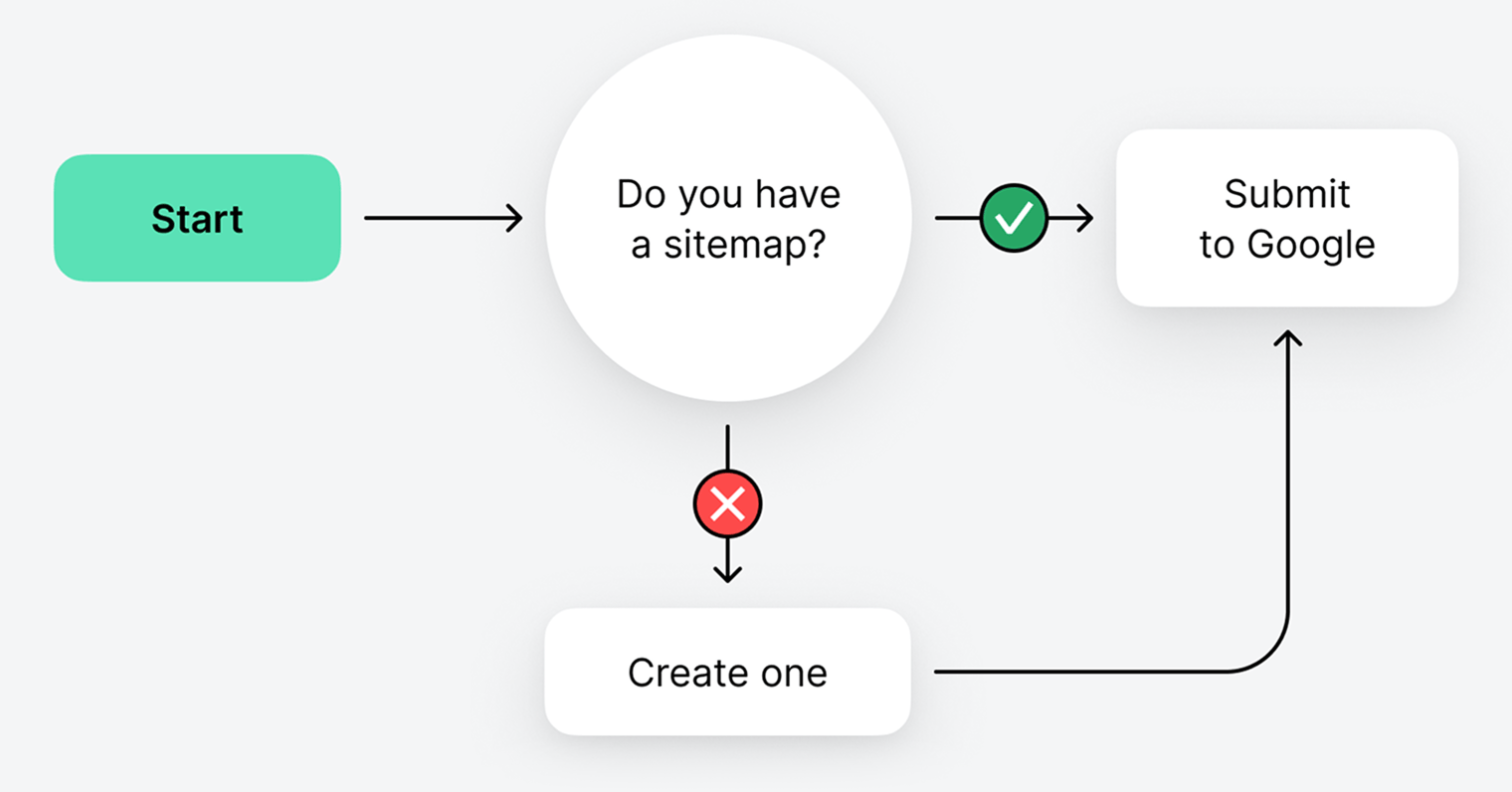
Finding or creating a sitemap
Sitemaps list the important pages on your website that you want search engines to index. If you already have a sitemap, it’ll likely be at one of these URLs:
- site.com/sitemap.xml
- site.com/sitemap_index.xml
If you can’t find it there, check site.com/robots.txt where it’s usually listed.

If you still can’t find it, you likely don’t have one and need to create one.
Submitting your sitemap
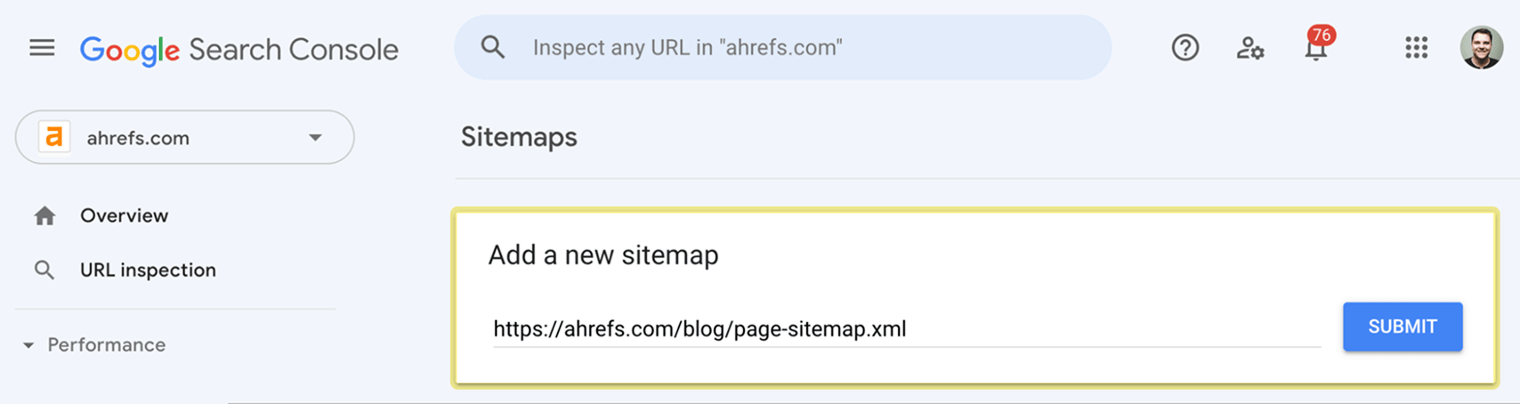
You do this via Google Search Console (GSC). It takes about two seconds.
How to track SEO success
Before we dive into how to do SEO, it’s worth taking a minute to understand how to track and measure SEO performance. This is never easy, and what we’ll cover here is a very high-level overview.
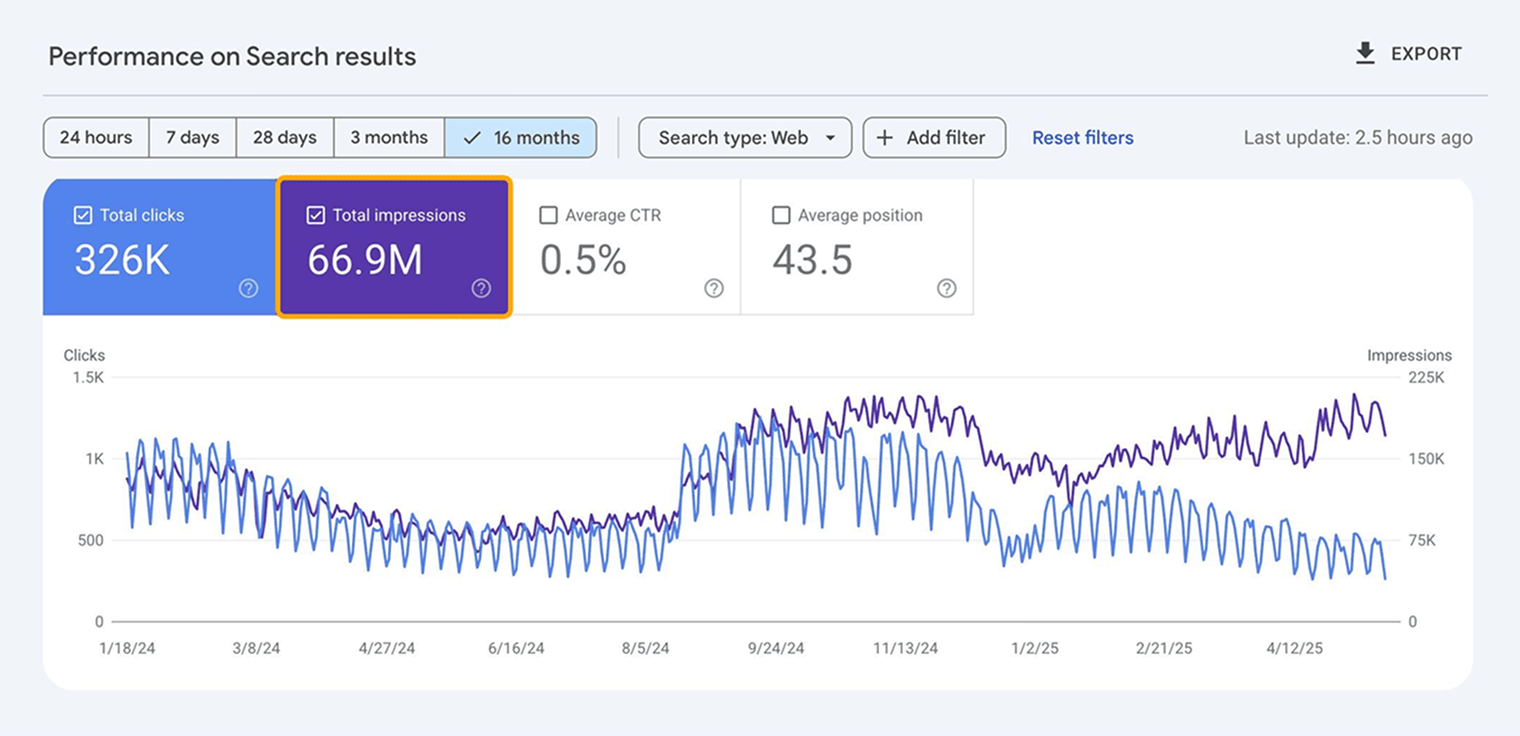
Organic traffic and impressions
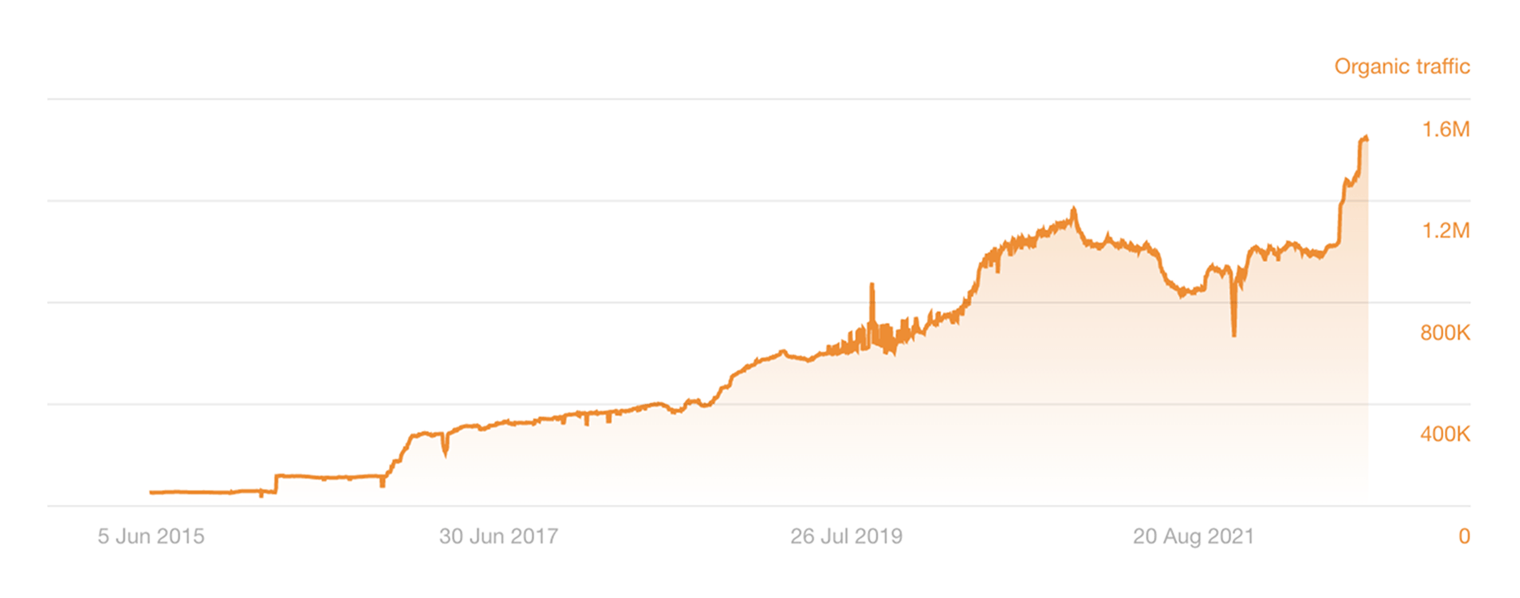
If organic traffic is going up, you’re doing something right.
Admittedly, organic traffic is getting harder to come by lately, since AI summarizes website content natively in search results pages—giving users less of a reason to click through to sites.
That said, it’s important to track, as it’ll still likely be your most prominent source of visitors. You can check it in Site Explorer for an estimate.
You can also track impressions to understand how visible your website is in search and AI—even if it doesn’t get clicked.
You can view this data in Google Search Console for free.
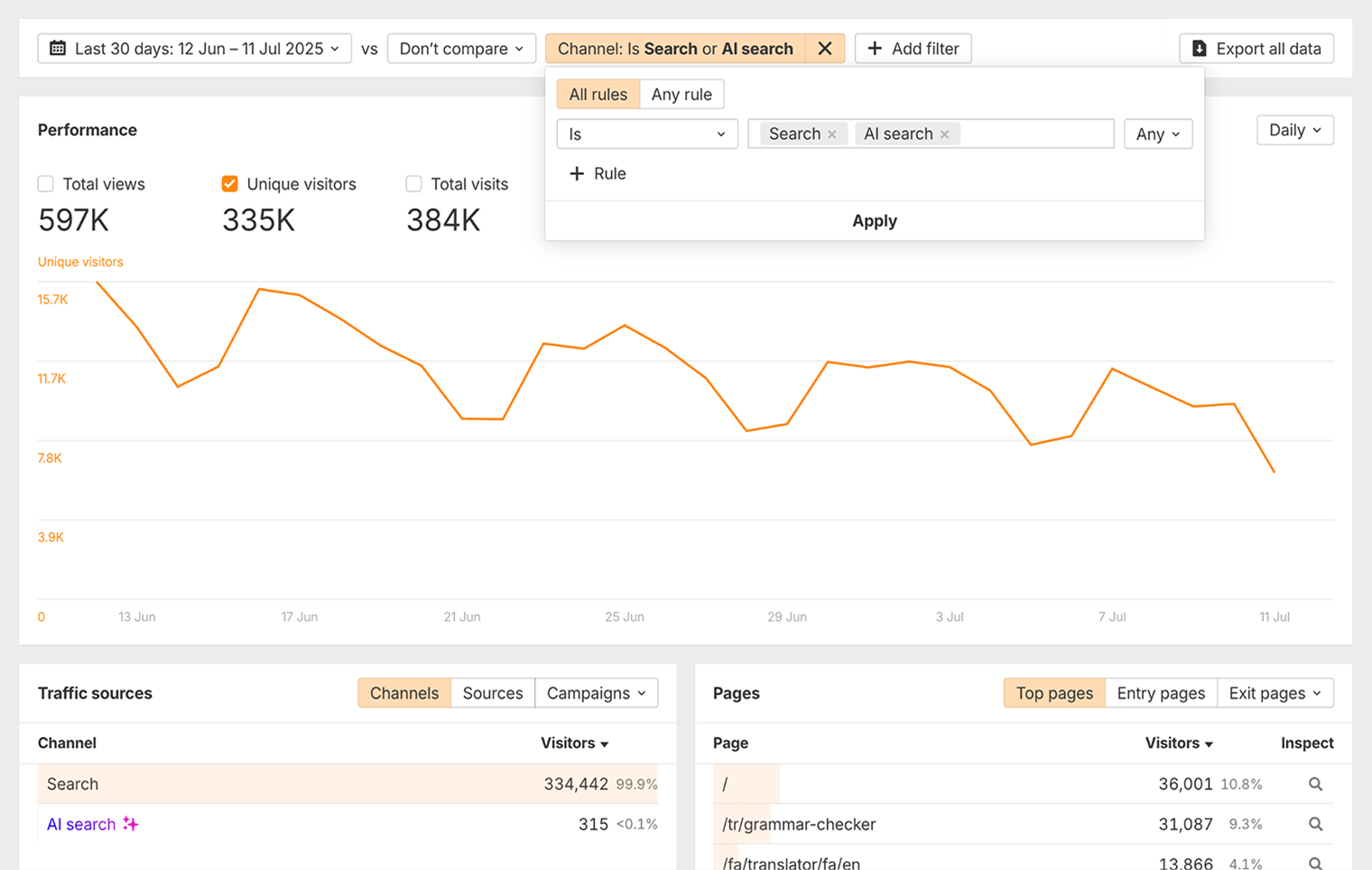
You can also use Ahrefs Web Analytics, for free, to track all of your site traffic and impressions across all sources—including search and AI.
Keyword rankings
If your rankings are on the rise for your target keywords, that’s another sign that you’re doing something right.
Rankings are still just as important for your business’ visibility today—even with the rise of AI.
Our research shows that 73% of the websites that appear in Google’s AI Overviews also rank in the top 10 search results.
In other words, to be visible in AI content, it’s very helpful if your site ranks organically.
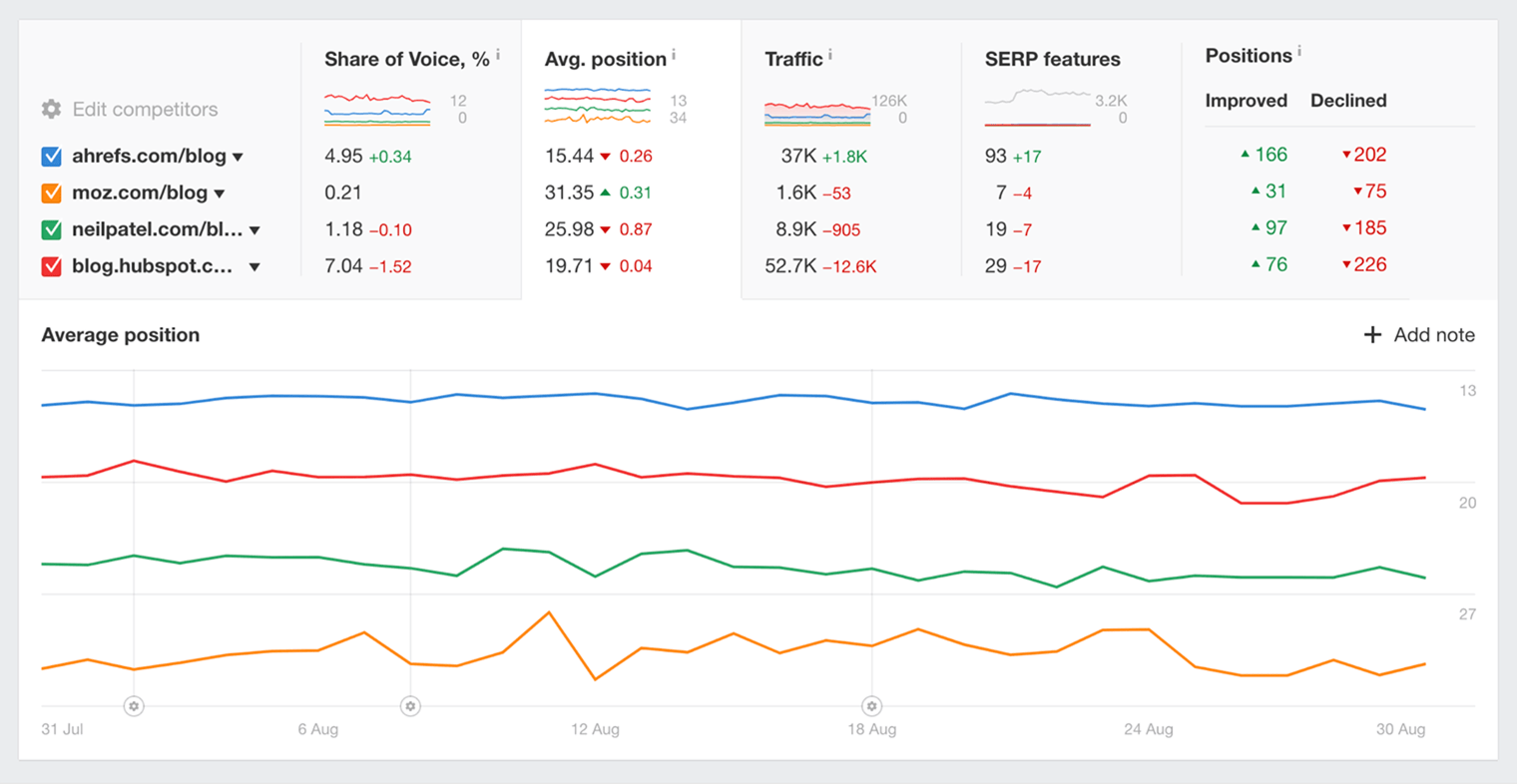
You can track average keyword rankings for free in GSC.
If you want to see actual rankings (not just averages), and get detailed historical ranking data for individual keywords, you’ll need a rank tracking tool like Ahrefs’ Rank Tracker.
AI visibility
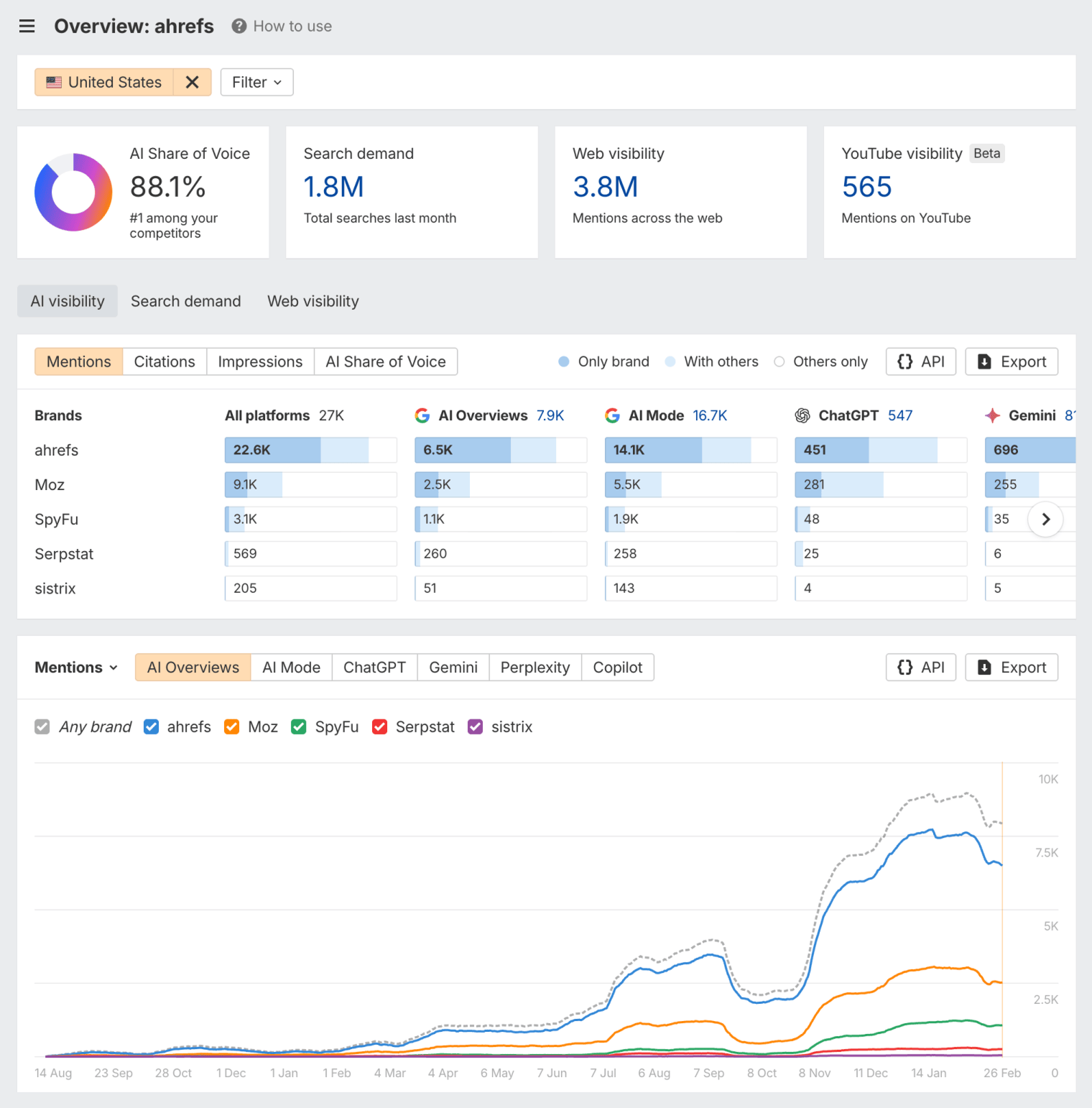
AI is becoming a big and important part of online visibility: 66% of people intentionally use AI on a regular basis 8.
You can see how often your website gets mentioned in AI results across Google AI Overviews, ChatGPT, Perplexity, Gemini, and Copilot using Ahrefs Brand Radar.
Share of Voice
It’s important to track how your website is performing, but you also need to understand how your competitors are doing.
Share of Voice is a way to benchmark your performance against theirs.
Share of Voice shows what percentage of clicks you get for your tracked keywords.
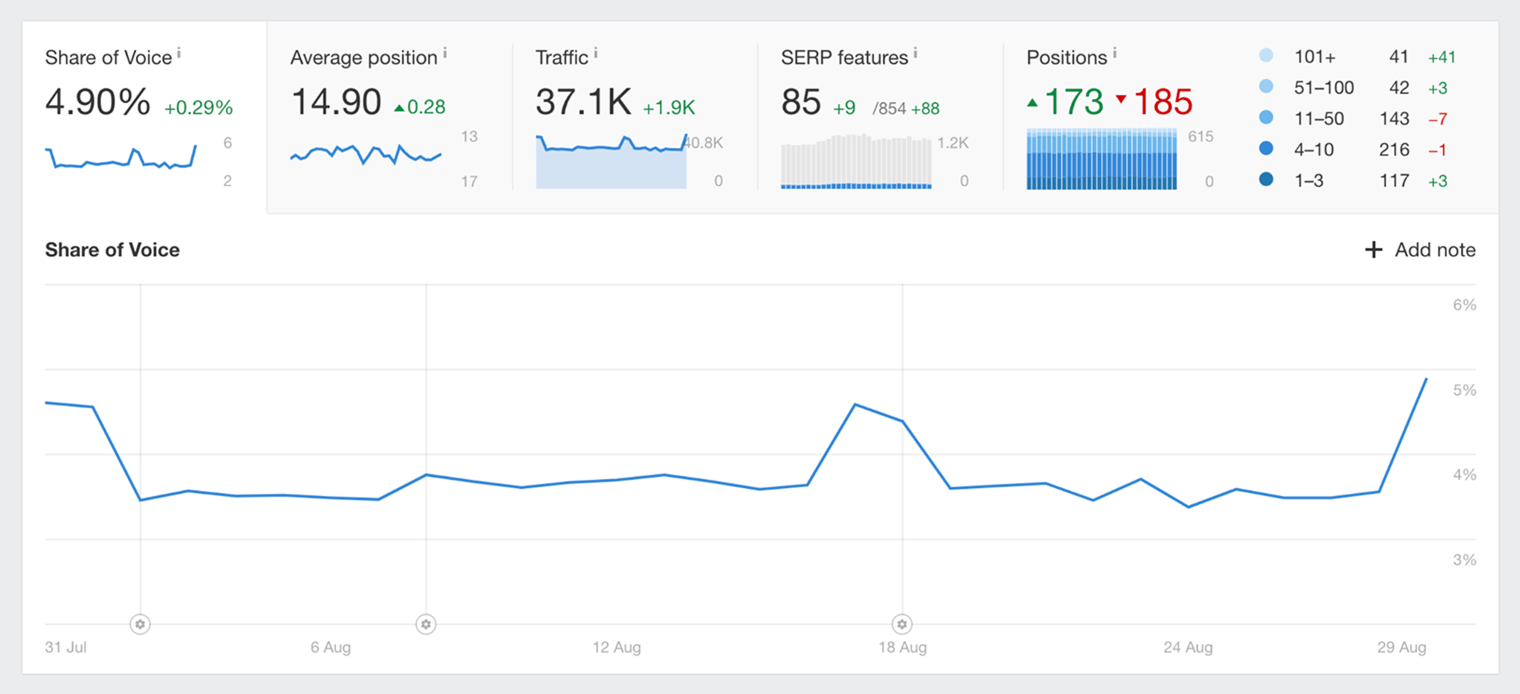
Screenshot taken from Ahrefs Rank Tracker
If your site ranked in all top 10 positions in Google for a keyword, you’d get 100% Share of Voice.
Whereas, if competitors filled half those spots, your Share of Voice would be 50%.
If your Share of Voice is rising, it’s a good sign your SEO is working.
Key takeaways
- SEO is the process of growing a website’s organic visibility across search and AI results.
- SEO is important because people won’t be able to find your website in search or AI assistants without it.
- Ranking high gets you free, passive, and consistent visibility in both search and AI month after month.
- Doing SEO is much easier when your website is properly set up for SEO success.
- Google will usually find and index your website on its own, but you can sometimes speed the process up by submitting your sitemap.
References
- "Domain extensions and SEO: What you need to know". Search Engine Land. 24th April 2025. Retrieved 11th July 2025.
- "Using page speed in mobile search ranking". Google. 17th January 2018. Retrieved 11th July 2025.
- "Creating helpful, reliable, people-first content". Google. 4th February 2025. Retrieved 11th July 2025.
- "Mobile-first indexing: Everything you need to know". Search Engine Land. January 9th 2025. Retrieved 11th July 2025.
- "The SEO impact of interstitials, before and after". Search Engine Land. October 4th 2024. Retrieved 11th July 2025.
- "Page speed optimization: Everything you need to know". Search Engine Land. November 15th 2024. Retrieved 11th July 2025.
- "The ABCs of Google ranking signals: What top search engineers revealed". Search Engine Land. May 13th 2025. Retrieved 11th July 2025.
- "Trust, attitudes and use of artificial intelligence: A global study 2025". KPMG. April 2025. Retrieved 11th July 2025.
Former Head of Content at Ahrefs (or, in plain English, I’m the guy responsible for ensuring that every blog post we publish is EPIC).
Master SEO Step by Step
How Search Engines Work
Before you start learning SEO, you need to understand how search engines work.
SEO Basics
Learn how to set your website up for SEO success, and get to grips with the four main facets of SEO.
Keyword Research
The starting point in SEO is to understand what your target customers are searching for.
SEO Content
Learn how to create content that ranks in search engines.
On-Page SEO
This is where you optimize your pages to help search engines understand them.
Link Building
Learn how to create content that ranks in search engines.
Technical SEO
Prevent technical problems that stop Google from accessing and understanding your website.
Local SEO
Learn how to improve your visibility in local search results and get more customers from your area.
What AI Means for SEO
You can’t talk about SEO today without mentioning generative AI.