


How to Do Keyword Research for SEO (Start to Finish)

By Tim Soulo
Chief Marketing Officer at Ahrefs


90% of pages get no organic traffic from Google. All of that hard work, all of that effort... for zero visitors.
But there’s a way to avoid this problem, to almost guarantee that relevant people will find your content.
Keyword research.
Keyword research is the process of discovering valuable search queries that your target customers type into search engines like Google to look for products, services, and information.
Keywords are the foundation of SEO. If you publish a page on a topic that no one is searching for, that article won’t receive any traffic from Google (or other search engines) — no matter how hard you try.
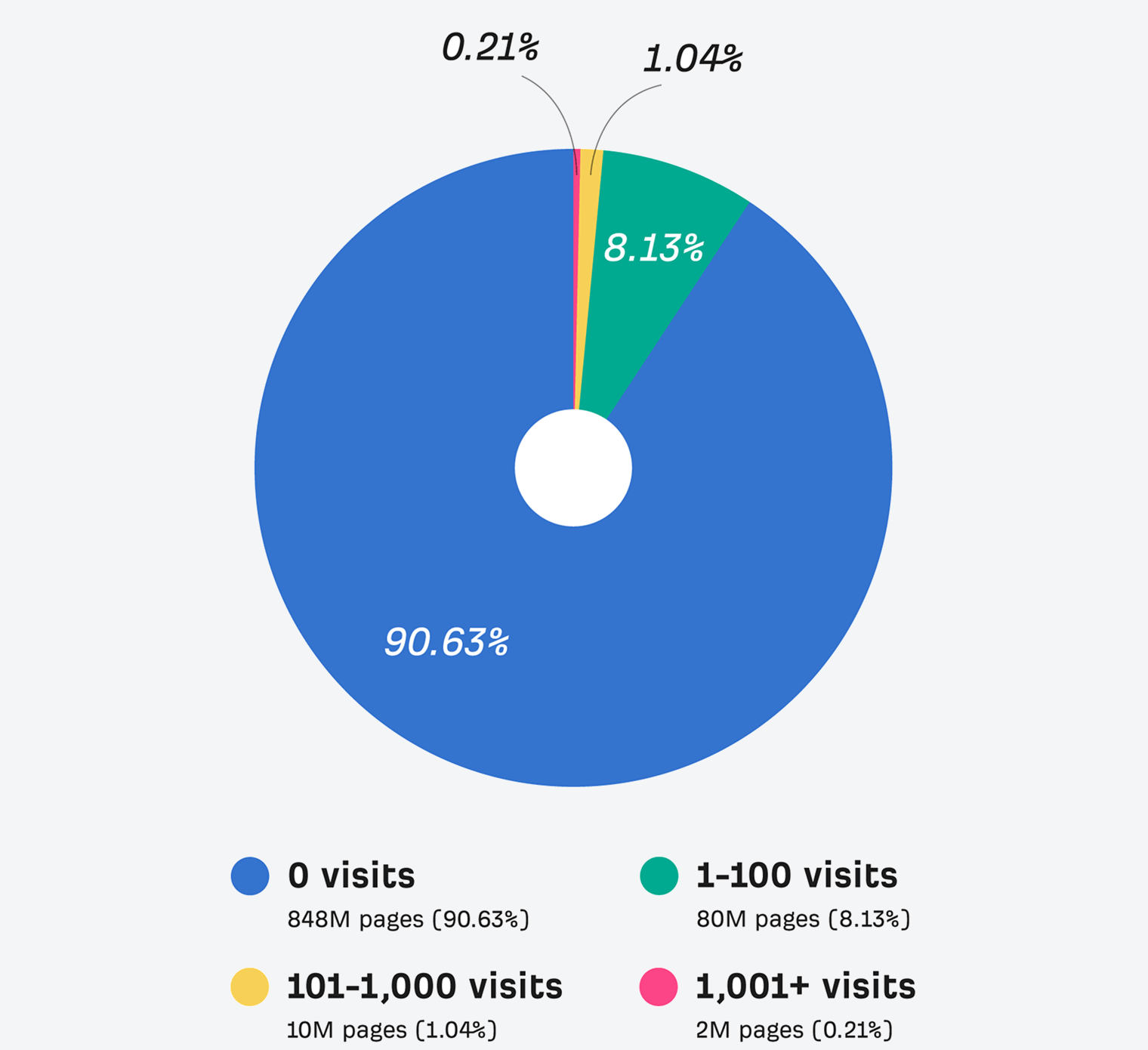
Many website owners make that mistake, and it’s part of the reason why 90.63% of pages on the internet get no traffic from Google, according to our study.
90% of Pages Get No Organic Search Traffic From Google
Based on a study of over 1 billion pages in Ahrefs’ Content Explorer index.
Keyword research helps you ensure that there is a search demand for whatever you want to write about. Thus, if your page ends up ranking well in Google for its target keyword, you’ll be enjoying a consistent stream of highly targeted visitors to it.
Keyword research is not rocket science. In fact, you’re about to learn most of it in about 20 minutes.
But there are quite a few important caveats and misconceptions that you need to be aware of in order to make better SEO decisions.
So let’s dive right in.
Getting started with keyword research
Keyword research starts from putting yourself in the shoes of your customers. What words and phrases might they use to find solutions to their problems?
Plug these into a keyword research tool like Ahrefs’ Keywords Explorer, and you’ll find thousands more relevant keyword ideas on top of what you just brainstormed.
It’s a simple process, but you need two things to do it well:
That’s what this chapter is all about.
Try out free keyword tools
There are tons of free tools to help you brainstorm keyword ideas.
To get started, every keyword research tool asks for a ”seed keyword”, which it then uses to generate a huge list of keyword ideas.
If you already have a product or business, coming up with seed keywords is easy. Just think about what people type into Google to find what you offer.
For example, if you sell coffee and coffee-making equipment, then your seed keywords might be:
- coffee
- cappuccino
- french press
- nespresso
- Etc
When you have a few ideas (don’t obsess over them), put them into Ahrefs Free Keyword Generator Tool.
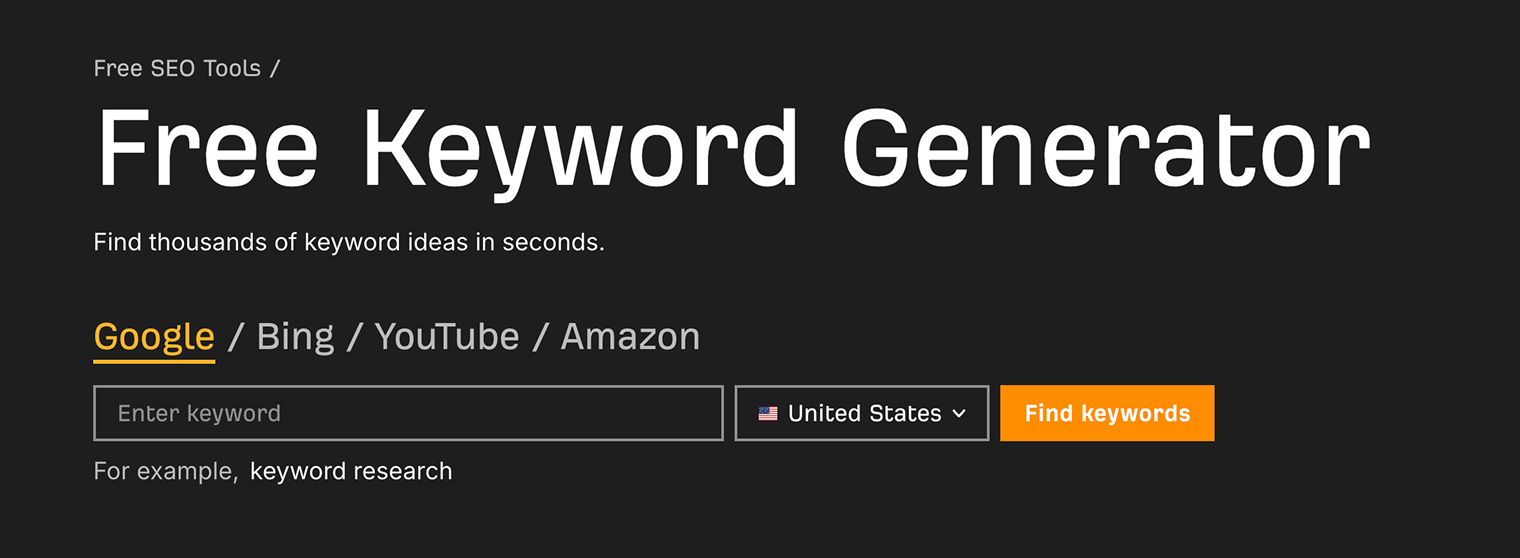
For every seed keyword you enter, you’ll get back 20 related keywords and 20 related questions (so that’s 40 keyword ideas already).
It also shows you how hard they’ll be to rank for (easy, medium, or hard), and a rough sense of how many searches they receive each month.
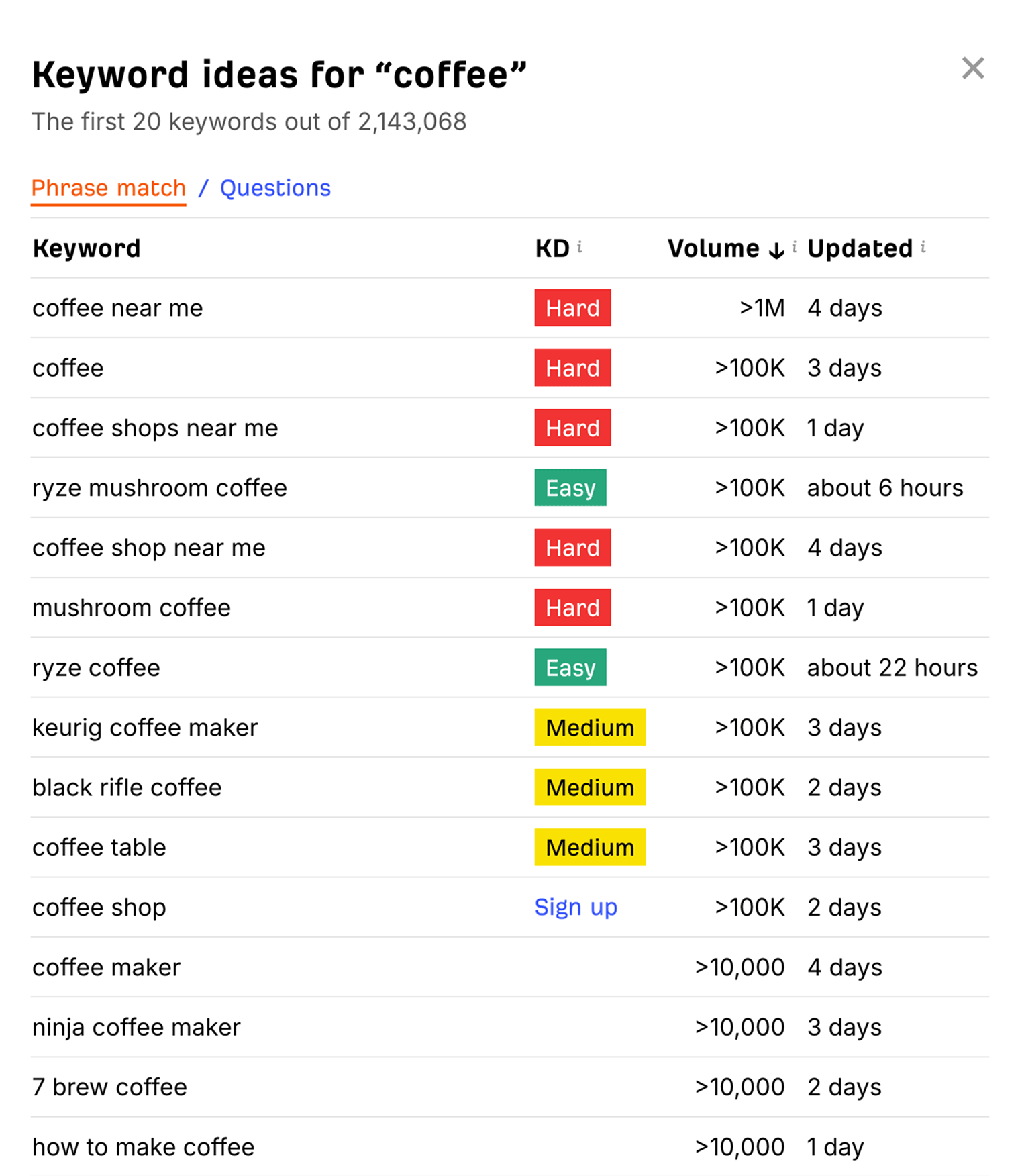
You can do this as many times as needed, for all of your seed keywords.
ChatGPT can also be useful. Paste your seed keywords into ChatGPT alongside a prompt like Suggest 10 short keyword ideas for each of the following topics:
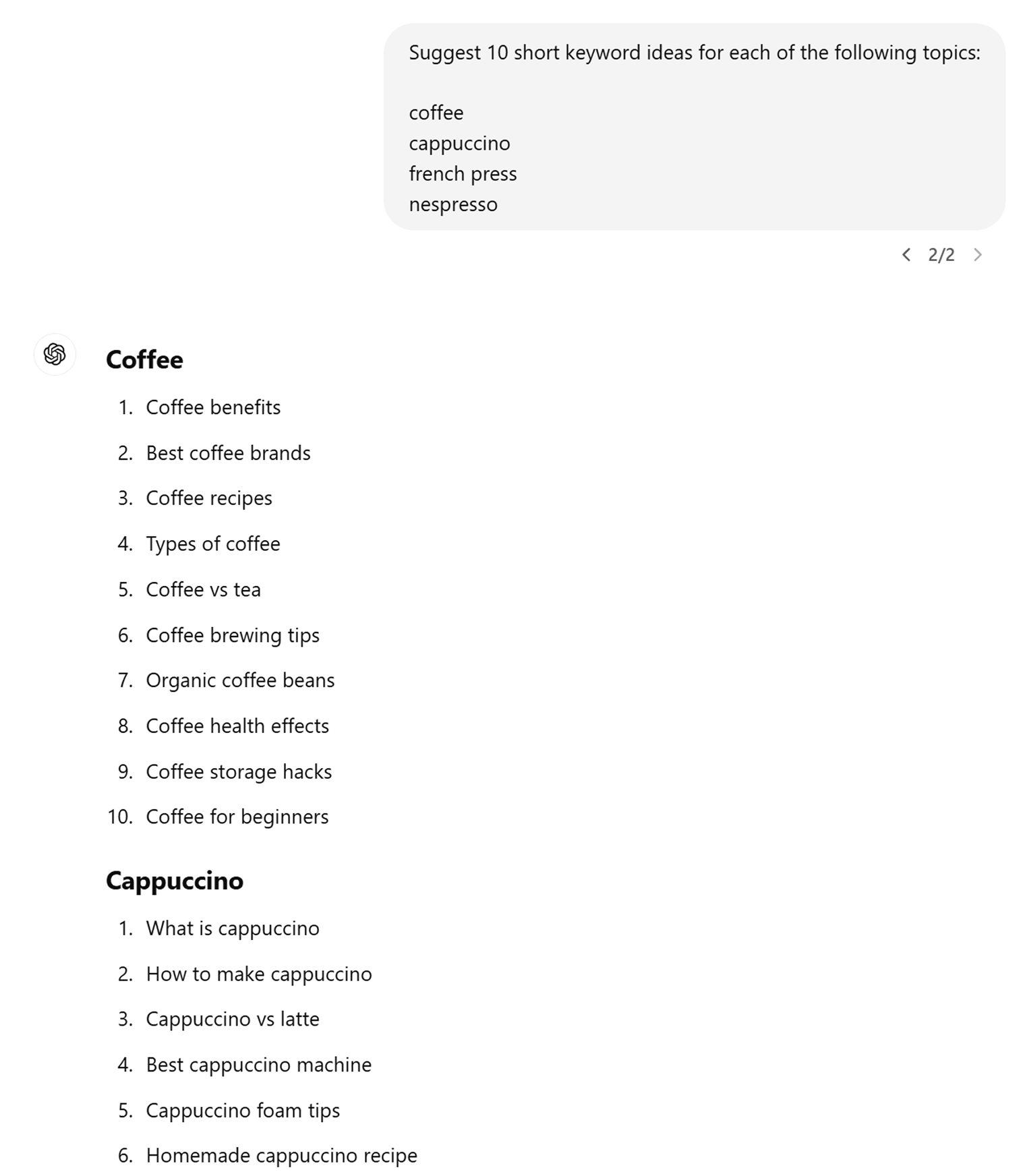
The downside of ChatGPT is that you won’t get realistic SEO metrics for your keywords, like keyword difficulty or monthly searches. But it’s useful for brainstorming tons of ideas to use with an SEO tool.
There are other free keyword research tools that can be useful (although they have some downsides):
- Google Keyword Planner – It’s a tool for those who want to run ads in Google. It can help with keyword ideas, but it only shows SEO metrics if you’re running paid ad campaigns.
- Google Trends – A cool tool for finding new and exciting topics, but it’s not very detailed: you can only see big, broad topics, and not specific keyword ideas.
- Answer the Public – uses Google’s autocomplete data to show you related keywords that people search for, but you only get 3 searches each day.
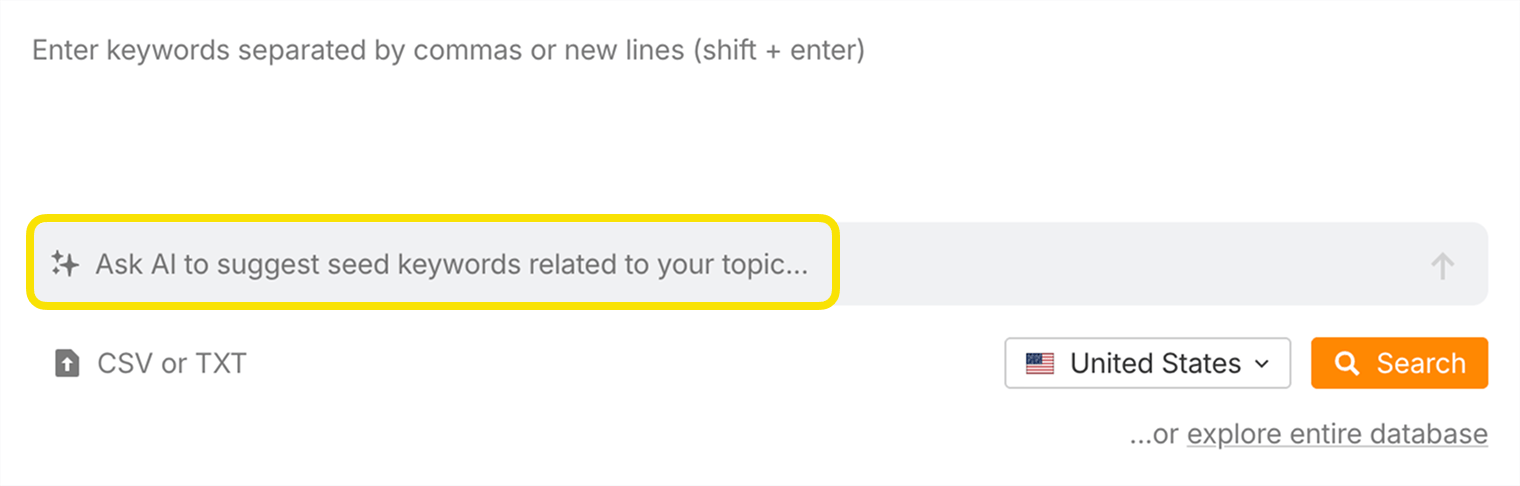
And once you get truly serious about growing the search traffic of your website, make sure to sign up for Ahrefs and give Keywords Explorer a spin. Take one of your seed keywords and ask AI to suggest some ideas:
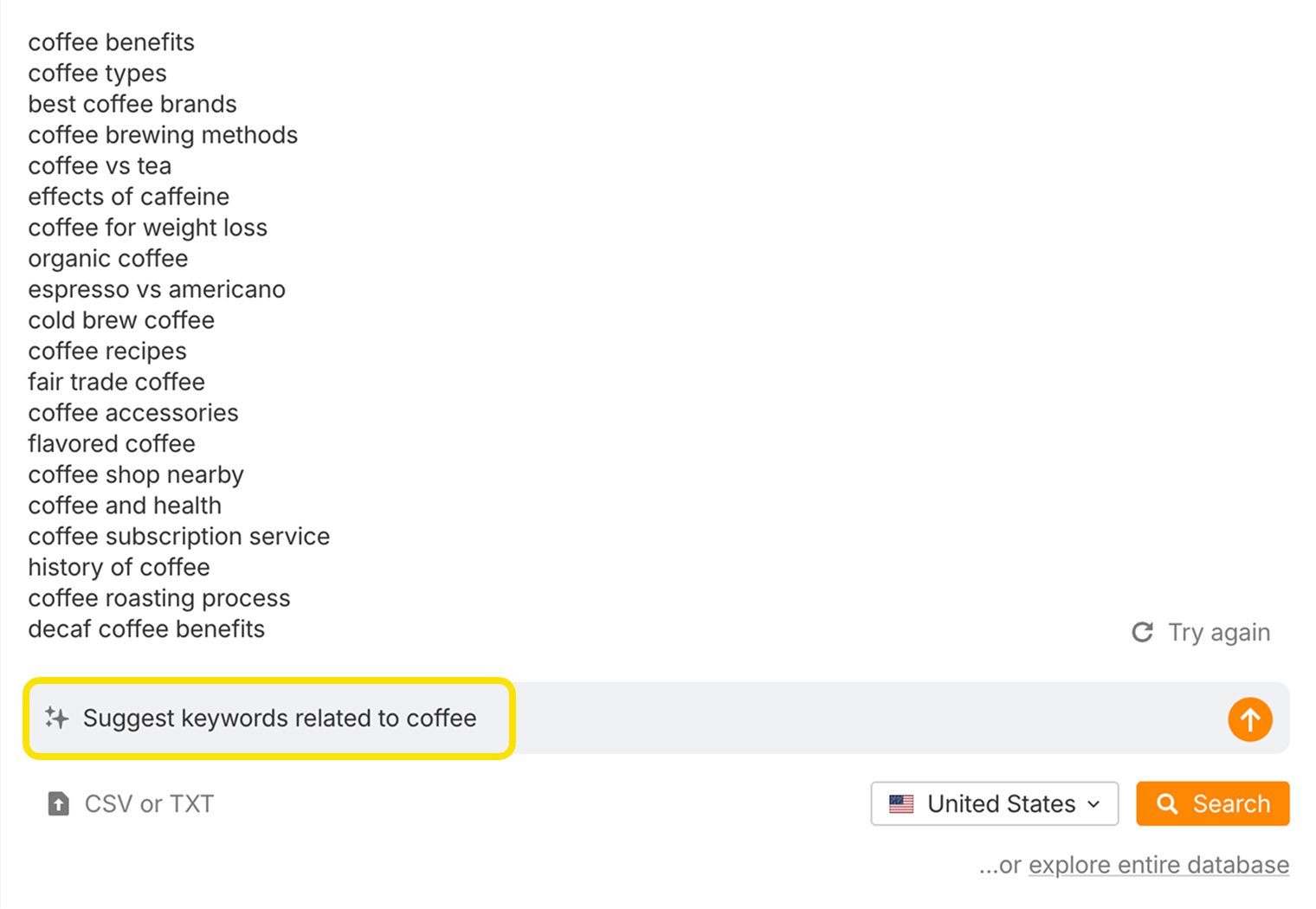
A moment later and you have 20 extra seed keywords to start your search:
Hit the search button and head to the Matching terms report to see how many keyword ideas it gives us:
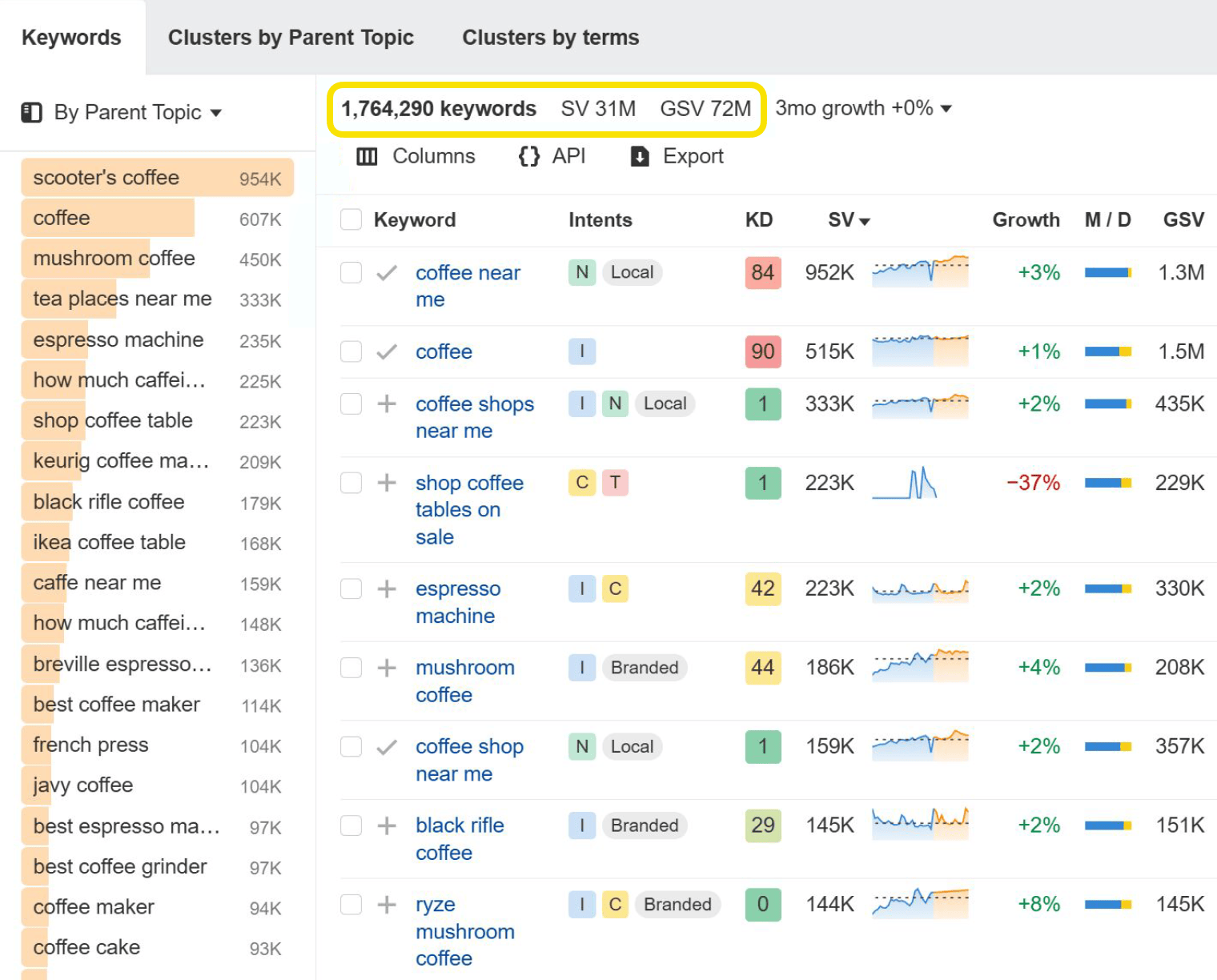
1.7 million keywords! No free tool will let you work with such a vast number of keyword ideas.
That may seem like an overwhelming number of keywords to work with. And it is. But don’t worry. You’ll learn how to narrow them down later in this guide.
See what keywords your website already ranks for
If you already have a website, you can find keywords that you already rank for. This is great for brainstorming new, similar keyword ideas, or for improving your pages to get better rankings for those keywords.
Once you’ve set it up, Google Search Console will show some of the search queries that your website is currently ranking for and getting clicks from.
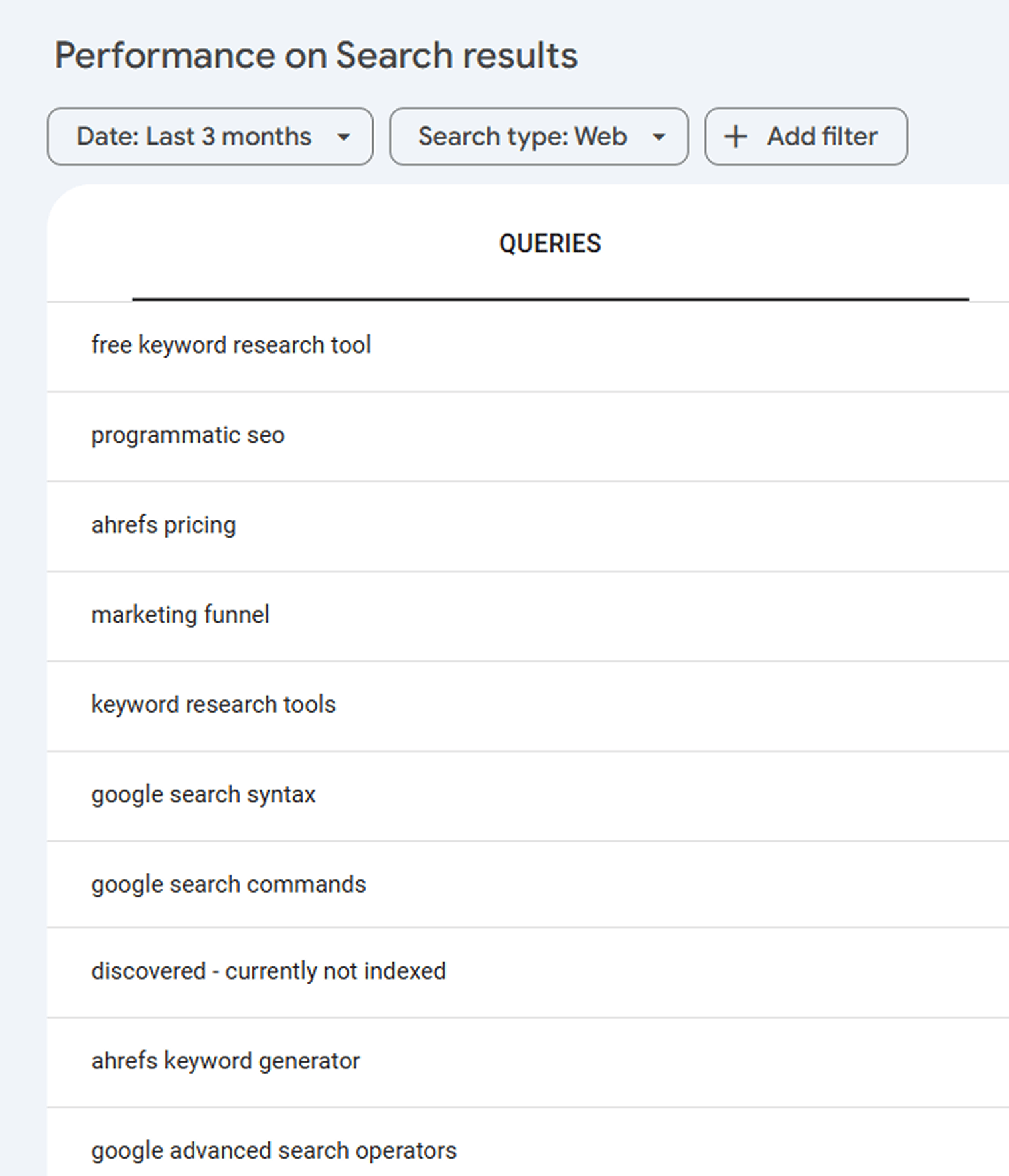
The downside of Search Console is that it won’t show you any SEO metrics. So if you see a cool keyword sending you a few clicks every month, you won’t know whether it’s worth trying to improve your ranking.
Does that keyword get 10 searches a month, or 10,000? Is it easy for you to rank for, or so hard that it’s not worth the effort? Search Console won’t tell you.
But Ahrefs Free will. This is our free plan, very similar to Google Search Console. But while Search Console only shows the top 1,000 keywords your website ranks for, Ahrefs Free will show you all of them. We’ll also show you their Keyword Difficulty score, and their monthly search volume.
See what keywords your competitors rank for
Now that you see the keywords your website ranks for...wouldn’t it be cool to see the keywords your competitors rank for?
You can do exactly that with Ahrefs. Search Google for one of your seed keywords and see who ranks on the front page.
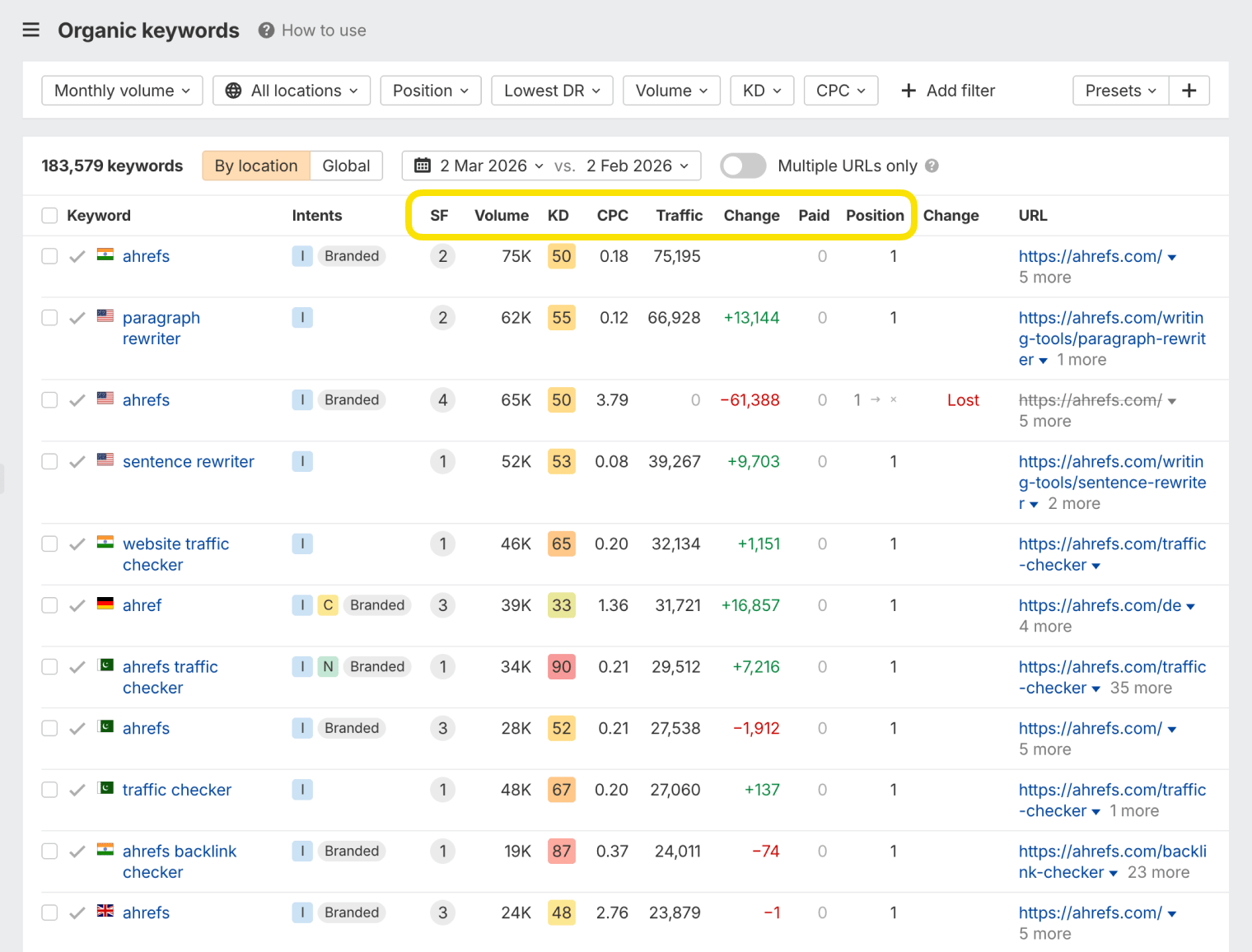
Once you find a competitor website that seems similar to yours (if you sell coffee-making equipment, they do too—they aren’t a café or Starbucks), plug it into a competitive intelligence tool like Ahrefs Site Explorer to check which pages bring it the most traffic and what keywords these pages are targeting.
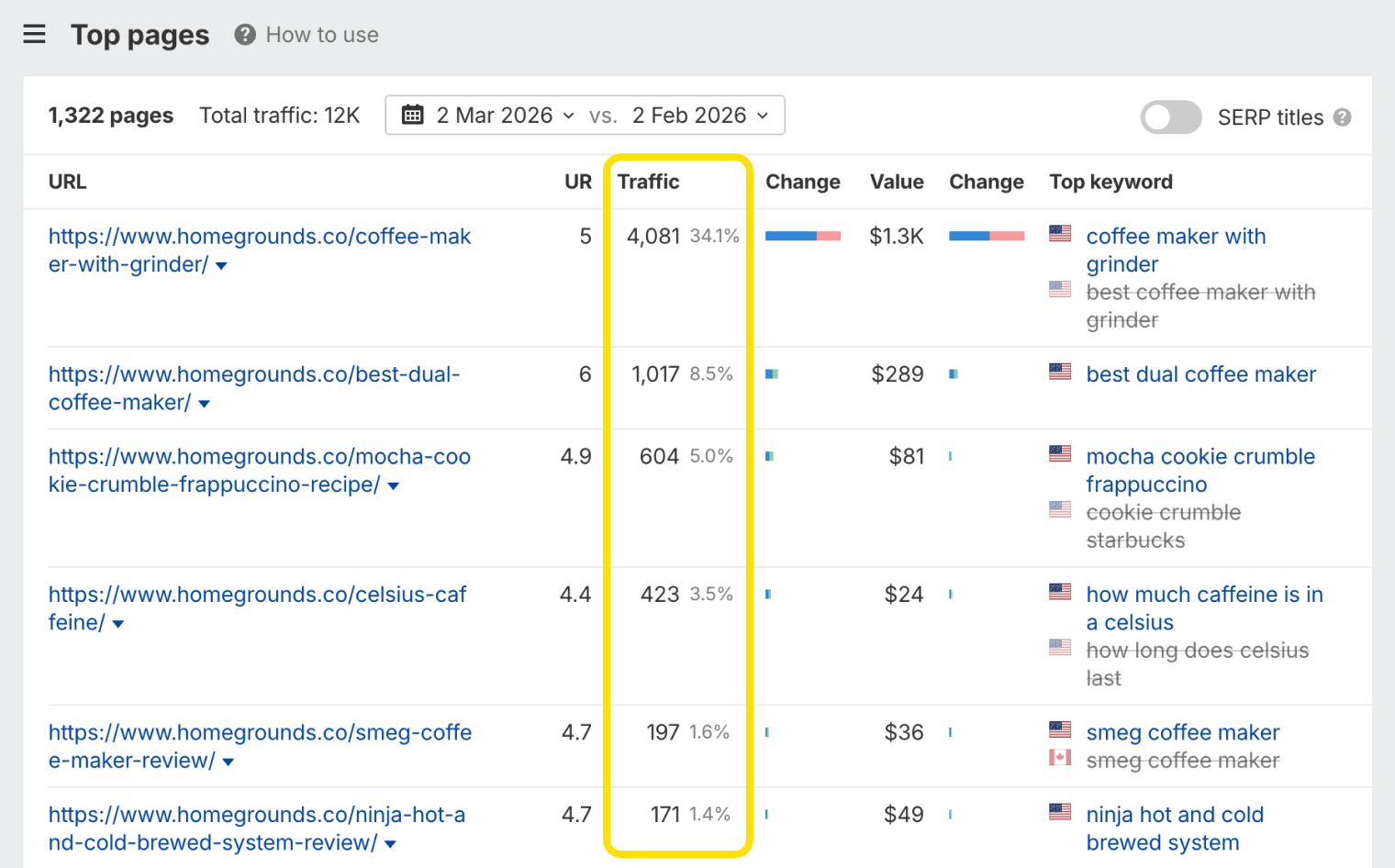
After repeating the process with a few of your competitors, you’ll find yourself with a pretty sizable list of relevant keywords. And you’ve barely even started your keyword research!
Whether these keyword ideas are purely informational (i.e., blog articles) or have commercial intent (i.e., product pages) is something we’re going to determine in later stages of our keyword research process. For now, your goal is to collect as many relevant keyword ideas as you can.
Make sure to repeat this process for as many competitors as you can. We have a handy report in Site Explorer, which will help you discover more of them. It’s called “Competing Domains” and shows you similar websites to the one you’ve entered based on the common keywords that they rank for in Google.
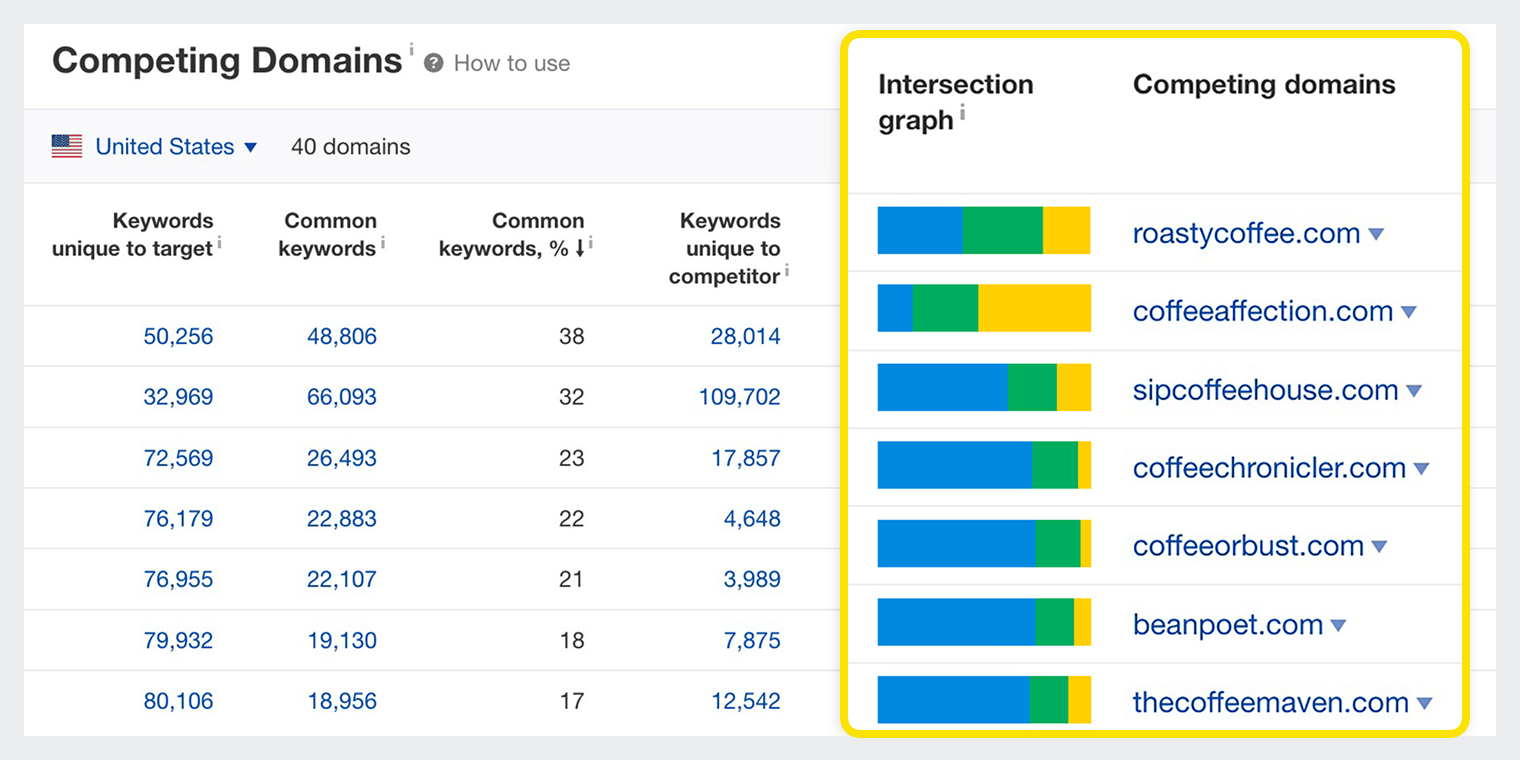
Seeing a lot of topics you’ve already covered?
If you’re doing keyword research for an established website, you may find that you’ve already covered most of your competitors’ keywords. In this case, you should try using the Content Gap report in Ahrefs’ Site Explorer.
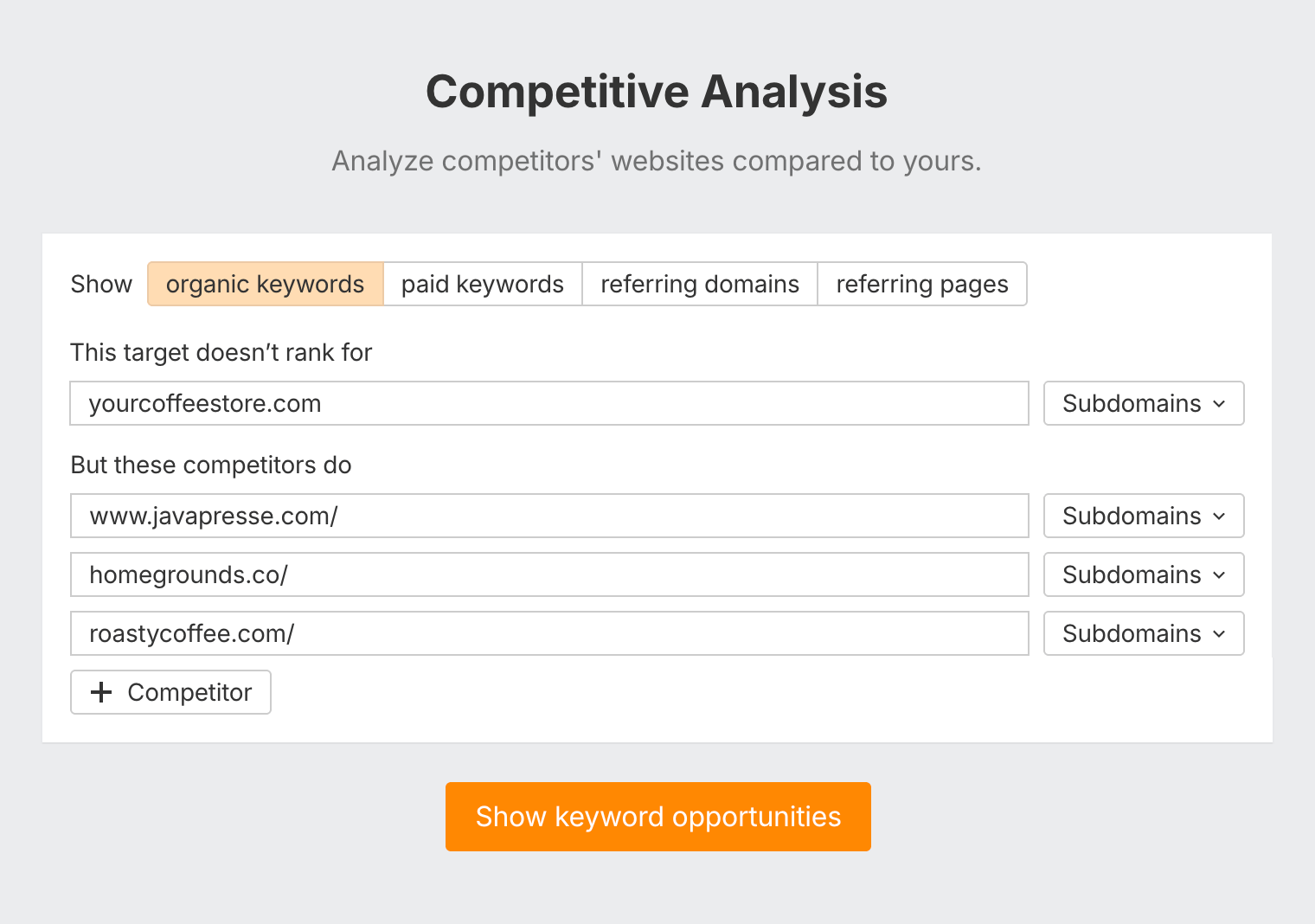
It finds keywords that one or more of your competitors rank for, but you don’t.
To use it, plug a few of your competitors’ websites into the top section, then paste your own site into the bottom field and click ”Show keywords.”
You can learn more about content gap analysis in this video.
Study your niche
Everything we’ve discussed so far is enough to generate an almost unlimited number of keyword ideas. But at the same time, the process kind of keeps you “in the box.” What about finding new topics that no one else has covered?
You can solve this by going to the places where your target audience hangs out—industry forums, groups, and Q&A sites—and studying their conversations. For example, here’s a thread I found on the /r/coffee subreddit:

A quick check in Keywords Explorer, and I found this search query: “aeropress coffee to water ratio.”
It only gets 150 searches per month, but the fact that this topic got 42 upvotes on Reddit means that people really appreciate this knowledge. Plus, the content of that Reddit thread can serve as a foundation for my future piece of content.
Other than browsing industry forums, your existing customers can also be a great source of keyword ideas.
So the next time you talk to them, remember to pay attention to the language they use and the common questions they ask. That might lead you to some original keyword ideas to cover on your website.
Types of keywords
We’ve already talked about seed keywords. As you get further into keyword research, it’s important to understand other ”types” of keywords you’ll encounter.
If you put seed keywords into a tool like Keywords Explorer, you’ll have the option of finding related keywords. There are two types: Matching terms and Related terms:
Matching terms
These are keyword ideas that match the terms (the words) in your seed keywords. The Matching terms report in Keywords Explorer has two modes: ”Terms match” and ”Phrase match.”
”Terms match” shows keyword ideas that contain all words of your seed keyword in them, regardless of where exactly they are and what order they’re in. So if our seed keyword is ”coffee machine,” we’ll get the following keyword ideas:
- coffee vending machine
- machine gun kelly coffee shop
“Phrase match” only returns keyword ideas that have the words of your seed keyword in the exact order as you entered them. Like so:
- best coffee machine
- coffee machine with grinder
Related terms
Related terms are keyword ideas that are related to your seed keywords but don’t necessarily contain your seed keywords. It also has two modes: ”Also rank for” and ”Also talk about.”
- “Also rank for” shows you search queries that the top-ranking pages for your seed keyword also rank for.
- “Also talk about” shows you words and phrases that are frequently mentioned on the top-ranking pages for your seed keywords.
Keyword clusters
By now you might have thousands of keyword ideas. You probably don’t want to create a thousand pages to target all of those keywords, so you can use a process called keyword clustering to simplify your list.
Let’s say that you’ve got the following keywords on your list:
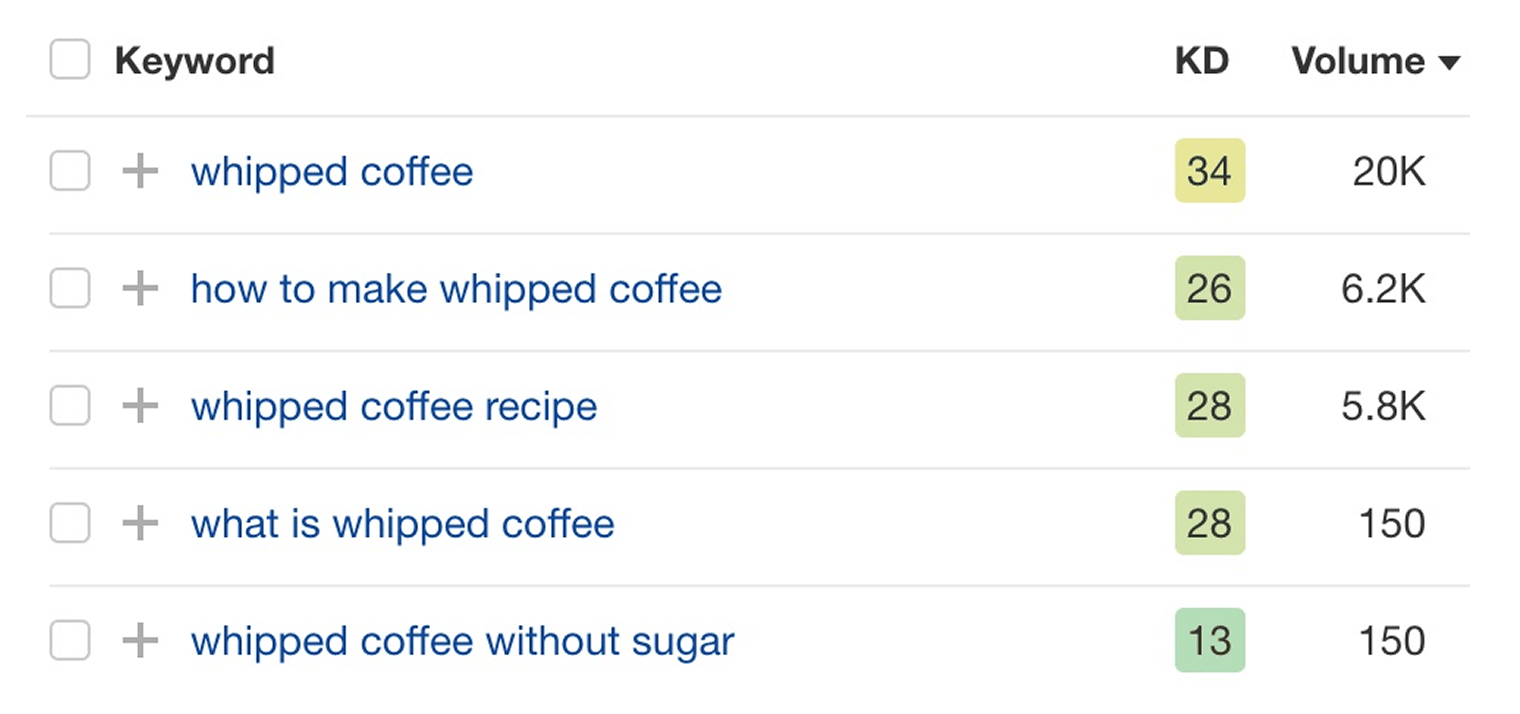
Let’s compare the search results for the keyword ”whipped coffee” with those of the keyword ”whipped coffee recipe”:
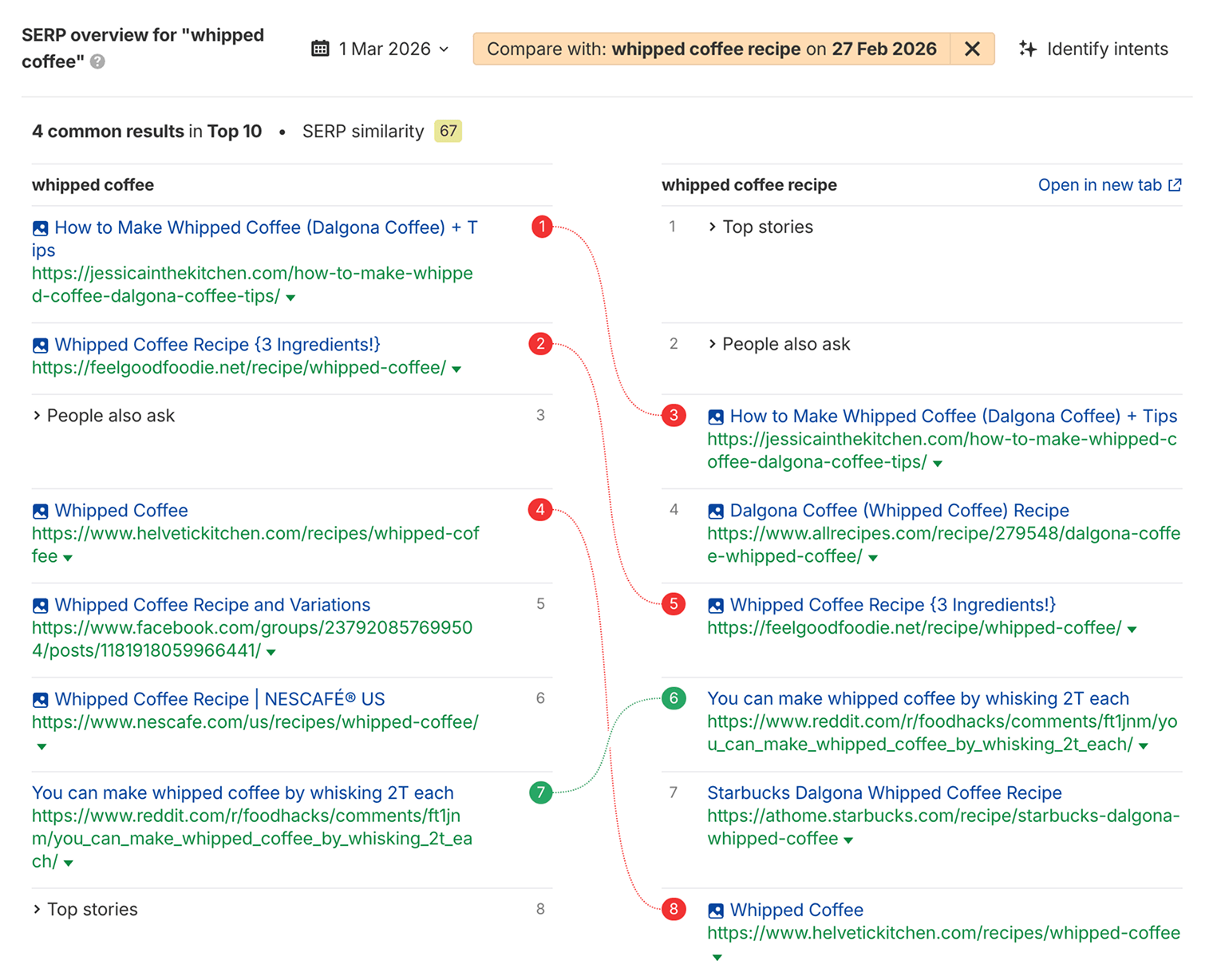
The top-ranking pages for both keywords are nearly identical. This means that Google sees the search query “whipped coffee recipe” as a subtopic of a more general query, “whipped coffee.” So you can rank for both keywords with a single page.
This process of grouping together related keywords is called clustering. In Ahrefs, we created a metric called Parent Topic that helps you group these related keywords together almost instantly.
Just add your keyword ideas into Keywords Explorer, go to the Clusters by Parent Topic tab, and you’ll see your keywords grouped together into clusters:
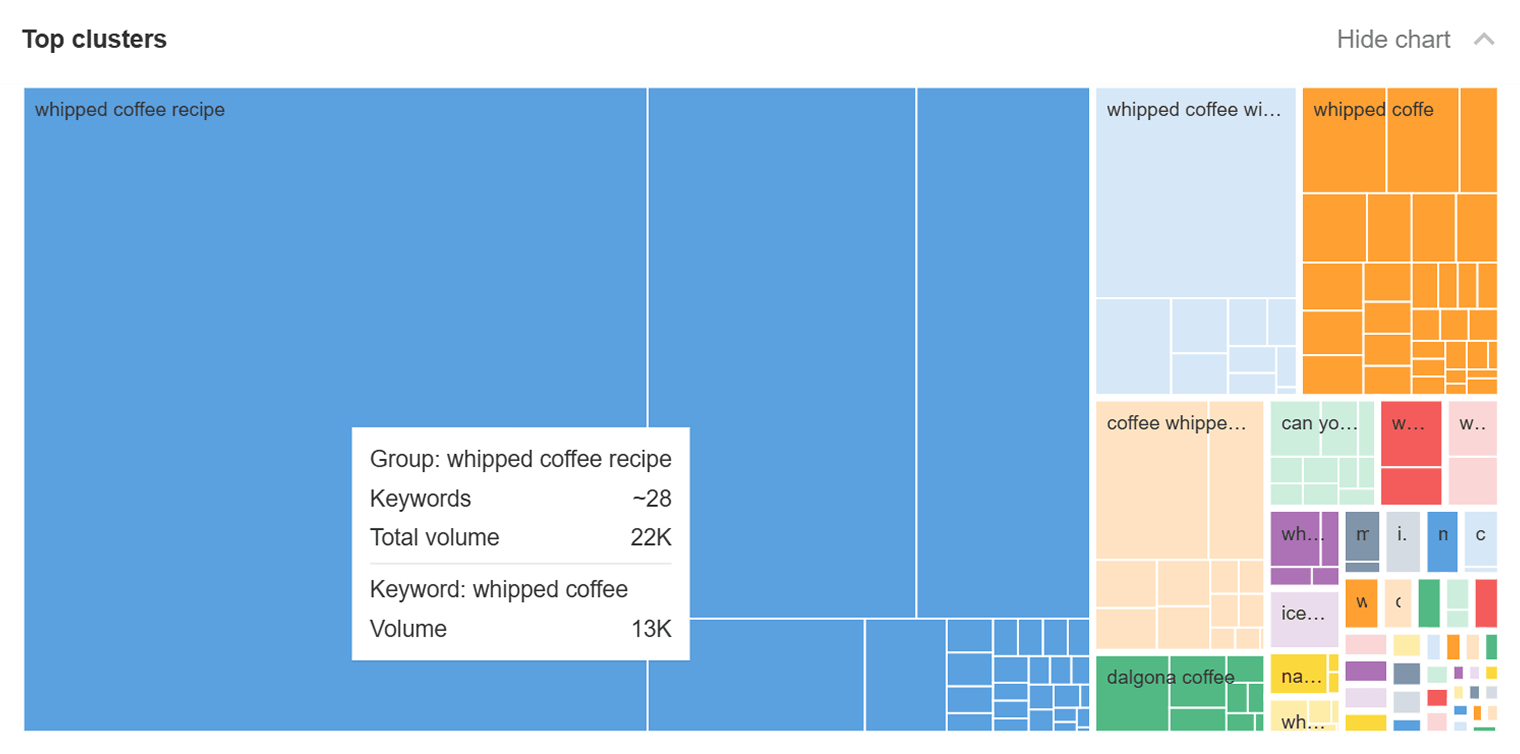
Here we can see 28 different keywords that are all part of the ”whipped coffee recipe” cluster. There’s a good chance we could publish a single high-quality guide to whipped coffee recipes, and rank decently well for all of these keywords.
The big benefit of clustering by Parent Topic is speed—it’s almost instantaneous. But there are other clustering methods too, like term clustering, where you group keywords by common words or phrases rather than search result similarity. You can learn more in our guide to keyword clustering.
Keyword intents
Keywords have different types of intent. Some keywords will be searched by people ready to buy a product or service. These are called commercial or transactional keywords.
- best instant coffee
- cuisinart coffee maker
- coffee table with storage
Others will have informational intent – they’re searched by people just looking to learn.
- how much caffeine in coffee
- coffee cake recipe
- is coffee good for you
Sometimes people just want to find a particular website or location, known as navigational intent.
- coffee near me
- stumptown coffee
- drive thru coffee
Keywords can also be branded or unbranded, like “starbucks coffee” versus “black coffee”.
Understanding these intents can help you work out what type of content you need to create, and prioritize whether a keyword is really worth targeting.
Informational keywords will probably benefit from some educational blog content, while commercial keywords might need a product landing page so the visitor can actually buy.
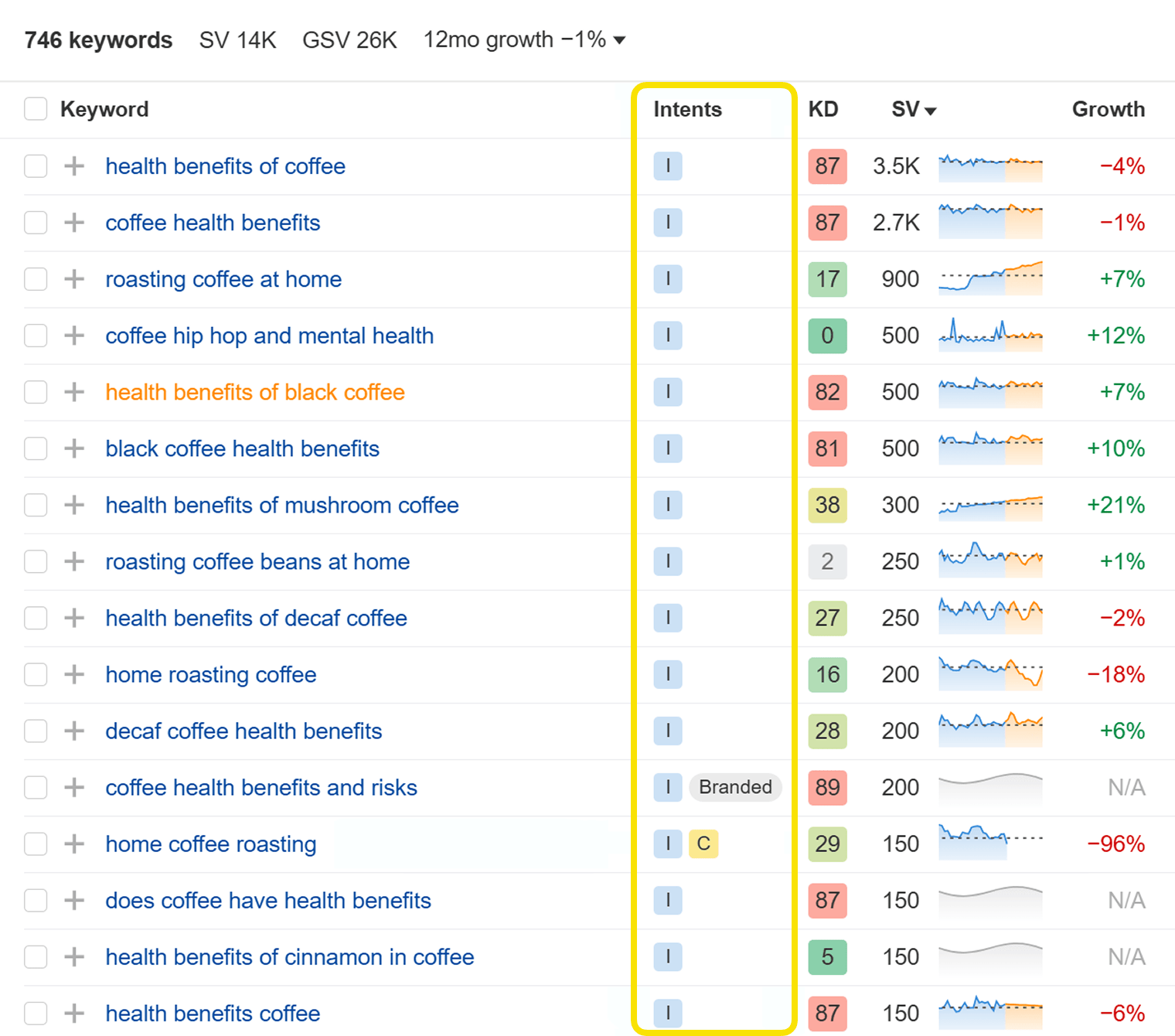
You can check the intent of a keyword by looking at the search results. “Home coffee roasting” has a mixture of roasting machines for sale (commercial intent) and a Reddit discussion about roasting beans at home (informational):
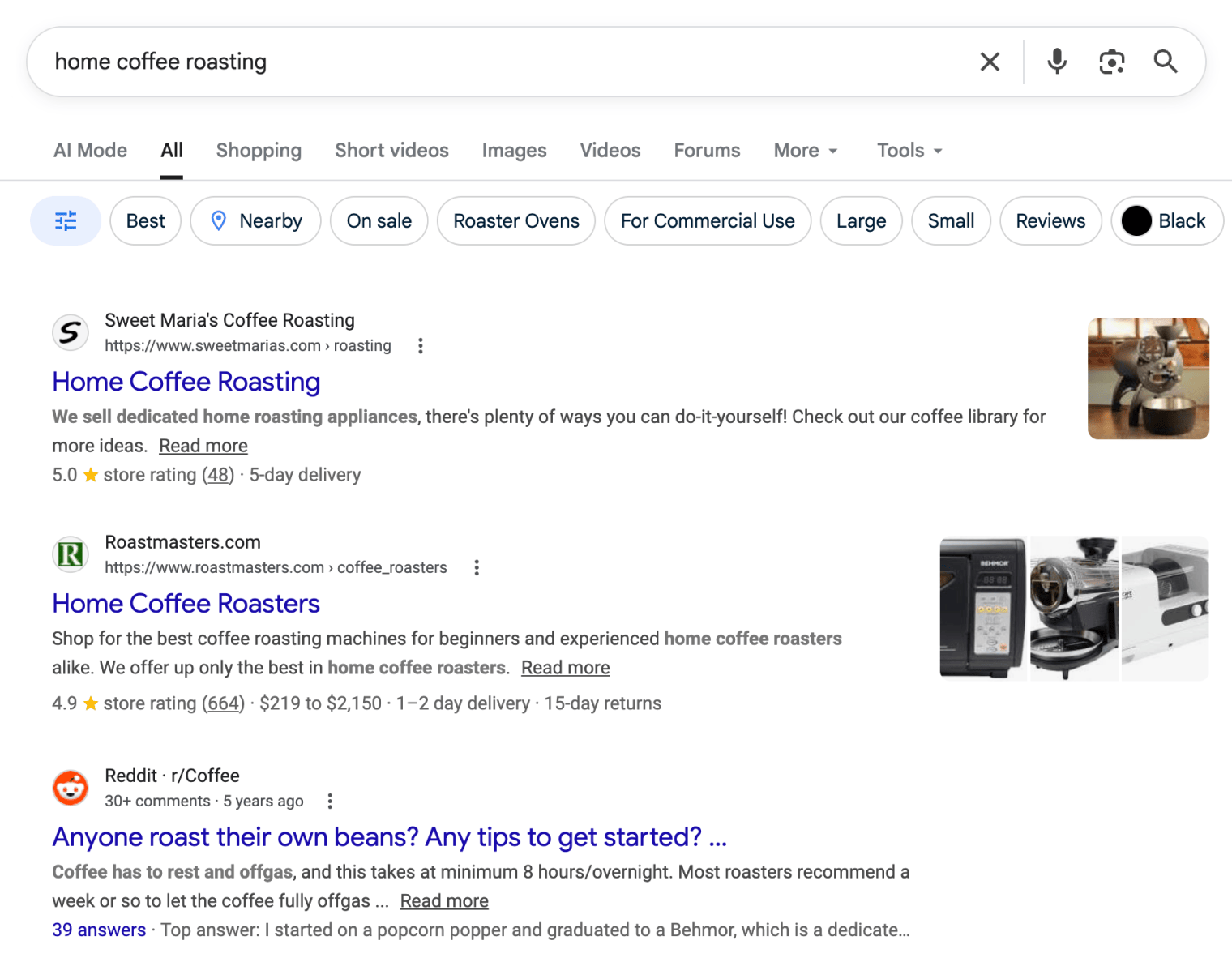
Keywords Explorer allows you to see the intents for hundreds of keywords at once, and filter to find keywords that match the intent you’re interested in:
You can learn more about keyword intents in our guide.
Keyword SEO metrics explained
Having access to millions of keyword ideas is all well and good. But how do you know which ones are best? After all, going through them all by hand will be a near-impossible task.
The solution is simple: use SEO metrics to narrow things down and separate the wheat from the chaff before adding them to your keyword list.
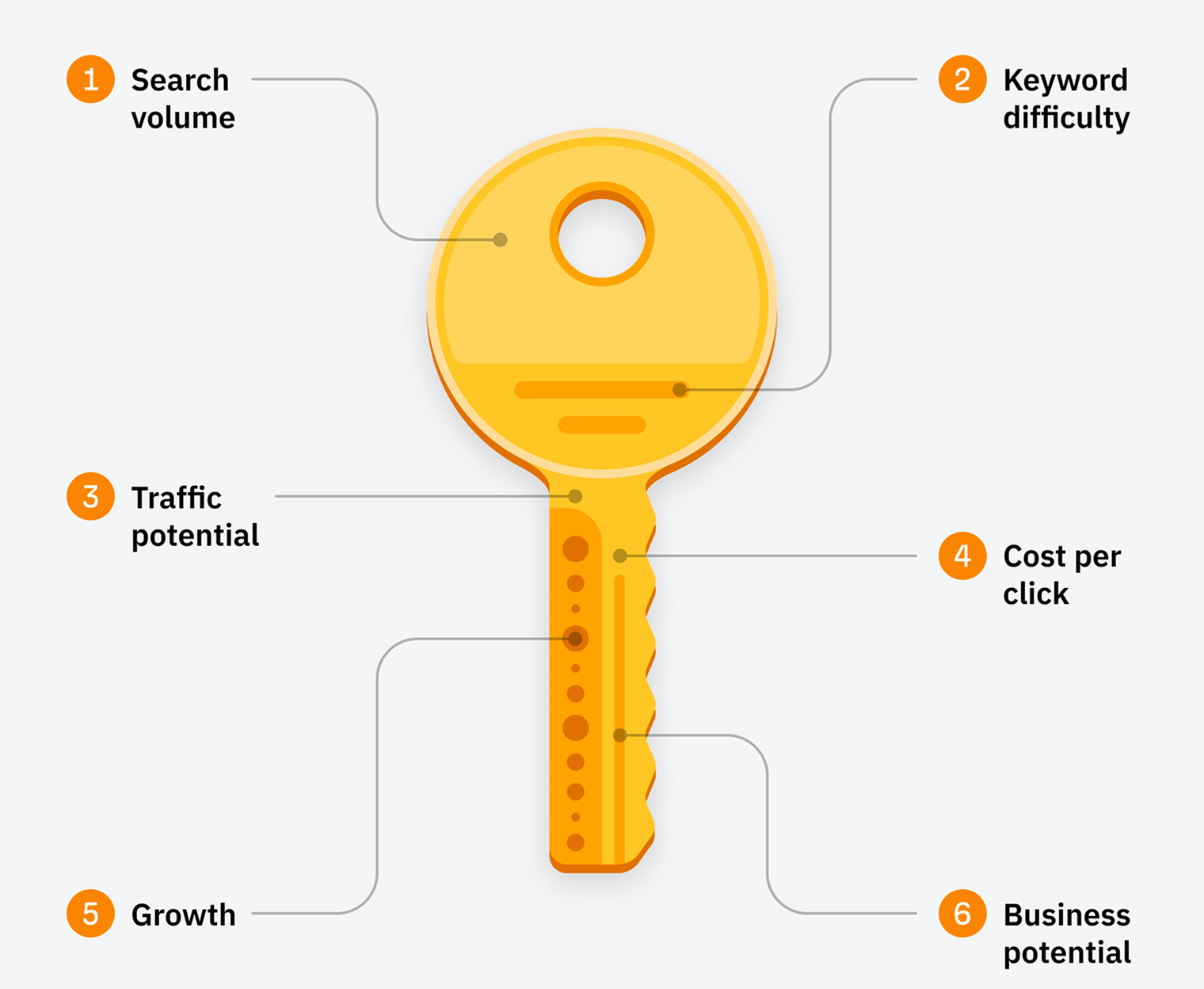
Let’s explore six keyword metrics you can use to do this.
Types of Keyword SEO Metrics
Search volume
Search volume tells you the average number of times a keyword gets searched per month. For example, “donald trump” has a monthly search volume of 3.1 million in the U.S. alone.
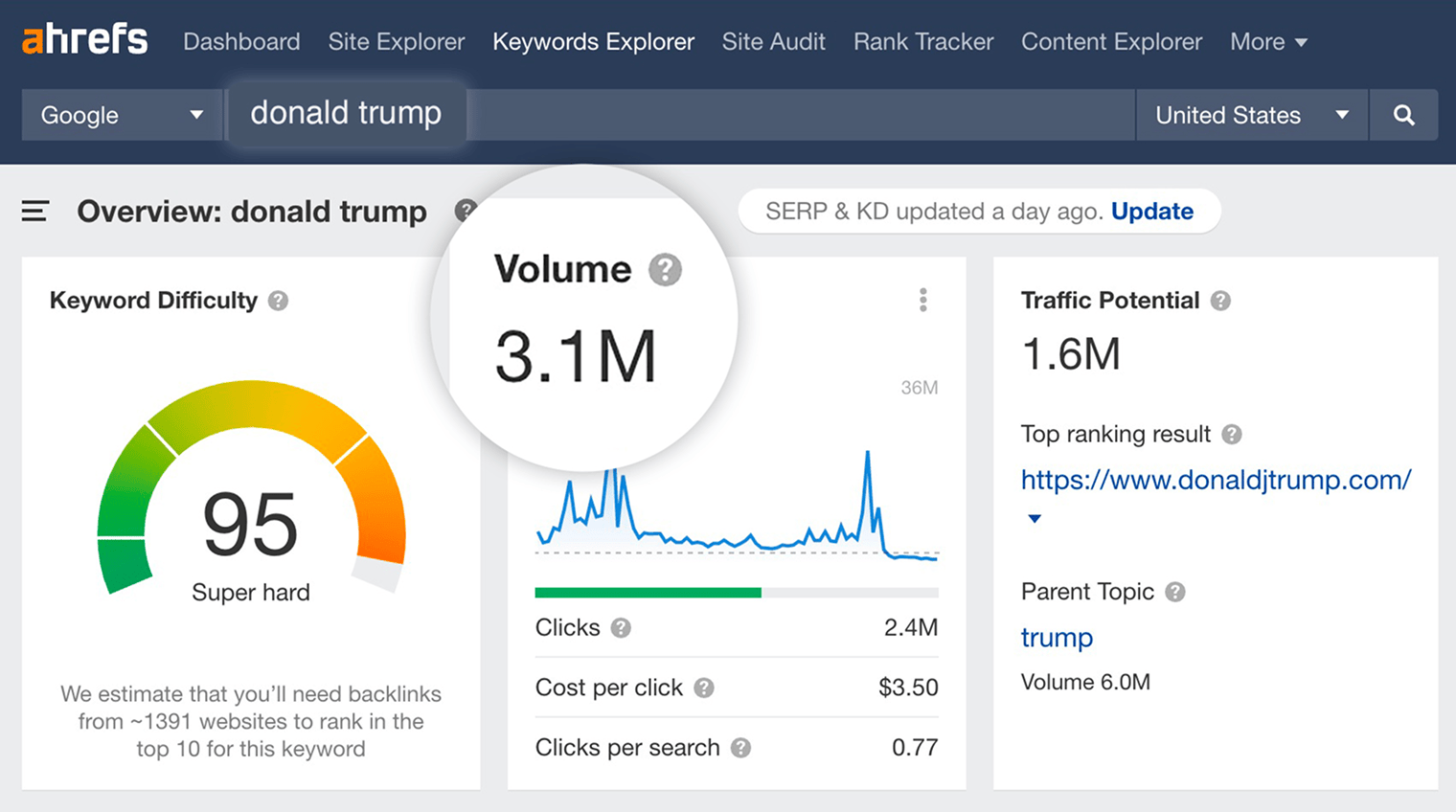
There are a few important things to understand about search volume:
- It’s the number of searches, not the number of people who searched – There are cases where someone might search for a keyword multiple times a month (e.g., “weather in singapore”). All such occurrences contribute to the search volume of that keyword.
- It doesn’t equal how many visits it will send you if you rank for it – Even if you manage to rank #1, your traffic from that one keyword will rarely exceed 30% of its search volume. And that’s if you’re lucky.
- It’s an annual average – If there are 120K searches for a keyword in December and none for the remaining 11 months of the year, its reported monthly search volume will be 10K (120K/12 months).
- It’s country-specific – Keyword tools often display search volume for the selected country. But some of them also have an option to show you the global search volume, which is the sum of search volumes across all countries.
Almost every keyword research tool will have a search volume filter to let you focus on the keyword ideas with a specific range of popularity. It has two main use cases:
- Filtering out super high-volume keywords – If your site is new, then you probably don’t want to waste your time looking at keywords with 10K+ monthly searches because they’re likely to be too competitive for you.
- Filtering specifically for lower-volume keywords – Perhaps you want to find uncompetitive, low-volume keywords where you can easily get a little bit of traffic. These are often referred to as ”long-tail keywords.”
Long-tail keywords are a household name in SEO. And yet they’re often overlooked. It seems no one wants to go after a keyword unless it gets at least a hundred searches per month. Let alone if it comes up as having zero search volume.
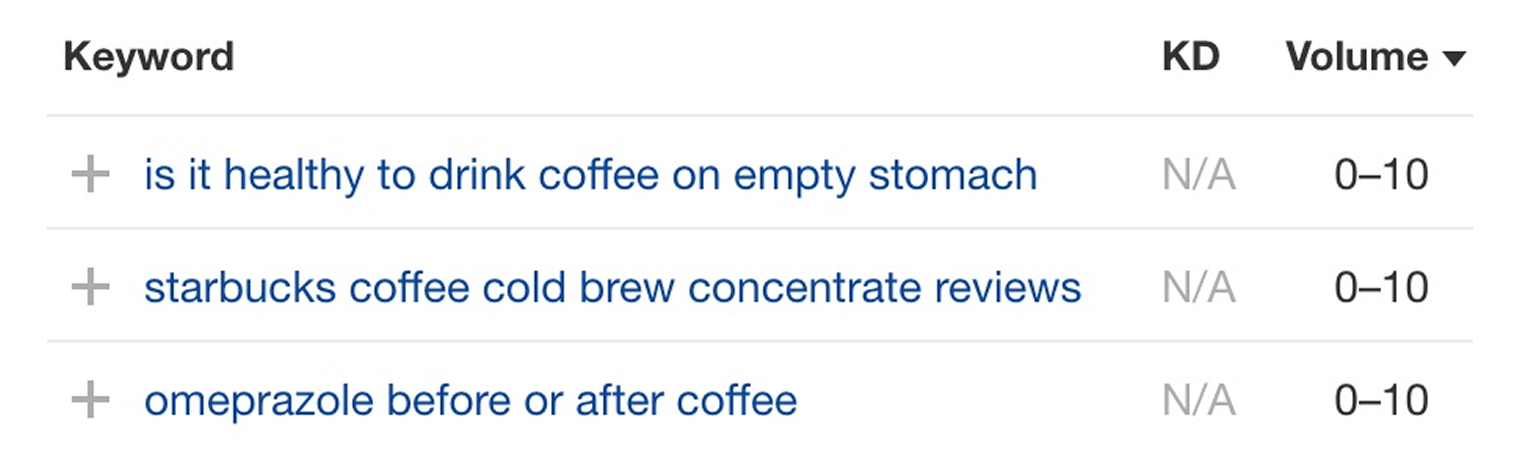
Such “zero volume” keywords will only bring a few visitors per month if you rank for them. But the thing is they add up! If you publish a hundred articles targeting such keywords, your annual total traffic may actually add up to a few thousand highly targeted visitors.
It’s a common rookie mistake to disregard low search volume keywords. They’re just as useful as their more popular counterparts. Often even more useful, since they’re more specific and often have high commercial value.
Another important thing to remember about search volumes is that they may vary slightly from tool to tool. That’s because each tool calculates and updates this metric in different ways.
All in all, search volume is an incredibly important metric in SEO. So I highly recommend that you read this dedicated article that I wrote about it.
Traffic Potential
The U.S. search volumes of the following two keywords are nearly equal:
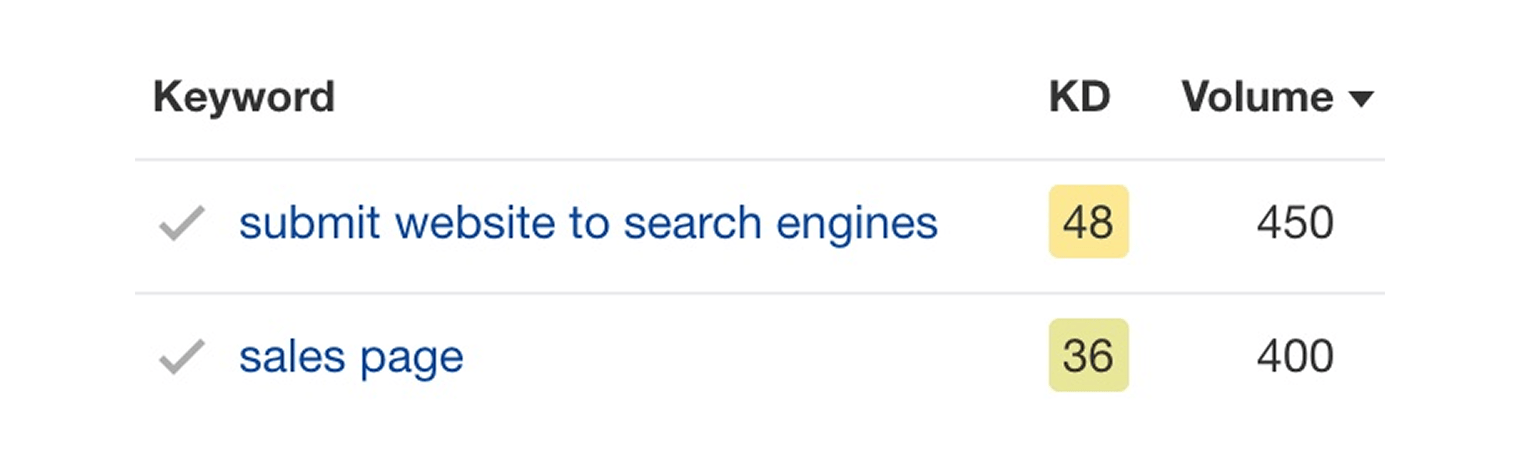
Which means that the amount of search traffic that you may get from targeting each of them should also be nearly equal, right? Well, not quite.
Let’s take the top-ranking pages for each of these keywords and compare how much search traffic they get in the U.S. This can easily be done by copying their URLs into Ahrefs’ Site Explorer.
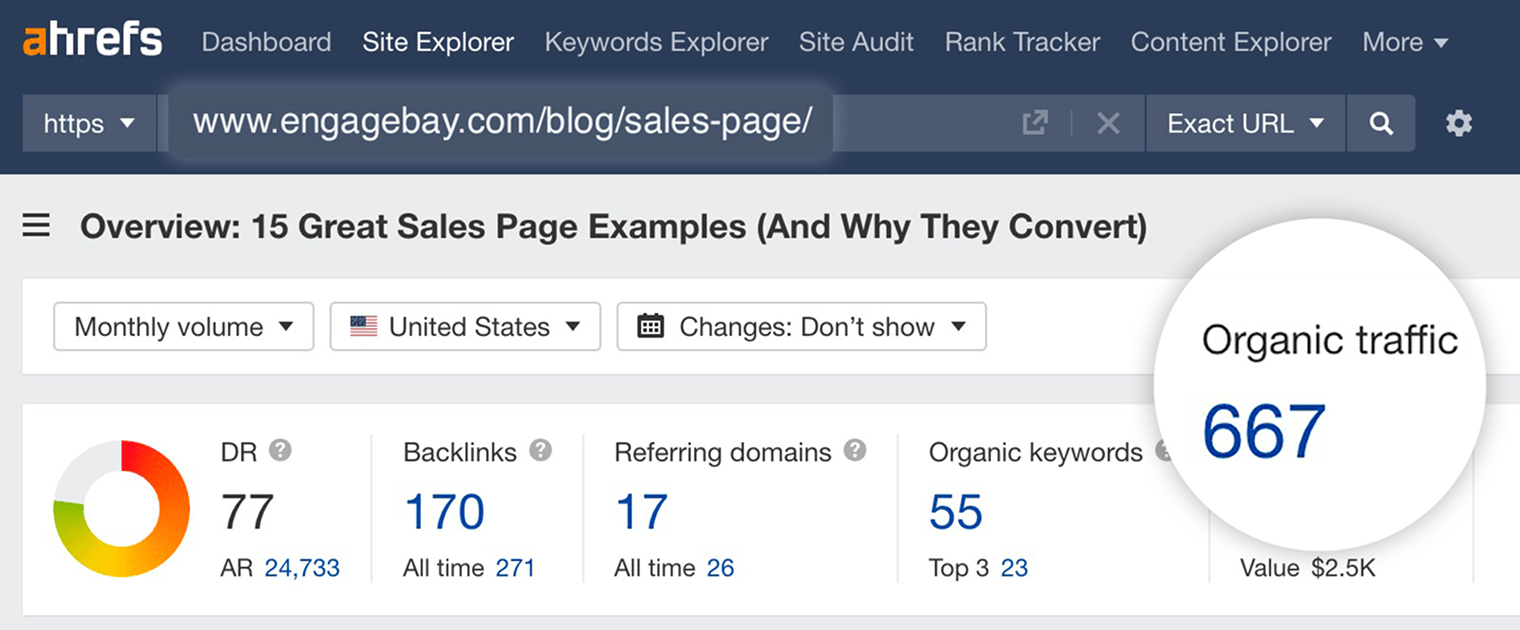
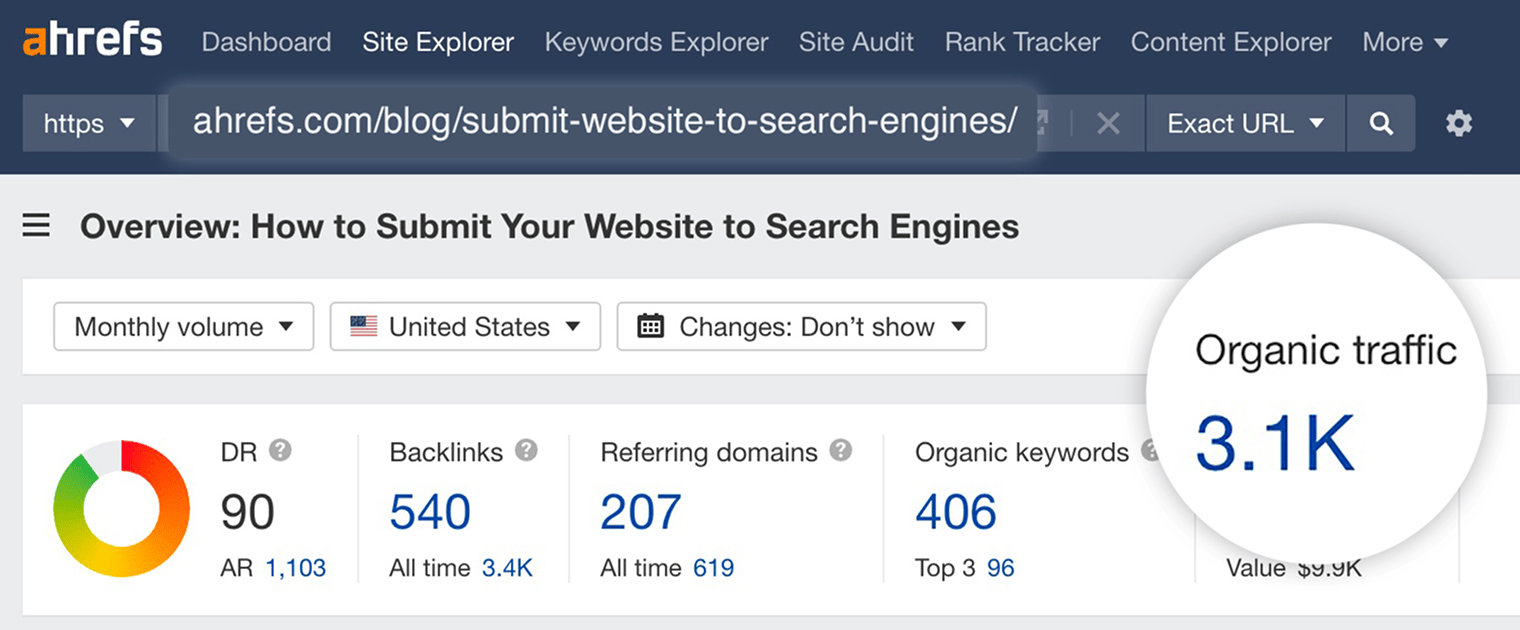
And it turns out that one of these pages is actually getting nearly 5X more search traffic than the other. How can that be?
Well, webpages don’t rank in Google for just a single keyword. If you look at the two screenshots above attentively, you’ll see that the top-ranking page for “sales page” is ranking in Google for 55 keywords. While the top-ranking page for “submit website to search engines” ranks in Google for a total of 406 different keywords.
Here are some of them (as seen in the Organic keywords report in Site Explorer):
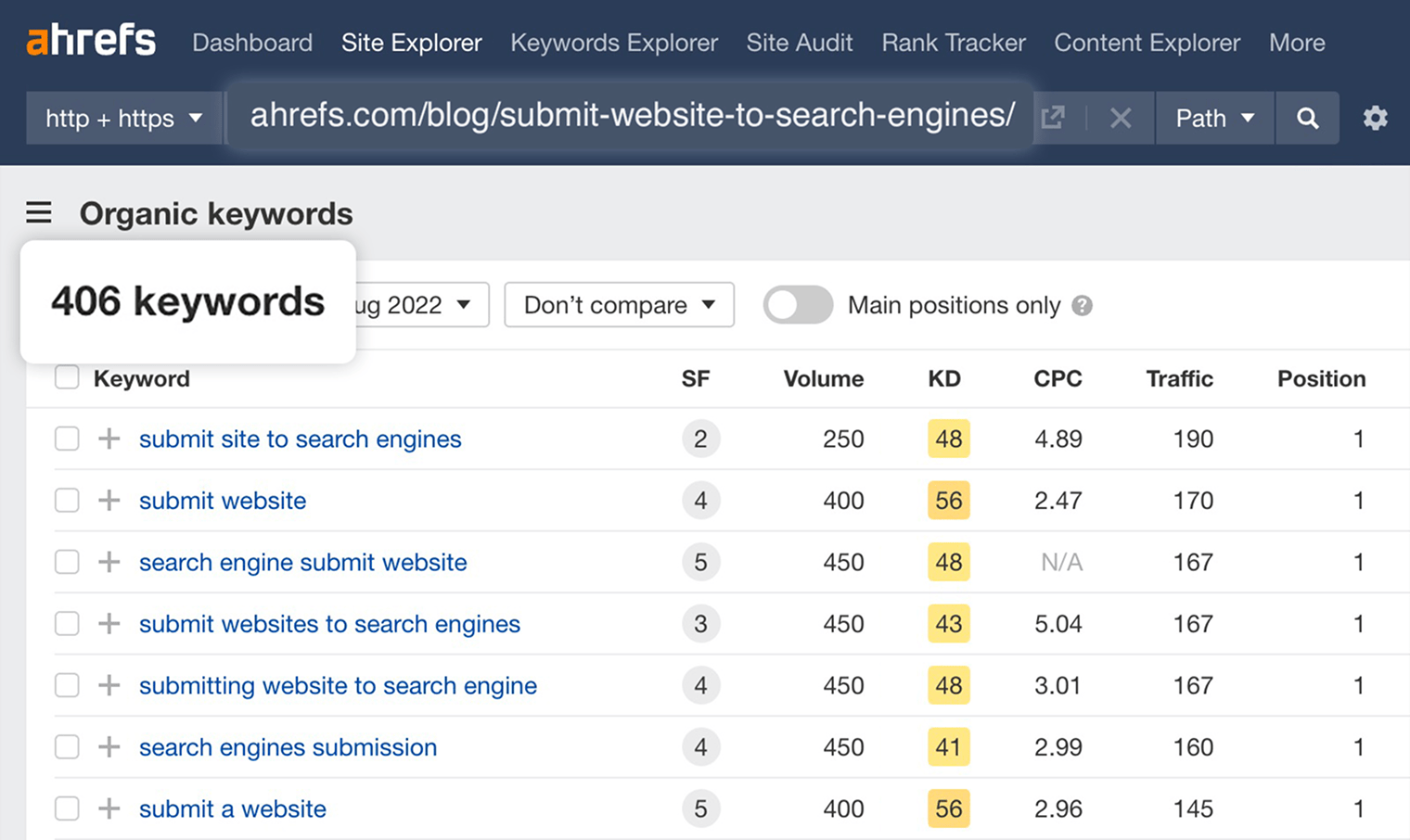
Whatever search query you have in mind, different people will phrase it differently while, essentially, looking for the same thing. Google is smart enough to understand that. And it, therefore, ranks the same page for all these similar search queries.
We studied this “phenomenon” back in the day, and it turned out that the average top-ranking page would also rank for about a thousand similar keywords.
This means that you should not blindly rely on the search volume of a single keyword when estimating the search traffic that your page is going to get if it ranks for it. What you need to do instead is examine the top-ranking pages for that keyword and see how much search traffic they get in total from all the variations of that keyword, which they rank for.
Here at Ahrefs, we thought it was such an important thing to consider when analyzing keywords that we have developed a dedicated metric to address it.
It’s called “Traffic Potential,” and it shows how much search traffic the top-ranking page for your keyword gets.
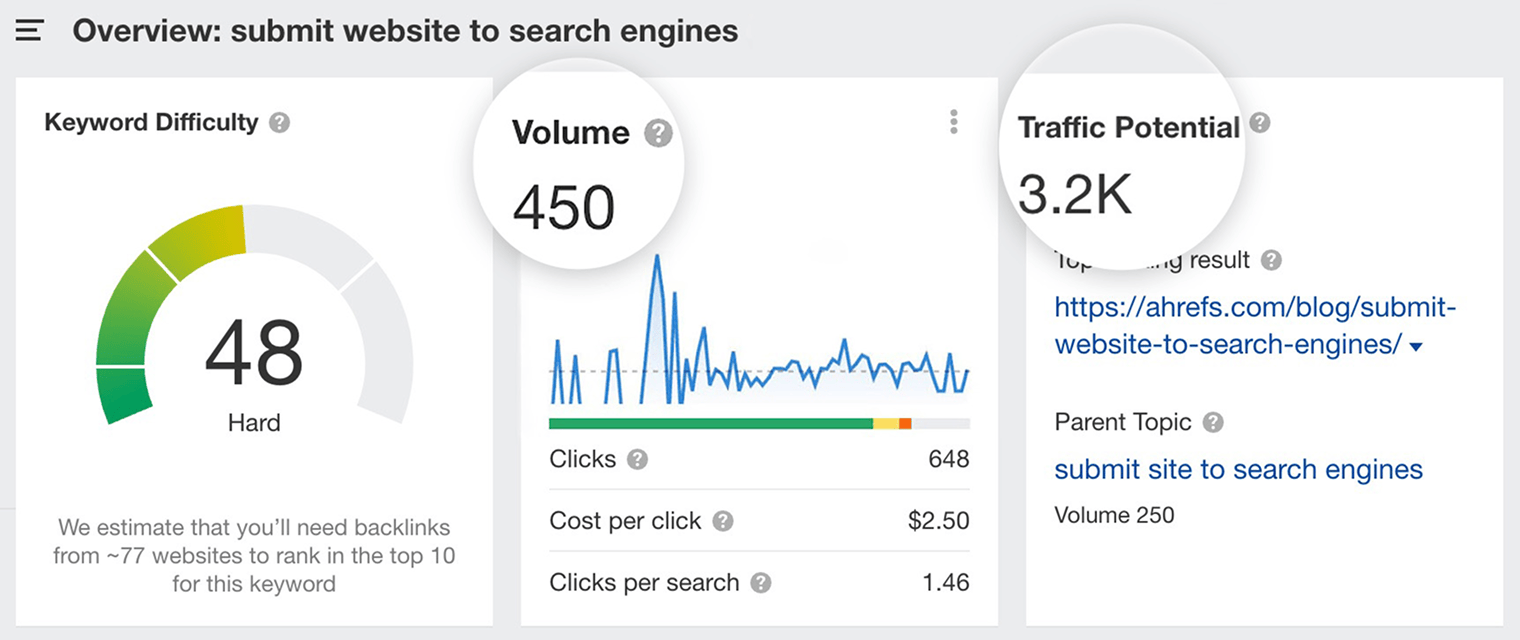
In Ahrefs’ Keywords Explorer, the Traffic Potential metric is located right next to the search volume. This saves you lots of time looking up what page ranks #1 for that keyword and how much search traffic it gets in total.
Both the search volume and Traffic Potential metrics are country-specific, though. So if you need to gauge the worldwide search traffic of a top-ranking page, you’ll need to use Site Explorer with “All countries” mode selected.
Keyword Difficulty
Experienced SEO professionals typically gauge the ranking difficulty of each keyword manually. That is, by looking at the search results for each keyword and analyzing them. They account for many different factors to judge how hard or easy it’ll be to rank:
- Search intent
- Content depth, relevance, freshness, authority
- Number (and quality) of backlinks
- Domain Rating
- SERP features
- Etc
This process varies from person to person, and there’s no consensus on precisely what is and isn’t important here.
One person might believe that Domain Rating is important, and another might think that relevance plays more of a role.
The opinions might also vary depending on the type of search query that they’re analyzing, because for different kinds of queries Google gives preference to different things.
All of that makes life a little difficult for SEO tool creators, who try to distill the complex and intricate concept of ranking difficulty down to a simple two-digit number.
But after talking to many professional SEOs about the signals that an actionable Keyword Difficulty (KD) score should factor in, we realized that everyone agreed on at least one thing: Backlinks are very important for ranking.
So, in the end, we decided to base our Keyword Difficulty (KD) score on the number of unique websites linking to the top 10 ranking pages.
Ahrefs’ Keyword Difficulty Scale
How many referring domains you’ll need to rank in Top10 for a keyword
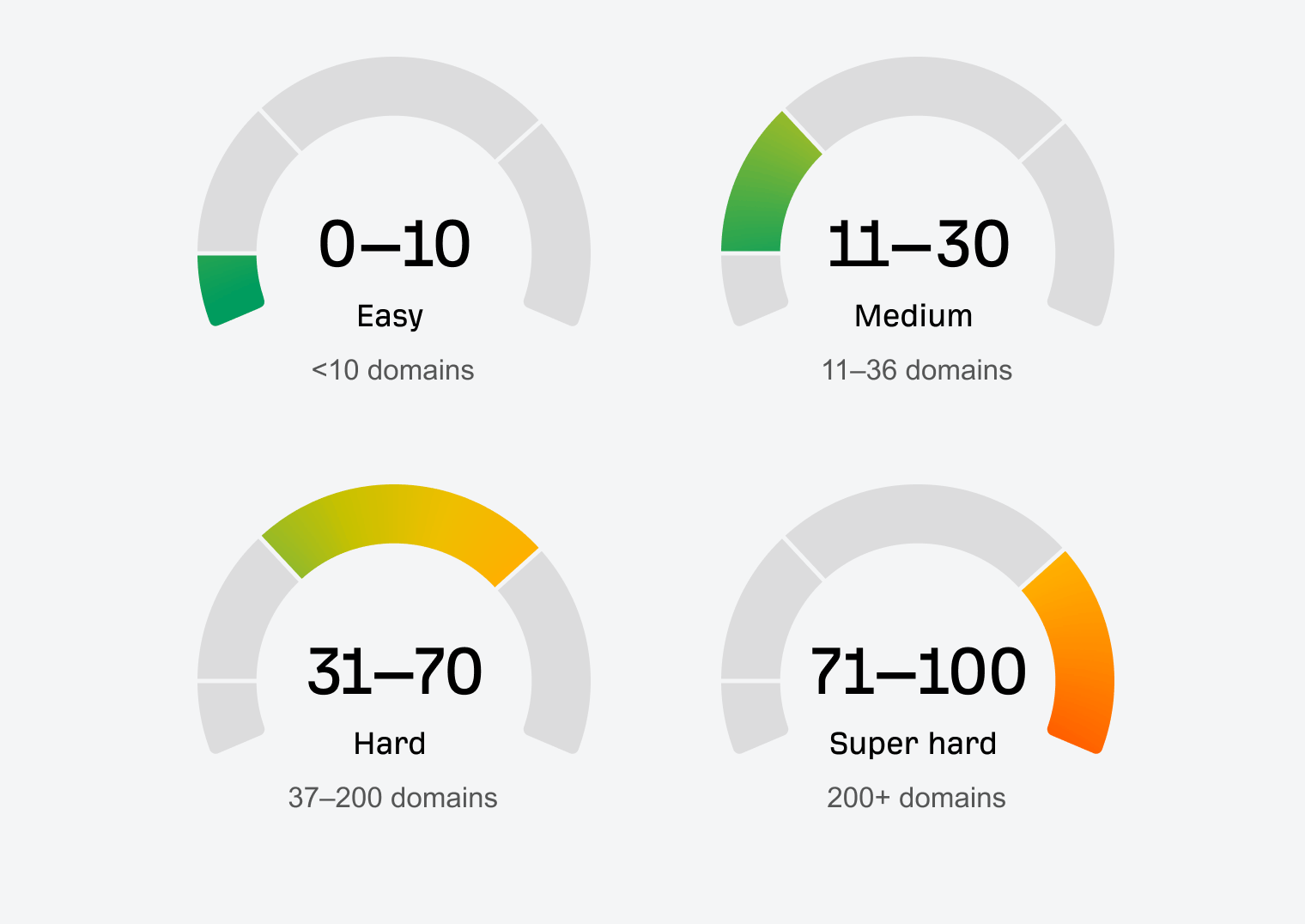
As you can see in the image above, KD relates to the estimated number of linking websites your page needs to rank in the top 10.
Did you get that? It’s not the estimated number of linking websites you need to rank #1. It’s the estimated number you need to rank in the top 10. Getting to #1 is an entirely different battle.
Many people misuse the KD metric by setting the filter from 0 to 10 and focusing solely on the easy keyword ideas. But here’s why avoiding high-KD keywords might be a mistake:
The bottom line is this: KD is not there to deter you from targeting specific keywords. It’s there to help you understand what it’ll take to rank for a given query (as well as the “link-worthiness” of a given topic).
Just know that you should always manually assess keywords before going after them and not rely solely on any tool’s difficulty score to make your final decision. No single score can distill the complexity of Google’s ranking algorithm into a single number. Be wary of tool creators who suggest otherwise.
Cost Per Click (CPC)
Cost Per Click (CPC) shows how much advertisers are willing to pay for a click on an ad displayed on top of search results for a given keyword. It’s more a metric for advertisers than SEOs, but it can serve as a useful proxy for a keyword’s value.
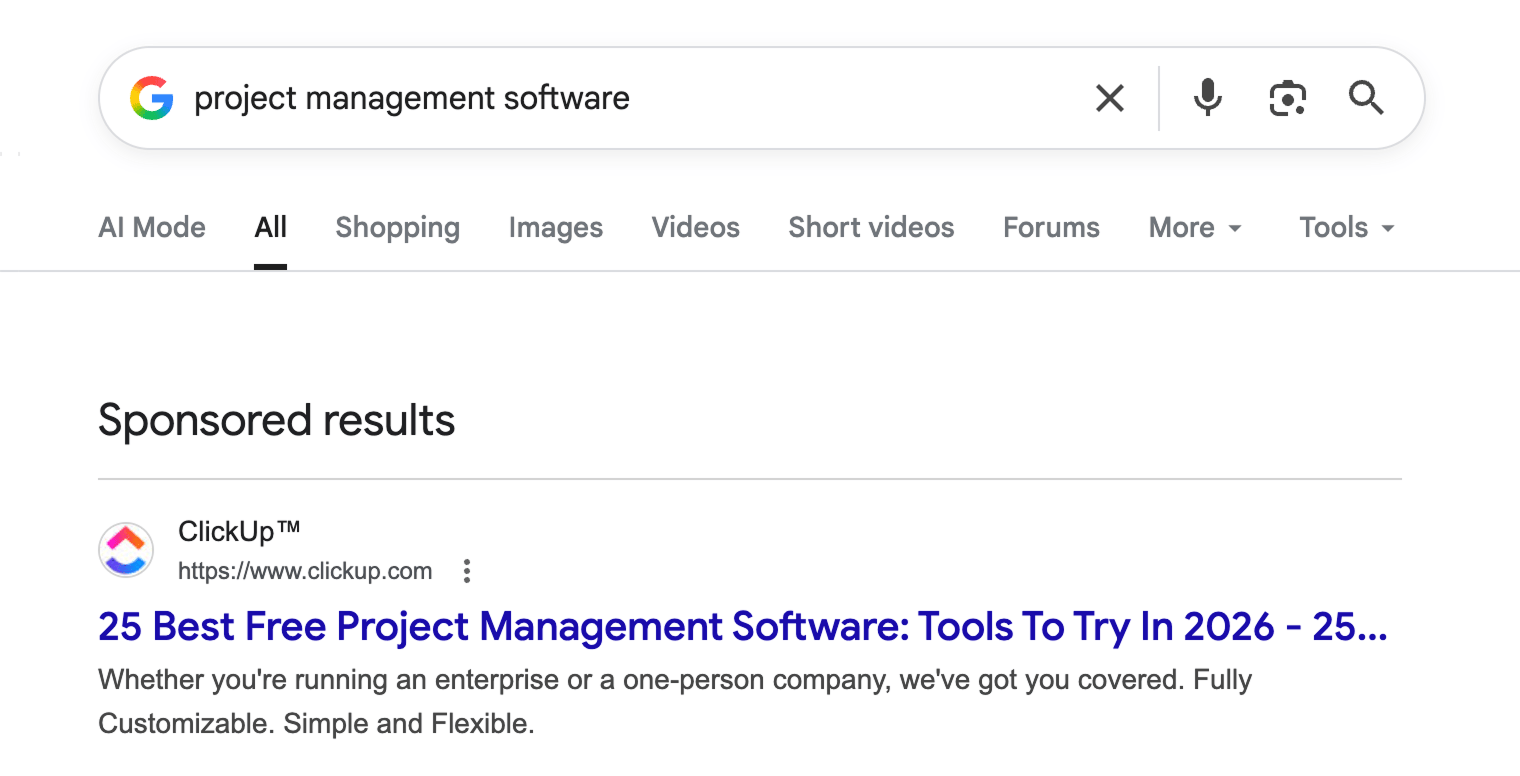
For example, the keyword “project management software” has a pretty high CPC of $30. That’s because people searching for it seem to be looking for a product to buy.
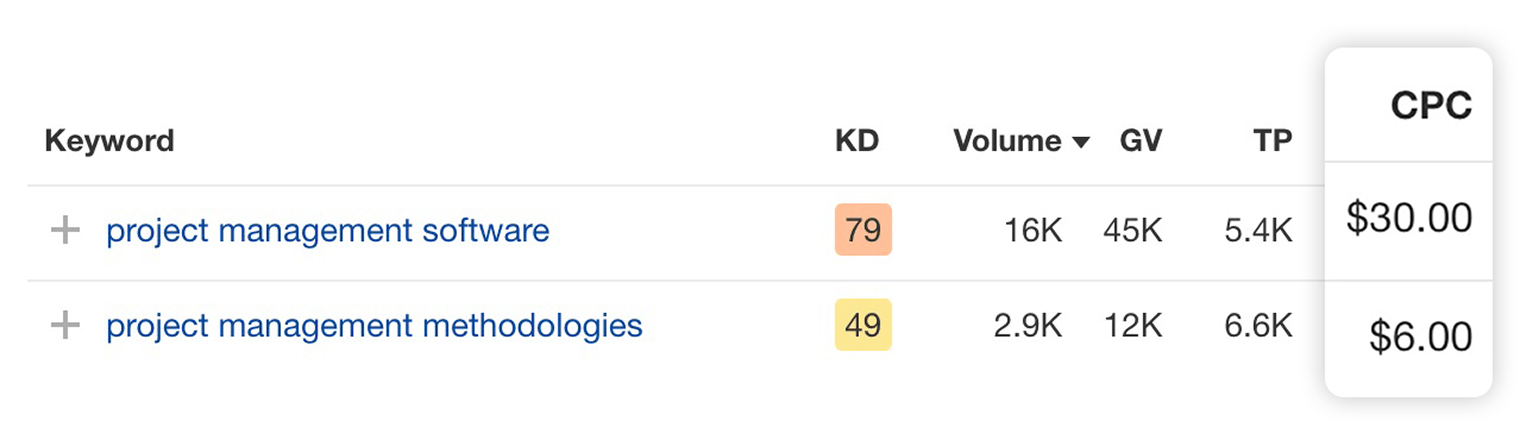
But it’s a different story for “project management methodologies.” This is clearly an informational search query, and the odds of selling your project management software to these people are not as high—hence, the much lower CPC of $6.
One important thing to know about CPC is that it’s much more volatile than search volume. While the search demand for most keywords stays roughly the same from month to month, their CPC can change any minute as more companies display ads for them.
This means that the CPC values that you see in various SEO tools are merely snapshots in time and aren’t particularly precise. If you want to get real-time CPC data, it is recommended that you use AdWords.
Growth
Given that search volume is an annual average, it can often lead you astray in terms of the future search demand of a given search query.
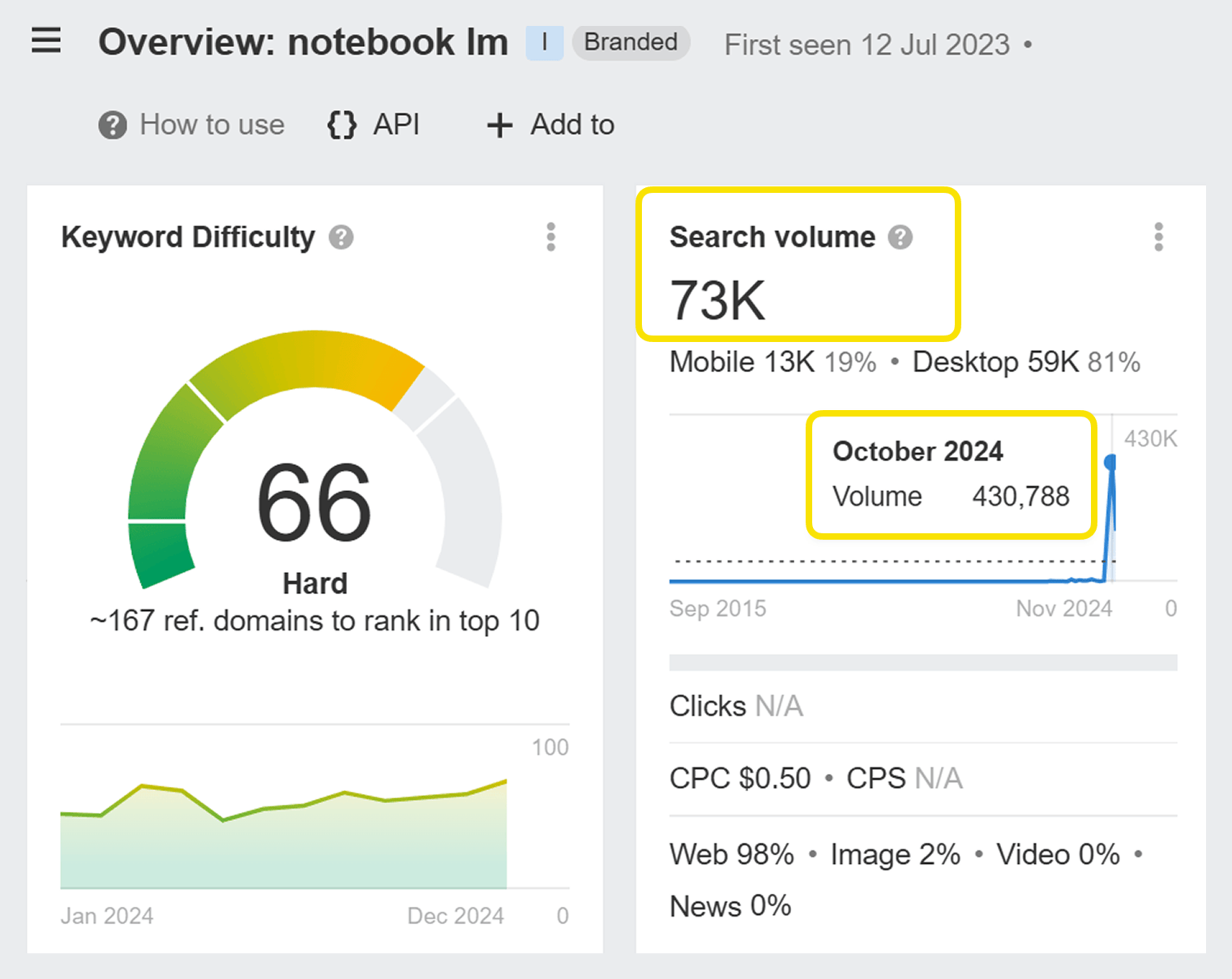
Notebook LM, an AI model that turns text into podcast audio, has a twelve-month average of 73,000 searches. But this average comes from many months with zero search volume… and a couple of months with over 400,000 searches.
In this case, the average is underestimating the likely search volume in the next few months:
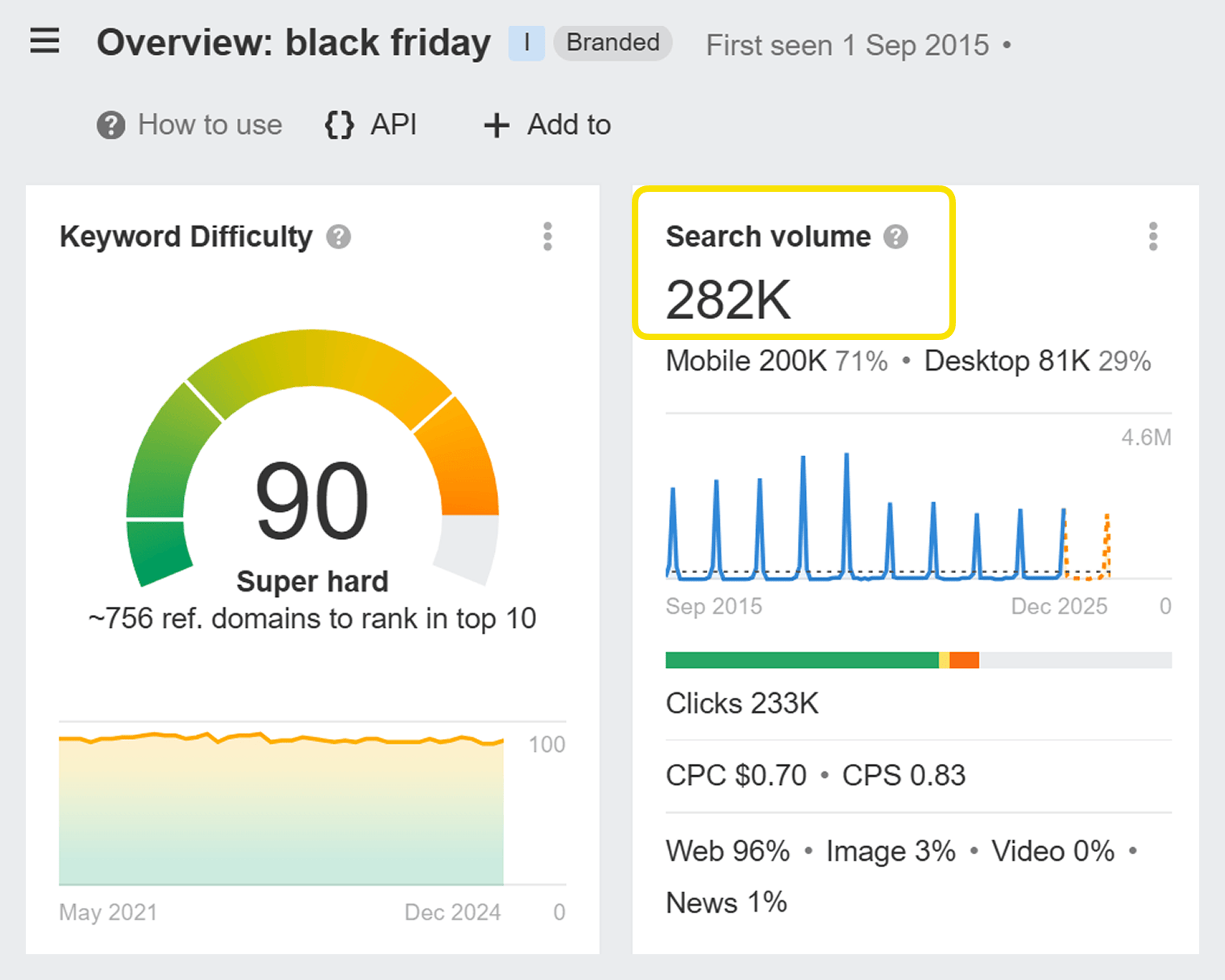
Or take a seasonal keyword like “black friday”. The average search volume shows as 282,000, but this average comes from many months of much lower search volume (around 50,000 most months) and one month of much higher volume (2.5 million searches in November 2024):
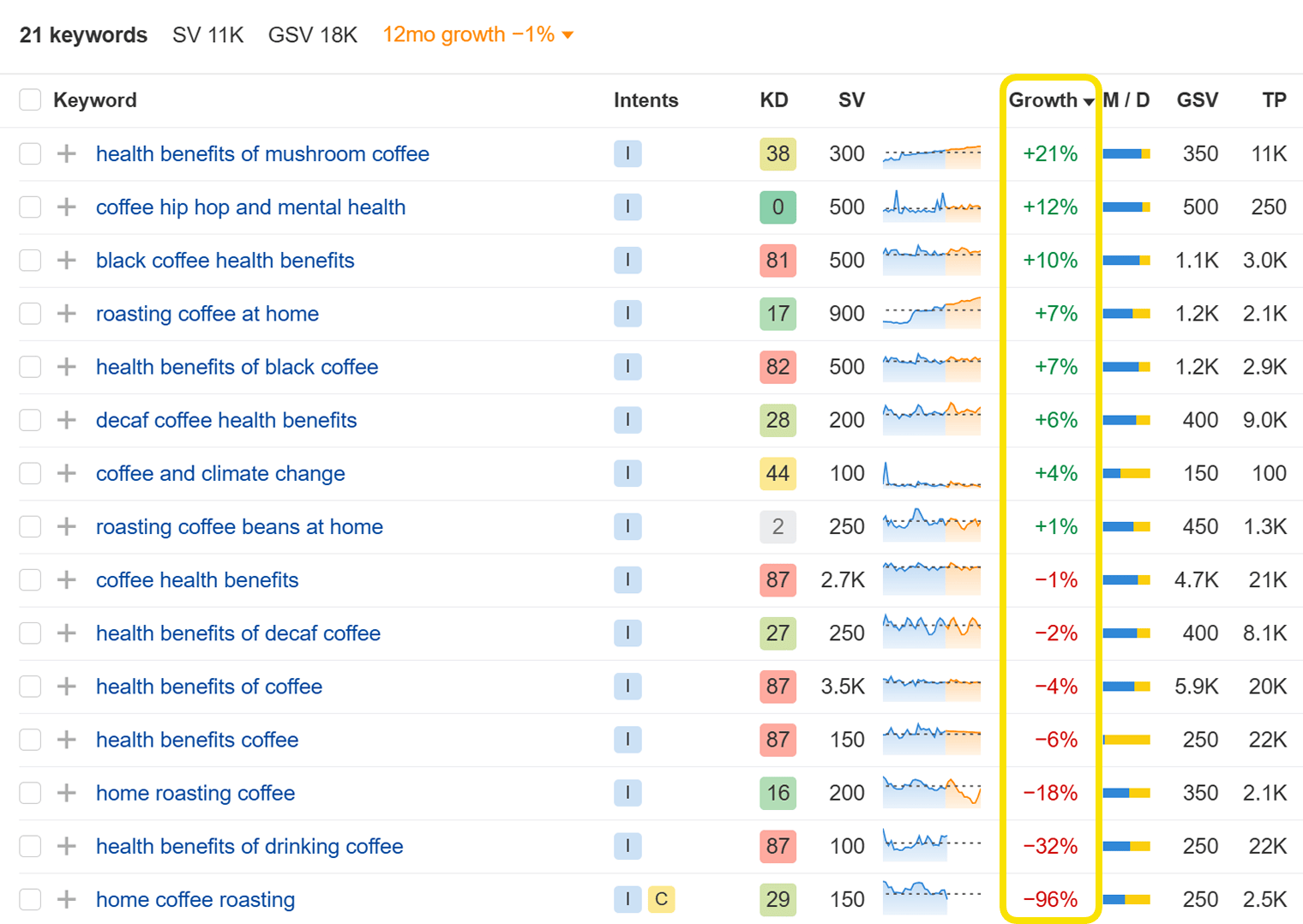
The number of searches any keyword gets changes over time, and there can be a real benefit to ranking for a keyword that has low search volume now, but is already on the way to becoming popular.
You can easily find these trending keywords using the “Growth” metric in Keywords Explorer. Just add your keywords and sort by the Growth column to topics that are getting more popular (like “health benefits of mushroom coffee”) or less popular (like “home coffee roasting”).
If you haven’t heard about it before, Google Trends is also a nice free tool for analyzing trending searches. And we have written a pretty extensive guide on how to use it.
Business Potential
Prioritizing your list of keywords and deciding where you should invest your efforts first is probably the least straightforward and most “individual” part of the keyword research process. There are just too many things to consider:
- What is the estimated traffic potential of this keyword?
- What’s the ranking difficulty? Who are you competing against?
- What will it take to create a perfect page? Or maybe you already have one, and it needs to be improved?
- What’s the business value of this keyword? What would you get from ranking for it?
That last point is a particularly important one. While search volume, traffic potential, ranking difficulty, and search intent are all important considerations, you also need to factor in what ranking for this keyword will be worth to your business.
Here at Ahrefs, we’ve developed our own way of determining the business value of a keyword.
We call it “business potential”, and it’s a simple score from 0 to 3, which indicates how easy it will be to pitch our product while covering a given keyword.
Business Potential
Score | What it means | Example |
|---|---|---|
| 3 | Our product is an irreplaceable solution to the problem. | ”how to see competitor’s backlinks” — because it’s hard to do that without a toolset like Ahrefs. |
| 2 | Our product helps quite a bit, but it isn’t essential to solving the problem. | ”SEO tips” — because some tips aren’t possible without our product, but others are. |
| 1 | Our product can only be mentioned fleetingly. | ”marketing ideas” — because SEO is one of many marketing ideas, and Ahrefs helps with that. |
| 0 | There’s absolutely no way to mention our product. | ”social media marketing” — because that isn’t something Ahrefs helps with. |
If you sell Aeropress accessories, a keyword like “aeropress filters” would have a very high business potential score. At the other end of the spectrum, a keyword like “stanley thermos” would have a low score: despite being related to coffee, it’s not something that your business helps with.
As a general rule, it’s a good idea to prioritize topics that score 2 or 3 on the Business Potential scale. These topics are most likely to bring potential customers to your website—ultimately, that’s the most important goal of keyword research and SEO.
When we categorized all of the blog posts on the Ahrefs website, 77% of them scored high (2 or 3) on Business Potential:
Number of articles by business potential score
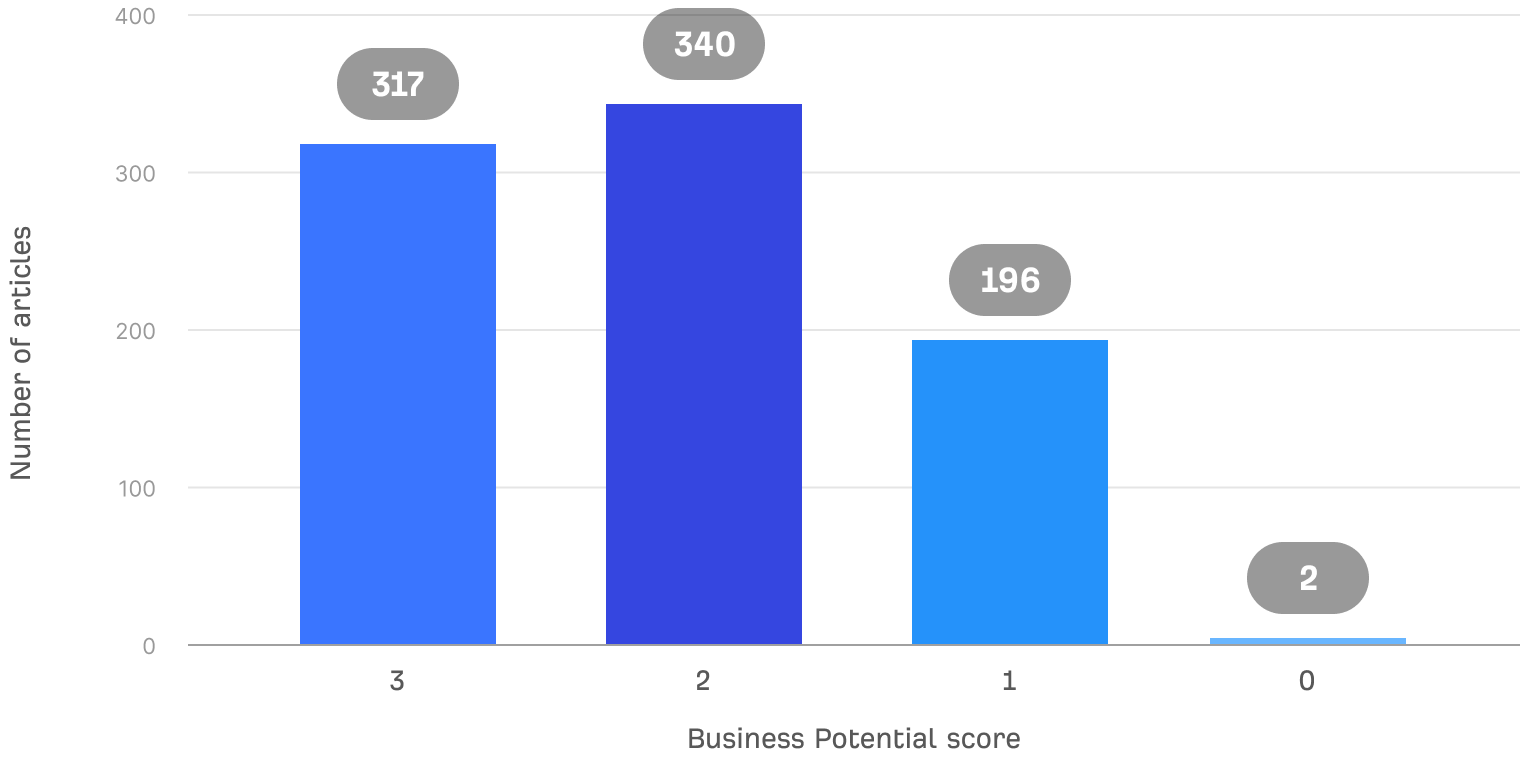
(And as you can see, we had almost no blog posts with zero business potential.)
How to prioritize keywords
So… which keywords should you start working on first?
Unfortunately, there’s no straightforward answer to this question. As SEOs like to say, “It depends.”
- Are you working on a brand-new website or an established business?
- Are you the only marketer, or do you manage a large team?
- Are you responsible for the actual conversions or providing new leads to the sales team?
- How fast do you need to show results?
Keyword research is an act of balancing your unique circumstances with a set of metrics and concepts, which we’ve just covered: traffic potential, keyword difficulty, business potential, and search intent.
In some cases, your job will be to get as much traffic as possible as fast as possible, which comes down to finding the high-volume, low-difficulty keywords. Other times, you’ll need to focus on leads or conversions, in which case business potential will be the most important metric to focus on.
Keyword research is not the process of finding “easy to rank for” keywords. It’s the process of finding the keywords that make the most sense to your business.
You should also have short-, medium-, and long-term ranking goals. If you only focus on short-term goals, you’ll never rank for the most lucrative keywords. If you only focus on medium- and long-term goals, it’ll take years to get any traffic.
Tim Soulo is CMO at Ahrefs. With over 15 years in the digital marketing industry, Tim is the author of many data-driven studies and actionable marketing frameworks, some of which gained industry-wide recognition. He enjoys challenging conventional marketing knowledge and optimizing for simplicity and efficiency.
Master SEO Step by Step
How Search Engines Work
Before you start learning SEO, you need to understand how search engines work.
SEO Basics
Learn how to set your website up for SEO success, and get to grips with the four main facets of SEO.
Keyword Research
The starting point in SEO is to understand what your target customers are searching for.
SEO Content
Learn how to create content that ranks in search engines.
On-Page SEO
This is where you optimize your pages to help search engines understand them.
Link Building
Learn how to create content that ranks in search engines.
Technical SEO
Prevent technical problems that stop Google from accessing and understanding your website.
Local SEO
Learn how to improve your visibility in local search results and get more customers from your area.
What AI Means for SEO
You can’t talk about SEO today without mentioning generative AI.