
“Indexed, though blocked by robots.txt” Can Be More Than A Robots.txt Block

By Patrick Stox
Technical SEO at Ahrefs
“Indexed, though blocked by robots.txt” tells you that Google has indexed URLs that you blocked them from crawling using the robots.txt file on your website.
In most cases, this will be a straightforward issue where you blocked crawling in your robots.txt file. But there are a few additional conditions that can trigger the problem, so let's go through the following troubleshooting process to diagnose and fix things as efficiently as possible.
How to fix 'Indexed, though blocked by robots.txt'
You can see that the first step is to ask yourself whether you want Google to index the URL.
If you don't want the URL indexed…
Just add a noindex meta robots tag and make sure to allow crawling—assuming it's canonical.
If you block a page from being crawled, Google may still index it because crawling and indexing are two different things. Unless Google can crawl a page, they won't see the noindex meta tag and may still index it because it has links.
If the URL canonicalizes to another page, don't add a noindex meta robots tag. Just make sure proper canonicalization signals are in place, including a canonical tag on the canonical page, and allow crawling so signals pass and consolidate correctly.
If you do want the URL indexed...
You need to figure out why Google can't crawl the URL and remove the block.
The most likely cause is a crawl block in robots.txt. But there are a few other scenarios where you may see messages saying that you're blocked. Let's go through these in the order you should probably be looking for them.
Check for a crawl block in robots.txt
The easiest way to see the issue is with the robots.txt tester in GSC, which will flag the blocking rule.
If you know what you’re looking for or you don’t have access to GSC, you can navigate to domain.com/robots.txt to find the file. We have more information in our robots.txt article, but you’re likely looking for a disallow statement like:
Disallow: /There may be a specific user-agent mentioned, or it may block everyone. If your site is new or has recently launched, you may want to look for:
User-agent: *Disallow: /Can't find an issue?
It's possible that someone already fixed the robots.txt block and resolved the issue before you’re looking into the issue. That's the best-case scenario. However, if the problem appears to be resolved but appears again shortly after, you may have an intermittent block.
How to fix "indexed, though blocked by robots.txt" in WordPress
You’ll want to remove the disallow statement causing the block. How you do this varies depending on the technology you’re using.
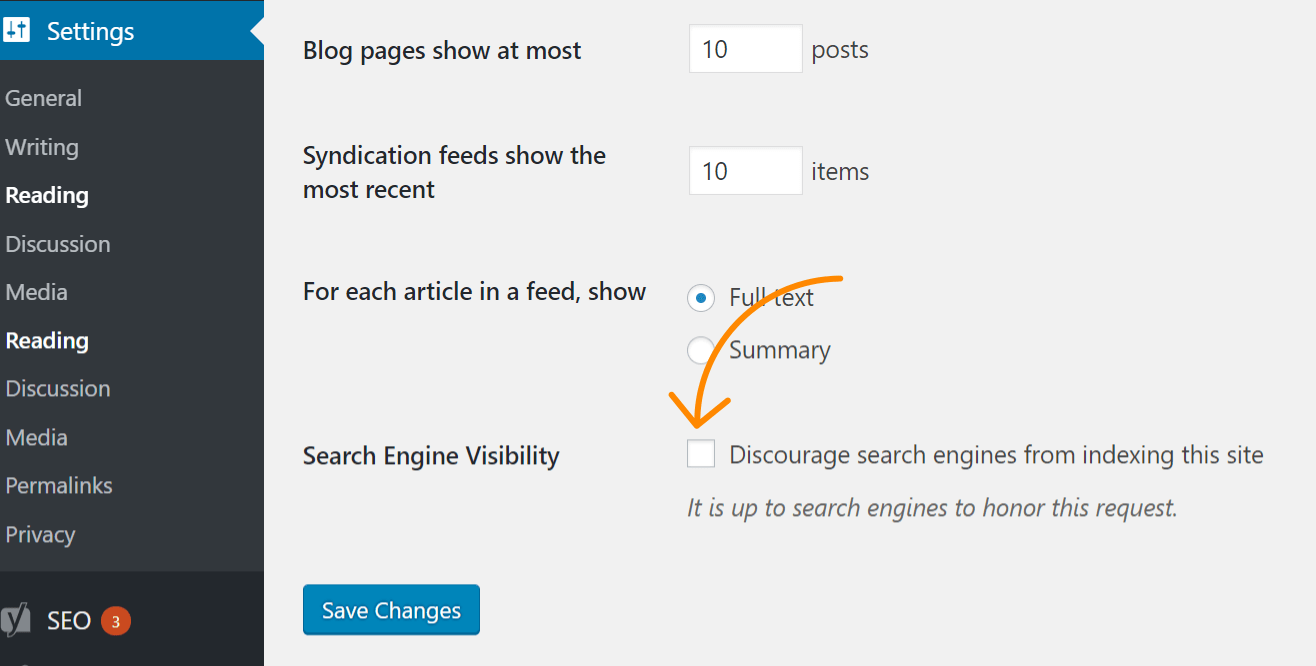
If the issue impacts your entire website, the most likely cause is that you checked a setting in WordPress to disallow indexing. This mistake is common on new websites and following website migrations. Follow these steps to check for it:
- Click 'Settings'
- Click 'Reading'
- Make sure 'Search Engine Visibility' is unchecked.
WordPress with Yoast
If you’re using the Yoast SEO plugin, you can directly edit the robots.txt file to remove the blocking statement.
- Click 'Yoast SEO'
- Click 'Tools'
- Click 'File editor'
WordPress with Rank Math
Similar to Yoast, Rank Math allows you to edit the robots.txt file directly.
- Click 'Rank Math'
- Click 'General Settings'
- Click 'Edit robots.txt'
FTP or hosting
If you have FTP access to the site, you can directly edit the robots.txt file to remove the disallow statement causing the issue. Your hosting provider may also give you access to a File Manager that allows you to access the robots.txt file directly.
Check for intermittent blocks
Intermittent issues can be more difficult to troubleshoot because the conditions causing the block may not always be present.
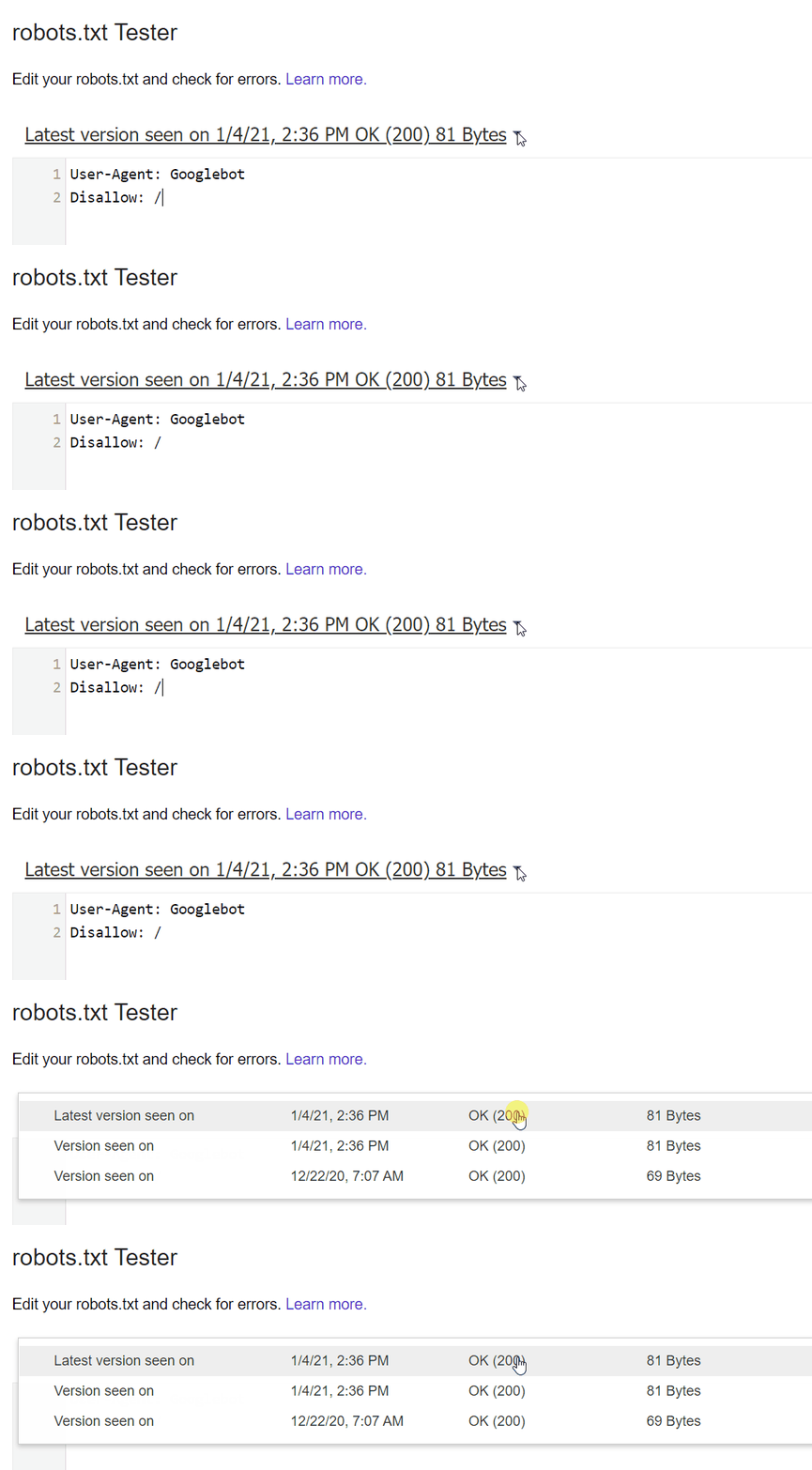
What I’d recommend is checking the history of your robots.txt file. For instance, in the GSC robots.txt tester, if you click the dropdown, you’ll see past versions of the file that you can click and see what they contained.
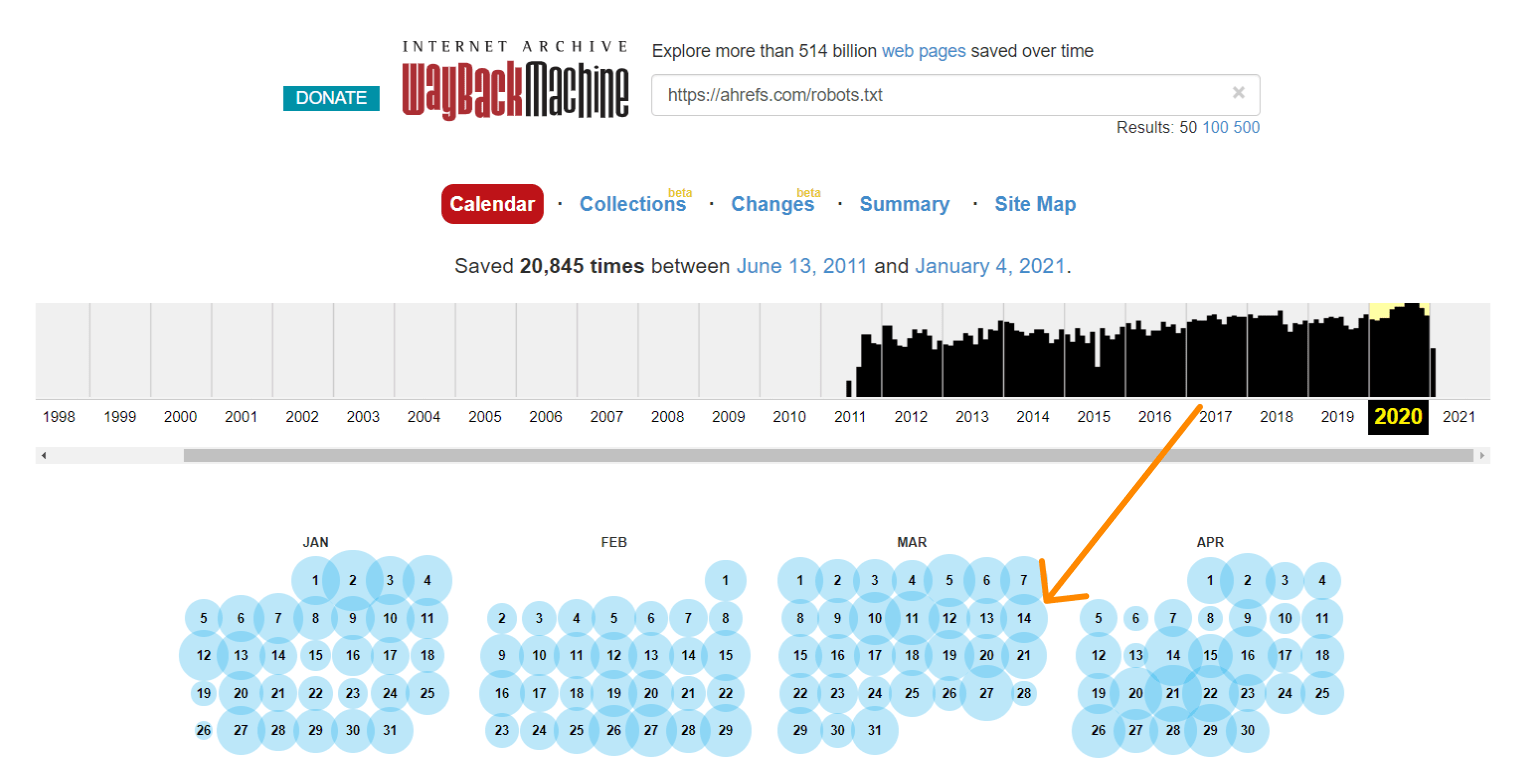
The Wayback Machine on archive.org also has a history of the robots.txt files for the websites they crawl. You can click on any of the dates they have data for and see what the file included on that particular day.
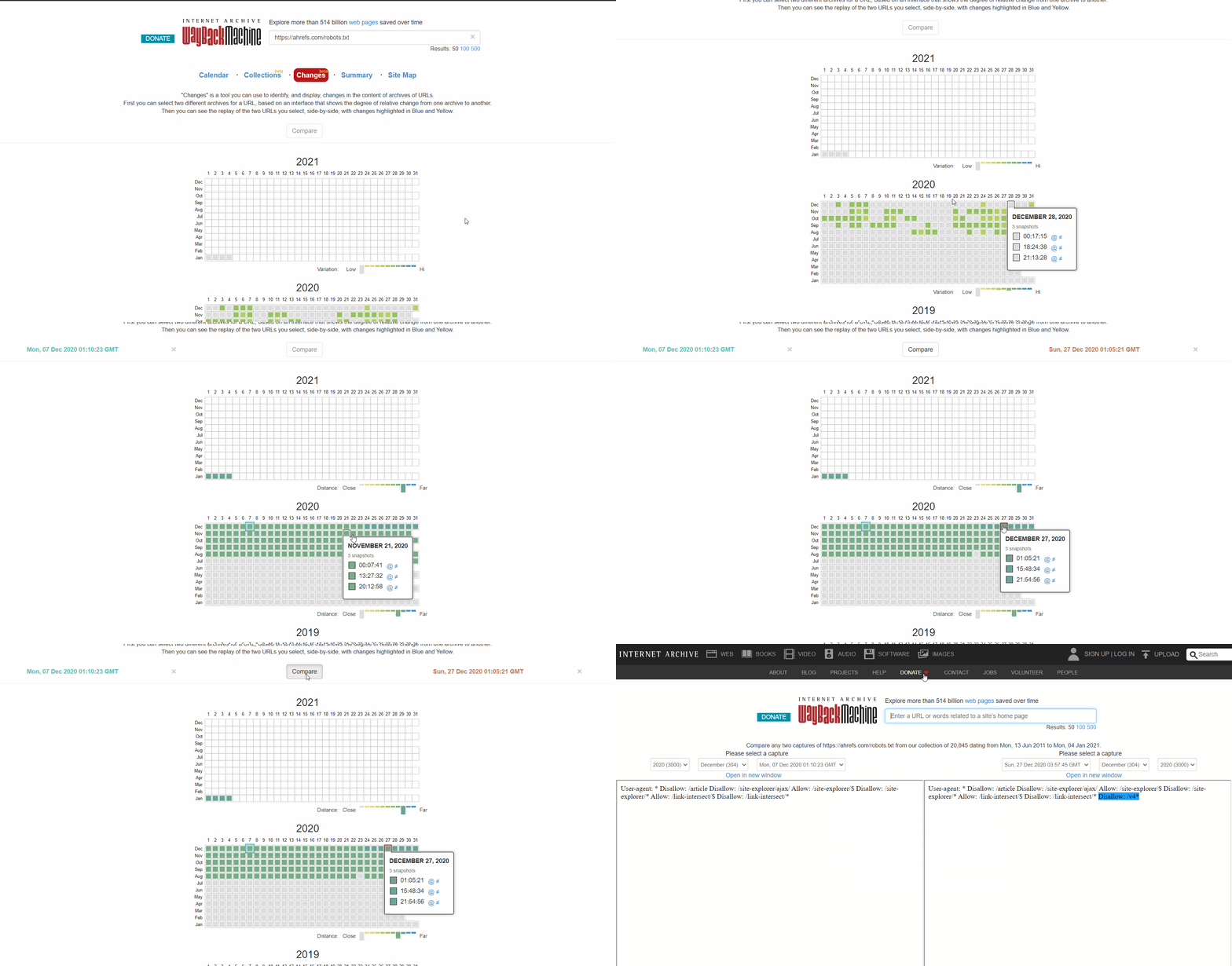
Or use the beta version of the Changes report, which lets you easily see content changes between two different versions.
How to fix intermittent blocks
The process for fixing intermittent blocks will depend on what is causing the issue. For example, one possible cause would be a shared cache between a test environment and a live environment. When the cache from the test environment is active, the robots.txt file may include a blocking directive. And when the cache from the live environment is active, the site may be crawlable. In this case, you would want to split the cache or maybe exclude .txt files from the cache in the test environment.
Check for user-agent blocks
User-agent blocks are when a site blocks a specific user-agent like Googlebot or AhrefsBot. In other words, the site is detecting a specific bot and blocking the corresponding user-agent.
If you can view a page fine in your regular browser but get blocked after changing your user-agent, it means that the specific user-agent you entered is blocked.
You can specify a particular user agent using Chrome devtools. Another option is to use a browser extension to change user agents like this one.
Alternatively, you can check for user-agent blocks with a cURL command. Here's how to do this on Windows:
- Press Windows+R to open a "Run" box.
- Type “cmd” and then click “OK.”
- Enter a cURL command like this:
curl -A “user-agent-name-here” -Lv [URL]curl -A “Mozilla/5.0 (compatible; AhrefsBot/7.0; +http://ahrefs.com/robot/)” -Lv https://ahrefs.comHow to fix user-agent blocks
Unfortunately, this is another one where knowing how to fix it will depend on where you find the block. Many different systems may block a bot, including .htaccess, server config, firewalls, CDN, or even something you may not be able to see that your hosting provider controls. Your best bet may be to contact your hosting provider or CDN and ask them where the block is coming from and how you can resolve it.
For example, here are two different ways to block a user agent in .htaccess that you might need to look for.
RewriteEngine OnRewriteCond %{HTTP_USER_AGENT} Googlebot [NC]RewriteRule .* - [F,L]Or…
BrowserMatchNoCase "Googlebot" botsOrder Allow,DenyAllow from ALLDeny from env=botsCheck for IP blocks
If you’ve confirmed you’re not blocked by robots.txt and ruled out user-agent blocks, then it’s likely an IP block.
How to fix IP blocks
IP blocks are difficult issues to track down. As with user-agent blocks, your best bet may be to contact your hosting provider or CDN and ask them where the block is coming from and how you can resolve it.
Here’s one example of something you may be looking for in .htaccess:
deny from 123.123.123.123
Final thoughts
Most of the time, the "indexed, though blocked by robots.txt" warning results from a robots.txt block. Hopefully, this guide helped you find and fix the issue if that wasn't the case for you.
Have questions? Let me know on Twitter.
Patrick Stox is an independent SEO consultant. Former Product Advisor, Technical SEO, and Brand Ambassador at Ahrefs. Before that he was a Technical SEO at IBM for many years, worked at an agency, had his own consultancy, and was in-house at a B2B company. A long time ago he started his career as a developer.
He’s an organizer for the Triangle SEO Meetup, the Tech SEO Connect conference, he runs a Technical SEO Slack group, and is a moderator for /r/TechSEO on Reddit.
Patrick was the lead author for the SEO chapter of the 2021 Web Almanac and reviewer for the 2022 chapter. He helped define the role of Search Marketing Strategist for the US Department of Labor. He also co-wrote the SEO Book For Beginners by Ahrefs and was the Technical Review Editor for The Art of SEO 4th Edition.
He’s spoken at 100+ industry events including Pubcon, SMX, Tech SEO Boost, Ad World, Digital Summit, and many more. He’s written 100+ articles for industry sites like Search Engine Land, Search Engine Journal, MarTech, and right here at Ahrefs. He was a finalist for SEO Speaker of the Year and SEO Contributor of the Year at the 2018 Search Engine Land Awards. He was also an EzineArticles Platinum author back in the day and still has the mug to prove it.
Patrick has judged nearly a dozen search awards for multiple years including the US Search Awards, UK Search Awards, and Interactive Marketing Awards. He participated in and documented the world’s largest SEO contest to date, the Wix SEO Hero contest which he arguably should have won.



Your weekly marketing’s must-reads
Join 284K marketers for weekly news, useful reads, industry updates, and the memes you didn’t know you needed.
Explore what’s inside the newsletter →