
How to Spot and Fix Mistakes in AI Answers

SEO & Marketing Educator at Ahrefs

- Set up the prompts
- Write down what’s actually true
- Find the pages behind the wrong answers
- Prioritize outreach targets
- Find the right contact
- Send a friendly correction request and follow up once
- What happened when we tried AEO outreach
- What you can do to reduce future inaccuracies in AI answers
- Proactive brand monitoring
Ask ChatGPT how much a product costs, for example, and it won’t necessarily rely on the company’s official pricing page. It may also draw from third-party sources—reviews, comparison articles, or “best tools” listicles, some of which were published years ago.
That creates a real problem for brands. If outdated or incorrect information about your pricing, products, or features is circulating online, AI systems may repeat it to potential customers. And seeing an AI confidently give people the wrong information about your product can be especially frustrating when the error is big enough to influence a buying decision.
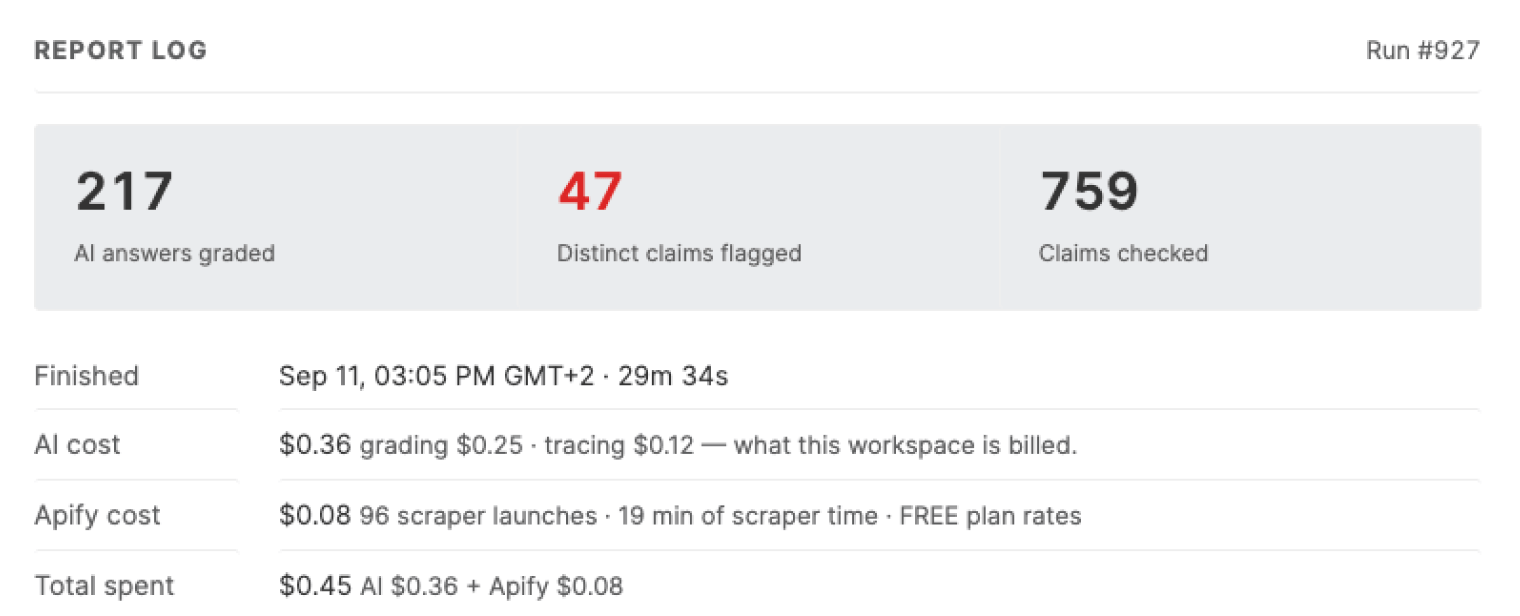
We saw this firsthand when we fact-checked 217 AI-generated answers about Ahrefs using our own app (available in Letaido). Of those, 41 answers—19%, or roughly 1 in 5—contained at least one false claim. In total, we found 47 distinct errors. And in some of our tests, the error rate was as high as 36%.
This makes accuracy and consistency across the web an important part of AI visibility. It’s not enough to have the right information on your own website—you also need to find and correct inaccurate information elsewhere that AI systems may rely on.
In this article, we’ll show you how to do that step by step, using the process we tested and an app we built to automate most of the work.
Set up the prompts
Throughout this article, we’ll use Ahrefs Brand Radar to collect AI answers and see which pages they cite. We’ll also use a custom app we built in Letaido, which connects to the data from Brand Radar to automate the fact-checking process. This step is optional, but it can save you a huge amount of time.
The basis of the fact-checking process is two kinds of prompts. Together, they reveal both known problems and errors you did not think to look for.
Provoked prompts: test the most important facts you don’t want AI to get wrong
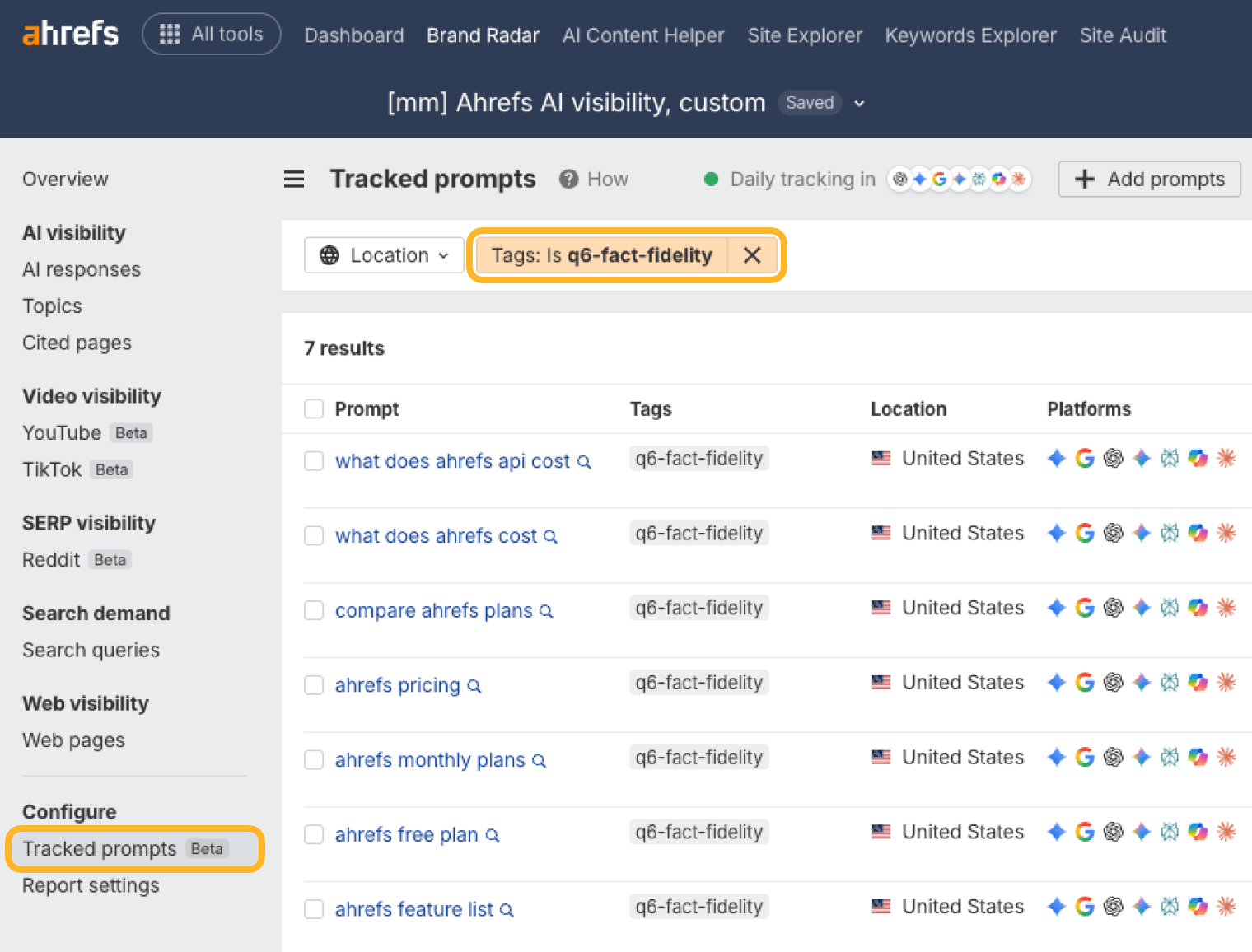
Build these prompts around a specific claim you think the web gets wrong, just like we suspected AI will get our API pricing wrong. Anything about your product that changed recently is a strong candidate, because third-party pages still describe the old version.
Each of these followed a real change at Ahrefs:
- A price change: “How much does Ahrefs cost?” and “What is the cheapest Ahrefs plan?”
- A feature that moved to a cheaper plan: “Does Ahrefs offer API access?” and “How much does the Ahrefs API cost?”
- A newly launched capability: “Does Ahrefs Brand Radar track Claude?”
In Brand Radar, you set these prompts up as custom prompts and tag them accordingly.
Unprovoked prompts: catch the errors you didn’t predict
Provoked prompts only test your own assumptions, so also run the fact check across the prompts you already track. That’s where the surprises are: an invented feature limit, a plan name that never existed, a competitor comparison built on a number from two years ago.
If you don’t already track a prompt set, we’ve got a detailed guide on where to find good prompt candidates. Here are a few examples of the “unprovoked” prompts we used in our process:
best seo tools
compare ahrefs plans
is ahrefs worth it
how to build backlinks
cheaper than ahrefs
bot analytics tools
alternatives to semrush
ahrefs vs Semrush
ahrefs or SE ranking
ai brand monitoring tools
Try not to get carried away with prompts to track. Every extra prompt adds answers to review, and the fact checker flags claims that turn out to be fine. A human still has to confirm each one, so a list you can actually review beats a bigger list you can’t.
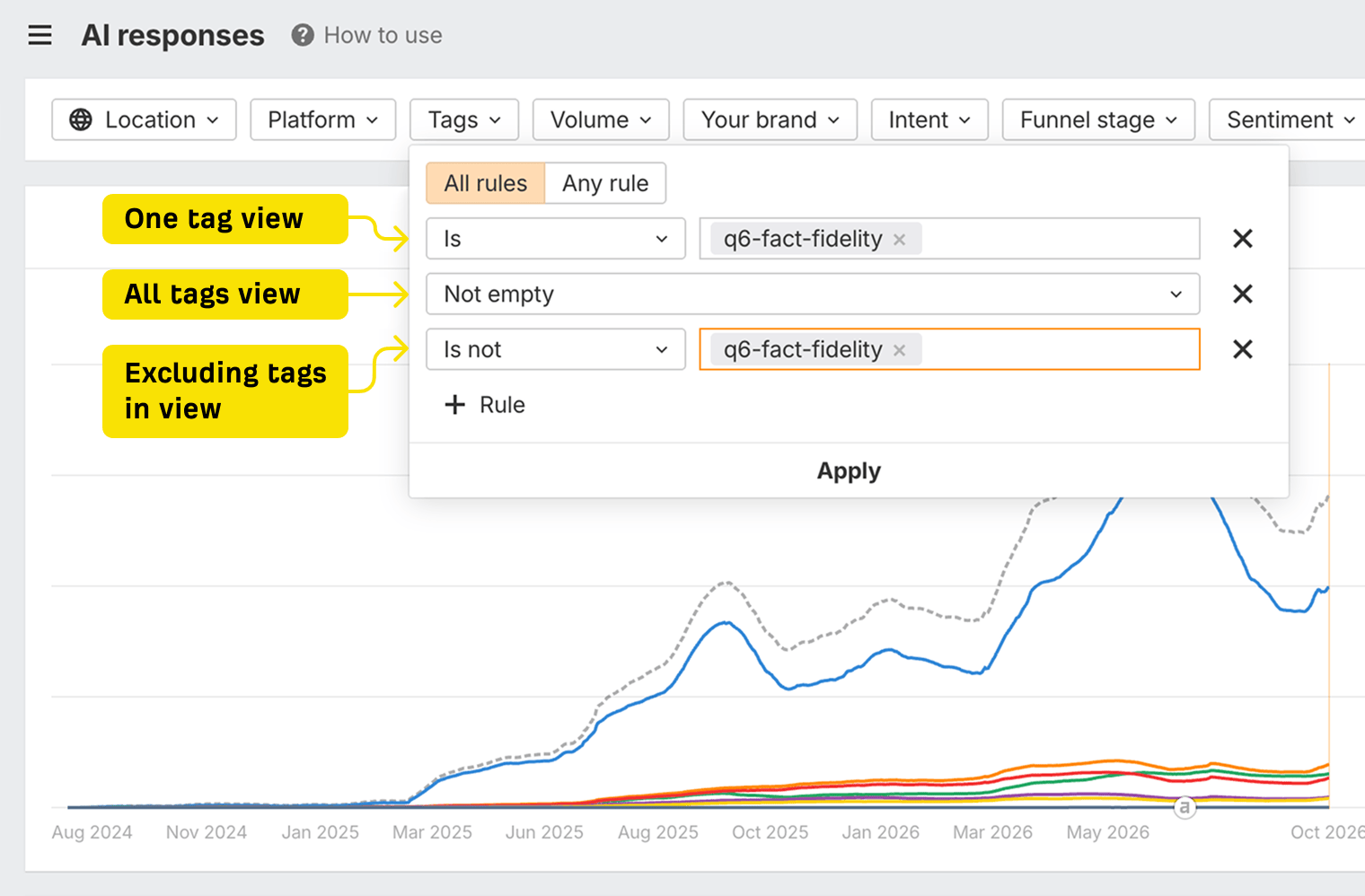
Once everything is set up in Brand Radar, you can use tags to move between different prompt groups. Here’s how to set the filters:
Write down what’s actually true
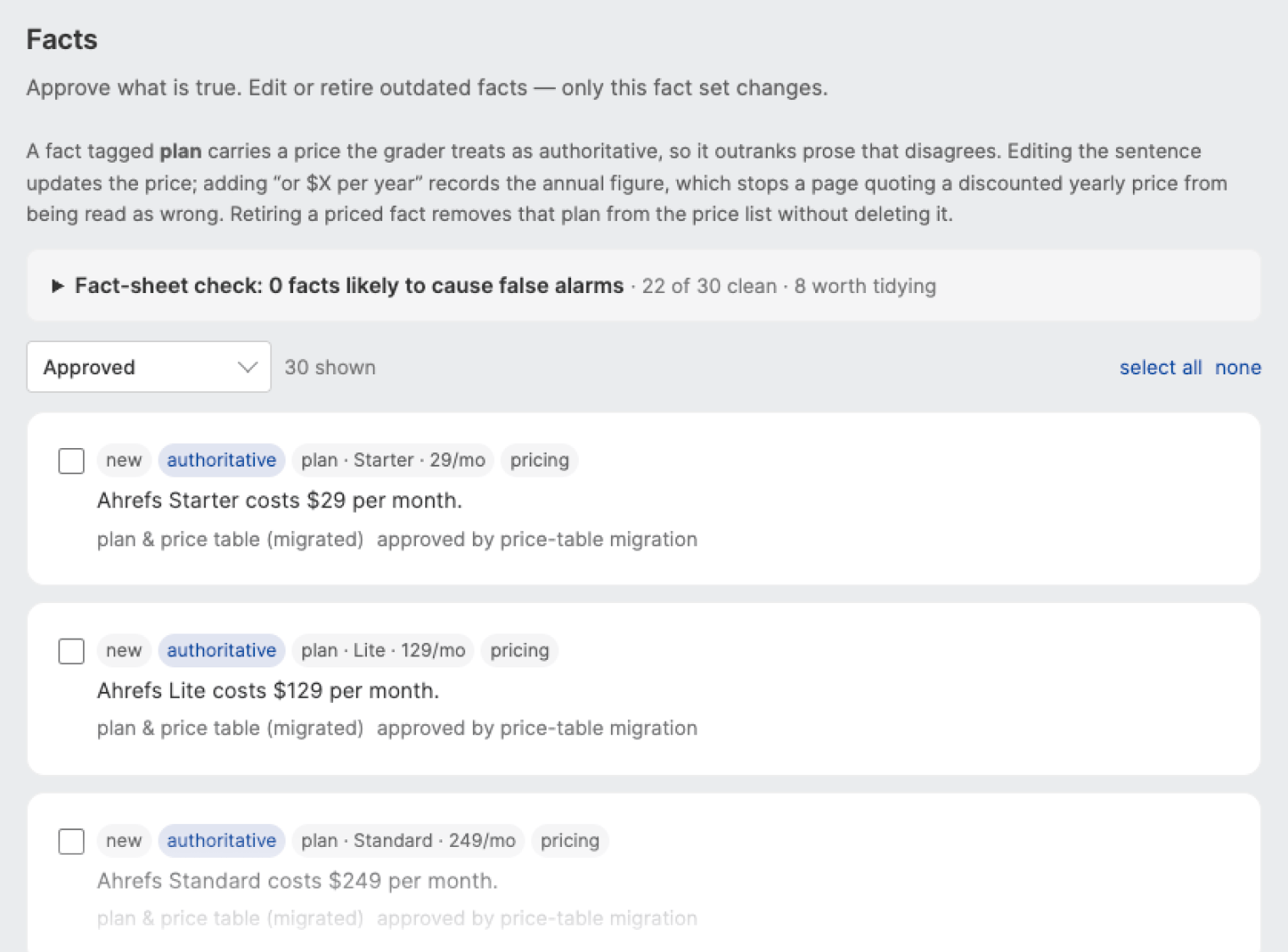
A fact checker can’t catch an error unless you tell it what the right answer is. That’s the source-of-truth document: a plain list of checkable claims about your product, each with a link that proves it.
It does double duty. The fact checker compares AI answers against it, and the human reviewer uses the same list to decide whether a flagged response is real before anyone emails an author.
What a good fact looks like
Aim for one claim per line, in plain language, specific enough that someone can confirm or disprove it in a few seconds. These examples are from our list:
Ahrefs pricing starts at $29 per month on the Starter plan.
Brand Radar is sold separately, priced from $50 per month and doesn’t require a paid Ahrefs subscription.
Custom prompt tracking can run daily, weekly, or monthly.
The Lite plan includes 150 custom prompt checks per month.
API access is included from the Lite plan and above and doesn’t require an Enterprise subscription.
Brand Radar shows bot activity through Bot Analytics and AI search traffic through Web Analytics. Both underlying tools are free.
Compare that to “Ahrefs is affordable” or “Brand Radar has flexible tracking options”. Neither can be checked, so neither belongs on the list.
Optionally, add three things to every fact: a source URL, an owner who can confirm it, and a last-verified date. The date matters more than it sounds. Half the errors we chased existed because a fact changed, and nobody updated the pages that repeated it. Your own list rots the same way.
How long should the fact list be
Keep your source-of-truth document long enough to cover what buyers ask about, but short enough to keep it current. In other words, write the facts that buyers actually decide on that you can realistically keep up to date.
Our list started around 50 facts and covered pricing, plan limits, prompt allowances, API access, and capability claims.
We didn’t include every fact about Ahrefs because the longer your fact list gets, the more it affects these elements of the process:
- Cost increases slightly. Each additional fact adds only a small amount to each run. In our app, the LLM costs used in the fact grader (Claude Sonnet 5) are ~$0.02 per answer check, ~$0.05 per page audit.
- Human review increases. Every flagged claim needs to be checked, and vague or poorly scoped facts can create false positives.
- Maintenance becomes more important. Every fact you add is another fact you need to keep accurate. An outdated source of truth can be worse than an incomplete one.
Find the pages behind the wrong answers
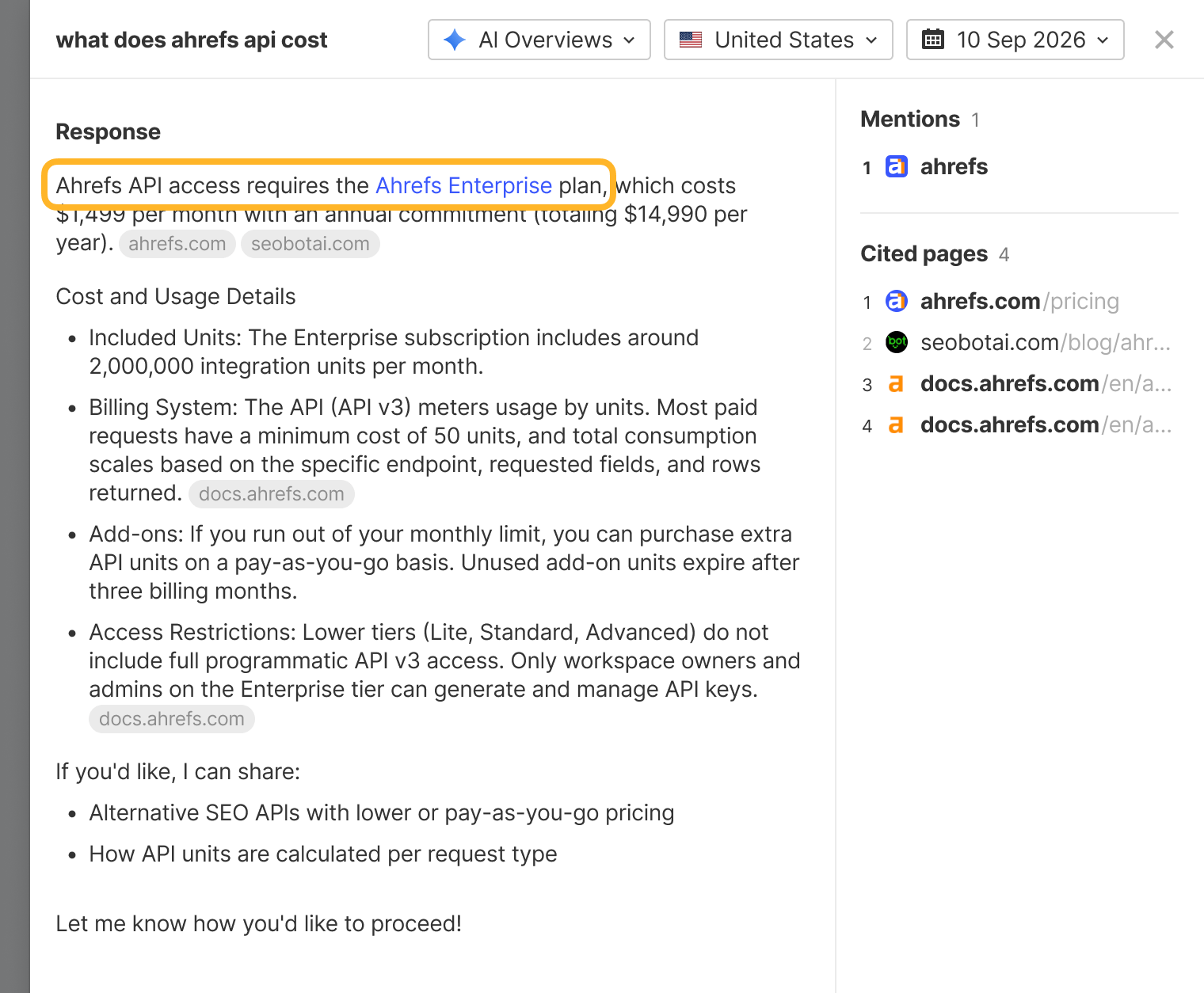
Once you’ve found an incorrect AI answer, the next question is: where did the bad information come from?
You can trace these errors back to their sources manually, but it quickly becomes time-consuming when you’re checking hundreds of answers. For larger audits, we recommend using AI to do most of the heavy lifting.
The manual version
This works well for a small number of prompts, and it’s worth doing once by hand even if you plan to automate it later.
The automated version
Once you’re reviewing hundreds of answers, doing this by hand becomes impractical.
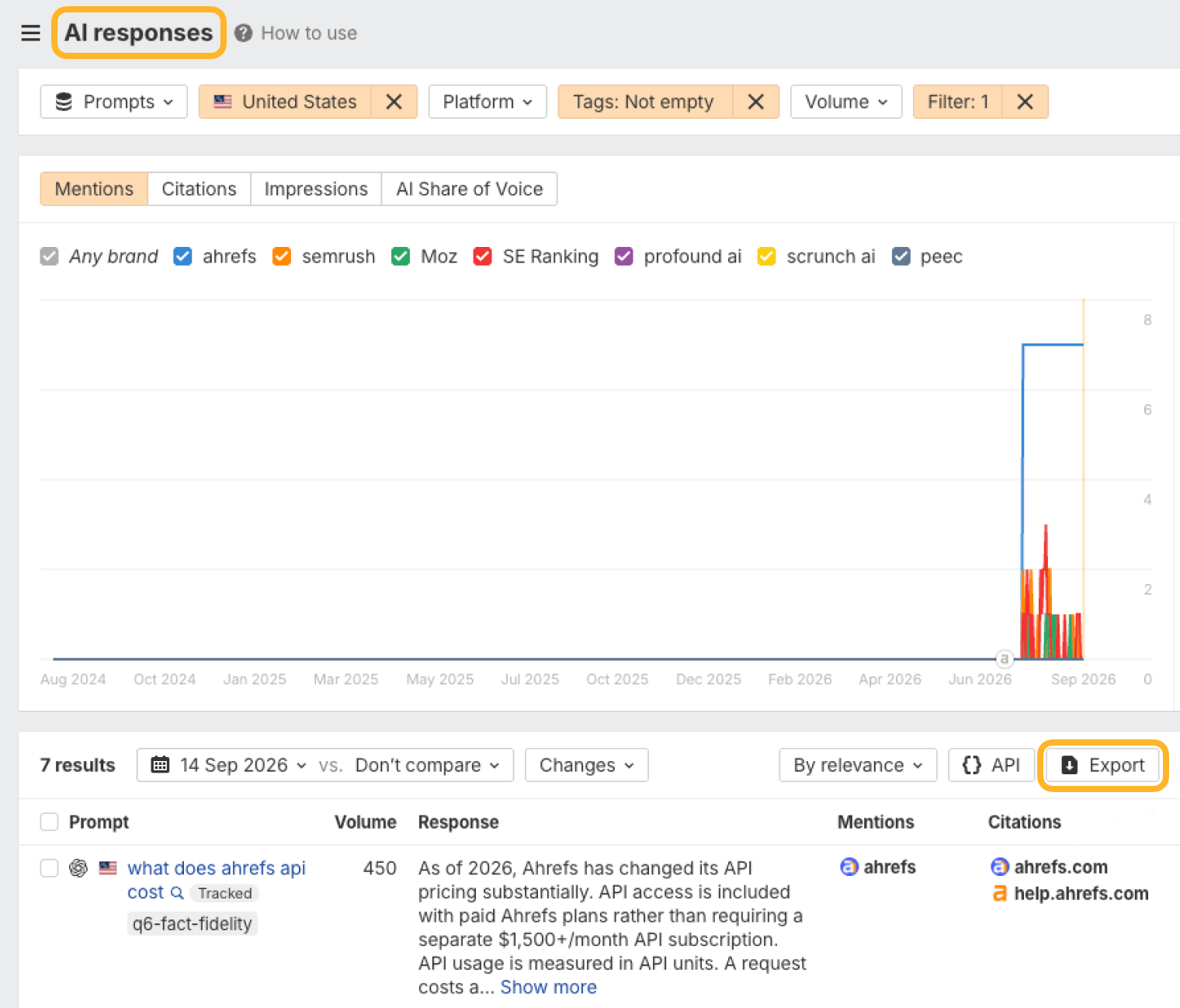
If you use Ahrefs, we built a fact-checking app in Letaido that automates the answer review, cited-page research, and prioritization using Brand Radar data.
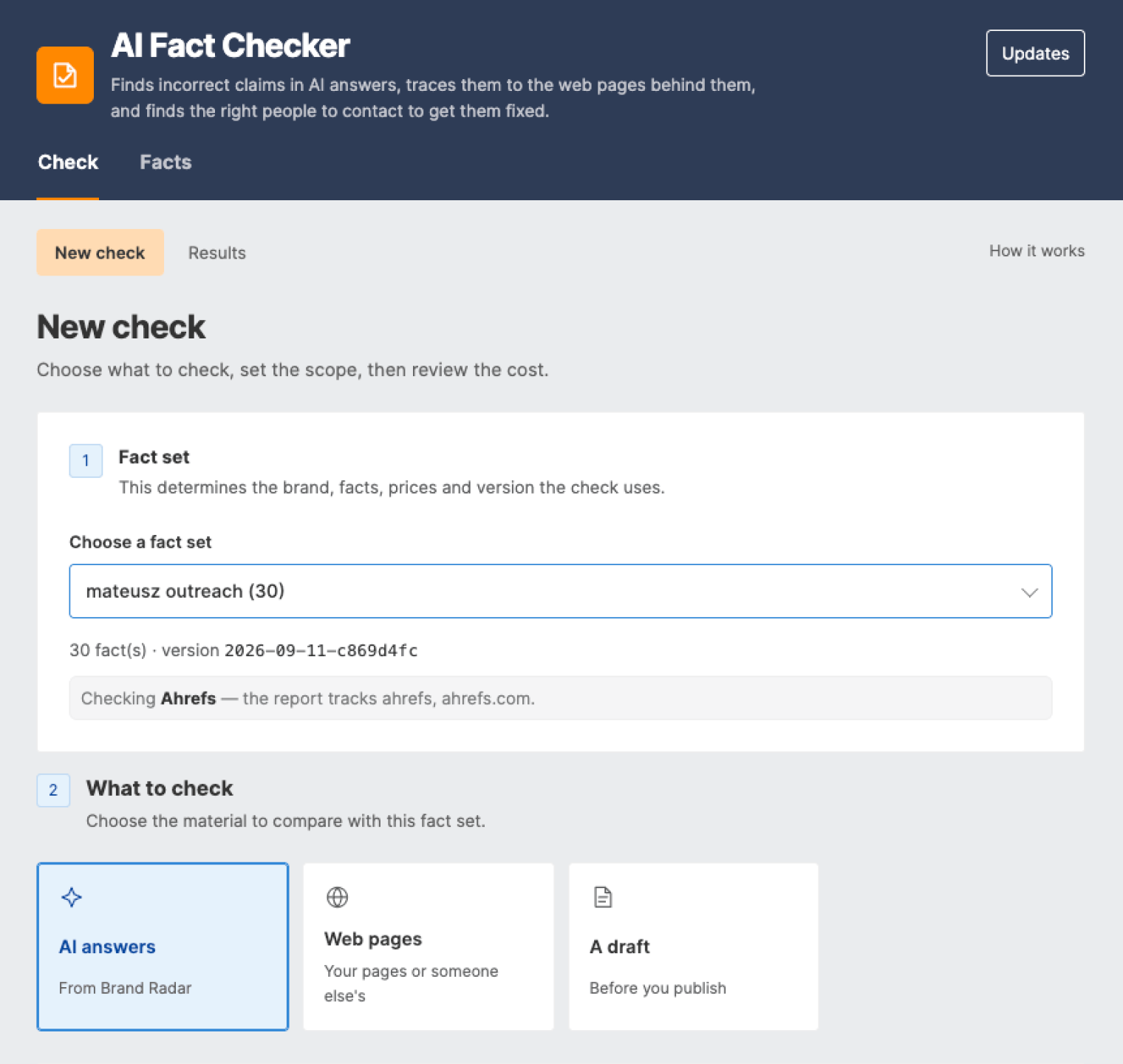
The app works in two main steps.
- Phase 1: Check the AI answer. You approve the facts. The app finds inaccurate claims in the AI answer, then checks the cited pages to see whether they state, contradict, or don’t mention each issue, with a verbatim quote as evidence.
- Phase 2: Audit the sources. You can then check cited pages against your full fact set to uncover other errors or important omissions. For pages worth fixing, the app finds the author and contact route (usually a social profile, such as LinkedIn), prioritizes them by impact, and exports the list to CSV or Word. For broader coverage, you can extend the audit to every page the AI retrieved, not just those it cited.
The same fact set can also check any web page or unpublished draft.
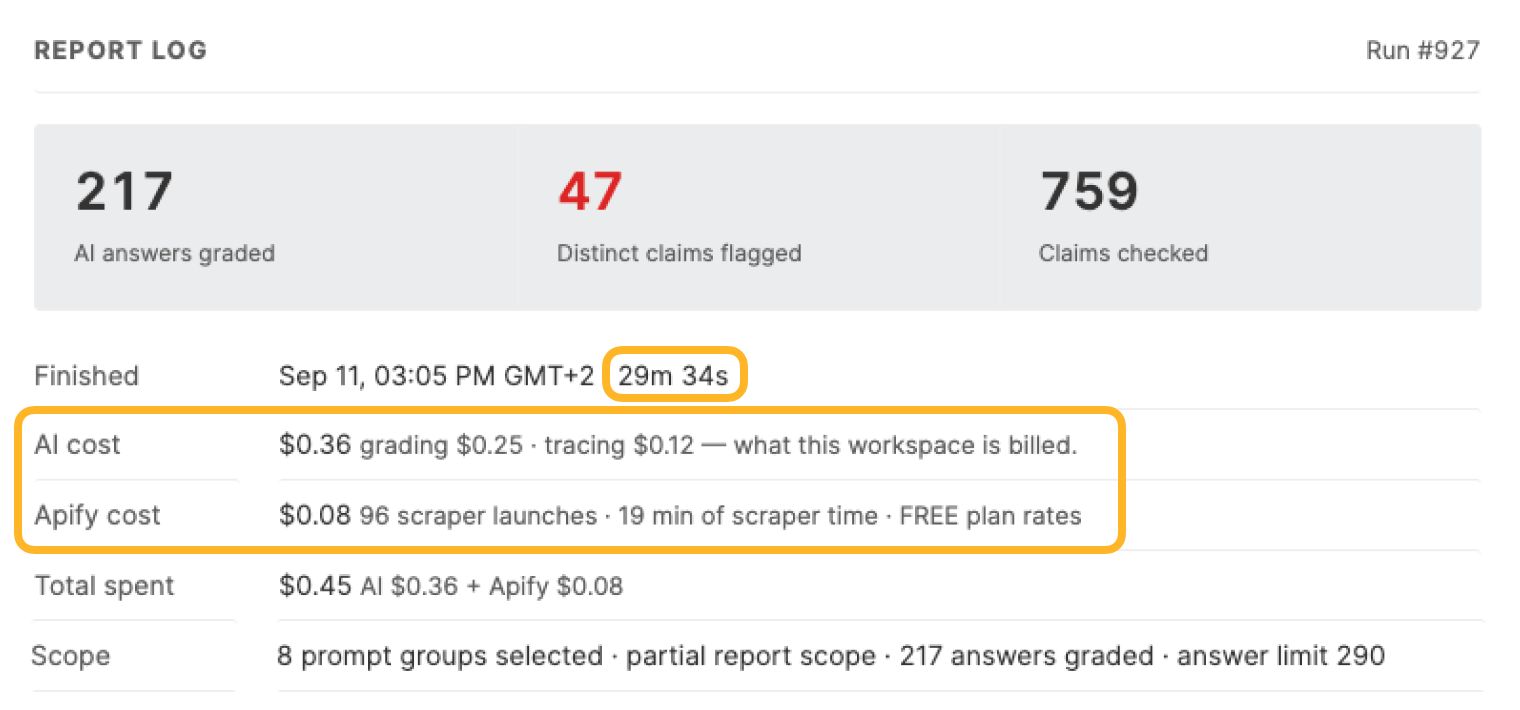
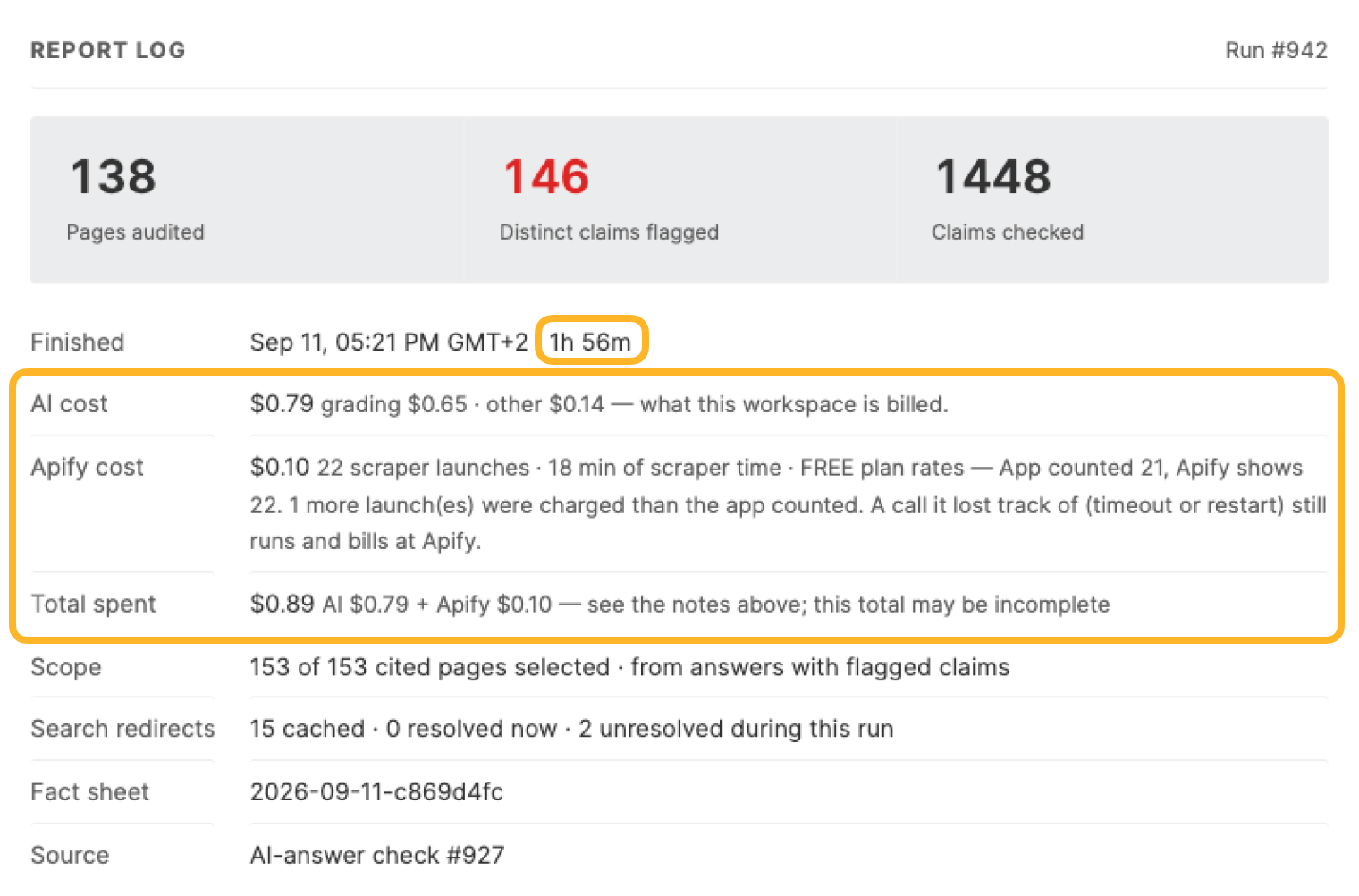
To give you an idea of the app’s costs, a check based on 30 facts, grading 217 answers, and 138 cited pages, costs a little over $1 in LLM tokens and took 2.5 hours (see screenshots below from both stages).
Prioritize outreach targets
Not every incorrect page is equally worth chasing. Prioritize the ones where a correction is most likely to improve AI answers or reach potential buyers directly.
Here are the main signals to look at:
- Severity: Fix errors that could affect a buying decision first, such as incorrect pricing, plan access, services offered, product limits, or missing features.
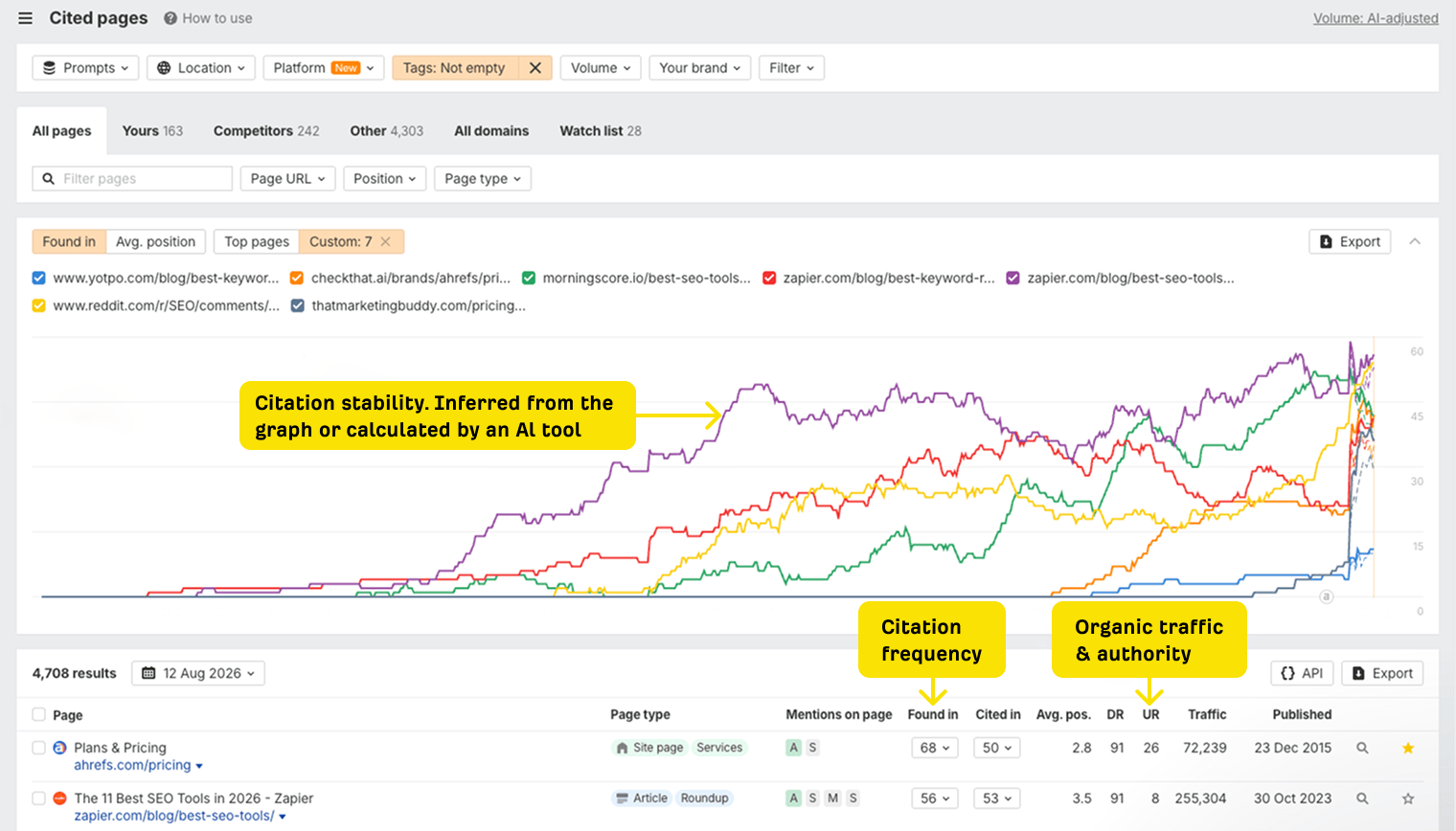
- Citation frequency: Pages cited often across answers or platforms have more influence than one-off sources.
- Citation stability: Sources that appear consistently across repeated checks are more valuable than those that show up once.
- Organic traffic: Pages with meaningful search traffic can reach buyers through both traditional search and AI answers.
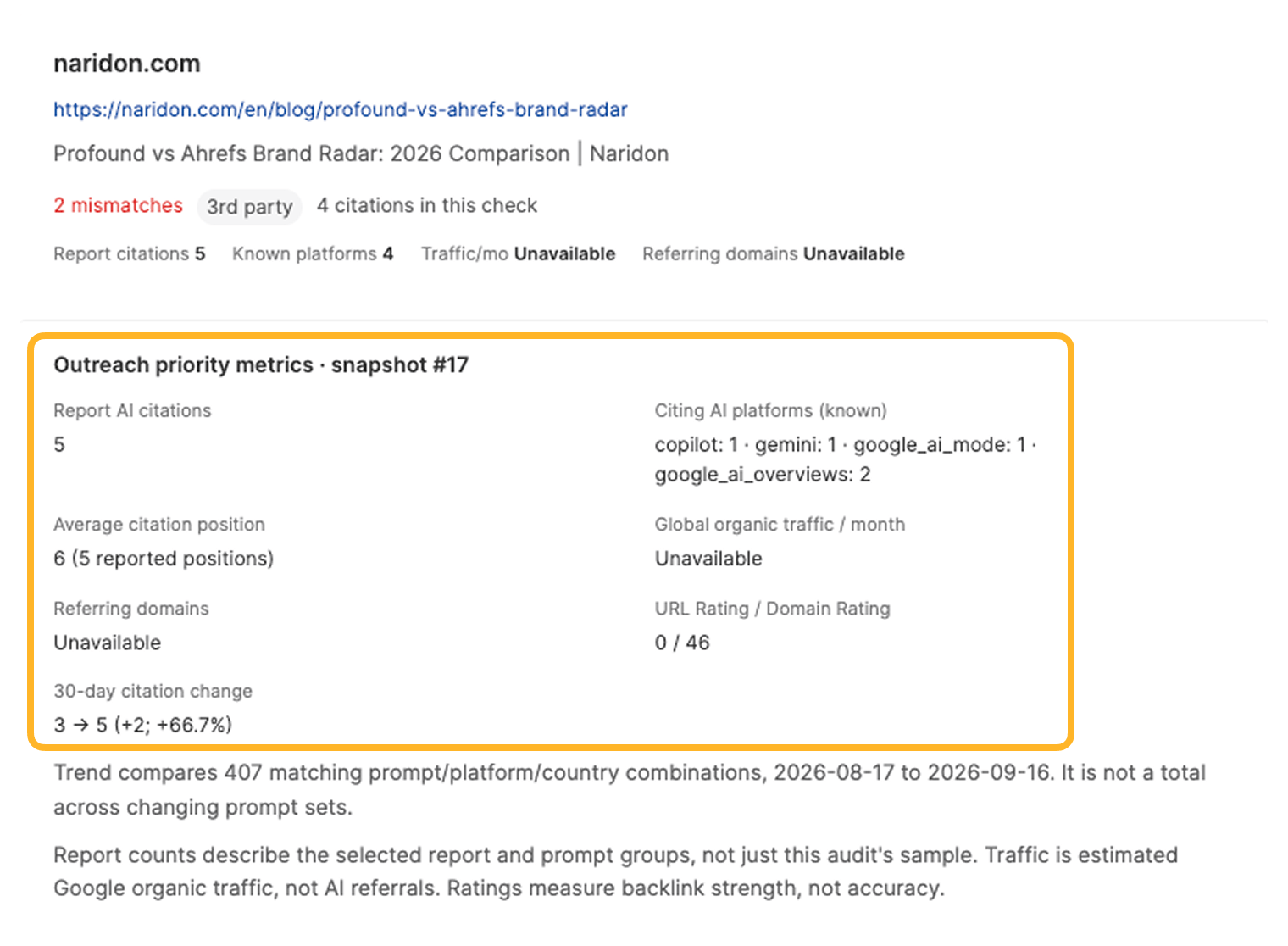
- Authority: Referring domains and Domain Rating can strengthen the case, especially when a page is also frequently cited and relevant.
- Relationship: Do you or a colleague already know the author? Could someone introduce you? Has the publication responded to you before? For example, for our campaign, Glen was the right person to approach one site because he already had a relationship with them. In another situation, the citation came from an influencer we already had relationships with, so our Partnerships team was the best fit to handle the outreach.
You can find some of that information in Brand Radar:
And if you’re using our Letaido app, the data is pulled from Brand Radar and served right next to the affected page:
Find the right contact
Once you’ve found a page you want to reach out to, the next step is figuring out who is actually responsible for it.
For a small number of pages, the standard web-fetching tools available in AI assistants are usually enough to pull the page and look for author or contact information.
At a larger scale, though, checking URLs one by one quickly becomes impractical. You’ll typically want to use a scraping API like Apify or another source of page HTML.
Our app first tries Ahrefs-stored snapshots. If that fails, it tries Apify, and if the contact can’t be found on the cited page, it follows the link to the author’s page (if linked) and tries again there.
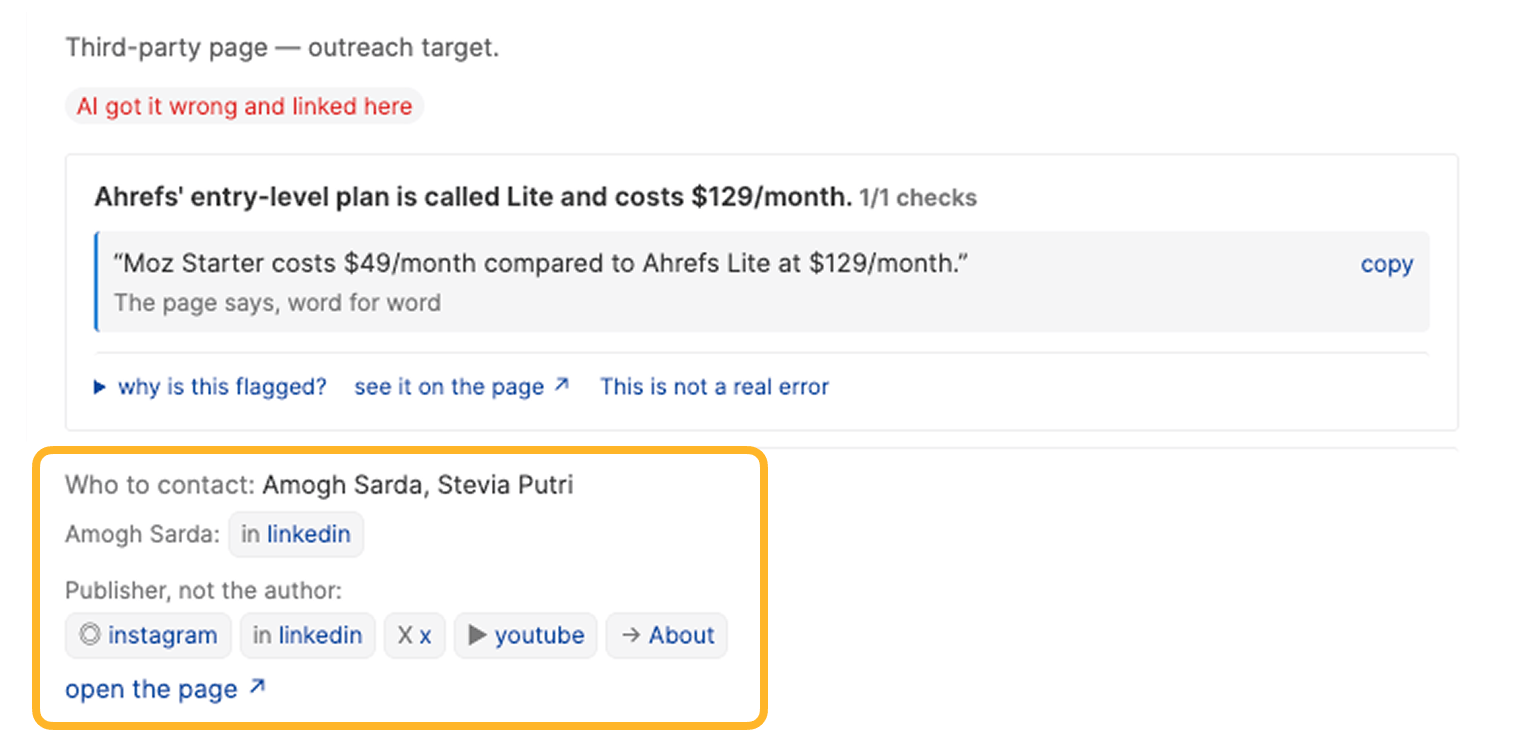
Start with the person named as the author. Check the article byline and author page first, then look at their LinkedIn or X profile if you need a way to contact them.
If you can’t find the author or they’re no longer there, move one level up. For a publication, that might be an editor or content lead. At a small company, the founder or marketing lead may be the best contact.
As a last resort, use the company’s general contact or support channel and ask for your message to be forwarded to whoever manages the page or content.
Tools such as HeyReach or BuzzSumo can help fill in missing contact details and identify likely people to approach. Many of them offer an API or MCP, so you can wire their functionality into an AI-assisted process.
Send a friendly correction request and follow up once
Keep your outreach helpful, not demanding. You can thank them for covering your product, point out one or two specific errors, link to a reliable source for the correct information, and make it clear there’s no pressure to update the page.
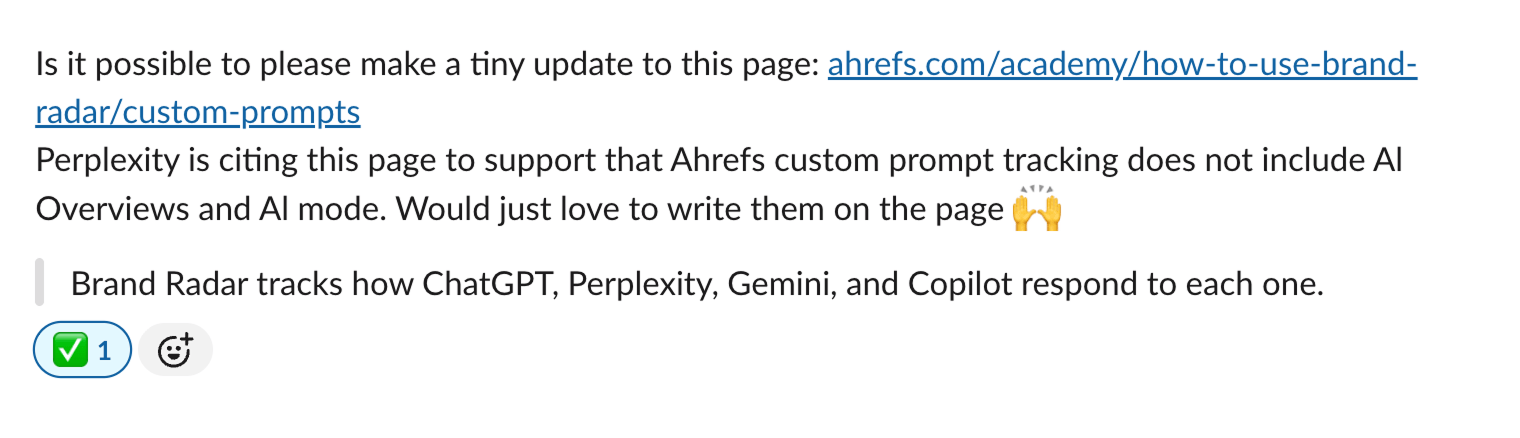
To illustrate, here’s one of the messages we’ve sent:
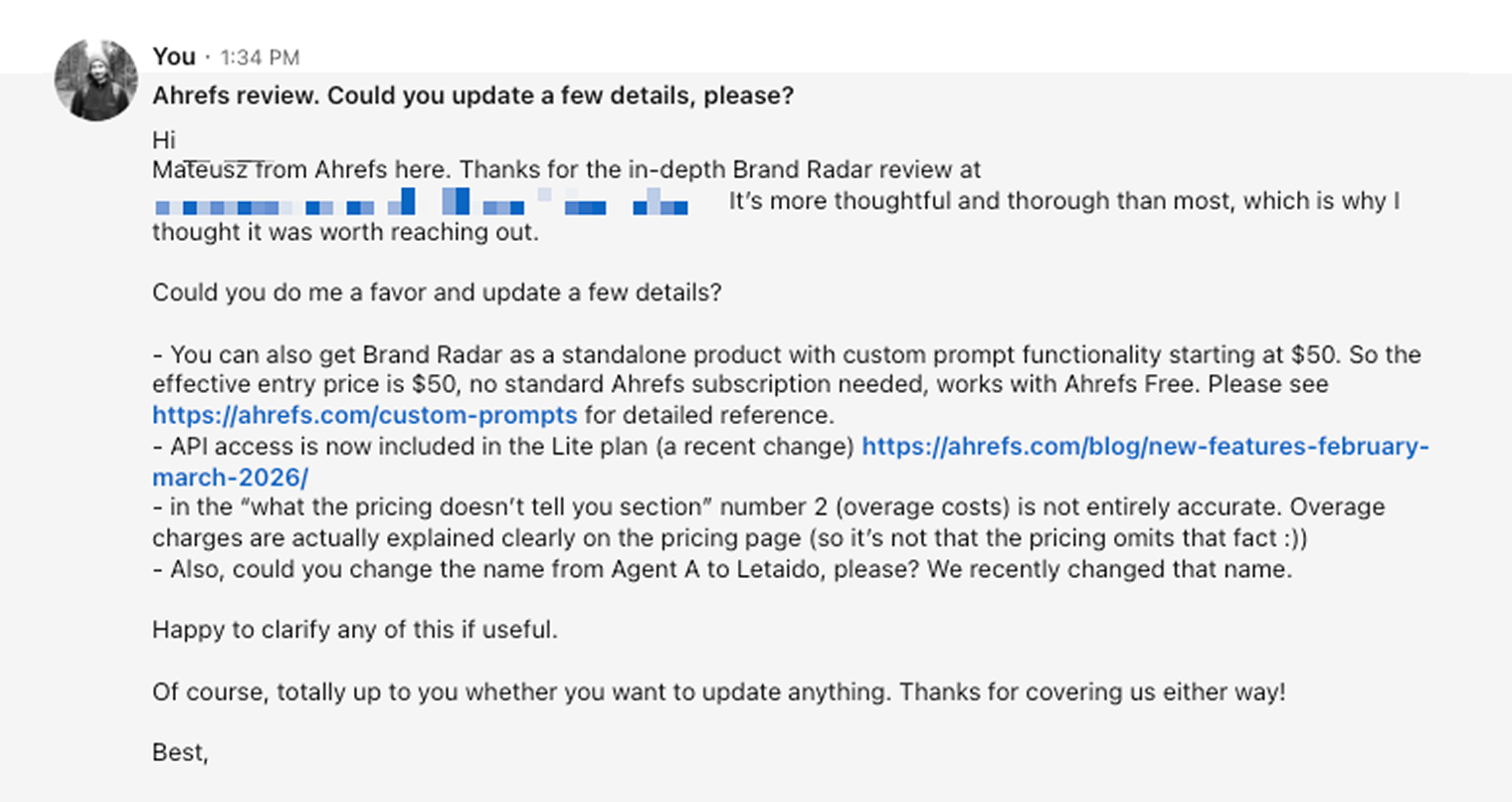
This lowers the barrier to starting a conversation, although it may be less effective because you’re asking the recipient to reply before they can see the value of the correction.
If you don’t hear back, follow up once. After that, move on to the next page on your list. Some of our follow-up messages actually worked.
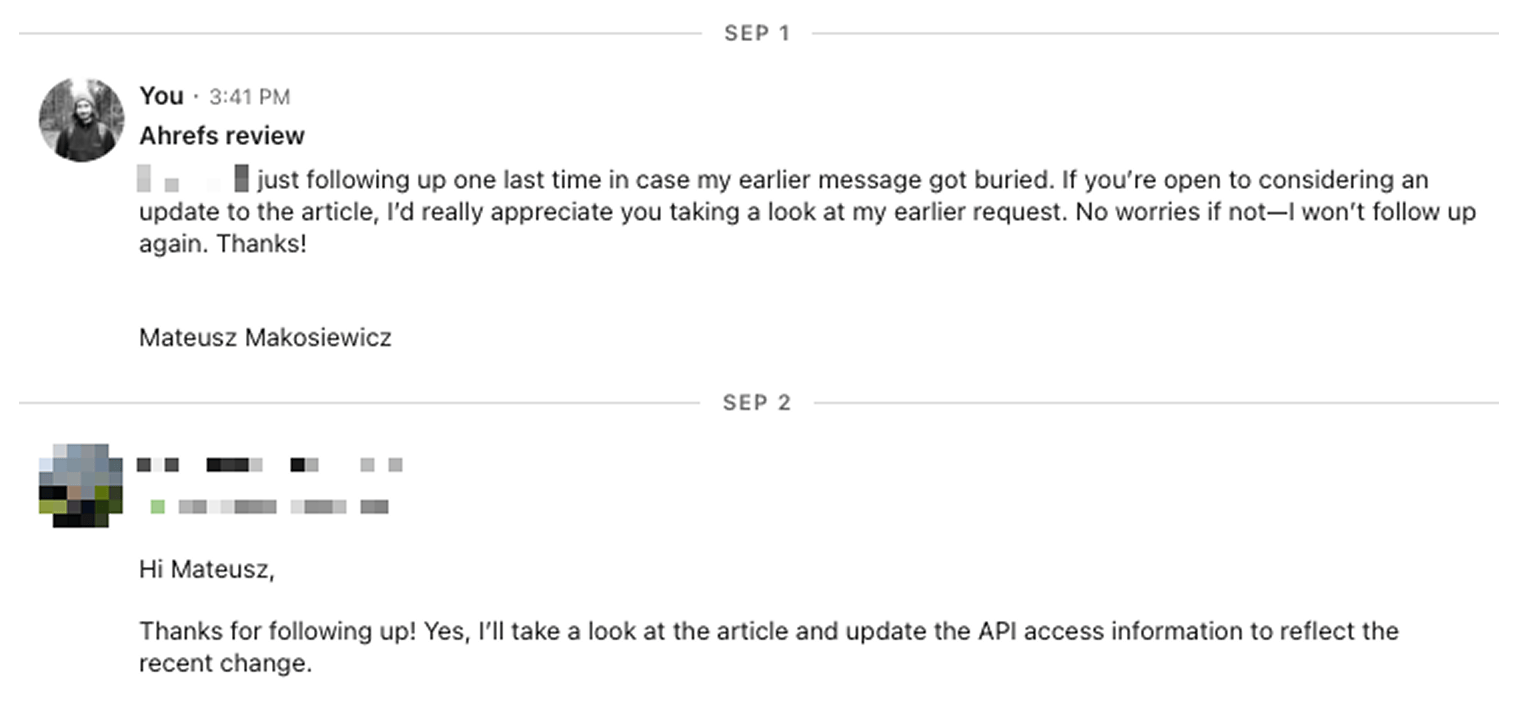
A few more practical tips for outreach:
Be friendly. Do not accuse the author of spreading misinformation or threaten them with reputational harm.
Assume the page became outdated rather than that the author acted in bad faith.
Keep the request specific. One verified correction is easier to act on than a long list of complaints.
Consider LinkedIn Premium or Sales Navigator if you need to send more direct messages or follow up without an existing connection. Sales Navigator allows you to send follow-up messages even if the first message wasn’t read by the recipient.
Track at least the URL, contact, outreach date, channel, claim to fix, response, follow-up, and confirmed change.
- And just in case, you can take a screenshot of the page before outreach. If you use a contact form, save proof that the message was submitted. If you’re using Ahrefs, you can use Site Explorer to document the changes on the page between dates.
What happened when we tried AEO outreach
We contacted 26 authors about inaccurate information in their articles. 14 replied (53.8%), and 6 made corrections we could verify on their pages (23%).
This is still ongoing, and of course, authors aren’t obligated to make any changes. Even so, getting nearly a quarter of the articles corrected is a promising result.
Here’s one of the outreach targets, before and after (diff view via Ahrefs’ Site Explorer).
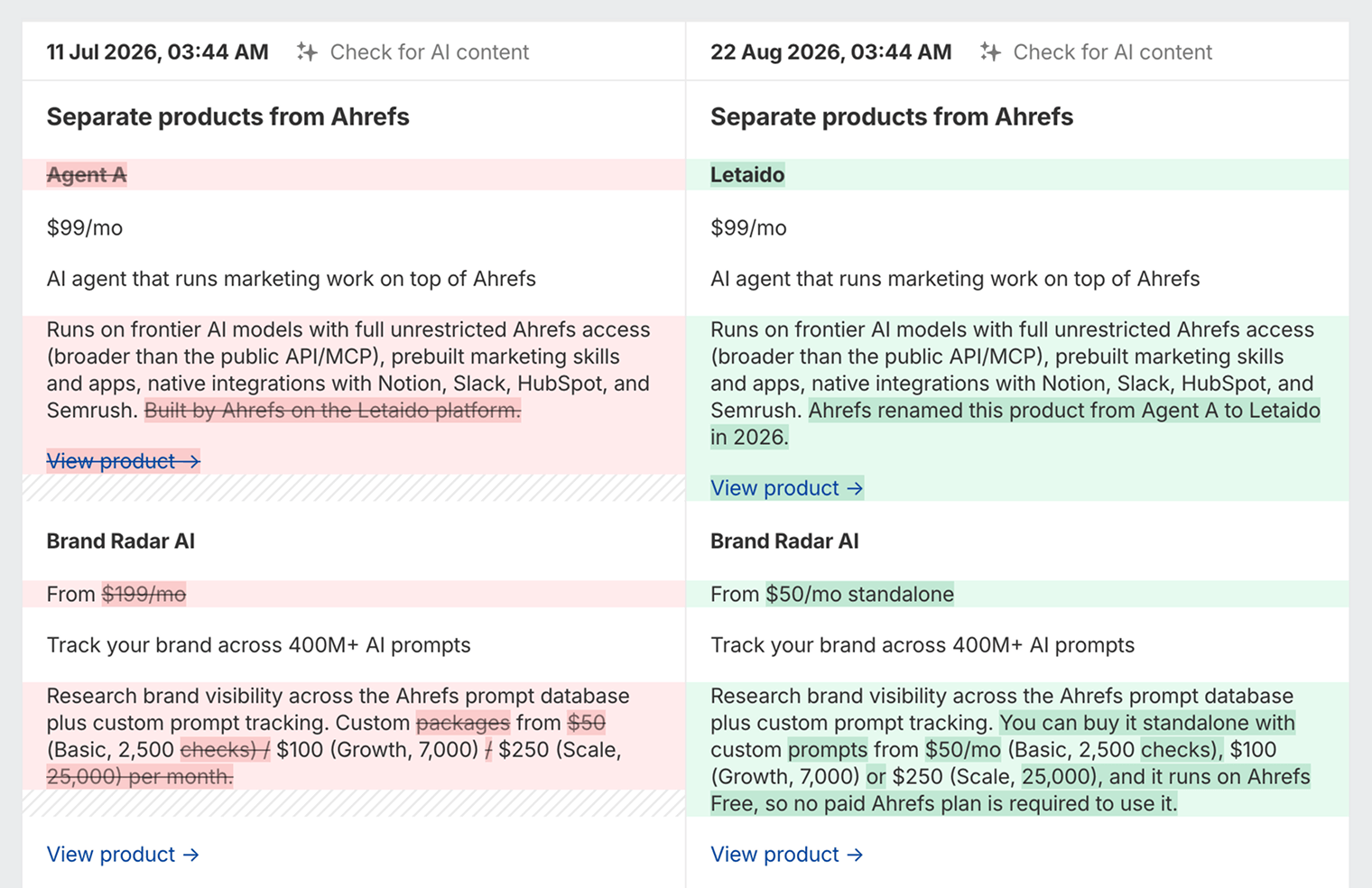
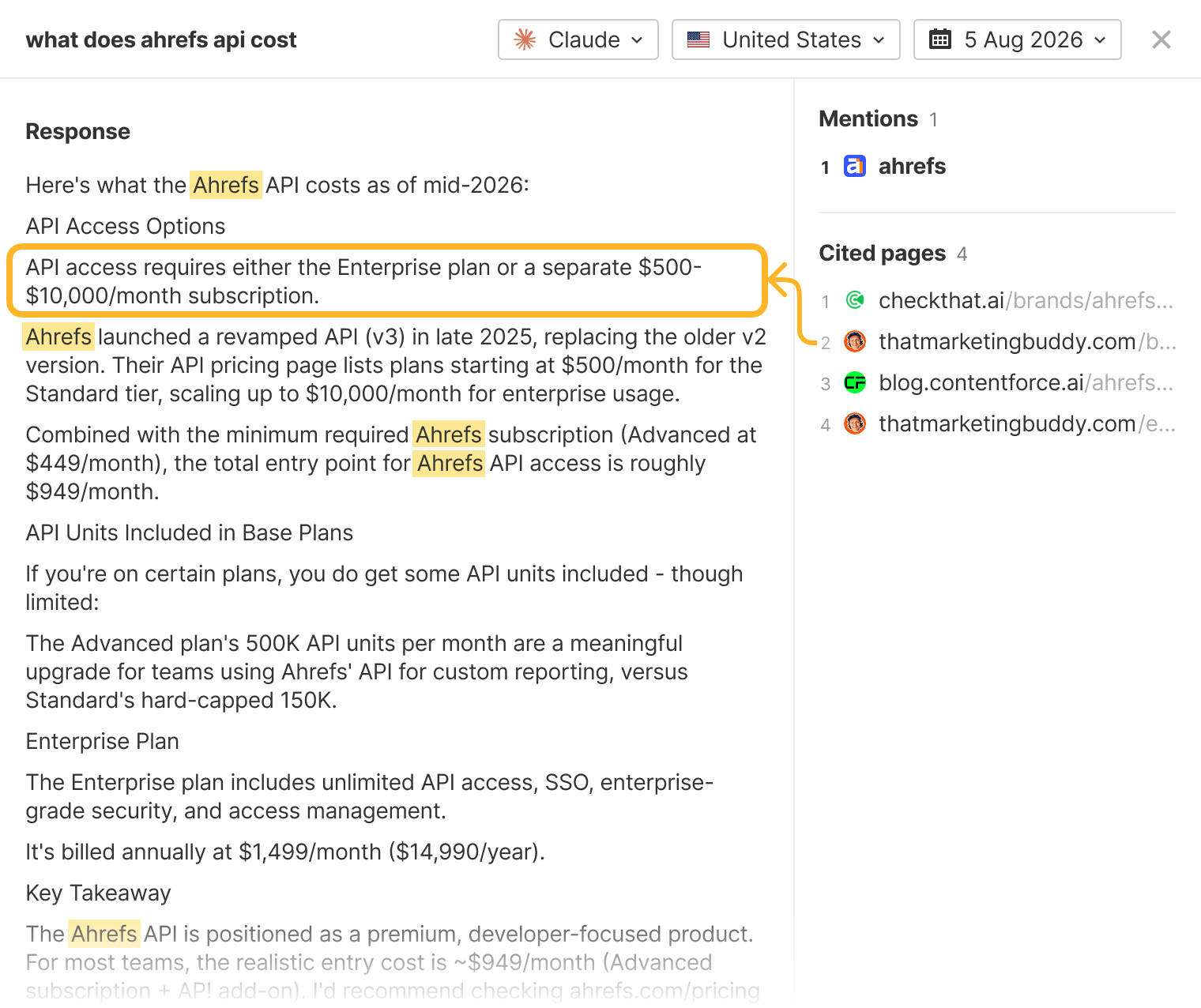
And yes, updating pages, even though we didn’t catch them all, did introduce correct facts in AI answers. Here’s an example (a big thank you to Joonas from thatmarketingbuddy.com):
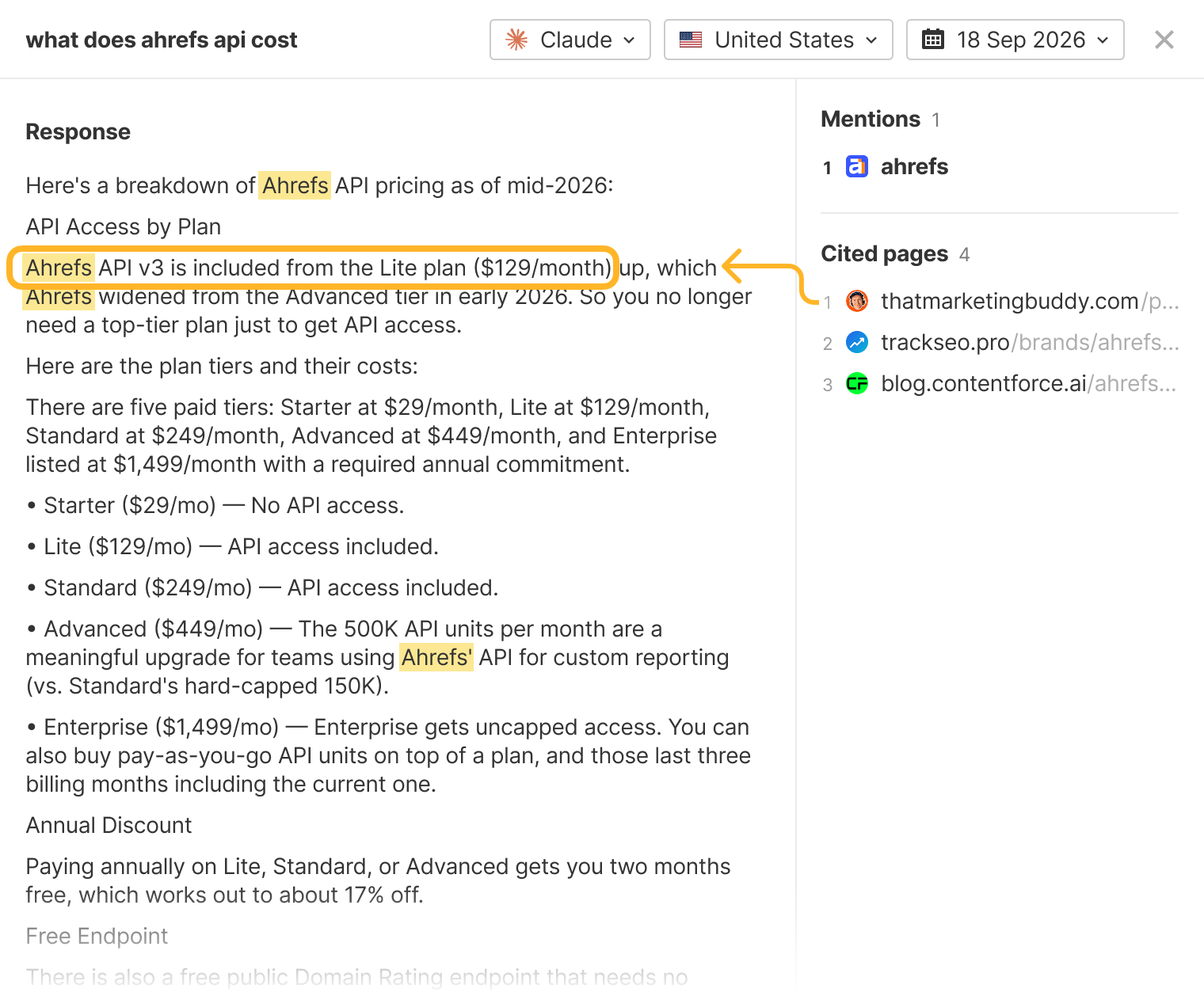
Two more authors said they would make changes, but those were still pending when we reviewed the results. We kept them out of the confirmed correction count.
For 12 of the 26 contacts, we received no reply.
We never received an outright refusal to update an article. Some authors, though, were willing to make a correction only if we mentioned or promoted their product in return. We declined. We felt that keeping published information accurate should be worthwhile on its own, and offering something in exchange would be unfair to the authors who made corrections without asking for anything.
The outreach also exposed a problem with our own explanations. Some of the confusion came from unclear descriptions of Brand Radar’s pricing and feature limits. That gave us something to work on ourselves: making it easier for someone writing about the product to understand what was included.
Getting a reply was easier than getting a change made. That’s worth remembering when you plan this work. You’ll need time to check whether promised updates happen, and you should expect some messages to go unanswered.
Why wrong AI answers won’t disappear anytime soon
I believe one change could make much of this problem go away: AI assistants should get fundamental facts about a brand from the brand itself. At the very least, they should flag when a claim comes from a third party and hasn’t been verified. Our Xarumei experiment showed just how ridiculous AI search can get when it doesn’t account for the adversarial nature of the web.
Until tech companies make that change, inaccurate information about brands will remain a problem—and a sign that AI assistants still have some growing up to do.
ChatGPT may already be taking steps to improve the quality of its answers. For example, it appears to add terms like “official” to fan-out queries and use the “site:” operator to pull information from specific websites, including brand sites. Lily Ray covers this in more detail in her article.
New errors will keep appearing, too. People will continue using AI to create content, so existing mistakes will get repeated, and new ones will be introduced when AI fills gaps with made-up information. Those pages then become sources for more AI-generated content, and the notorious slop loop continues.
By the way, we’ve been “on the other side of the fence”, too. During our self-promotion experiment, a competitor asked us to correct an error AI had introduced into our own content—despite our manual reviews and honest attempts to cite only verified information.
What you can do to reduce future inaccuracies in AI answers
You can’t control what AI assistants say, but you can make the correct information easier for them—and everyone else—to find.
Make your own product information unambiguous
Explain pricing, plan limits, and feature availability clearly. If your own copy leaves room for interpretation, third parties and AI systems will fill in the gaps—and they may get it wrong. Don’t repeat our mistake that caused many inaccuracies about Brand Radar.
Keep your old content up to date
Your own site can become a source of outdated information, too. When pricing or packaging changes, update older articles that mention it. We found three errors on our Ahrefs site during our audit.
Documentation and help content can also be an important source for AI search. To illustrate this, I picked Samsung as an example and looked at where its AI citations come from. I found that roughly half came from support documentation and buying guides. Samsung isn’t unique here—we see similar patterns across many brands, where practical, first-party content is frequently cited in AI answers and used by AI agents.
Where Samsung’s AI citations come from
Share of all AI citations by URL pattern, sorted by citation rate. Samsung domain, top 1,000 cited pages.
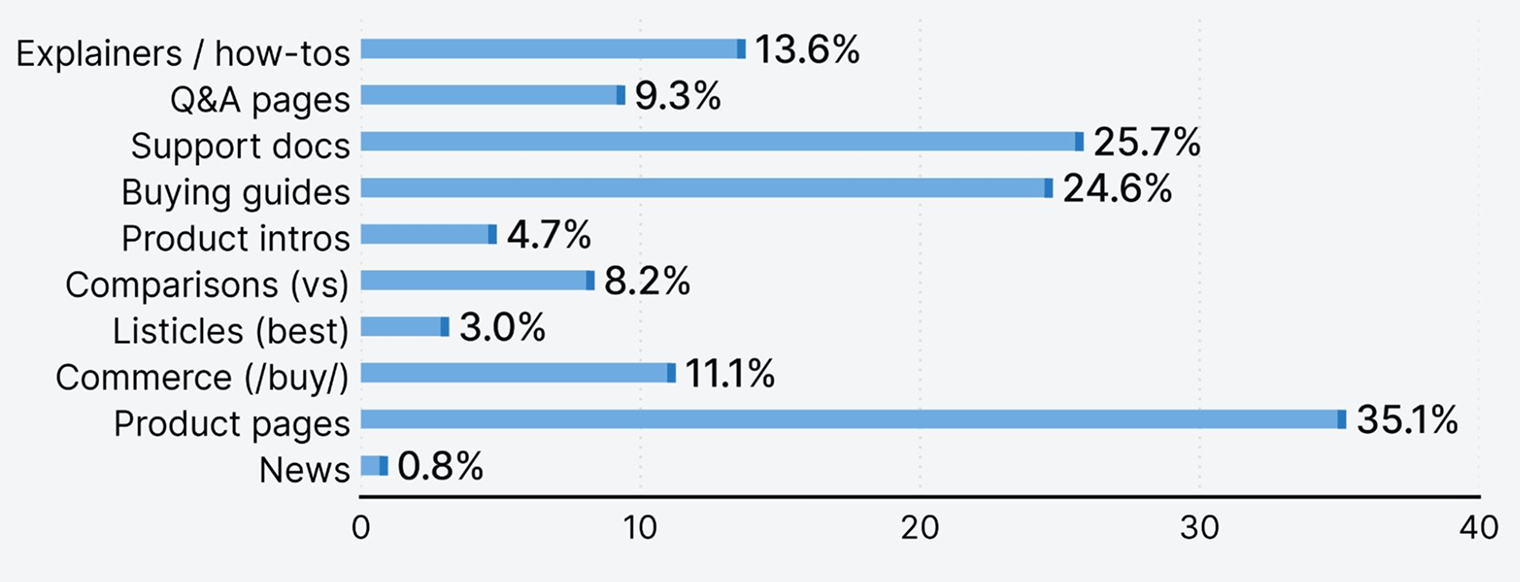
Source: Ahrefs via Letaido
Make your product facts easier for agents to access
Longer term, consider publishing a canonical, machine-readable source of product information. That could be an MCP endpoint, like Mobbin’s, an RSS feed of pricing and functionality updates, or another approach to agentic resource discovery, as Suganthan Mohanadasan has already implemented.
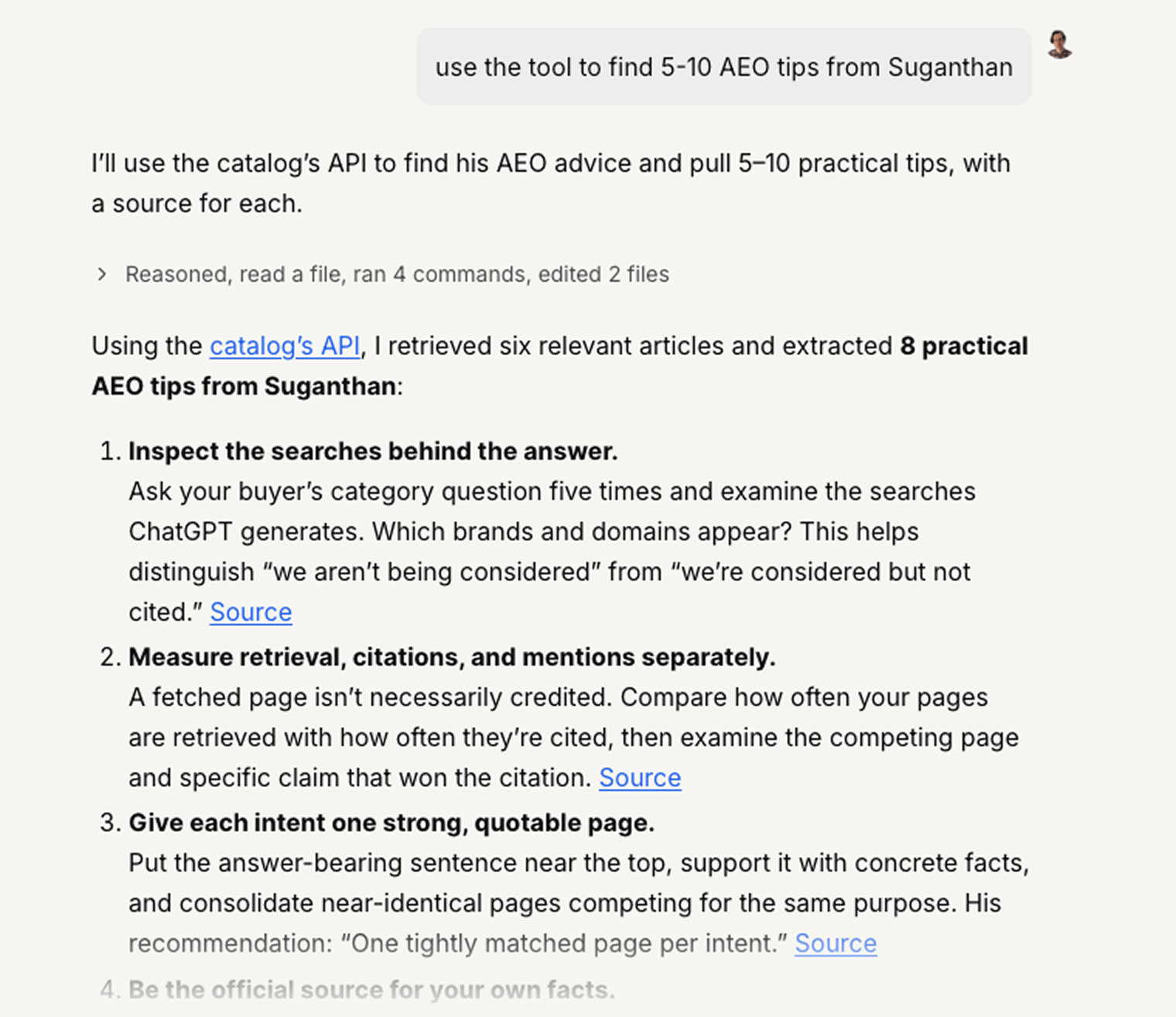
None of this guarantees that an AI assistant will use your information. But the easier you make it to find the current, canonical facts, the less room there is for outdated third-party information to fill the gap.
Proactive brand monitoring
This means monitoring brand mentions across the web and reacting quickly when you spot inaccuracies. In my experience, content creators care most about their work right after publishing, so reaching out early gives you a better chance of getting them to fix the page.
Of course, this doesn’t guarantee anything. You don’t know whether a particular page will ever be cited in an AI answer. But acting fast may stop misinformation from making its way into some AI responses.
You can also look for signals that a page is more likely to get cited. Its DR, reputation, and relevance to the topic you care about can all be useful proxies—especially if you’re operating in a narrow niche with only a handful of relevant pages on the web. Freshness can matter too, particularly when a new page is more up to date than the sources AI systems are already citing.
You can set up brand mention monitoring with a tool like Firehose.
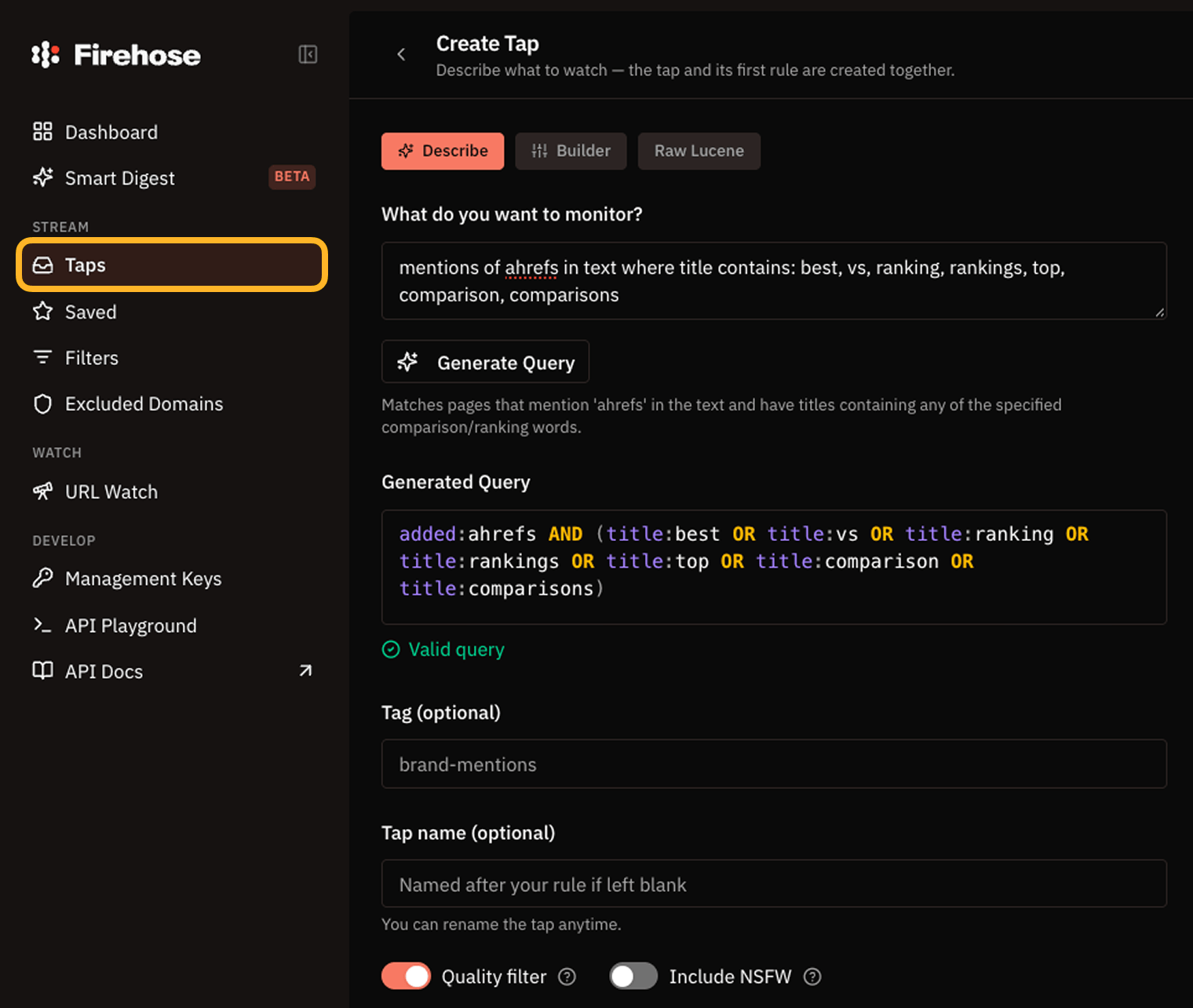
You could also connect your agent via API and have it automatically fact-check each new source as soon as it’s found, giving you near-real-time monitoring.
Note for publishers
If you maintain comparison or pricing posts, you can automate the update loop. Kamila Olexa built a pipeline that watches competitor pricing pages, extracts the new tiers, finds every post that mentions them, rewrites just the pricing sections, and asks for approval in Slack before publishing. Here’s how it works.
Final thoughts
Web mentions have become a currency. Getting your name onto certain pages costs, and apparently, getting your brand represented accurately can cost, too. That matters because where your brand is mentioned online—and what those mentions say—can have a huge impact on how visible you are in AI answers.
That’s why an app like ours, which automates the process of finding and fixing inaccurate information, can be so useful. But as we found out, unless you’re prepared to offer something in return for someone updating information about your brand, you may not get very far.
The bigger problem, though, is something AI developers need to address: how AI systems choose which sources to trust when answering questions about brands. Right now, that process doesn’t really serve anyone.
You can’t expect every content creator or website owner to constantly check their facts and keep information about every company up to date. But you can expect a business to care about keeping its own information accurate. It has every reason to—wrong or outdated information can directly hurt its business.
AI systems should be better at recognizing that. When it comes to basic facts about a company, accurate and up-to-date information from the business itself should carry more weight than an old mention on a third-party website.
Mateusz Makosiewicz is a marketing researcher and educator at Ahrefs. He has been involved in marketing for over 15 years, specializing in growth marketing, content marketing, marketing strategy, and management.
Mateusz studied Advertising and Media Marketing at the University of Gdańsk. He gained his marketing experience in agencies, SaaS companies, and hardware companies where he worked in various roles, from managing advertising projects for clients to leading marketing departments.
On the Ahrefs blog, he writes about SEO and marketing based on experience drawn from testing probably every piece of marketing advice ever published, trial and error in startup marketing in Silicon Valley, and tweaking growth engines like his life depended on it.
Explore all AEO guides
What Is Answer Engine Optimization (AEO)?
Start here. What AEO is, how it differs from SEO, and the seven steps to getting started.
How Answer Engines Work
What actually happens between a prompt and an answer — and where your brand can enter the process.
How to Track AI Visibility
You can’t optimize what you can’t see. Seven ways to measure where your brand shows up in AI answers.
How to Choose the Best Prompts to Track
Track clusters of prompts, not one-off responses. Eleven places to find the queries worth monitoring.
How to Optimize Content for Answer Engines
Ranking gets you considered. This is how you get cited — the topics, formats, and on-page changes that work.
How to Monitor and Win Brand Mentions in AI Answers
AI recommends the brands it has seen discussed elsewhere. Here’s how to monitor those mentions and earn more of them.
How to Optimize Your Website for Answer Engines
The technical fixes that decide whether AI can reach your pages, read them, and work out who you are.
How to Spot and Fix Mistakes in AI Answers
Find and fix inaccurate AI answers by tracing bad sources, correcting misinformation, and improving your brand’s visibility across AI search.