
YouTube SEO for AI Search: How to Rank your YouTube Videos
YouTube is the most cited domain in Google's AI overviews.
According to Ahrefs' data, YouTube mentions have a 0.737 correlation with ChatGPT visibility, the strongest correlation of any factor studied.
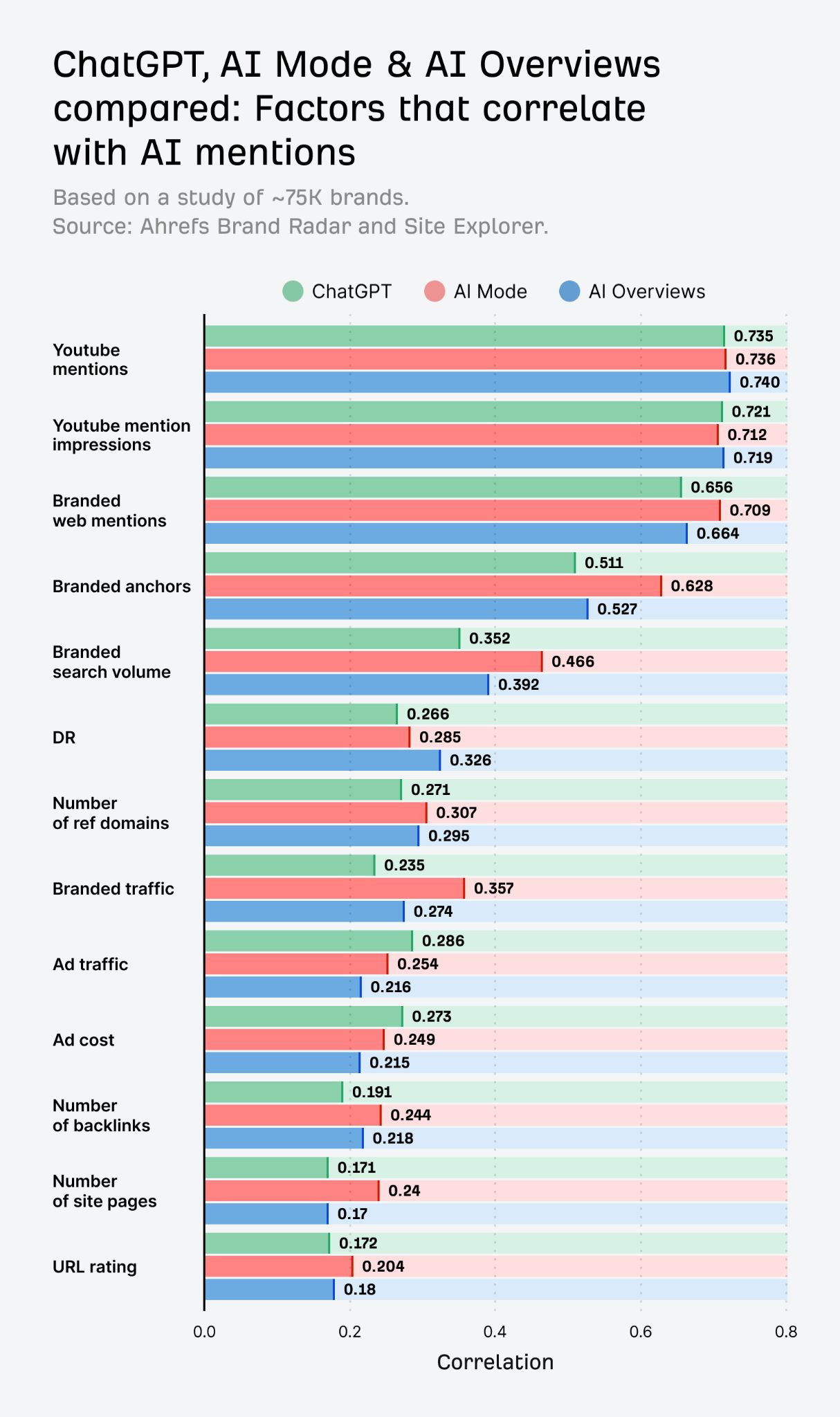
This makes sense given that GPT-4 was trained on over a million hours of YouTube transcripts. YouTube isn't just a platform AI cites, it's a platform AI learns from.
This lesson walks through a three-step process to get your YouTube videos in front of AI.
Step 1: Find what's already working on YouTube in your niche
The key idea here is to target what can be called search hits rather than viral hits.
A viral hit gets you a spike of views that keeps spreading based on YouTube users' interests, but once the algorithm has exhausted the interested audience, it dies off.
A search hit gets you consistent traffic from both Google and YouTube search month after month, because people are actively searching for that topic.
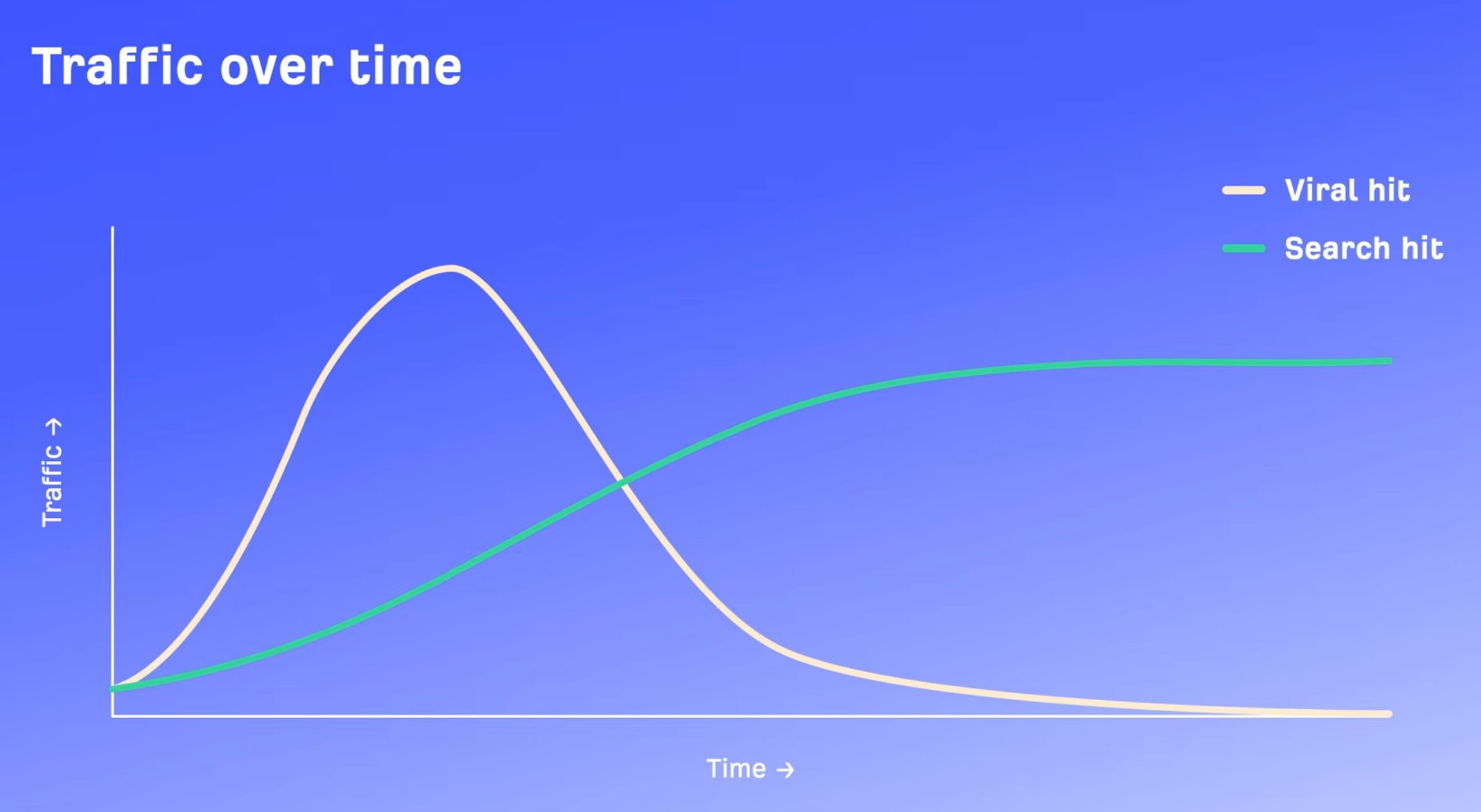
Search hits are exactly the kind of videos AI is likely to pull from.
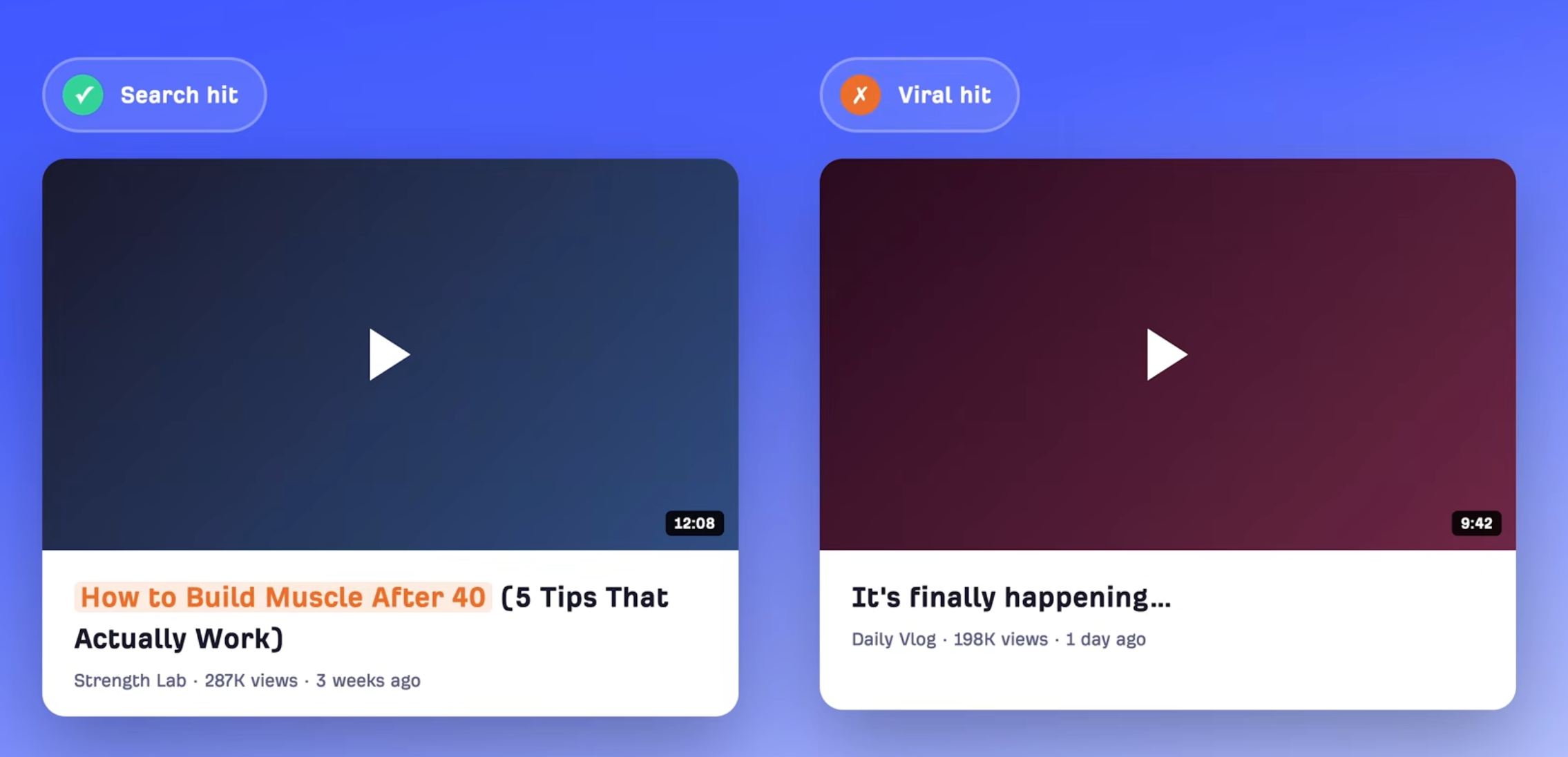
If Google is already ranking a YouTube video for a keyword, there's a good chance AI overviews will cite it too. On top of that, titles for search videos tend to be very clear about what the video covers, whereas viral hit titles often aren't.
Here's how to find these topics:
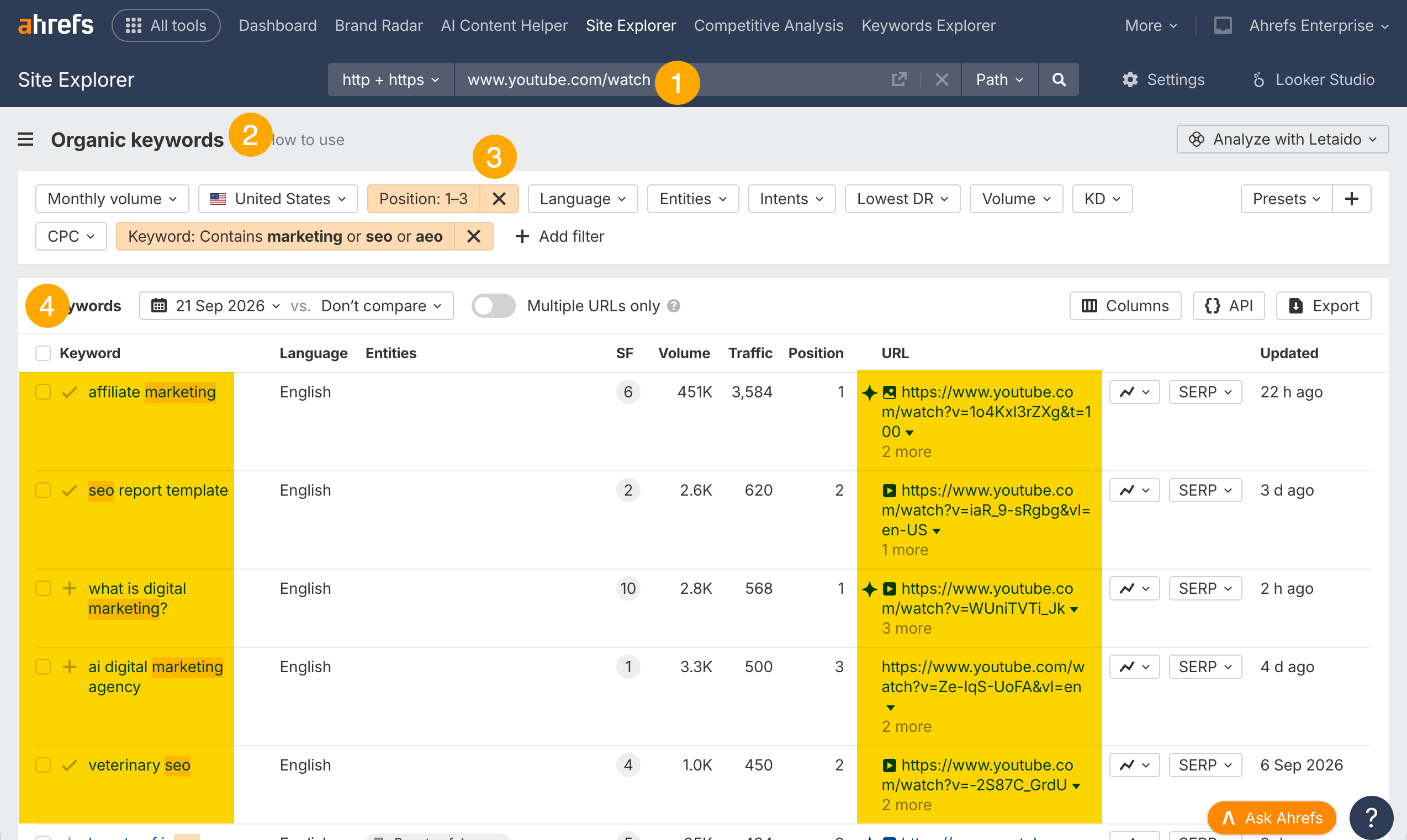
Go to Site Explorer and enter "www.youtube.com/watch"
Open the Organic Keywords report. This shows every keyword that YouTube videos are ranking for in Google
Filter for keyword rankings in the top three
Add your niche terms to the include filter
Step 2: Create Videos That Rank
Once you've found your topics, you need to make sure your video is set up to rank in Google. Follow this checklist:
Title contains the keyword people are searching for. This isn't the place for clever or clickbaity titles. If the keyword is "how to use Google Docs," that phrase should be right in your title. Save the creativity for the thumbnail: the title handles the keyword, the thumbnail sells the click.
Description is a real summary of the video. Write a genuine summary of what the video covers and add your target keyword in the first couple of lines. Google reads this, AI reads this, and viewers read it, so make it count.
Add timestamps. Timestamps turn into YouTube chapters, and those chapters can show up in Google for specific queries. If your video covers five tips and someone searches for tip number three, Google can link directly to that chapter, essentially free extra visibility for about two minutes of work.
Say the keyword in your video. Google understands audio content and video content, as Liz Reid, VP of Search at Google, has confirmed. So if your video is about "the best protein powder for repair," actually say those words in the video rather than only putting them in the title.
Match the format to what's already ranking. If tutorials dominate the search results for your keyword, make a tutorial. If listicles rank, make a listicle. Don't fight the format, match what's already working because that matches the intent of the searcher.
None of this is complicated, but it's the difference between a video that gets buried and one that shows up every time someone searches for that topic.
Step 3: Layer in AI Visibility
At this point you have a video optimized for Google search, but there's a further step for AEO (AI Engine Optimization).
Go to Brand Radar and enter a popular brand or YouTube channel
Open the Topics report
Set a filter where the domain mentioned is "youtube.com"
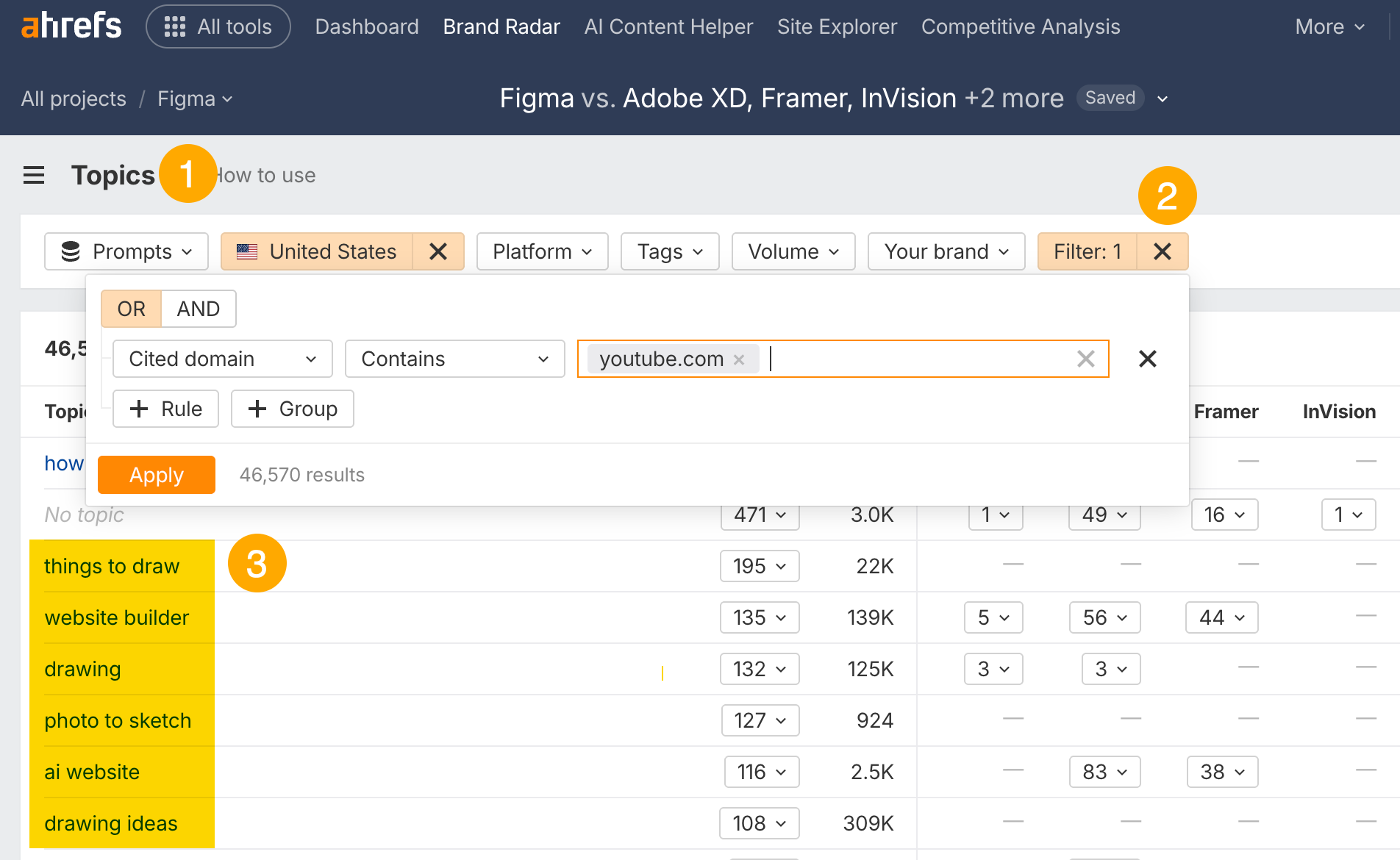
This shows exactly which queries AI is pulling YouTube videos into, so you can go create content around those topics.
As for how to actually rank there, it comes back to what was already covered: pick the right keyword, make a thorough, well-optimized video, and be comprehensive without wasting people's time.
Every video you publish on YouTube is potentially training data for AI models. Even if a video doesn't get cited right away, the content is being absorbed. The more helpful, specific, and well-structured your videos are, the more likely AI is to learn from them and eventually recommend them.
Check out some of the articles on the Ahrefs blog to learn about AEO:
Answer Engine Optimization (AEO) Course
What you'll learn
The fundamentals of how AI search works and why AEO matters
How different AI platforms decide what to cite
How to find gaps between your brand and competitors in AI search
How to do keyword and prompt research for AEO
How to create content that AI wants to cite
How to earn brand mentions across the web
How to optimize YouTube videos for AI visibility
Technical AEO best practices
How to track AI traffic and measure your progress
