Add a top 1% marketer to your team

Backlink Checker
Try the free version of Ahrefs’ Backlink Checker. Get a glimpse into the power of our premium tool.
The most powerful backlink checker
Ahrefs has the second most active web crawler after Google, which means we have the best backlink database in the industry.
Our backlink index is updated with fresh data every 15 minutes.
Check any website’s authority
as you browse
Unlock Domain Rating (DR) and URL Rating (UR) metrics with our browser extension and free Ahrefs account.
Also available for Firefox.
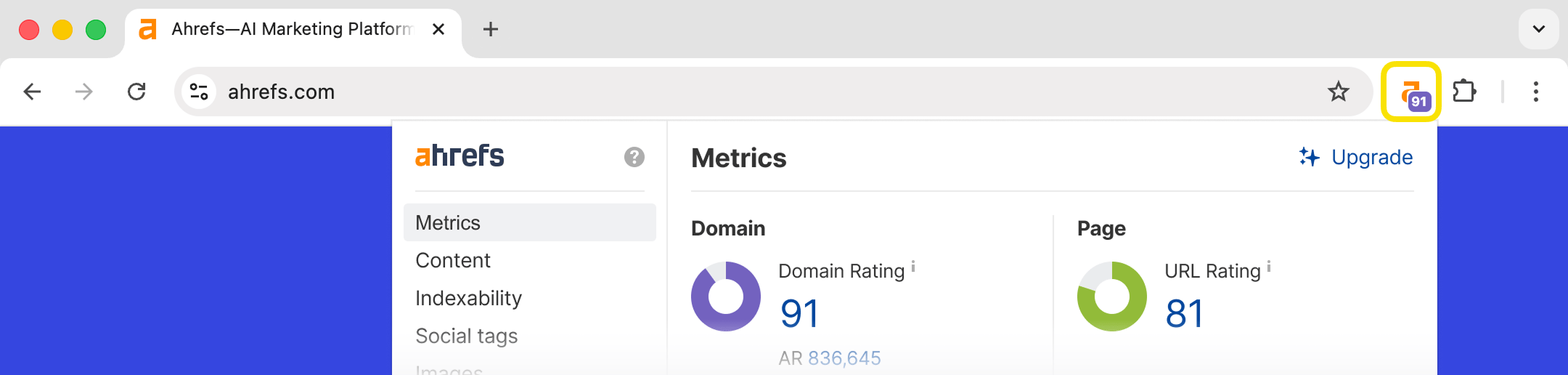
See domain and page-level metrics for any target
Check any website, URL or subsection to see actionable and insightful SEO metrics:
Number of referring domains
Number of backlinks
Domain Rating (DR)
Ahrefs Rank (AR)

Our proprietary Domain Rating (DR) metric is super-useful for judging the “backlink popularity” (strength) of a target.
Monitor the growth and decline of backlink profiles
See an interactive view of referring domains and pages over time.

Get a complete breakdown of the target’s backlink profile
See every page linking to your target in the detailed Backlinks report. Use powerful filters to dive deeper.
Link type (“dofollow” / “nofollow”)
Platform
Domain Rating (DR)
URL Rating (UR)
Referring domains
Etc

See estimated organic traffic to each linking page & referring domain
Get awesome insights into the popularity of the linking web page and website with organic traffic estimates. No other tool shows you this.
See all websites linking to your target with domain-wide metrics
Check the Referring domains report to see every linking domain, along with useful SEO metrics.
Domain Rating (DR)
Referring domains (followed)
Linked domains (followed)
Estimated organic traffic
Links to target (total & followed)

Find any linking domain with the handy search function.

See the most linked-to pages
Find "linkworthy" pages by researching your competitors' most linked-to pages with the Best by links report.

Use the "404 not found" filter to find highly linked-to broken pages on any website and kickstart a broken link building campaign.

See a complete breakdown of all outbound links
The Linked domains report shows SEO metrics for every outbound linked domain.
Domain Rating (DR)
Ahrefs Rank (AR)
Total followed referring domains
Total followed linked domains
Estimated organic traffic
Number of links from the target (total & followed)

We also show the target's broken outbound links in the Broken links report, and a full breakdown of outbound linking anchor text in the Anchors report.
In-depth link analysis features
Here are more features that make Ahrefs’ Backlink Checker special:
- See followed and nofollowed links — The more quality followed backlinks a site has, the more trustworthy it is in the eyes of Google. Ahrefs shows you the complete picture of followed vs nofollowed links for any target.
- Backlink anchor text — Analyze anchor texts to see how your competitors optimize their backlink profiles. Use anchor text analysis to detect possible negative SEO attacks on your website.
- Disavow link spam — If you notice some suspicious backlink activity, you can add spammy links to a disavow file directly from the Backlink Checker. Importing this file into Google’s Disavow Tool takes only a few clicks.
- Export to PDF and CSV — Need to report on your findings or download a report for further analysis? Simply export your data and reports to a PDF or CSV file.
- Inbuilt filters, in every report — Analyze the data you care about, and nothing else.
In a nutshell, Ahrefs’ Backlink Checker is a powerhouse capable of pretty much any backlink research task.
We're constantly evolving the tool and introducing more useful features and data for SEO professionals.
Link Building Guides
The Beginner’s Guide to Link Building
Everything you need to know about link building for SEO. What it is, how it works, what makes a good link, how to build it and more.
9 Easy Link Building Strategies (That Anyone Can Use)
Are you struggling to build backlinks to your website? Try these 9 easy (yet effective) link building strategies today.
The Only 8 Link-Building Tools You Need (Free & Paid)
You don't need dozens of link building tools. You just need 8 of them. Here are the 8 we recommend.

