

To help solve this problem, SEO tools like Ahrefs give keywords a “difficulty” score from 0 to 100.
But the truth is that these scores aren’t foolproof.
So in this post, I’m going to outline the benefits and shortcomings of the Keyword Difficulty metric, as well as break down what other things professional SEOs look at when estimating their chances to rank for a given keyword.
Keyword Difficulty (KD) is an SEO metric that estimates how hard it would be to rank on the first page of Google for a given keyword. It is measured on a scale from 0 to 100, with the latter being the hardest to rank for.
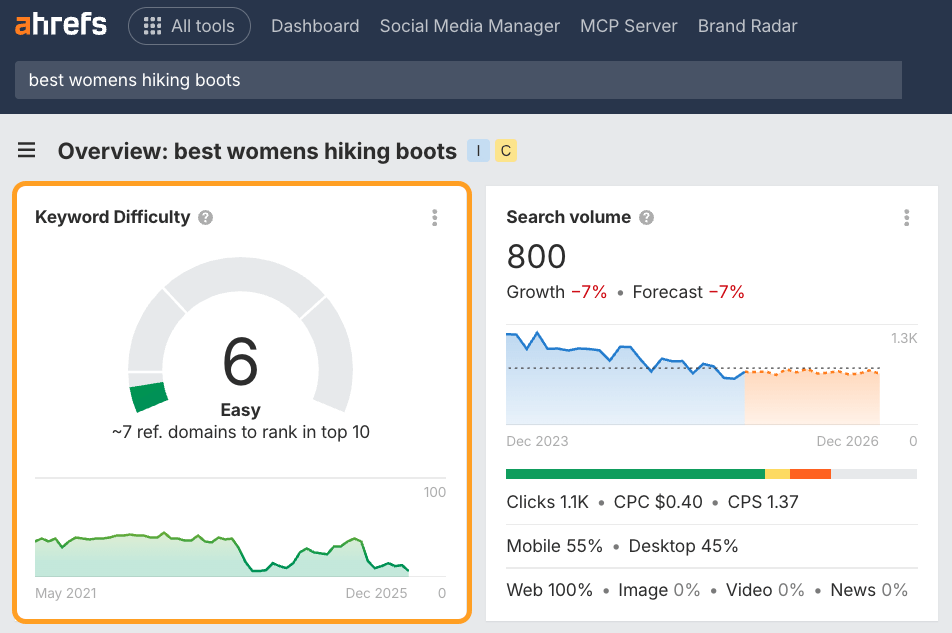
However, when many SEO professionals use the term “Keyword Difficulty,” they’re sometimes referring to the broader concept of ranking difficulty—not a particular metric in a particular SEO tool.
Google still relies on link-based signals like PageRank to rank search results, so knowing the backlink strength of top-ranking pages is still one of the best predictors of how hard a keyword is to win.
LLMs are increasingly using link graph data too, so assessing link authority is arguably only growing in importance.
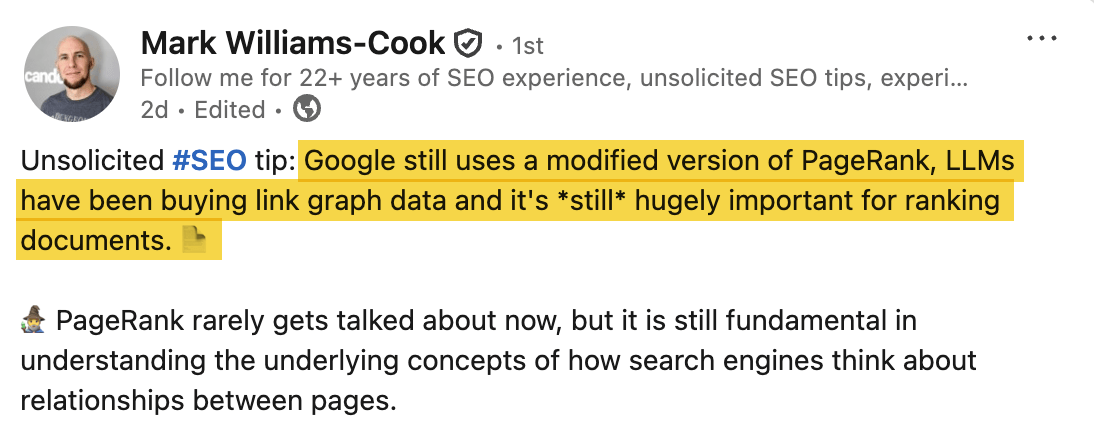
Keyword Difficulty scores distill that into a simple benchmark that shows you how much backlink strength you’ll need to compete.
They’re a quick and easy way to judge which keywords are realistically within reach and worth investing in.
Almost every keyword research tool has a Keyword Difficulty score. These tools all use the same 0-100 scale, but each one calculates it differently.
If you check the Keyword Difficulty of the same keywords in different SEO tools, the numbers will vary quite substantially.
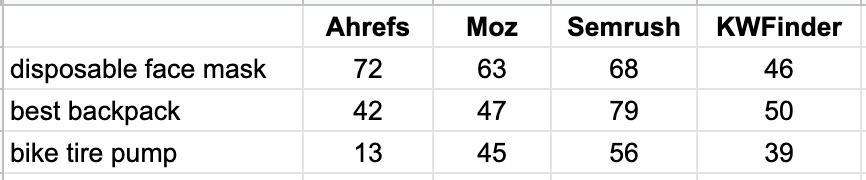
That’s why it is important to understand how exactly the ranking difficulty is calculated by your SEO tool of choice. Only then can you make informed decisions based on it.
How we calculate Keyword Difficulty at Ahrefs
Here at Ahrefs, we use a simple method for calculating KD.
We pull the top 10 ranking pages for your keyword and look up how many websites link to each of them.
The more links the top-ranking pages for your keyword have, the higher its KD score.
Very simple and very actionable.
Keyword Difficulty in Ahrefs is an absolute metric —not a relative one—scored from 0 to 100 based on the backlink profiles of top-ranking pages.
It’s a straightforward benchmark:
- KD 0-5 – Top-ranking pages barely have any backlinks
- KD ~50 – Top-ranking pages have a couple of hundred backlinks
- KD 90+ – Top-ranking pages have thousands of backlinks
In other words, the score tells you how hard it is for the average website to rank, but it doesn’t account for your specific website’s authority.
Think of the KD Score like the speed limit on a highway. The sign might say “70 MPH” (High Difficulty), which applies to everyone. But your personal difficulty depends on the car you’re driving.
If you are in a Formula 1 car (High Authority/High Topical Relevance), 70 MPH feels effortless.
If you’re on a bike (New Domain/Low Authority), reaching that speed is impossible, regardless of what the sign says. The sign is accurate, but ultimately your vehicle determines the challenge.
You should always interpret the KD score through the lens of your own “Personal Keyword Difficulty.”
Personal Keyword Difficulty
If your site has a higher Domain Rating or stronger topical authority than the average found on the SERP, the “effective” difficulty is likely far lower for your site than tools might suggest.
On the flip side, if you’re a new player, even mid-range scores will require extra effort.
Essentially, Ahrefs’ Keyword Difficulty score is the baseline, and your site’s authority provides the context.
There is a way to quickly get a better idea of your “Personal Keyword Difficulty” scores using the Ahrefs MCP.
Just copy and paste this prompt I’ve built into Claude, with the Ahrefs MCP switched on.
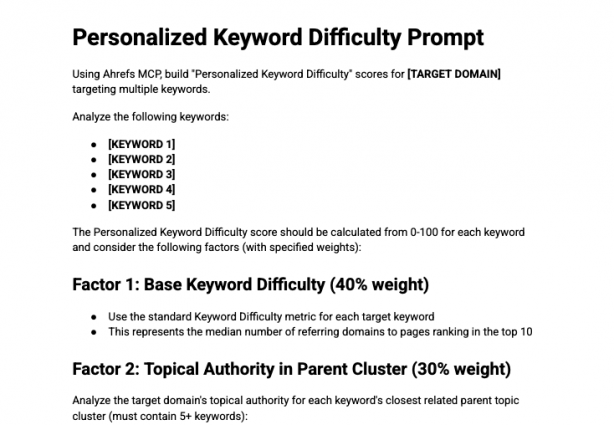
It takes multiple factors into account, including:
- Baseline Keyword Difficulty (I.e. KD in Ahrefs)
- Your site’s topical authority for your chosen keyword (e.g. how many other keywords you rank for in the same “Parent Topic” cluster, and their associated traffic)
- Your site’s Domain Rating versus other SERP competitors
- Your page’s URL Rating (for existing content within that “Parent Topic” cluster) compared to other SERP competitors
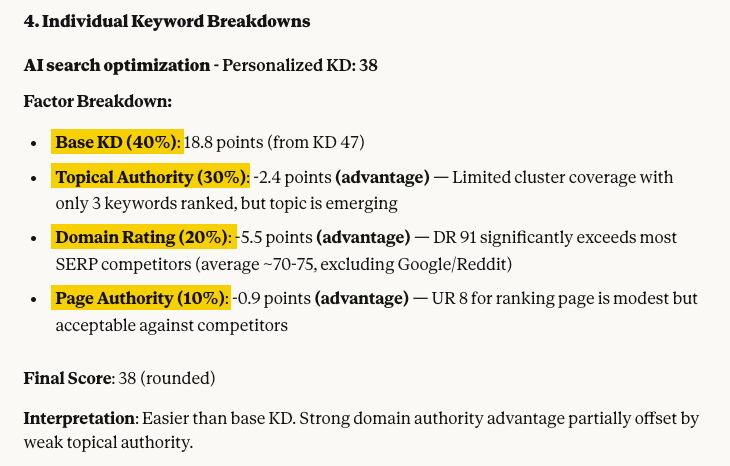
Claude then weights those factors, to develop a “Personalized Keyword Difficulty” score.
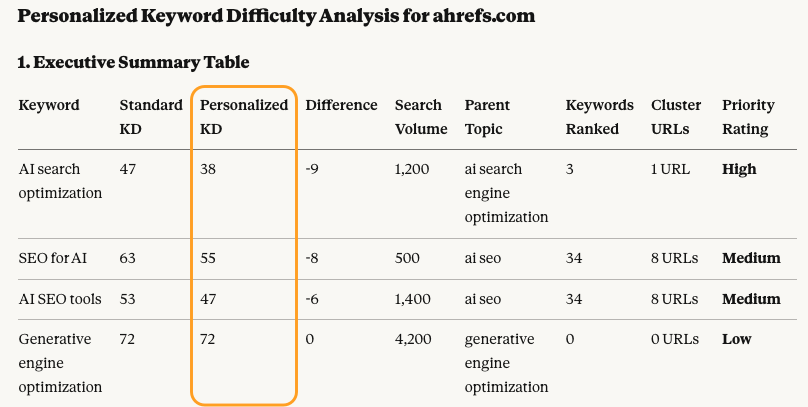
This essentially inflates or decreases the base Keyword Difficulty depending on your site’s performance and authority across the relevant topic.
For the keyword “AI search optimization” our Personal Keyword Difficulty dropped by 9 points—meaning it should, in theory, be easier for us to rank.
That’s because we already have a strong URL Rating, a DR well above competitors, and existing visibility for related keywords across the same Parent Topic.
Once Claude has analyzed all of your Ahrefs data, it’ll suggest actionable recommendations…

As any SEO worth their salt knows, backlinks aren’t the only ranking factor. If you want to properly gauge your chances of ranking for a given keyword, you need to go further and do a more thorough analysis of the SERP.
Speaking of which…
Nobody knows exactly how Google ranks pages. But we do know the main things that matter for ranking well.
And by analyzing those “main things,” SEOs can get a pretty good idea of what it takes to rank on Google for a given keyword.
So here’s how to do it.
1. Figure out how many backlinks you’ll need
Backlinks act as votes, which tell Google that a given page is more valuable than any other page on the same topic. So, as a general rule, if you want to rank in the top 10 search results for a given keyword, you’ll have to acquire as many backlinks as the current top-ranking pages have (if not more).
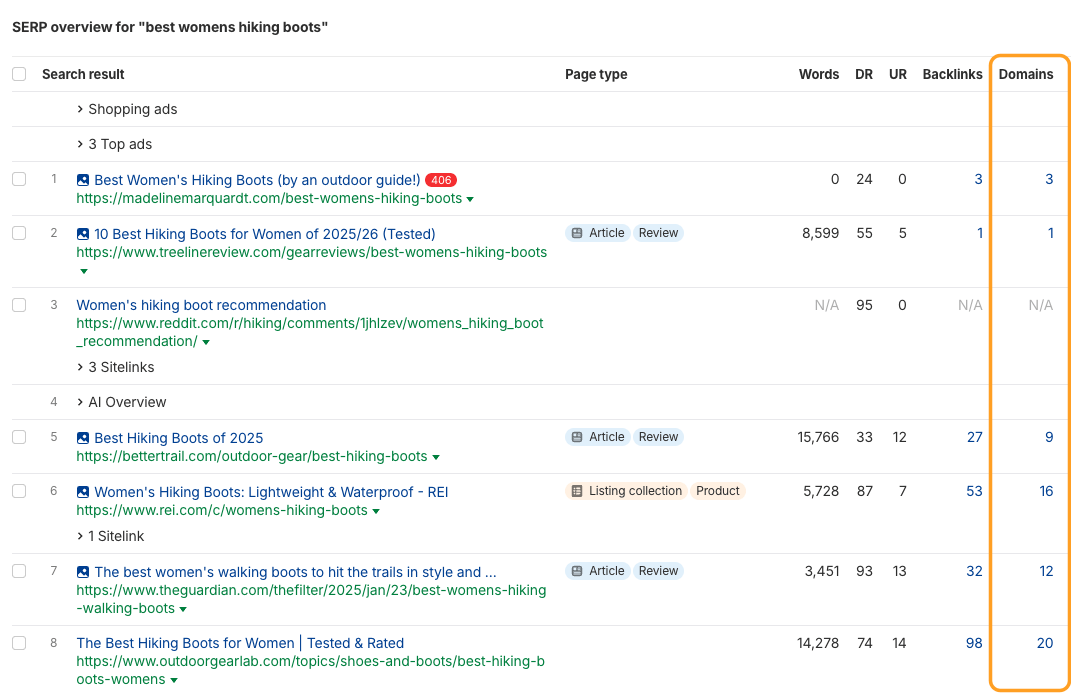
In Ahrefs’ Keywords Explorer , we actually have a text hint right under our KD score that tells you an approximate number of backlinks you’ll need:
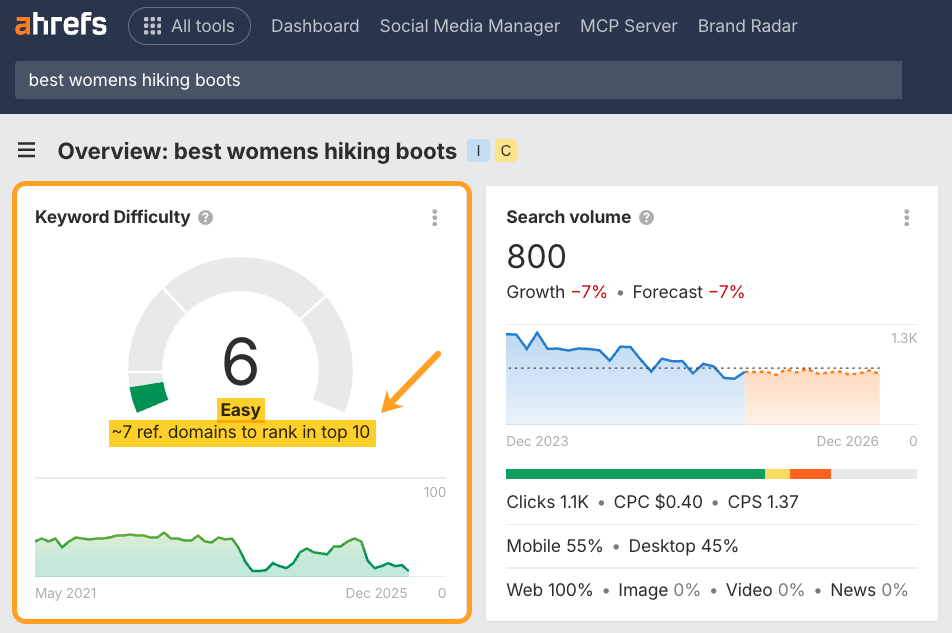
Two important caveats here:
- The hint says “to rank in the top 10,” which means that getting as many (or more) backlinks as your competitors won’t guarantee that you’ll rank #1. But there’s a very good chance that you’ll rank somewhere in the top 10.
- The sheer quantity of backlinks can often be misleading because some backlinks cast a stronger vote than others. So this number is merely an estimation.
To properly estimate the strength of the backlink profiles of the top-ranking pages, you’ll have to review all their backlinks manually, i.e., do a backlink audit of these pages.
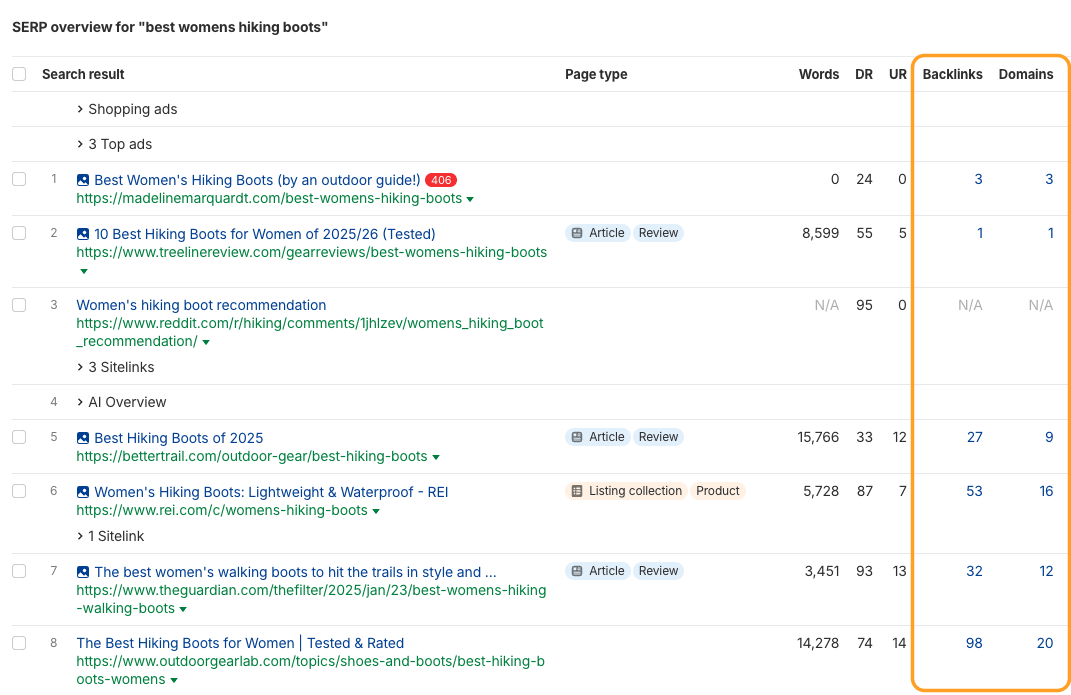
In Keywords Explorer , we’ve created a handy shortcut for this, since each number in the “SERP Overview” links to its respective backlink report in Ahrefs’ Site Explorer :
2. Look for “Cracks” in the SERP
Because KD scores represent the average Referring Domains of the top-ranking pages, they can sometimes hide specific weaknesses in the search results that you can exploit.
A high KD score usually means the top pages have many backlinks, but it doesn’t tell you if those pages actually satisfy the user.
To enhance your keyword strategy, look for “cracks” in the SERP that Keyword Difficulty doesn’t account for, such as:
Content freshness
Are the top results outdated (e.g., posts from 2019 with no updates)? Stale content is often easier to outrank—even when it has strong backlinks.
To check this, head to the “SERP Overview” in Keywords Explorer for your target keyword. Then click on the arrow dropdown, and hit “Inspect”.
This will bring up the Page Inspect tool where you can check on when the article was last updated.
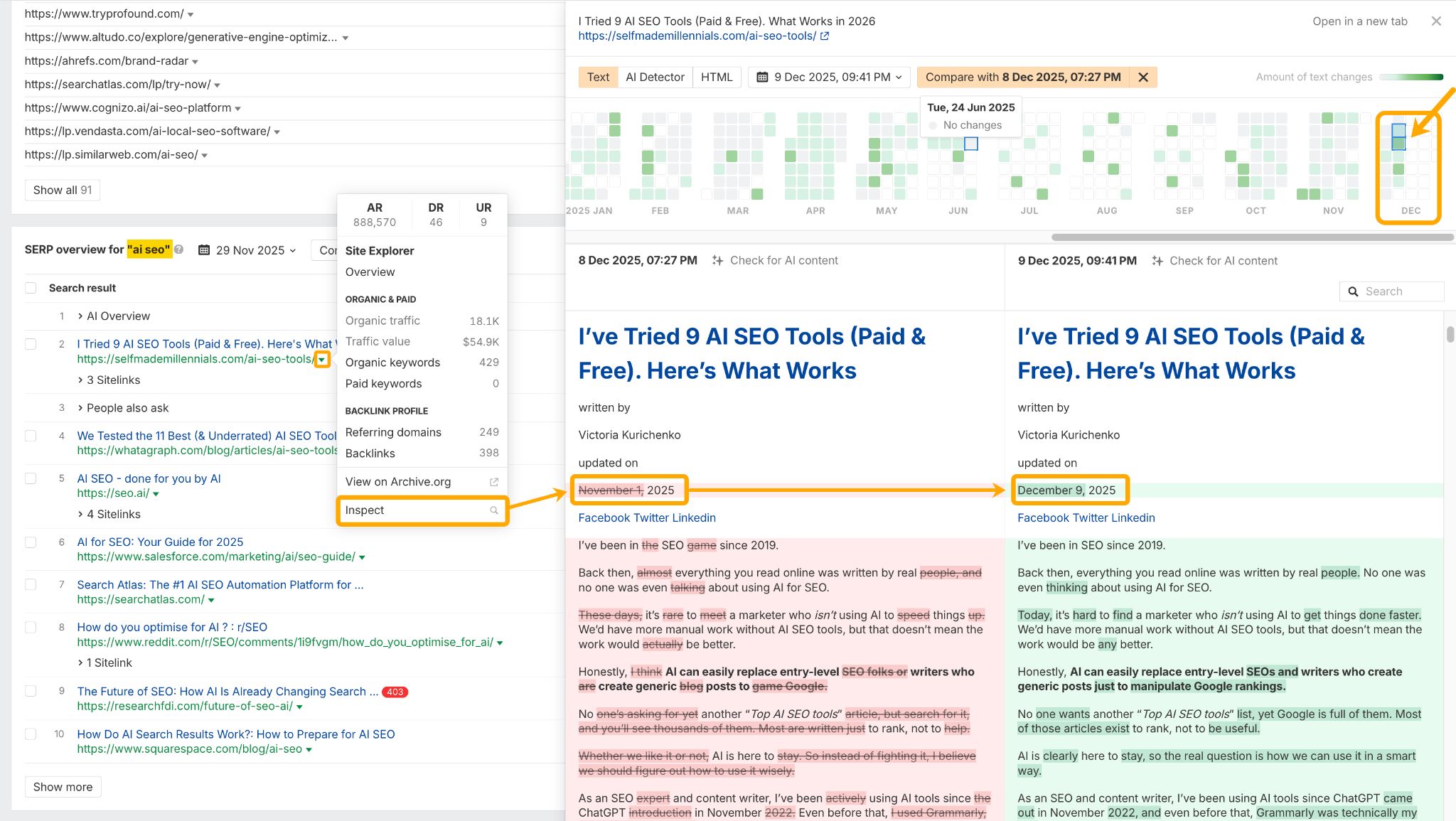
In this example for the keyword “AI SEO” I can see the #1 ranking page was only updated a few days ago, and gets regular “Moderate” updates throughout the year—which likely makes it a tough one to beat.
Low DR brands
Are there forums or low-authority blogs ranking among the giants?
If a low-authority site has managed to rank, it’s a strong signal that the “giants” aren’t satisfying the intent perfectly.
Omid Ghiam, founder of Marketer Milk, actually factors this into his SEO and AEO keyword research. Using DR filtering in Ahrefs Keywords Explorer, he finds keywords that only show low DR brands in the SERPs (e.g. DR <15).

The main filter we first want to play with is the Lowest DR filter. This will allow us to find keyword ideas where the pages that rank for that keyword have a really low DR (domain rating). In theory, if those pages are ranking for that specific keyword, we can also rank for it (with a better piece of content, that is). I like to make the lowest DR to something like 10 or 15, in the top 5 or 10 results on the first page of Google.

“Fluffy” content
Sometimes high-authority sites rank simply because of their domain strength, even if their content is 1,000 words of filler.
These are prime targets for you to outrank with high-value, concise content.
3. Review the “authority” of your competitors
As mentioned, you want to assess the authority of your SERP competitors. This includes checking factors like DR, URL rating, and ownership of content clusters.
A high website authority can indirectly contribute toward a higher ranking on Google:
A. Internal links
High authority means that a given website has lots of strong pages. And the page that you see ranking on Google may be receiving lots of “link juice” from such pages, making it a high-authority page too (even in the absence of backlinks from other websites).
B. Familiar brand
When shown a list of search results, people often prefer familiar websites. This behavior ends up reshuffling the SERPs since Google has its own ” Click probability model “, which uses SERP CTR data to assess user satisfaction and inform re-ranking. That’s how “familiar websites” often tend to rank high, and benefit from compounding awareness.
4. Investigate the search intent
Your ability to address the search intent is crucial for ranking well on Google.
In case you’re unfamiliar with the term, search intent is basically the expectation that searchers have. Google’s goal is to fulfill people’s expectations when they perform a search.
You can better understand intent when you review the top-ranking pages for a keyword, and analyze what searchers get from them.
To do this, head to the SERP Overview report in Keywords Explorer and hit “Identify intents”.
This will give you a breakdown of the intent of each ranking result, so you can understand what kind of content searchers are looking to find.

As you can tell from the example above, ~60% of the top-ranking pages for the keyword “backlink checker” are “free backlink checking tools”, so this is the dominant search intent.
The remaining 40% belongs to paid or more “comprehensive” backlink checking tools.
In other words, if you try to target this keyword with a blog article or a landing page, it won’t work.
We know this for a fact because we actually tried it.
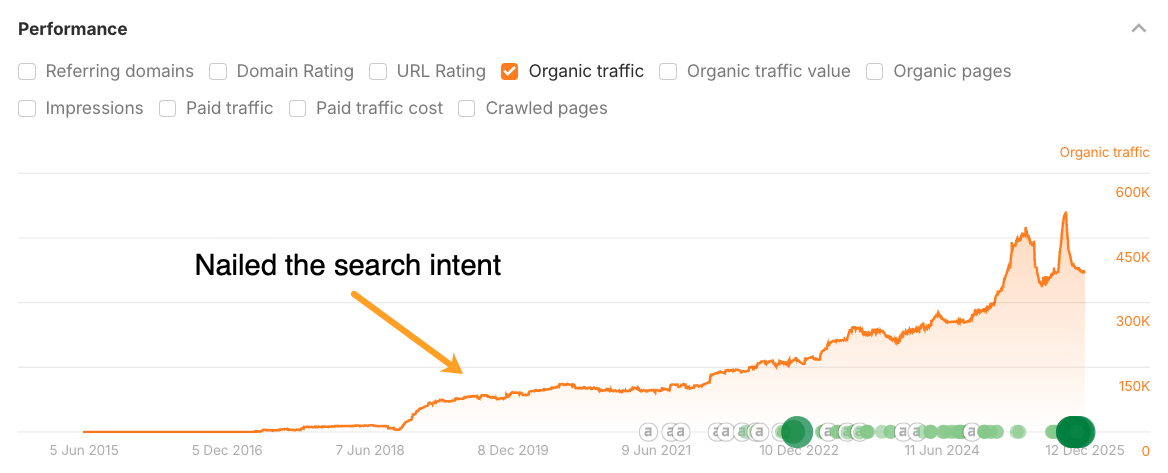
Above is the graph of organic search traffic to our backlink checker page.
Originally, we had just a simple landing page explaining that Ahrefs has a backlink checker tool, and offering people to sign up for our paid trial.
No matter how much we optimized that page, it never ranked higher than #8 for that keyword.
Then we studied the pages that were outranking us and realized that all of them were free online tools.
And as soon as we converted our landing page into a free tool, it shot up to #1 for the keyword “backlink checker” and started ranking high for many other relevant keywords.

So, in short, browse the top-ranking pages and figure out what exactly people expect to get from it.
5. Gauge the quality of content
The famous Skyscraper technique has led lots of content marketers astray by suggesting that a longer and more detailed article equals a better article.
But just making your article longer doesn’t necessarily make it better. A better article is one that provides more value in less time (and without boring you to death).
So here are some pointers that will help you gauge the quality of content that already ranks at the top for your target keyword:
- Does it provide accurate and up-to-date information?
- Is it written by a subject matter expert?
- Does it contain unique information?
- Is it well-written?
- Is it properly formatted?
- Is it well-designed?
The first three are the most important ones.
Google wants to provide its users with accurate information that comes from credible sources.
We know that for a fact because the latest edition of its Search Quality Rater Guidelines has lots of focus on the concept called E-E-A-T , which stands for experience, expertise, authoritativeness, and trustworthiness.
So instead of making your pages longer than those of your competitors, try investing in E-E-A-T.
As with many things in SEO, the answer is it depends:
- On the authority of your website.
- On your credibility in a given space.
- On your ability to acquire backlinks.
- On whether you have the ability and/or resources to cater to search intent.
- Etc.
A good exercise that may help you get used to Ahrefs’ KD metric is to look up the KD scores of the keywords that your website is already ranking for.
You can do this by entering your website into Ahrefs’ Site Explorer and visiting the Organic keywords report:
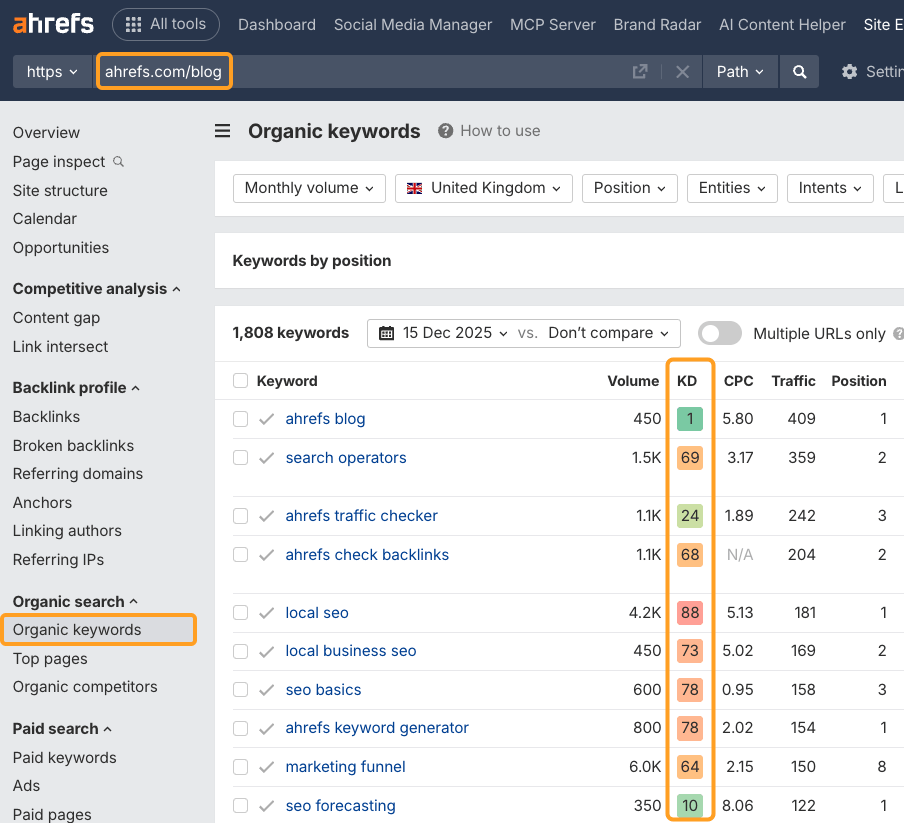
This gives you a nice benchmark. But it’s by no means a substitute for the process I’ve outlined above.
If you want to accurately estimate your chances of ranking for a given keyword, you should thoroughly study the top-ranking pages and factor in your own skills and resources.
And please don’t shy away from targeting high-KD keywords.
When it comes to many of the KD 70+ keywords that we rank for today, it took us four to five rewrites, lots of promotion, and many years of patience to get there.
So the sooner you “attack” a high-KD keyword that you really want to rank for, the sooner you’ll get there.
Final thoughts
It would be quite awesome to have a Keyword Difficulty metric that could accurately predict your chances of ranking for a given keyword. But as you can probably tell by now, such a metric doesn’t exist.
So the only way for you to make the right SEO bets is by thoroughly studying the search results for the keywords that you want to rank for.
I hope the process I’ve outlined above is helpful for you. And if you have any further questions, feel free to ping me on Twitter.