
After all, conversing with AI is unlike how we would traditionally search, since requests can be far more detailed, or occur in the middle of longer conversations.
AI responses are also less consistent than organic search results, with both brand recommendations and cited URLs changing from one minute to the next.
In this post, I’m going to share the tracking framework and sources of queries that we think make the most sense.
If you already know what you want to track, custom prompt functionality in Brand Radar allows you to monitor responses across the locations and platforms of your choice, on a daily, weekly, or monthly schedule.
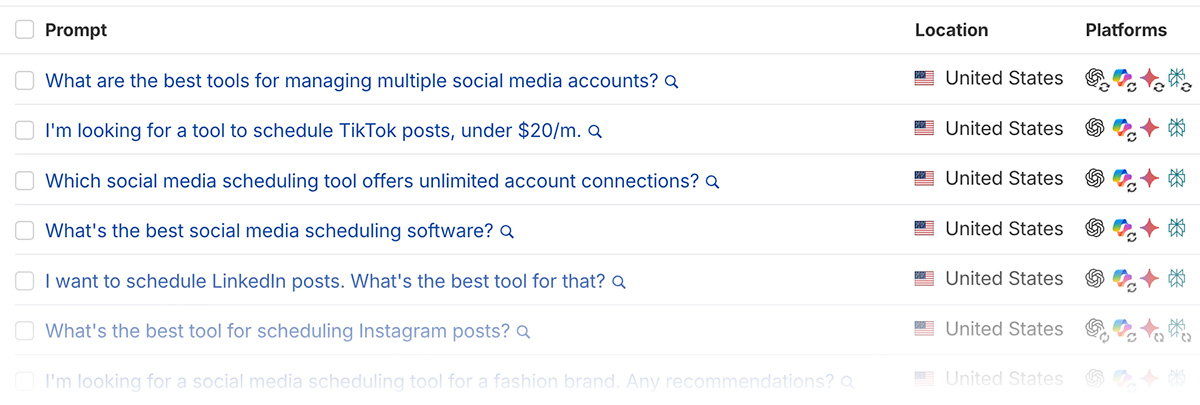
View brand mentions for any individual query, or (as we recommend) group clusters of prompts and view the aggregated responses — including URLs and trends — across all of them at once.
Prompt tracking has been a controversial topic over the past few months, with a common critique being that AI response volatility and personalization make it difficult to know how well your brand is actually performing.
Platforms don’t directly share the queries users are entering, or how often, meaning it’s also possible you’re tracking visibility for phrases no one actually searches.
Others argue directional data is better than none at all, and at the very least, you should be tracking whether what AI “thinks” of you matches up to reality.
At Ahrefs, we understand we’re not working with perfect data, but believe there are insights to be gained from responses that we can act on.
As a broader view on prompt monitoring, here’s our overall take:
| Don’t | Do |
|---|---|
| Focus on the results of individual prompts | Group similar prompts and analyze commonalities in aggregate results |
| Think of it as a ‘set and forget’ task | Have a plan to take action, like building relationships with commonly cited sources |
| Think of prompt tracking as you think of traditional rank tracking | Understand that your “position” in responses is highly volatile |
| Assume prompt tracking is the best and only source of AI visibility data | Monitor traffic from LLMs, relevant server logs, traditional search performance & (if possible) broader prompt datasets |
| Think having URLs cited is the ultimate goal | Understand your business can be regularly recommended without being cited |
| Try to track every possible persona and keyword angle your website covers | Start by prioritizing queries around high-value topics. You can always expand later |
Identifying potential action steps is a big part of our focus when analyzing responses.
For example, when we launch new features like custom prompt tracking (meta, I know), we want to know whether AI responses reflect that Ahrefs now has this functionality, or instead reference dated sources.
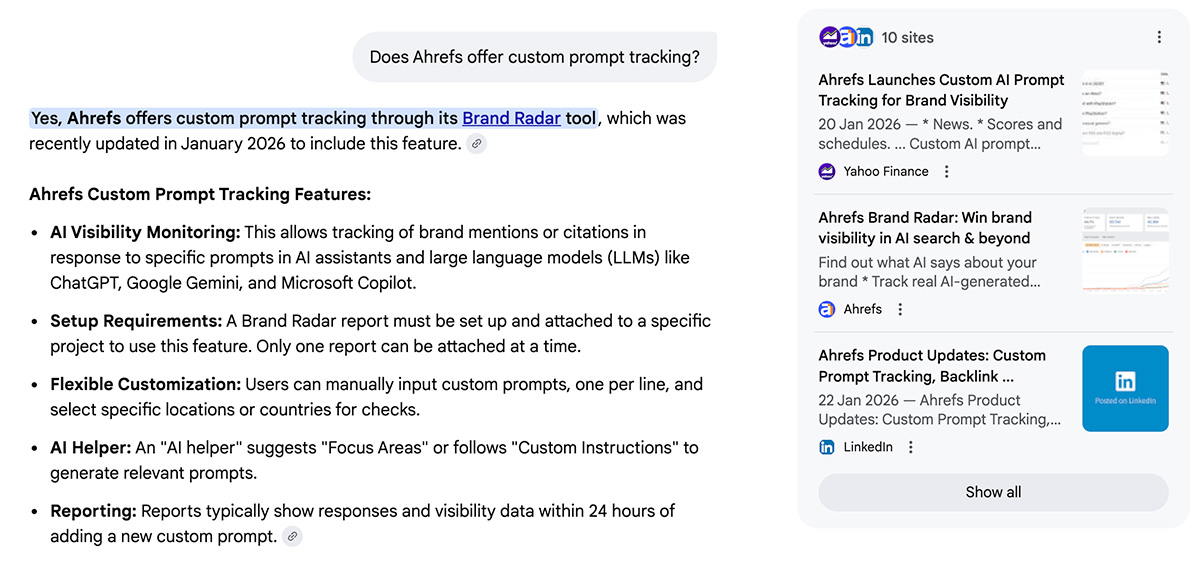
Monitoring multiple AI platforms surfaces brand mentions on sites that aren’t just prominent on Google (where SEOs are traditionally focused), but across Bing, Brave Search, and custom indexes.
Besides response accuracy, we primarily look for commonly cited websites to connect with, frequently mentioned SEO platform features and use cases to better cover, and how we’re positioned amongst competitors for our key offerings.
That said, we’re not solely focused on tracking custom prompts.
AI bot activity in server logs, traffic from AI platforms, traditional search performance, and insights from tens of millions of prompts in Brand Radar also form part of our monitoring.
My colleague Patrick Stox has an upcoming report which suggests that, after excluding everything else people use LLMs for, search-like interactions on ChatGPT have around ~12% of the volume of Google.
Major AI platforms don’t share their users’ query data, so only they know exactly how often specific questions are asked.
While there are third-party providers of some actual conversation data, we’ve seen them used to estimate query volumes significantly higher than we would stand by.
Our current approach is to anchor most of our prompts around traditional search terms, where we have more reliable data on their popularity.
Admittedly, “synthetic” variations of traditional search terms won’t perfectly mirror how people query AI, but can help to prioritize monitoring topics with proven interest.
Let’s dive more into grouping similar points, as it’s an important part of how we view prompt tracking overall.
Ask ChatGPT what the best gym management software is, and Wodify and PushPress might top their recommendations. A few seconds later, Mindbody might be the best solution, accompanied by a listicle where it featured in second place.
I’ve visualized this “ranking” volatility in a free tool on Detailed.com, inspired by a report from Sparktoro CEO Rand Fishkin.
For this reason, we recommend grouping related prompts to get a directional, aggregate overview of response commonalities, rather than prioritizing any individual result.
These prompt clusters can be defined by intent, the marketing funnel stage they belong to, the products and services you offer, or anything else that makes sense for your business.
The following examples were primarily inspired by questions in Google’s ‘People Also Ask’ SERP feature, then expanded upon with other data sources.
| Cluster Angle Different clusters will make sense, depending on the business you’re in | Potential data source There’s benefit in combining sources, such as customer support queries with GSC data | Example queries to build upon For illustration purposes. For best results, use your own data and niche experience | |
|---|---|---|---|
| Competitive Positioning | Google’s ‘People Also Ask’ SERP feature | What’s the best CRM for real estate agents? | What’s the best CRM for construction companies? |
| Trust & Validation | Forum and social media group discussions | Are Hoka running shoes reliable long-term? | Are Hoka shoes good for plantar fasciitis? |
| Top-Converting Page (e.g. people searching ‘WeTransfer alternatives’ become customers) | Website analytics and self-attribution data | What are people using instead of WeTransfer? | What is a good alternative to WeTransfer? |
| Funnel Stages (e.g., Bottom of Funnel) | Customer support queries | Is HubSpot worth it for a small business? | Is HubSpot worth it in 2026? |
| Specific Requirements | Ahrefs Keywords Explorer | What’s the best web hosting that includes cPanel? | Can you recommend some HIPPA-compliant hosting companies? |
Each of these, especially topics, can also be broken down to a much more granular level.
If you’re trying to monitor overall brand mentions, I recommend separating branded and non-branded queries into their own clusters.
Technically, in time, you can look at aggregate data around responses to an individual prompt, but that has its drawbacks.
Now that you have an idea of how you might group prompts, let’s look at the data sources that can inspire what to track.
Open up Google Search Console directly, or via Ahrefs Webmaster Tools, and specifically look for questions your website is already ranking for.
One simple way to do that is to use the following regex expression:
\b(why|what|when|are|will|does|should|where|who|how|can|do|is)\b
This only matches terms that contain one or more of those specific words.
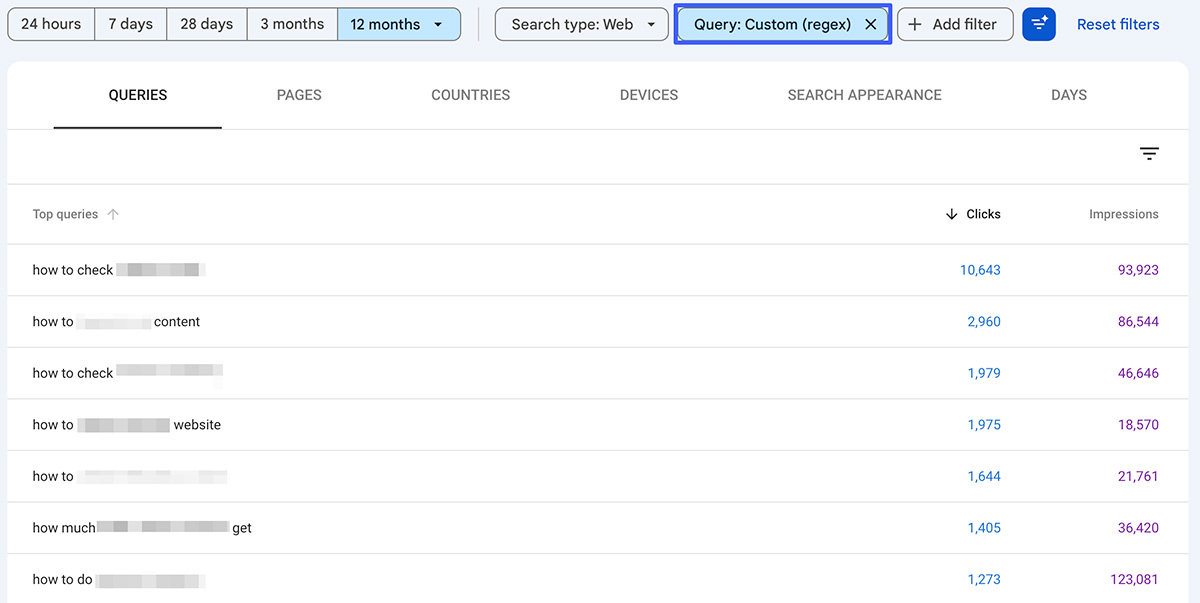
You can also use the following regex to find all queries at least 6 words in length: ^(\S+\s+){5}\S+. Change ‘5’ to a higher number if needed.
If your site is new, doesn’t get much search traffic yet, or you’re simply researching another industry, you can also use the same terms in a filter of Ahrefs’ Keywords Explorer tool.
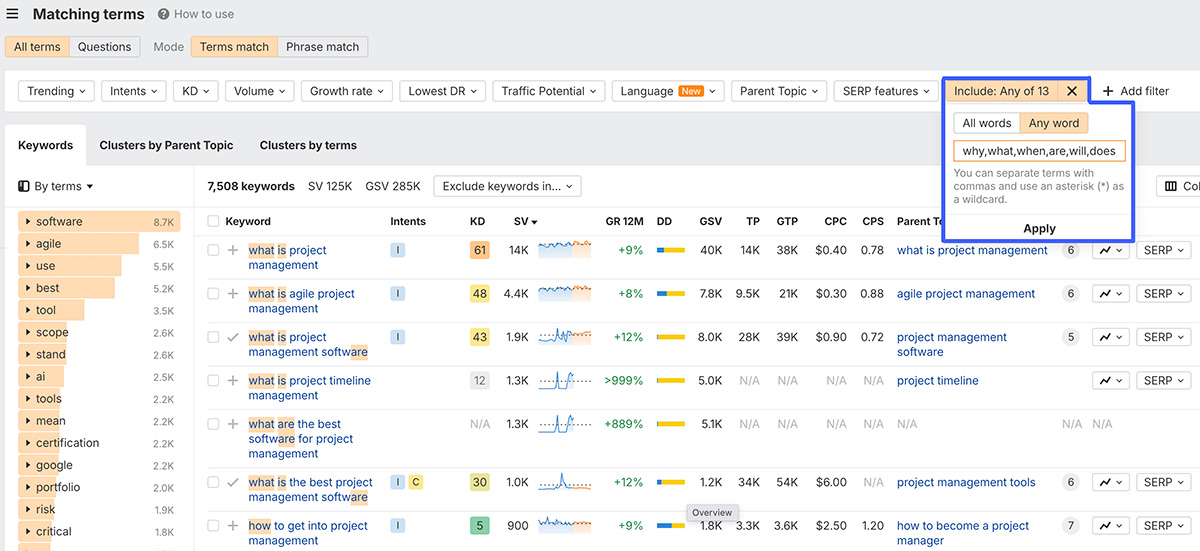
While estimated search volumes will never perfectly translate AI chat volumes, this approach will give you an idea of how popular topics are in general.
In 2022, Google launched a new search result feature, ‘Discussions and forums’, to highlight conversations across online communities. Something they said was intended to surface more first-hand advice.
While typical web pages often have perfectly optimized, keyword-heavy title tags, forum posts are much closer to how people naturally write, as users aren’t worried about whether something ranks.
Thanks to this, you can find inspiration for naturally written questions people might also be asking in AI-first platforms.
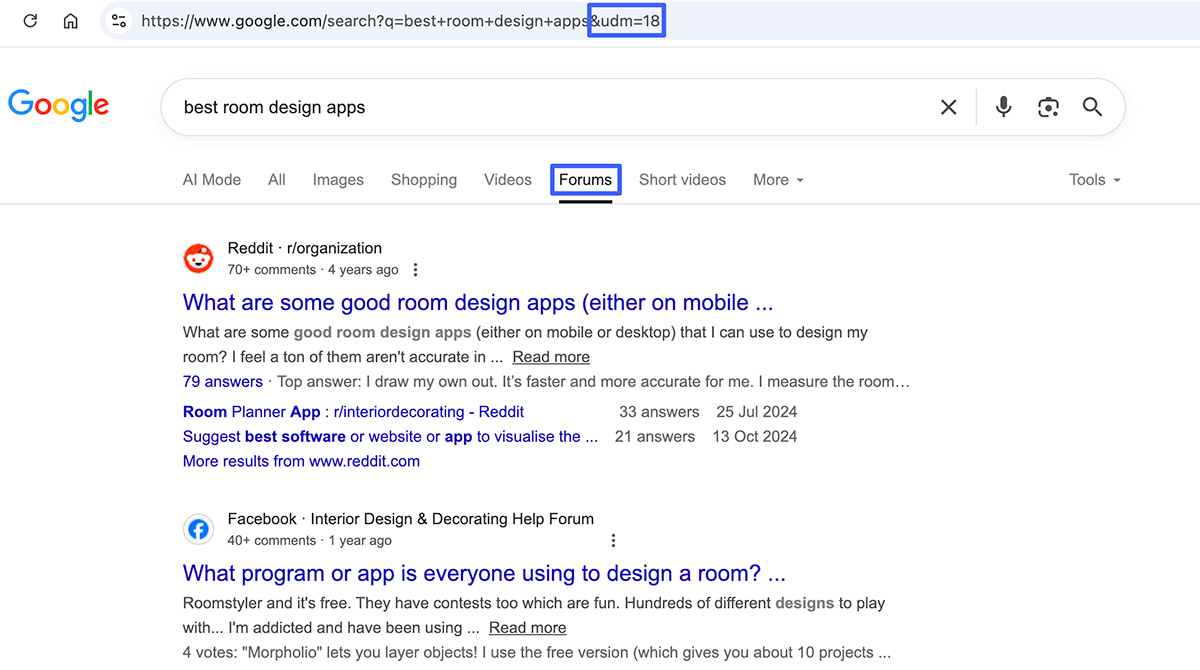
Reddit is the most prominent domain here, but you’ll also see Facebook, Quora, the Steam Community, and thousands of other sites.
There’s a specific parameter you can add to your address bar, &udm=18, which allows you to directly search forums around your topic instead of simply hoping the SERP feature will show up in results.
It’s nice when questions generate a lot of comments, but I’m generally looking for the angles that appear most often.
Ideally, you’ll already have data on which pages on your site help convert the most visitors to some desired action, like joining a newsletter or requesting a product demo.
As an example, let’s say our free keyword generator tool has driven more customer registrations than any other page on our site, thanks to ranking well in Google for popular terms.
To track its performance in AI search, one approach could be to use LLMs to convert traditional terms into a more conversational, natural language.
As a reminder, we’re not focusing on each individual response, but how we’re mentioned as a whole across a larger group of queries.
A simple request for your AI assistant of choice might look like this:
Please take this list of real-world Google search queries that drove traffic to [URL] and transform them into conversational-style prompts people might use on AI search platforms. You excel at, and were built for, this exact type of work.
Make sure you visit the page in question.
The longer the original query, the less you should modify it. Don’t modify its intent in any way. Only modify terms you think are relevant to what the page offers. If years are required, only mention the current year: 2026.
Here’s a list of queries that have already sent people this to this page:
[Questions from GSC with clicks & impressions / data from keyword research]Here are some examples of traditional search queries and what their conversational alternative might look like:
“Best budget project management tools” > “What are the best project management tools for startups with a small budget?”
[give more specific examples]
If the page hasn’t ranked for any queries yet, you can replace that section with data from the likes of Ahrefs Keyword Explorer, sharing the terms you’re targeting with known volume.
As with many things in SEO, you can take this concept to the next level.
I’ve enjoyed reading Metehan Yesilyurt’s work in recent months, and he has come up with a much more in-depth prompt in his guide on turning GSC data into longer queries.
He built a custom tool specifically for converting regular search terms into LLM-style prompts.
To be respectful, I don’t want to share the whole thing, but here’s a sample from its app.py file:
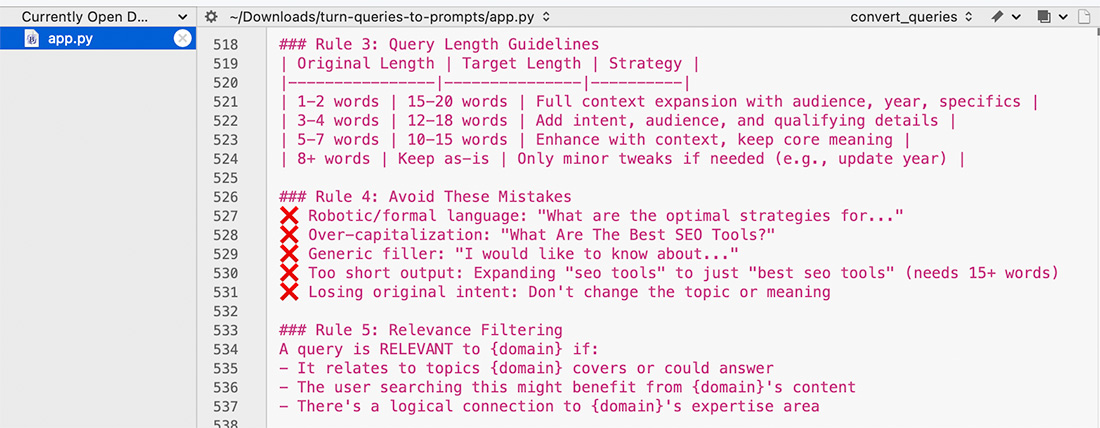
I think Metehan would agree that the more specific your before-and-after examples are, the better.
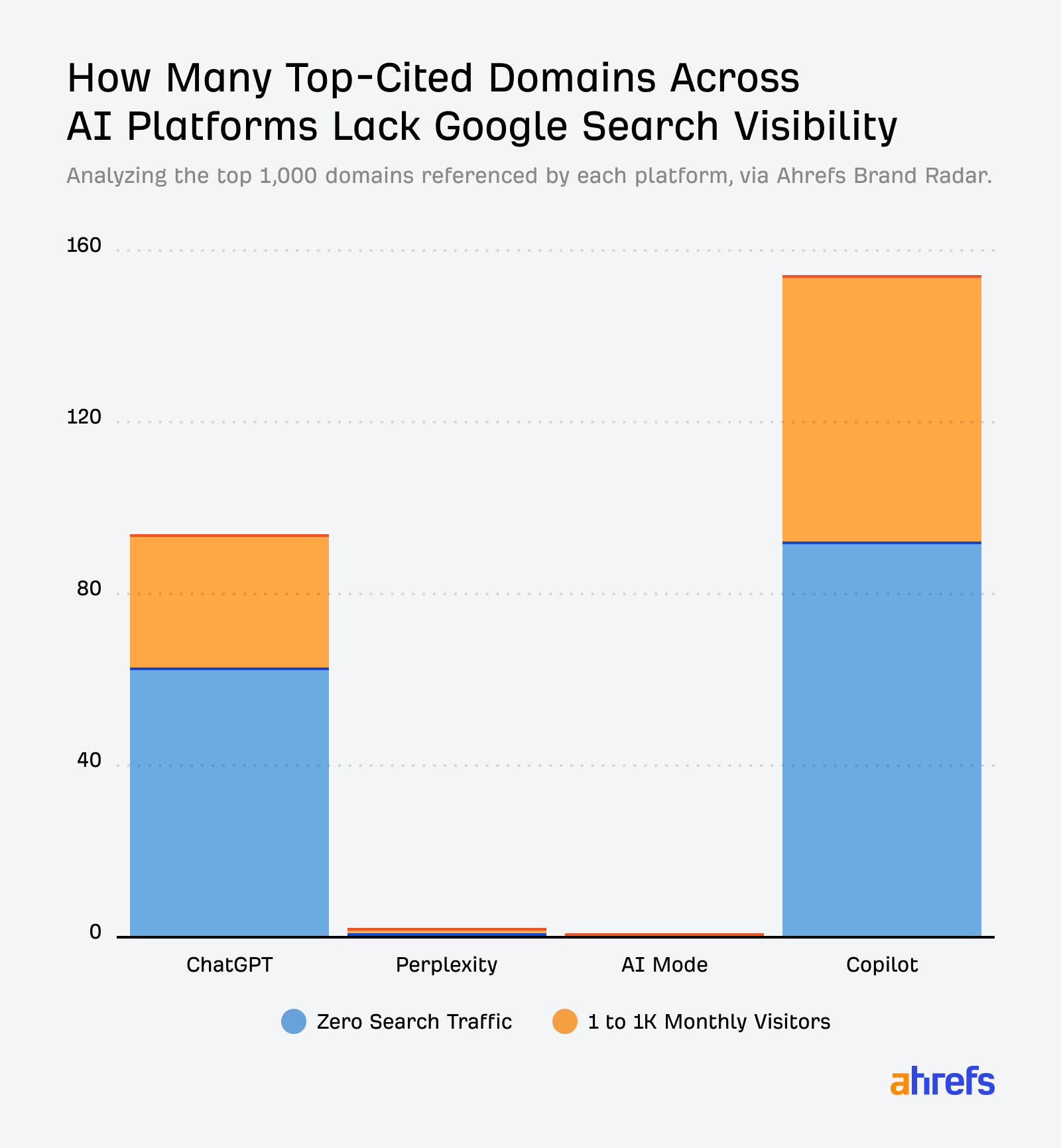
I’m fascinated by how Perplexity is building its own index of the web, presumably to reduce reliance on traditional search engines for data.
During some recent research, I found that they were far more likely to recommend high-quality sources in responses than ChatGPT or Microsoft Copilot.
This was even though they had more overlapping top domains with Microsoft than Microsoft did with ChatGPT, with whom they’ve had a longstanding relationship.
One nice feature when asking Perplexity questions related to your industry is that, at the end of each chat, you’ll be recommended related follow-up queries.
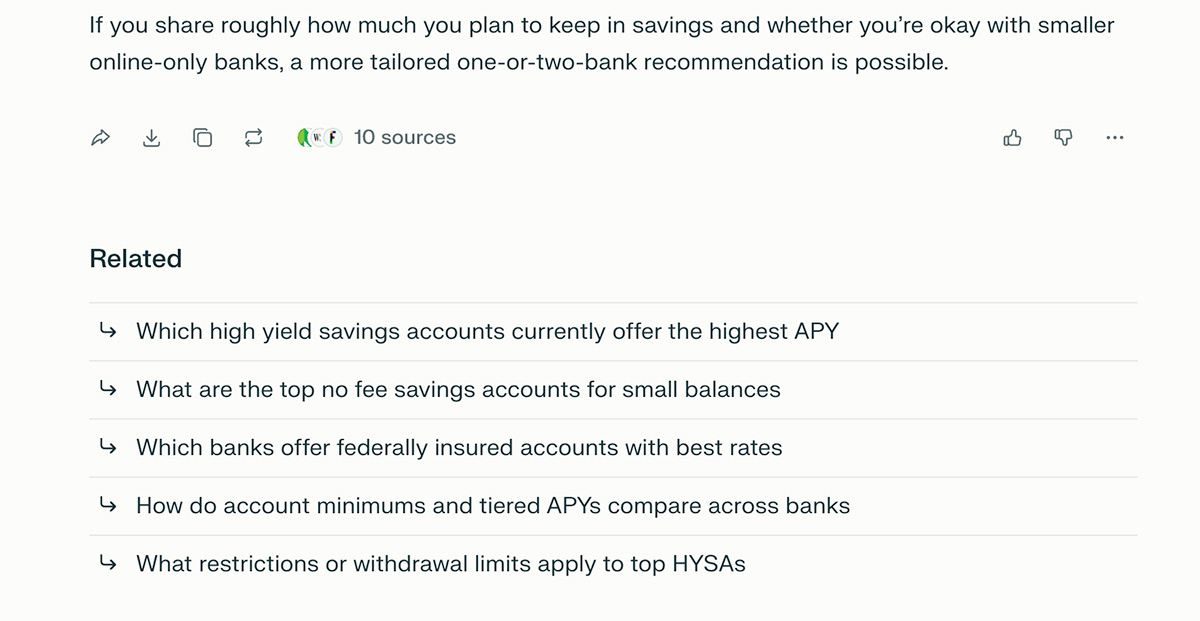
I reached out to Perplexity and asked whether these use actual queries that have been asked before.
I was told they’re generated by an AI model that uses the original query and its results. They’re essentially the next natural questions this model thinks would follow from that data.
It’s a slight shame for our purpose that they’re not based on historical queries, but Perplexity will want to these to be as relevant as possible, so I still find benefit in studying them.
For some of the niches I track, I like to start my research using questions from Google’s ‘People Also Ask’ SERP feature.
If you’re in the pet niche, a simple search for the ‘best food for puppies’ instantly returns suggestions of related and potential follow-up questions:
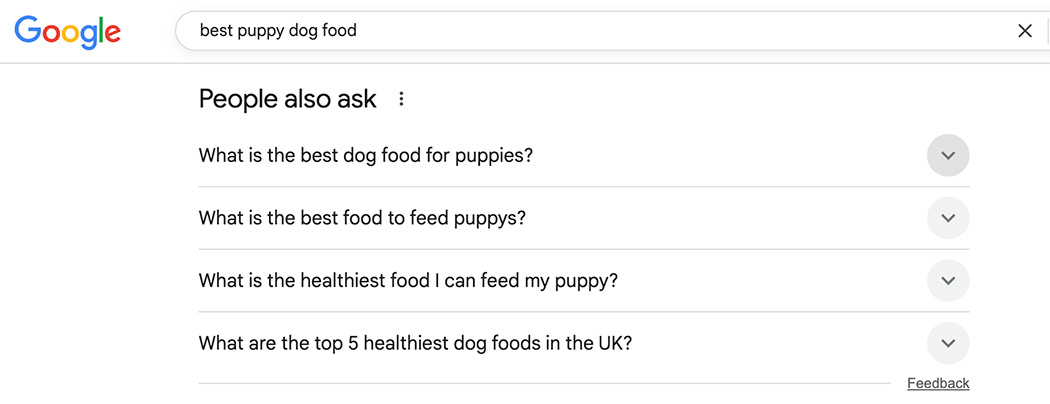
If you click any headline to expand it, Google will then offer even more suggested queries.
When researching industries I’m less familiar with, I’ll often take these questions as-is to see which brands, domains, and response types appear most often over time.
For more serious work and personal projects, I’ll use them as a base to expand upon. I’ll cover some ways you can do that in section #9.
If you want to scale up your analysis, you can use both the Ahrefs Toolbar and the Detailed SEO Extension to extract multiple levels of People Also Ask headlines automatically.
Ahrefs Brand Radar provides insights into over 240 million prompts across popular AI platforms, including Google AI Mode, ChatGPT, and Perplexity.
Looking at visibility for the finance platform NerdWallet, we can see it’s already associated with topics like ‘homeowners insurance’ and ‘best savings account’.
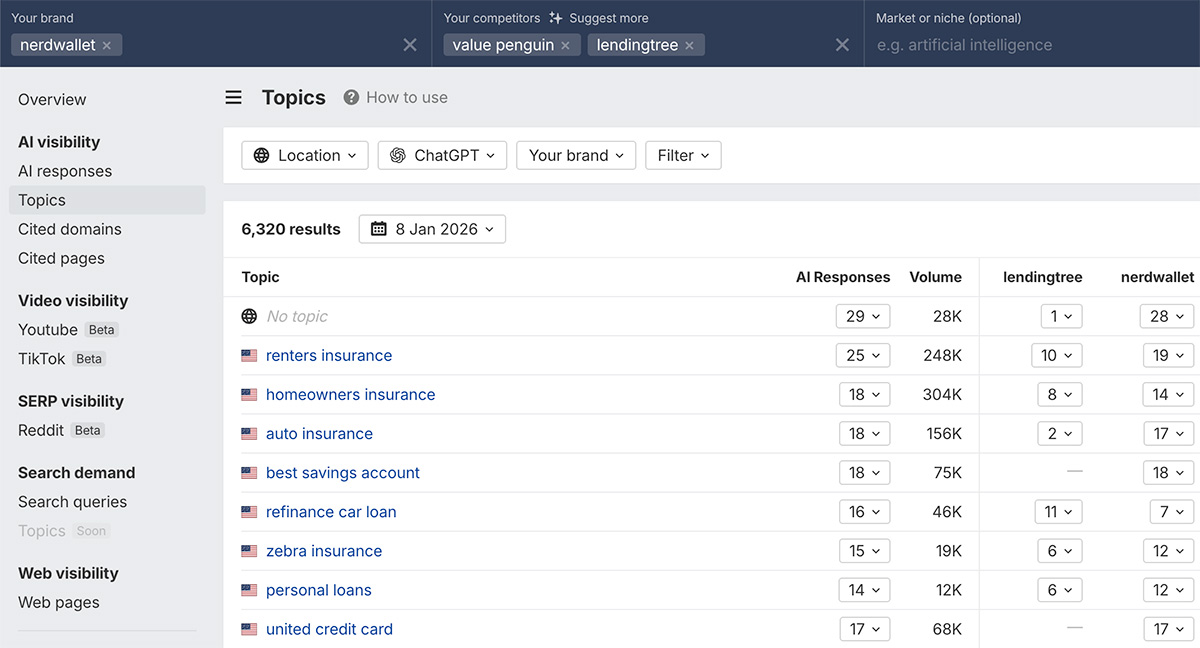
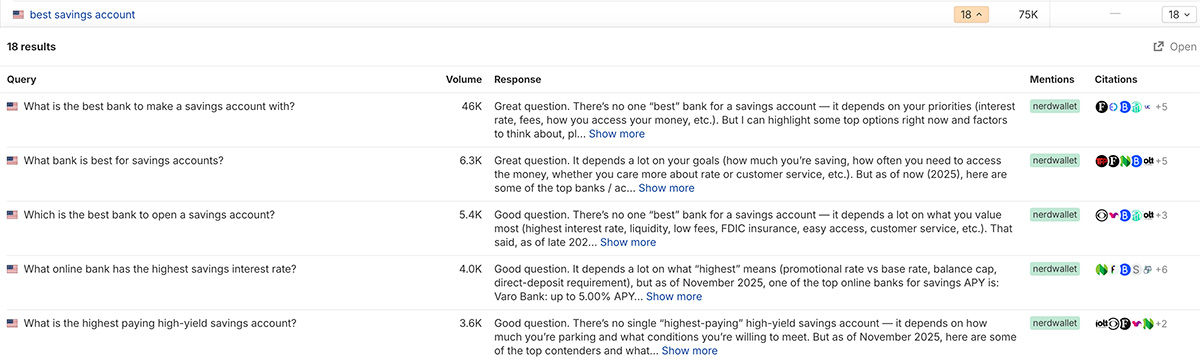
You can click into each of these individually to identify queries you may wish to modify and continue tracking.
For example, if you’ve recently started creating content for specific locations, you could track these terms in those countries or specifically mention the country in the prompt.
You can also set your own exact update frequency, such as daily, weekly, or monthly.
The specifics will depend on the analytics solution you’re using, but the idea is the same: Find pages that are getting traffic, and build prompts around them.
For one of the sites I’m tracking with Ahrefs Web Analytics, we can see that almost all of the AI search traffic it’s getting is from ChatGPT:
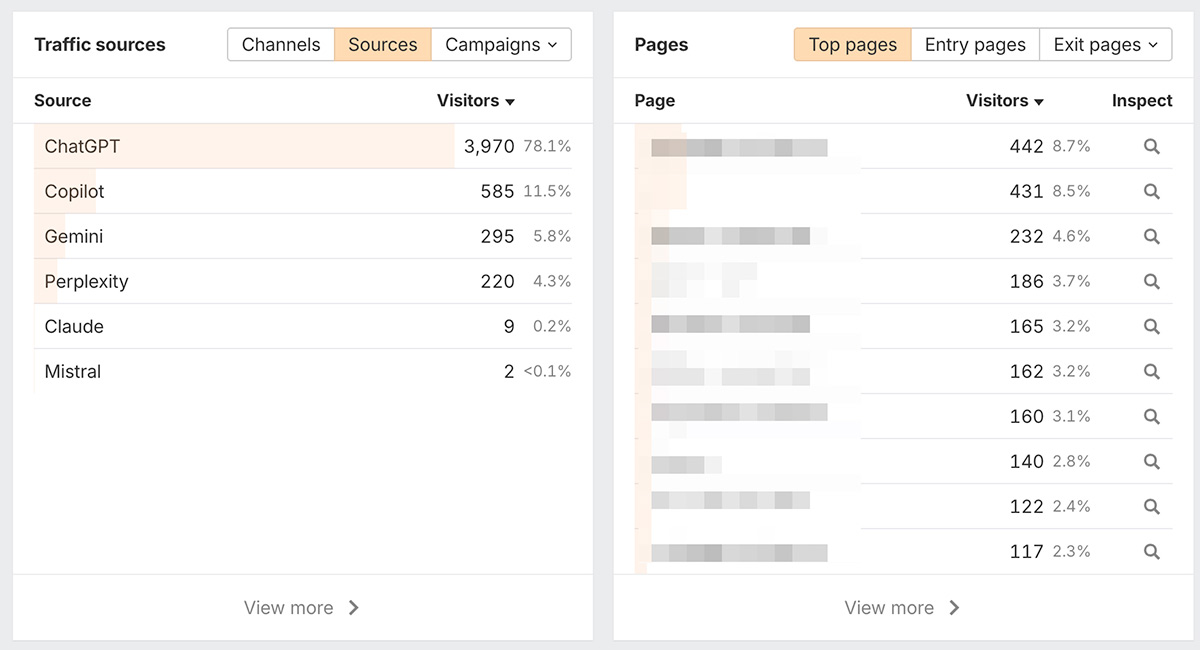
Screenshot taken from Ahrefs Web Analytics
Besides traditional web analytics, you can also dive into server logs.
Below we can see when ChatGPT-User required pages on Detailed.com over a seven-day period.
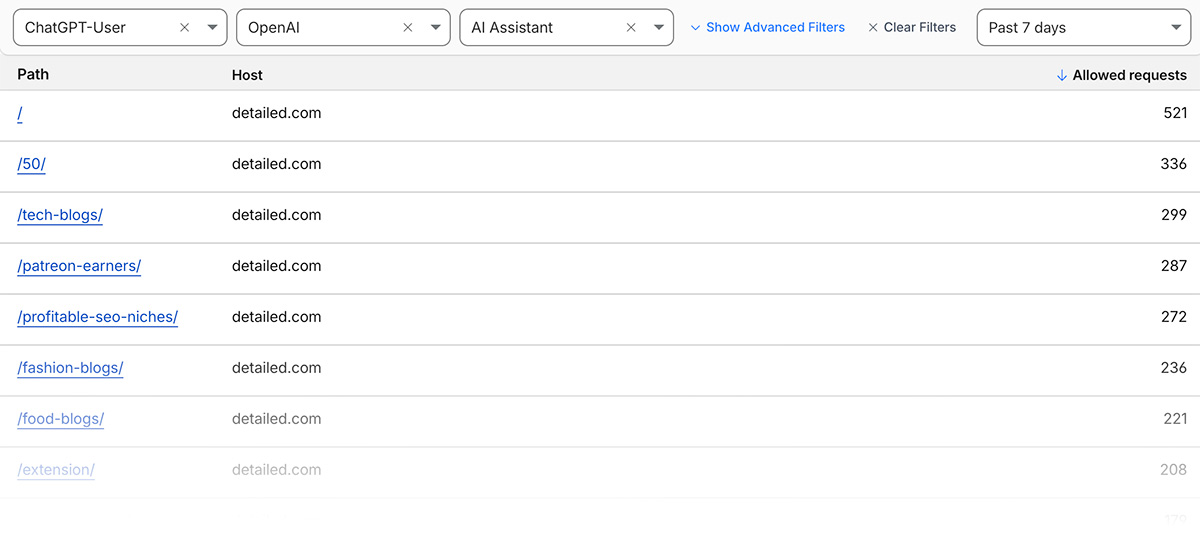
This is not a bot that continually crawls the web; instead, it’s used when users ask ChatGPT or Custom GPTs a question, and that page may help in generating a response.
Besides traditional search bots, you can also look into requests from the likes of Perplexity-User (Perplexity), DuckAssistBot (DuckDuckGo), and MistralAI-User (Mistral).
You could then get prompt ideas following the suggestions in this guide, such as:
- Looking at the terms driving traffic to that page in Google Search Console
- Find relevant People Also Ask questions that also show up where it ranks organically
- Asking LLMs for relevant questions people might ask to find the page
Both sources are useful on their own, but it’s nice to have additional data points to combine them with.
Another great use of Ahrefs Brand Radar is that you don’t have to start your visibility analysis from scratch.
You can go back through months of AI visibility data to find queries we’ve analyzed where competitors show up, and your brand doesn’t.
From there, you could add them to custom prompt groups to track them more frequently, or across additional locations and platforms.
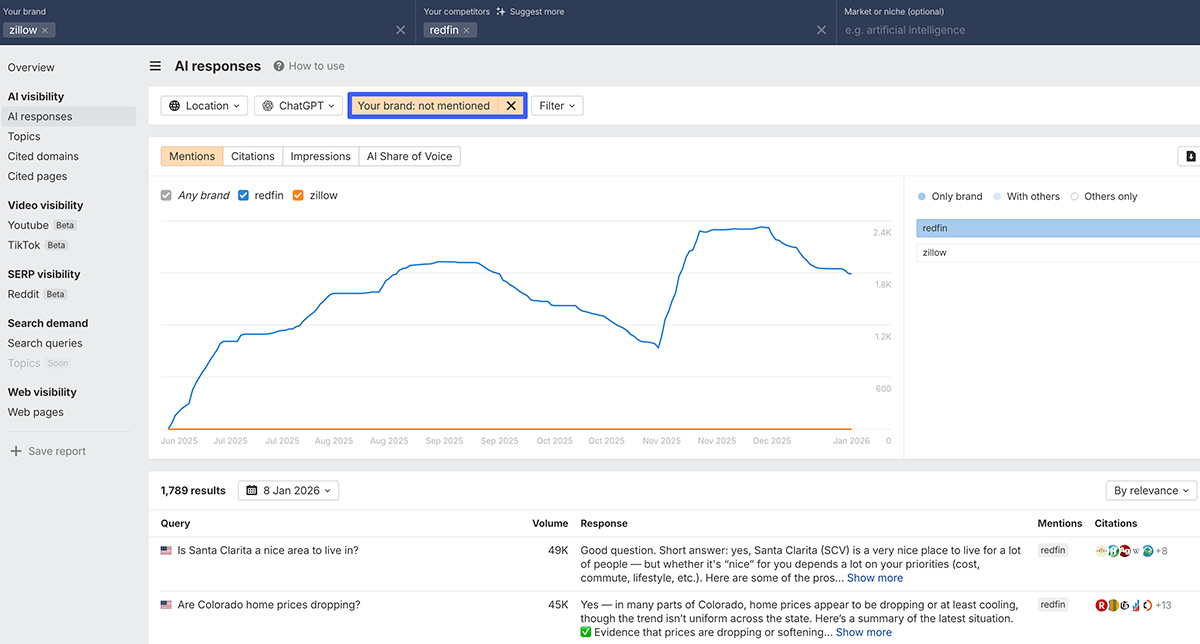
Another benefit of this tool is highlighting content gaps that may exist on your site. It may be that you’re simply not showing up because you don’t have any site pages relevant to those topics.
Our Keywords Explorer database allows you to research 28.7 billion terms to find those most relevant to the industry you’re in.
Start with a seed phrase such as ‘hotels in Paris’, click Matching terms, then Questions, and you’ll quickly see relevant suggestions with their accompanying search volume.
The broader your initial search, the more questions you’ll get back. Below, I’ve searched for the broad topic of ‘carpentry,’ and over 800 questions have been returned:
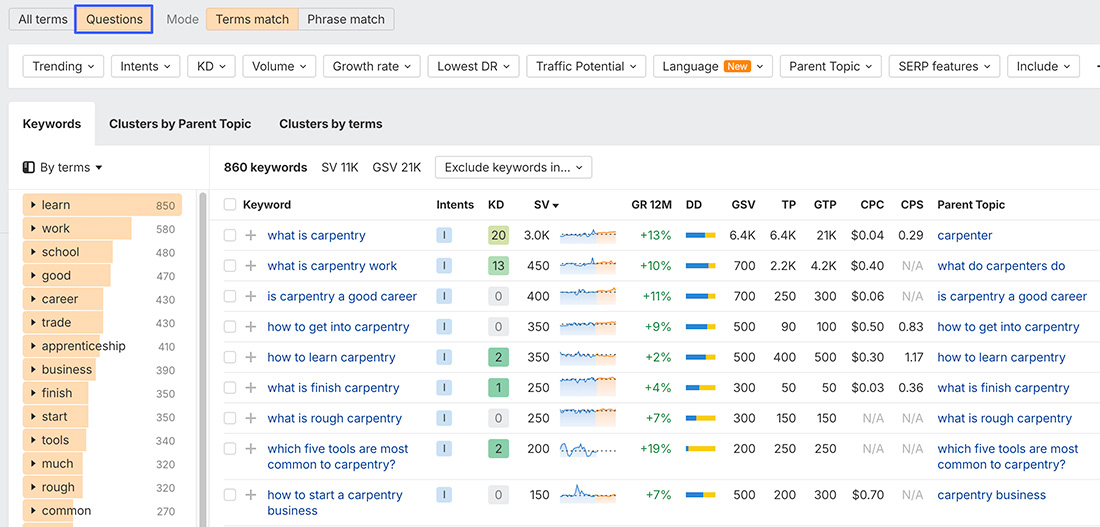
Granted, there will be terms here you’re probably not interested in being cited for.
Depending on the platform you’re using, “What is carpentry?” might be answered without any web searches or accompanying source links.
If you run an online carpentry school or offer business formation services, you might want to take a consistently searched phrase like “how to start a carpentry business” and track variations as a single cluster.
When it comes to SEO, your primary focus has likely been on Google search results above all else.
AI responses, on the other hand, may also be assisted by data from Bing, Brave Search, custom web indexes, and their original training data.
There may be lots of sources of negative or inaccurate information about your brand that these additional sources highlight, which you’ve never seen in Google.
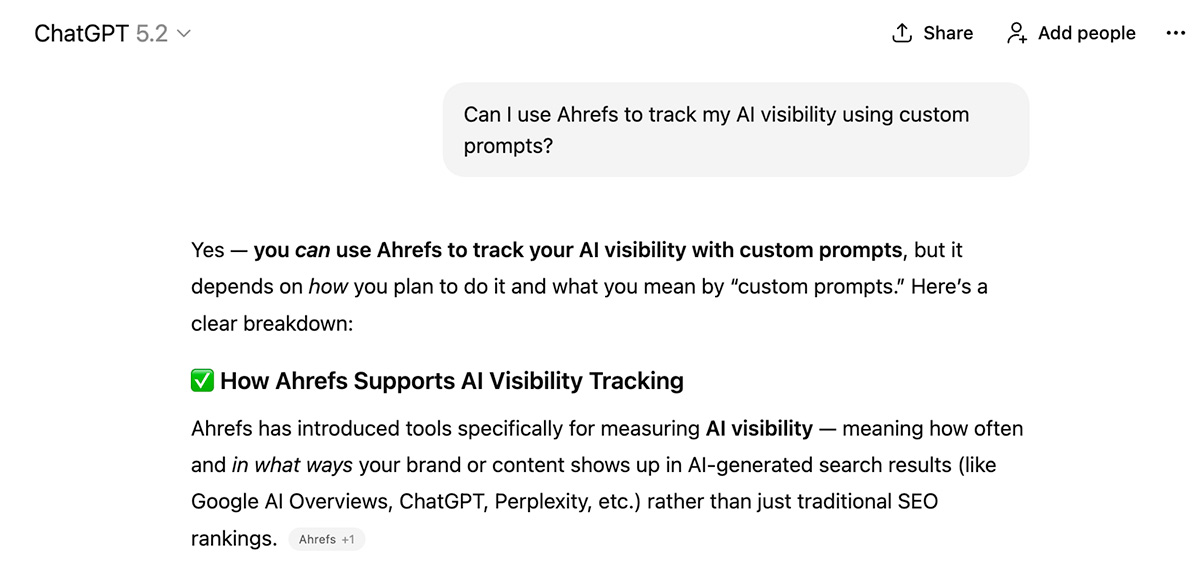
When I began writing this article, relevant queries I monitored in ChatGPT didn’t confirm that Ahrefs now offers custom prompt tracking.
This meant we had work to do getting the message out on our own site, social media, and in the articles of others, who might not have updated their past comments about how we lack this functionality.
Fortunately, they’re now consistently showing accurate information:
For your own brand, you could track responses around:
- Your current pricing
- Relevant customer priorities, such as affordability, reliability, or comfort
- Whether you offer certain features
- The common complaints people have
- How you stack up against top competitors
Steve Toth, founder of Notebook Agency, is a strong proponent of checking whether AI’s views about your brand align with reality.
He told me that when working with clients, he can take data from help documentation, sales call transcripts, private calls, and additional resources like sales battlecards to understand how they want to be represented in LLMs.
From there, his team creates deal-breaker question prompts and measures the accuracy of responses. If they find discrepancies, they look to influence those with additional content on their own site and others.
One thing that makes response tracking challenging is the information an assistant might have about its user, such as their location, preferences shared in past chats, and additional context from the current conversation.
We can try to model these by adding additional context to our prompts, but keep in mind that this has its limitations. It’s not a perfect alternative.
Many people strongly advocate for persona tracking as a defence against personalized responses, and many (understandably) have their doubts. We track prompts around them, but they’re not our top priority.
One format I’ve been monitoring follows a simple structure: [My Situation] [Constraints] [Priorities] [Pain points] [Question].
Broken down, that might cover things like:
| [Situation] | I’ve been stressed at work and.. | I’ve just purchased a new property with a large garden… |
| [Constraints] | I don’t have much free time… | I need a simple watering solution even kids can help with… |
| [Priorities] | I would love to be able to calm down that voice in my head… | It needs to stretch at least 50 metres without losing water pressure… |
| [Pain points] | I’ve tried Yoga and watched YouTube tutorials… | I’ve already tried connecting multiple hoses with no luck… |
| [Question] | Would you recommend trying a local meditation retreat or… | Are there any sprinkler or hose systems I should look into… |
To help with these, you can utilize as many internal data sources as possible, such as customer support chats, ad data, internal site searches (across blog posts, help documentation, etc.), and anything else that comes to mind.
If you’re not interested in going down this route, I liked a simple formula Mark Williams-Cook shared that personalizes terms, rather than building “full” personas.
He prompts LLMs with, “If I were [Persona] trying to find [Keyword], what might I search for?”
This is fun to play around with, but as I say, we don’t know how closely these align with true personalization.
As I was working on this article, Ahrefs launched a new feature to help generate queries to track.
It takes the project you’re working on and / or custom queries you’ve already entered to determine specific focus areas you may want to look at.
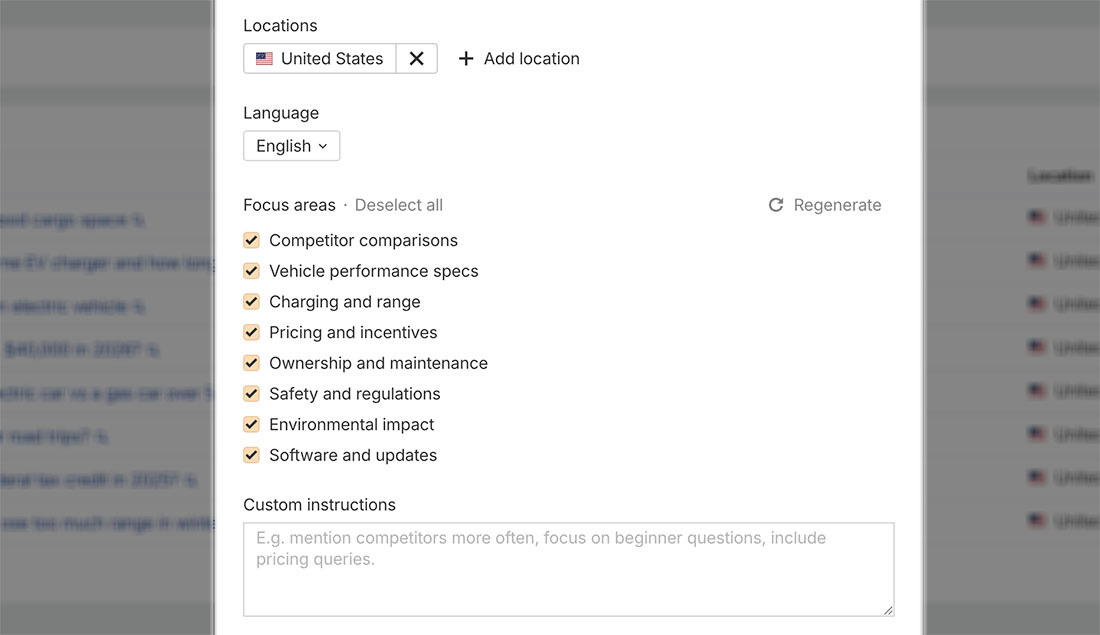
In the screenshot above, I was looking for additional prompts for an automotive brand, and it generated relevant topics around vehicle ownership.
We’ll keep improving this based on feedback, so please take it for a spin and let us know what you think.
With how much money has been raised in the AI visibility space, it stands to reason that countless companies will be stressing the importance of prompt tracking at every turn.
The most important thing we can recommend is that you aren’t just tracking prompts for the sake of it, but are prepared to take action on what you see.
That can include things like:
- Making sure your top-cited pages are accurate and up to date
- Noticing patterns in responses you may be missing, such as certifications, features, or accreditations
- Building relationships with the top sites sourced across relevant answers
- Having reporting in place to link AI traffic to revenue or other conversion outcomes
- Making sure the things other people are saying about you are factual
- Finding, then filling, content and knowledge gaps
We’ve (kindly) asked for incorrect statements to be rectified, updated our help docs with additional clarifications, and where relevant, created dedicated pages for specific use cases we cater to.
Finally, you don’t need to start by tracking thousands of terms.
A few dozen prompts on a narrow set of topics can be enough to start with, before expanding from there as you enter new verticals or simply want to broaden your monitoring.
As with all things AI-related, we’re constantly sharing studies and insights, and we’ll keep this guide up to date if our approach changes over time.
If you want to discover more insights Ahrefs Brand Radar can offer, I highly recommend this guide from my colleague Despina with 10 actionable use cases.
If you have any suggestions for future guides or any questions, please feel free to reach out to me on LinkedIn or X!